|
|
Windows XP |
Windows Vista |
Windows 7 |
|
|
Management |
Windows PowerShell 2.0 |
Download |
Download |
INCLUDED |
|
|
Scripting of Group Policy Settings – Requires Remote Server Administration Tools for Windows 7 |
NO |
NO |
NEW |
|
|
Group Policy Preferences |
Download |
Download |
INCLUDED |
|
|
Windows Recovery Environment |
NO |
YES |
IMPROVED |
|
|
Windows Troubleshooting Platform |
NO |
NO |
NEW |
|
|
Unified Tracing |
YES |
YES |
IMPROVED |
|
|
Problem Steps Recorder |
NO |
NO |
NEW |
|
|
Remote Access to Reliability Data |
NO |
NO |
NEW |
|
Deployment |
Deployment Image Servicing & Management |
NO |
YES |
IMPROVED |
|
|
Dynamic Driver Provisioning |
NO |
NO |
NEW |
|
|
Volume Activation |
NO |
YES |
IMPROVED |
|
|
Multicast Multiple Stream Transfer |
NO |
NO |
NEW |
|
|
User State Migration Tool |
YES |
YES |
IMPROVED |
|
|
VHD Image Management & Deployment |
NO |
NO |
NEW |
|
|
Rich Remoting Experience – Multimedia, Bi‐directional Audio, Multi‐Monitor |
NO |
NO |
NEW |
|
|
VHD Boot |
NO |
NO |
NEW |
|
Security and |
BitLocker™ Drive Encryption‐ Windows Vista or Windows 7 Enterprise |
NO |
YES |
IMPROVED |
|
Compliance |
BitLocker To Go™‐ Requires Windows 7 Enterprise |
NO |
NO |
NEW |
|
|
AppLocker™‐ Requires Windows 7 Enterprise |
NO |
NO |
NEW |
|
|
Multiple Active Firewall Profiles |
NO |
NO |
NEW |
|
|
Granular Audit |
NO |
YES |
IMPROVED |
|
|
User Account Control |
NO |
YES |
IMPROVED |
|
|
Domain Name System Security Extensions |
NO |
NO |
NEW |
|
|
Smart Card Support |
YES |
YES |
IMPROVED |
|
|
Biometric Support |
3rd Party |
3rd Party |
NEW |
|
File |
Desktop Search |
Download |
YES |
IMPROVED |
|
Organization |
Libraries |
NO |
NO |
NEW |
|
and Search |
Search Federation |
NO |
NO |
NEW |
|
|
Enterprise Search Scopes ‐ Requires Windows 7 Enterprise |
NO |
NO |
NEW |
|
Remote |
DirectAccess – Requires Windows 7 Enterprise, Windows Server 2008 R2 |
NO |
NO |
NEW |
|
Access |
VPN Reconnect |
NO |
NO |
NEW |
|
BranchCache – Requires Windows 7 Enterprise |
NO |
NO |
NEW |
|
|
Mobile Broadband |
NO |
NO |
NEW |
|
|
RemoteApp & Desktop Connections |
NO |
NO |
NEW |
INFO: 34 Reasons to Explore Windows 7
Comments Off on INFO: 34 Reasons to Explore Windows 7
Posted in Uncategorized
NEWS: Ford Motors chooses Microsoft Tag to better connect with customers
“The 2010 Ford Taurus’s advanced features range from radar-based cruise control to EcoBoost green-friendly acceleration to a Blind Spot Information System. In all, the Taurus has 10 class-exclusive, consumer-oriented technologies.
This presented Steve Ling, Car Marketing Manager for Ford, with an unusual challenge: How do you explain these complex features without giving consumers information overload?
The solution: Microsoft Tag, Microsoft’s new “bar code-on-steroids” that unlocks a whole new way to give consumers useful, relevant information. It provides animated tours of the Taurus’ slick technologies on a mobile phone wherever and whenever consumers want to see them—all by just hovering their phones over a colorful symbol provided on marketing brochures, ads, catalogs, or in-store displays.
Ford is not alone. Companies ranging from publishers, retailers, hotels, restaurants, consumer goods manufacturers, and entertainment companies, such as Best Buy, Procter & Gamble, and LionsGate Entertainment—even Kobe Bryant—have signed up to use Microsoft Tags since the technology was unofficially introduced in January.
Kevin Kerr, Industry Technology Strategist at Microsoft, says Microsoft Tag has the potential to build closer ties between consumers and advertisers. Tag also can help turn consumer interest into consumer action, and it can help identify which parts of an advertising campaign are generating income and which are not.”
…
CONTINUED AT:
http://www.microsoft.com/presspass/features/2009/sep09/09-16tag.mspx
Comments Off on NEWS: Ford Motors chooses Microsoft Tag to better connect with customers
Posted in Uncategorized
NEWS: Businessweek – “Win 7: Microsoft Gets It Right (Finally)”
Businessweek wrote a strongly opinionated article about Windows 7, but a positive one nonetheless.
Win 7: Microsoft Gets It Right (Finally)
The operating system is fast and loaded with smart features—unlike the disastrous Vista…Win 7 is a big deal. If you’re running Vista, you should plan to spend $120 or so for an upgrade. And if you have an older PC running Windows XP, then maybe this launch is a good excuse to think about a replacement.
The innards of Win 7 are little altered from Vista, other than offering a welcome boost in performance. It’s nice to see an operating system from Microsoft that’s less demanding of hardware resources than its predecessor. More important, Win 7 solves a large number of quirks that made Vista annoying and adds some very polished features that make the program easier to use.
I’ve been running the final version of Win 7 on my main PC since Microsoft finished the software at the end of July. My positive first impression has grown stronger as I’ve used it. There are few compatibility problems—Microsoft has delivered on the promise that if an app runs on Vista, it will run on 7—and it boots up significantly faster and performs more snappily than Vista.
LINK:
http://www.businessweek.com/magazine/content/09_43/b4152071041302.htm
Comments Off on NEWS: Businessweek – “Win 7: Microsoft Gets It Right (Finally)”
Posted in Uncategorized
WEBCAST: Unlock the Value of your Software Assurance Benefits
Webcast Series: Unlock the Value of your Microsoft Software Assurance (SA) Benefits
|
Session 1 |
9:00AM Pacific, 11:00 AM Central, 12:00 PM Eastern |
Software Assurance Overview |
||||
|
Session 2 |
10:00AM Pacific, 12:00PM Central, 1:00PM Easter |
E-Learning, Training Vouchers and Home Use Program Benefits |
Registration:
[Contact me for date & registration details]
**Register only ONCE to attend one or both sessions. You can come and go as you please.
During these uncertain times, organizations are looking for ways to find the training, resources, and services they need without having to pay more. Microsoft Enterprise Agreements (EAs) come with a rich array of Software Assurance (SA) Benefits that organizations can leverage to save money, increase productivity, and provide their workforce with training and other valuable programs such as Employee Purchase and Home Use.
Join this webcast to learn more about Software Assurance (SA) and how it can help your organization. SA Fridays, a series of webcasts held on the first Friday of each month, will cover the basics of SA, provide SA experts who can answer your questions about SA, as well as go deeper on some of the SA benefits available.
Who Should Attend:
- IT Managers and/or Software Assurance (SA) Administrators
- Human Resources/Training Managers and Directors
- Anyone else who wants to learn more about SA Benefits
SESSION 1: Software Assurance
(9am Pacific, 11am Central, 12pm Eastern) – 60 minutes
This session will cover the basics of SA benefits available; how to activate and consume the benefits to meet the planning, deployment, and training needs of your organization.
SESSION 2: E-Learning, Training Vouchers and Home Use Program Benefits
(10am Pacific, 12pm Central, 1pm Eastern) – 60 minutes
Learn more about the three primary SA Benefits that can help you with your company training needs. By using these strategically, your company can efficiently drive technical training to their IT professionals and developers as well as end-user training across their organization – reducing training costs while accelerating the deployment, management and adoption of the different Microsoft solutions.
Don’t miss this opportunity to learn more about how to leverage Software Assurance (SA) Benefits from our SA experts without having to leave your office. Register today for SA Fridays! Please forward to anyone else in your organization who might be interested!
Comments Off on WEBCAST: Unlock the Value of your Software Assurance Benefits
Posted in Uncategorized
TRAINING: Microsoft VDI & Remote Desktop Services Hands On Labs
If you’re a customer of mine that would like to attend the following briefing, please contact me and I’ll provide you with a date and registration details. This is NOT A PUBLIC EVENT.
Microsoft VDI & Remote Desktop Services Hands On Labs
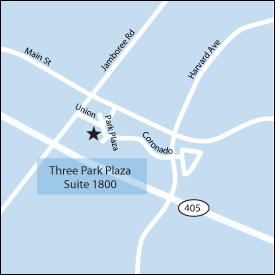
You are invited to attend an exclusive event that will provide you with hands on experience deploying a Virtual Desktop Infrastructure with the Remote Desktop Services technology that ships with Windows Server 2008 R2. This event will take place at the Microsoft Technology Center in Irvine, CA. This is a one day session and will begin at 9AM.
VDI & Remote Desktop Services
This overview event will give students a hands-on introduction to deploying and configuring a Virtual Desktop Infrastructure based on the Remote Desktop Services technologies includes with Windows Server 2008 R2.Companies are increasingly turning to virtualization as the answer to their desktop challenges. Desktop virtualization involves decoupling the different computing layers and storing some or all of them in a data center. Through virtualization, employees can access their applications and data very safely over a network, minimizing the risk of data loss. On the IT side, virtualization accelerates deployment of new capabilities without needing to acquire new hardware and configure components. It also helps reduce application testing requirements and compatibility issues and simplifies disaster recovery and compliance.
By attending this course you will become familiar with new VDI capabilities included with Windows Server 2008 R2.
Comments Off on TRAINING: Microsoft VDI & Remote Desktop Services Hands On Labs
Posted in Uncategorized
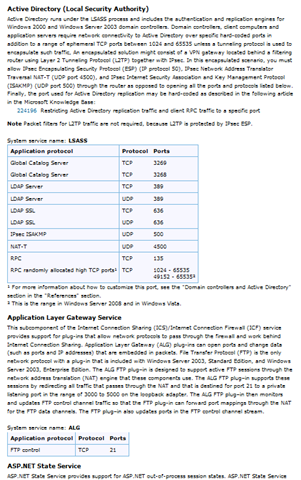
INFO: Service overview and network port requirements for the Windows Server system
This is a heck of a site. It effectively documents what ports are necessary to expose a specific application service through a firewall or filter.
- Service overview and network port requirements for the Windows Server system
http://support.microsoft.com/kb/832017
This is a living document and is updated regularly to include new and updated products and services. Here’s a sample list of services that are currently listed.
- Active Directory
- Application Layer Gateway Service
- ASP.NET Slate Service
- Certificate Services
- Cluster Services
- Computer Browser
- DHCP
- DFS
- DFS-R
- Distributed Link Tracking
- DTC
- DNS
- Event Log access
- Exchange Server
- …
Comments Off on INFO: Service overview and network port requirements for the Windows Server system
Posted in Uncategorized
NEWS: Gartner on Windows 7: “Don’t wait for Service Pack to test”
Gartner weighed in yesterday about Enterprise evaluation & deployment of Windows 7.
(as published in CIO Magazine)
———————
Windows 7: Don’t Wait for Service Pack to Test, Gartner Says
October 14, 2009 – With any new OS deployment, IT teams traditionally take the "safe" route and wait for the first service pack. But IT groups that follow that strategy with Windows 7 rollouts will get caught in a support crunch, says research firm Gartner.
“As companies consider Windows 7 deployment timing, many IT veterans choose the traditional safety play: hold off on testing until the first service pack of the new OS arrives. In this case, Microsoft says that will be roughly 12 months after Windows 7 ships on Oct. 22.
But the situation is different for this OS upgrade cycle, analysts say. With automatic Windows updates delivering fixes on a regular basis, businesses should resist the urge to wait for the first service pack to start their Windows 7 deployments, says Gartner research VP Steven Kleynhans.
"Waiting for service packs made sense in the past because it was the only way people got fixes. That’s not the case today," he says.”
…
"If you wait until Windows 7 SP1 to start testing, you will run out of time," warns Kleynhans.
LINK:
http://www.cio.com/article/505021/Windows_7_Don_t_Wait_for_Service_Pack_to_Test_Gartner_Says
Comments Off on NEWS: Gartner on Windows 7: “Don’t wait for Service Pack to test”
Posted in Uncategorized
BETA: Xbox LIVE Preview Program: Zune, Facebook and Twitter
I am happy to announce that we’re doing an Xbox LIVE Update Preview program for upcoming features such as Zune, Facebook and Twitter. Much like we have done in the past, you’ll need to visit the Microsoft Connect site from this link and sign in with your Windows LIVE ID that is connected to your Xbox LIVE Gamertag.
Once you do that, you need to fill out the "Xbox LIVE Update Preview Sign Up" survey in order to be considered for receiving the Preview System Update. We’re asking a few questions about where you live, your home network, ISP connection and a few other pieces of
information. We are looking for a good cross-section of our members in order to get the best feedback we can.
The Xbox team will then review all of the applications and if you’re selected we’ll send you an email notifying you of your acceptance in the program. A couple of points before you head off to register:
- We’re looking for multiple thousands of participants, so your chances of making it in are good
This opportunity is open to all Xbox LIVE Members in regions where Xbox LIVE is available
- Just completing the survey does not automatically get you access to the Preview Program. We’ll be making final selections from the completed surveys and send you an email if you are selected.
- While both Xbox LIVE Gold and Silver members can sign up, Priority will be given to Gold members in the selection process.
For additional details and specific requirements, head to Xbox.com.
If you are accepted, you’ll hear from us in about a week. Make sure your information on Connect is updated with a current email address so we can email you if you are accepted.
Sign up for the Xbox LIVE Update Preview Program
LINK:
http://majornelson.com/archive/2009/10/14/Xbox-LIVE-Preview-Program-Zune-Facebook-and-Twitter.aspx
Comments Off on BETA: Xbox LIVE Preview Program: Zune, Facebook and Twitter
Posted in Uncategorized
VIDEO/PODCAST: The History of Microsoft (25 videos spanning 1975-1999)
In case you haven’t seen this, “The History of Microsoft” – a 25 video podcast series – is fully available from Channel 9 in a single RSS feed:
- RSS: “The History of Microsoft”
http://channel9.msdn.com/shows/History/feed/zune/
Each video is an 8-10 minute recap of all the major ‘happenings’ of the time at Microsoft. Interestingly they decided not to do the year 2000+. Hopefully they’ll revisit those in the year 2015?
Additionally, the RSS feed itself includes a text transcript of each major highlight discussed in the video as well as “other notable events in the world during that year”.
Major years to check out IMHO include:
Comments Off on VIDEO/PODCAST: The History of Microsoft (25 videos spanning 1975-1999)
Posted in Uncategorized
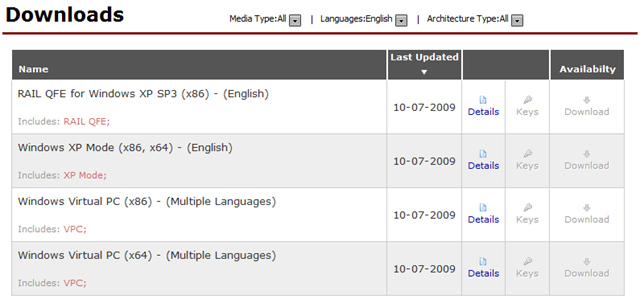
RELEASE: Windows XP Mode & Windows Virtual PC
Now available on MSDN & Technet:
- Windows XP Mode (x86, x64)
- Windows Virtual PC (x86, x64)
Basically, there’s a naming jump from “Virtual PC 2007” to “Windows Virtual PC”. Windows XP Mode is a much larger download because it includes an installation of Windows XP as well. There is also a patch that needs to be applied to Windows XP SP3 if Virtual PC is to be run on that environment.
There’s already a ton of Supporting Documentation:
- Windows XP Mode for Windows 7 brochure
Explore the many features of Windows XP Mode for Windows 7 - Running Windows XP Mode with Windows Virtual PC
A how to guide for small businesses - Windows Virtual PC evaluation guide
How to set up a virtual environment and try out some of the key features of Windows Virtual PC
DOWNLOAD: Windows XP Mode & Virtual PC Documentation
http://www.microsoft.com/windows/virtual-pc/support/default.aspx
SECURE TECHNET DOWNLOAD:
https://technet.microsoft.com/en-us/subscriptions/securedownloads/default.aspx
Comments Off on RELEASE: Windows XP Mode & Windows Virtual PC
Posted in Uncategorized

VDI & Remote Desktop Services

You must be logged in to post a comment.