Posted by: kurtsh | October 27, 2009

DOWNLOAD: Windows 7 Product Guide now available

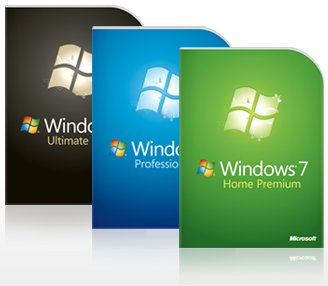
image The Windows 7 Product Guide provides a detailed look at the many new and improved features in Windows 7. The guide is designed as an accurate source of information that can help you to understand how Windows 7 Simplifies Everyday Tasks, Works the Way You Want, and Makes New Things Possible.

The guide is also designed to provide IT Professionals with information about how to Make People Productive Anywhere, Manage Risk Through Enhanced Security and Control, and Reduce Costs by Streamlining PC Management.

This is not a help and how to guide. Rather, it provides an overview of the many exciting features in Windows 7 and pointers to more information. The Windows 7 Product Guide is available in both XPS and PDF formats.

DOWNLOAD:  Windows 7 Product Guide
http://www.microsoft.com/downloads/details.aspx?displaylang=en&FamilyID=b3c68ec2-e726-4830-ac89-31c71d6be5f3

Digg This

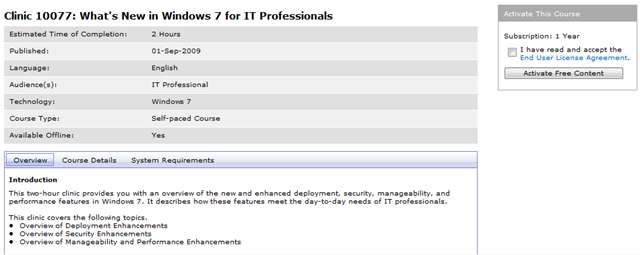
image Here are a few FREE Online Training Clinics that Microsoft is currently offering.  These online training clinics serve as great resources to become familiar with our latest products and technologies. 

Most of the clinics can be completed in 1-2 hours and can be taken at your own pace.  Some of the available free training include:

Windows:

SQL:

Exchange:

Development:

Security:

Sharepoint:

Additional technologies:

And there are several more learning clinics available!  To view all our free training clinics, please access the link below:

LINK:  http://learning.microsoft.com/Manager/Catalog.aspx?view=free

Digg This

Posted by: kurtsh | October 26, 2009

BETA: System Center Service Manager Beta 2 releases

image Microsoft System Center Service Manager is Microsoft’s entree into the help desk/ticketing system solution space.  Leveraging the foundation in place that most customers have such as Active Directory & SQL Server, Service Manager promises to be a great addition to any IT organization looking for richer integration with their existing management infrastructure. 

Customers that own other elements of the System Center suite such as System Center Configuration Manager and System Center Operations Manager will find that Service Manager fits like a glove due to it’s immediate integration with these partnered system.

REGISTRATION:
Try the beta (available from the Connect site) You must sign up thru the directory.
https://connect.microsoft.com/site/sitehome.aspx?SiteID=446&wa=wsignin1.0

Tell us what you think on the public forum.
http://social.technet.microsoft.com/forums/en-US/systemcenterservicemanager/threads/

NOTE:  This milestone is the feature complete milestone for Service Manager.  From here on out we will only be fixing bugs and responding to customer feedback. After 4 yrs in the making of the product, the end is in sight!

Key Technologies
  • A workflow engine for automating all or portions of IT processes and for integrating System Center solutions
  • A common data warehouse and reporting platform for integrating business intelligence information across System Center
  • A connector framework to support technology integration across System Center, other Microsoft products, and common industry management tools
  • A CMDB to support the management of information about IT service components and how they relate to one another
  • A self-service portal to provide end users access to IT resources, reducing help desk call volume
  • A knowledge base to capture and share practical knowledge for IT professionals and end users

Background/Supporting Materials
What’s new in Beta 2?

  • Problem management
  • End user self-service portal
  • IT analyst portal
  • Inbound email to incident workflow
  • New reports
  • Full extensible data warehouse
  • Authoring console for customizing forms and creating custom workflows (without writing code!)
  • Operations Manager integration – alert to incident scenario and service/service component inventory sync
  • Self-service software provisioning
  • significant improvements in performance and scalability

Also, of note this is the first time that any System Center product has ever simultaneously shipped a beta release in multiple languages (English, German, and Japanese for now).

Digg This

image Windows 7 USB/DVD Download Tool (WUDT) helps customers who have PCs without optical disk drives (such as small notebook PCs) to upgrade to Windows 7.  (See http://www.microsoftstore.com/win7usb)

The WUDT is downloadable from Microsoft Store and the Microsoft Download Center. Windows 7 customers who purchase an electronic software distribution (ESD) edition of Windows from the Microsoft Store can create bootable USB devices (thumb drives or external hard drives) or DVD backup media by downloading the ESD edition (an ISO image) and then running the WUDT.

Digg This

image image On Tuesday, Oct 27, Paul Thurrott, Michael Otey, Paul Robichaux, Jeff James, and key Microsoft leaders gather for a lively discussion of how to make the most of the new releases!

They will discuss how Windows® 7, Windows Server®2008 R2 and Microsoft® Exchange Server 2010 are designed to help simplify IT infrastructure management, save costs, and get more from systems with solutions that are interoperable.

PEOPLE – This is a FREE virtual event!  Did you see the list of speakers?  (See list to the right)  It’s practically a who’s who of the Microsoft ecosystem.

In the keynote and three technical sessions participants will discover exactly what’s in it for their business and will receive technical resources to get the most out of the new features and capabilities. This event is presented in an interactive, real-life simulation, with a lifelike visual environment, networking and interactive tools, staffed sponsor booths, and educational chats to complement each conference session.

Digg This

image

The Gartner Symposium this week included a Windows 7 Early Adopter Customer Panel sponsored by Microsoft. 

In this highly visible discussion, featured Gartner Research VP & Distinguished Analyst Michael Silver facilitated a panel discussion with four early adopters of Windows 7:

  • ADP
  • BMW
  • Energizer
  • Pella

These companies shared their deployment and planning experiences, as well as their recommendations for companies new to Windows 7 deployment.

This is a great chance to get valuable insider information from Microsoft customers who are leaders in their industries.

Digg This

clip_image002Interested in getting access to Microsoft’s Office 2010 Web Apps “Tech Preview” including Word, Excel, Powerpoint, & OneNote?

Visit the following link and sign in with a Windows Live ID. Accepting the agreement will give you immediate access to the Office 2010 Web Apps Tech Preview.

———————

OKAY.  I ENROLLED.  NOW WHAT?
The applications will show up/execute when you click the newly appearing “VIEW” or “EDIT” menu items available after selecting a document that is stored within your Skydrive.

clip_image004UPLOADING & VIEWING YOUR OWN SPREADSHEETS/DOCUMENTS TO SKYDRIVE
By going to http://skydrive.live.com while logged in with your Windows Live ID, you should be able to upload spreadsheets to Microsoft’s online storage.  (See snapshots of my own Skydrive storage to the right) 

When you click on your own uploaded spreadsheet, the option to “EDIT” should appear. (Or at least “VIEW”)  Clicking on “edit” will open the document in Web-based Excel.

WAIT!  WHY CAN’T I EDIT WORD DOCUMENTS?
Word is extremely complicated due to the amount of real-time activity that goes on while you edit a document – remember that this is all done using AJAX! – whether it’s spellchecking as you type or changes/edits between different users on the Internet in real time to allow multiple people to edit the same document without collisions.

As a result, Word does not allow editing YET in this Tech Preview release.  It will provide editing capabilities in a future release of the online app.

image

Digg This

image At the behest of our Exchange Specialist (jk Mike), I’m happy to post that Exchange Server 2010 has not only released but will be available for download on the Volume Licensing site (MVLS) on November 1st for authorized Microsoft Volume Licensing customers.  (https://licensing.microsoft.com)

Read all about what’s new in Exchange Server 2010 here at the Exchange web site:
http://www.microsoft.com/exchange/2010/en/us/whats-new.aspx

Digg This

image Service Pack 2 for Configuration Manager 2007 delivers new platform support for Windows 7 client, Windows Vista SP2, Windows Server 2008 R2 and Windows Server 2008 SP2. In addition, Service Pack 2 delivers continued innovation with Intel vPro technology, support for Branch Cache enabled environments, and continued development for 64 bit architectures.

Feature Summary

  • New Operating System Support
    • Windows 7
    • Windows Vista Sp2
    • Windows Server 2008 R2
    • Windows Server 2008 SP2
  • New Features in Out of Band Management
    In addition to providing feature parity with SP1 and AMT firmware versions 3.2.1, 4.0 and 5.0, the following new features are supported:
    • Wireless management with up to 8 wireless profiles
    • End point access control: 802.1x support
    • Audit logging
    • Support for different power states
    • Power control options at the collection level
    • Data storage
    • Scheduling configuration for in-band provisioning
  • Asset Intelligence Certificate Requirement Removal
    Configuration Manager Service Pack 1 introduced Asset Intelligence v1.5. This version allowed customers to configure an online synchronization to ensure that their catalog was up to date with the latest Microsoft inventory for both hardware and applications. This initial release required a certificate. With Service Pack 2, the requirement to have the certificate has been removed, so any customer can configure their Asset Intelligence capabilities to connect online and update their catalog. Software Assurance is not required for this functionality.
  • 64-bit Architecture Development
    Service Pack 2 will also continue to deliver new support for x64 architectures, including the following:
    • X64 support for Operations Manager 2007 Client Agent
    • Update to Management Packs for 64-bit operating systems – SP2 will ship 64-bit performance counters (the management pack is a separate release)
    • Remote control support added for x64 XP and x64 Server 2003
  • Improved Client Policy Evaluation
    • Faster policy processing
    • More efficient software distribution configured to run at user logon
  • Branch Cache Support
    Support for scenarios where Windows Server 2008 R2 and Windows 7 Client are present and Branch Cache is enabled

DOWNLOAD: 
http://www.microsoft.com/downloads/details.aspx?displaylang=en&FamilyID=3318741a-c038-4ab1-852a-e9c13f8a8140

Digg This

One of our employees, Samer Chidiac, is also a DJ and he got his hands on one of the Windows 7 demonstration videos.  Try not to crack a grin during his remix.

Digg This

« Newer Posts - Older Posts »

Categories