Posted by: kurtsh | November 19, 2009

NEWS: Free laptops for all Los Angeles PDC 2009 attendees!

I told you guys you all should sign up for this years PDC.

And to be clear – this is NOT a ‘netbook’ as it’s been claimed in some news outlets.  This is a full blown customized Acer convertible Tablet PC with Windows 7 Ultimate on it, with a custom installation of the OS installed.  Acer – in case you didn’t know – holds the patent on the Tablet swivel in most Tablet PCs today.

image In the absence of any big news during his keynote address this morning, Microsoft Windows President Steven Sinofsky took a page from Oprah’s playbook and stirred the crowd to life with the surprise announcement that all of the paying attendees at the company’s big Professional Developers Conference in Los Angeles would get a free laptop.

Sinofsky said the laptop was custom-designed by the Windows team, working with PC maker Acer to create a machine that represented the best overall experience it could create with the new Windows 7 operating system. It’s meant for software developers to fully explore the possibilities of the new operating system.

"We’re going to take this laptop, and it’s going to be available to you," Sinofsky told the crowd. "For free."

As heard on the webcast, there were huge cheers in the giant keynote hall at the Los Angeles Convention Center. Sinofsky encouraged them to stick around for the rest of the talk, recalling an incident a few years ago, when Microsoft similarly gave away a free mobile device that caused people to rush for the distribution center.

Microsoft historically has focused on operating systems and applications software, not PC hardware, but the company has increasingly been working more closely with PC makers to get them to tune their systems more carefully to work more smoothly with Windows. In that way the Windows team’s work with Acer on the custom "PDC Laptop" is an interesting development even if it won’t be available outside the show.
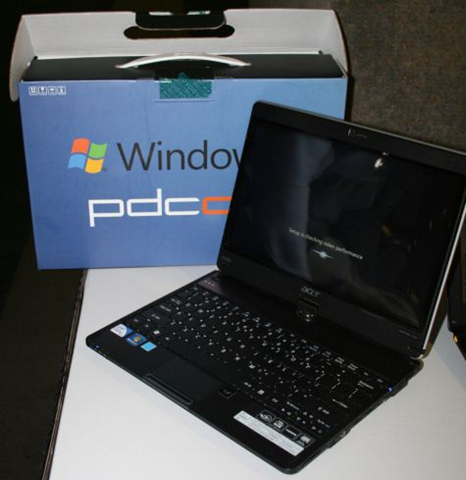
(Taken from Todd Bishop’s Microsoft Blog & CNET’s Unboxing of the PDC Laptop)

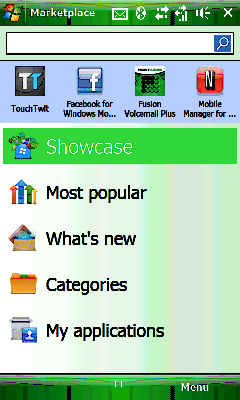
image The Windows 7 Application Compatibility List for IT Professionals is a Microsoft Office Excel-based spreadsheet containing software applications which have met Windows 7 Logo Program testing requirements for compatibility with 32-bit and 64-bit Windows 7 (“Compatible – Windows 7 Logo”).

Additionally, this list contains applications with a status of “Compatible,” “Free update required,” “Paid update required,” “Future compatibility,” and “Not compatible.” Any of these mean the software publisher has stated the compatibility status but note these products have not met the Windows 7 Logo Program testing requirements.

For the latest collection of compatible applications and hardware devices, please visit the Windows 7 Compatibility Center. You can also leave feedback on compatibility and suggest new products to get added in future reports.

DOWNLOAD: Windows 7 Application Compatibility List for IT Professionals
http://www.microsoft.com/downloads/details.aspx?displaylang=en&FamilyID=890e522e-e39e-4278-aebc-186f81e29173

Posted by: kurtsh | November 16, 2009

RELEASE: Windows Marketplace for Windows Mobile 6.0/6.1

image About frickin’ time.  Windows Marketplace is now available to download for the REST of us that don’t own brand spankin’ new devices.

The good part about having the Windows Mobile Marketplace available is that it’ll make available a lot of FREE products that many people had no idea existed.

Here’s a few that you can find on the Marketplace that are real gems:

  • Mobile Manager for Netflix
    If you have a Netflix account, you can arrange your shipments online through your Windows Phone.
  • Bing for Windows Phone
    This is a rich mapping product that works great with phone GPSs and provides local restaurants, gas stations, and other necessities all directly.
  • Tower Defense
    Arrange your towers and defend yourself from bombers, drones, and hummers.

DOWNLOAD: 
Windows Marketplace for Windows Mobile 6.0/6.1
http://windowsphone.com/getmarketplace

(Also go straight to http://mp.windowsphone.com to download straight to your phone)

Posted by: kurtsh | November 16, 2009

DOWNLOAD: Coffee Monitor Management Pack for SCOM 2007 R2

In a nutshell, this Management Pack for System Center Operations Manager 2007 R2 can be used to keep track of the level of coffee in left in the pot.  Through the use of SCOM 2007 R2, a network camera, and  this management pack, you will never run out of coffee which as we all know is the most important part of a productive environment!

image coffee

This is mostly made as a proof of concept, as this technique can be transferred to other monitor types. It could be expanded with other types of sensors, like a weight to check the level of coffee instead of a camera, or a thermometer to check the temperature of the coffee.

This is the very first version.   By default, it will trigger a warning when under 50% is left, and a Critical Alert when under 20% is left.

DOWNLOAD:
Coretech Coffee Monitor Management Pack for Microsoft System Center Operations Mgr 2007 R2
http://bit.ly/356ZOy

Posted by: kurtsh | November 16, 2009

INFO: Connect your Zune to any Apple iPod dock for $19

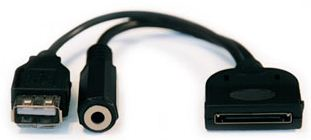
imageGot a Zune?  Tired of not being able to take advantage of the oodles of Apple iPod accessories out there because the pinouts on your Zune don’t work with the Apple iPod connector pinouts?

This looks promising: 
The CableJive Universal Dock Converter

It reportedly gives you standard USB connectivity which works to both charge your Zune as well as send audio to an iPod/iPhone dock.  All you need to bring is the charging cable that comes with the Zune.

Now you can have all the advantages that the ZuneHD has over the iPod as well as the opportunity to leverage a rich ecosystem of accessories:

  • 2X FASTER CHARGE TIME:
    Fully charging a ZuneHD takes only 2 hours versus the iPod Touch’s 4 hours.
  • ALMOST HALF THE WEIGHT:
    The ZuneHD weighs 2.6oz versus the iPod Touch’ 4.05oz.
  • LONGER BATTERY LIFE:
    Playing video on a ZuneHD for up to 8.5 hours on a single charge versus the iPod Touch’s ability to last 6 hours.
  • VIVID HIGH DEF DISPLAY:
    ZuneHD features a next gen 16:9 OLED display versus the iPod Touch’s standard LCD 4:3 display.
  • ZUNE HD RADIO:
    ZuneHD contains both an FM as well as an HD receiver providing owners with clear digital audio as well as the ability to automatically add any song they hear on the radio to their ‘shopping cart’ to purchase on Zune Marketplace or via…
  • ZUNE PASS 
    ZuneHD users get the ability to download any and all music they want for a flat monthly subscription fee of $14.95.  Additionally, they can download 10 MP3 for permanent ownership each month for use regardless of whether they continue their subscription the following month.
  • ZUNE DESKTOP SOFTWARE:
    The award winning, easy to use, fresh interface of the Zune desktop software provides users with a richer, better experience than iTUNES as acknowledged by industry experts.

LINK:  CableJive Universal Dock Converter
http://bit.ly/1kAza

image Last week at the TechEd Europe conference, in conjunction with the launch of Exchange Server 2010, Microsoft launched Forefront Protection 2010 for Exchange Server.  The product and evaluation software is available now.

Part of our Business Ready Security strategy, Forefront Protection for Exchange (FPE) offers multiple anti-malware engines for 38 times faster detection than single engine solutions, and 99% guaranteed spam protection with only one in 250,000 spam false positives.  Customers also have the choice of using the hosted Forefront Online Protection for Exchange service, or both offerings together for defense-in-depth.

Like all of our Forefront solutions, FPE is designed to help companies balance the needs of business with security requirements.  Email is an extremely critical application, of course, and it presents challenges to both businesspeople and IT managers.  Employees (and non-employees) needs secure access to messaging and documents from anywhere, as well as a spam-free inbox and protection from malware.  On the other hand, IT must manage multiple sites and devices, ensure information protection and compliance, and ward off financially-motivated threats.

Combined with Exchange 2010 and other Microsoft identity and security technologies, FPE is part of Microsoft’s comprehensive solution for secure messaging.  It’s worth watching a video presentation on the whole solution here, in fact.)

New features in Forefront Protection 2010 for Exchange Server include:

  • Premium antispam protection, with 99% detection rate, less than 1 in 250,000 false positives, and backscatter filtering
  • New user interface with dashboard view of detection statistics and health monitoring
  • Antispyware scanning provided by the Microsoft Antimalware Engine
  • Support for Exchange 2010, Windows PowerShell, and Hyper-V
  • Standardized installation using MSI installer

Already a number of customers have deployed FPE with success.  Quotes from two:

  • “Forefront Protection 2010 for Exchange Server goes hand-in-hand with Exchange Server 2010. We wouldn’t put anything else for e-mail security on our Exchange Server 2010.”
    Jonathan Wynn, IT Manager– Del Monte Foods.
  • “Implementing Forefront Protection 2010 for Exchange Server was an easy decision for us following the success of our previous Forefront Security for Exchange Server implementation”
    George Podolak, Director of IT, Pei Cobb Freed & Partners

Posted by: kurtsh | November 14, 2009

BETA: Office 2010 System beta registration now online!

On your marks… get set… Register to receive the Office 2010 System Beta!

——————-

 imageOFFICE

  • Microsoft® Office Professional Plus 2010 Beta. Enhance the creation, management and sharing of information, while streamlining processes and improving security.
    Sign up for Office 2010 Beta

imageSHAREPOINT

  • Microsoft Office SharePoint Server 2010 Beta. Connect and empower people using the integrated set of rich features in the business collaboration platform for the Enterprise and the Web.
    Sign up for SharePoint 2010 Beta

PROJECT

  • Microsoft Project Server 2010 Beta. Use innovative capabilities in a familiar UI to capture work in a centralized repository, build and maintain project schedules online, and create powerful dashboards and reports.
  • Microsoft Project Professional 2010 Beta. Simplify planning, collaboration, and resource management with powerful, visually-enhanced tools.
    Sign up for Project 2010 Beta

VISIO

  • Microsoft Visio Premium 2010 Beta. Take diagramming to a bold new level with dynamic, data-driven visualization tools and templates.
    Sign up for Visio 2010 Beta

image SquareTrade, the company famous for providing warranties for eBay purchases released a report detailing the aggregated return rate of the 3 major consoles on the market:  Xbox 360, Playstation 3, and Wii.  It goes over the past history of the Xbox 360’s failure rate relative to the other consoles and gives numbers to back comparisons up.

LESS THAN 1% FAILURE RATE
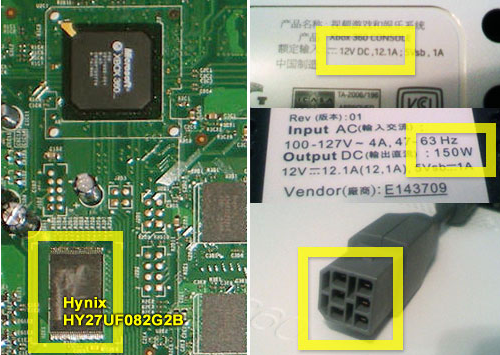
What is interesting about the report, a survey involving a random sample of 16,000 console purchasers that had warranties with SquareTrade, is that it found that since introducing the “Jasper” chipset in the 4th quarter of CY2008, returns for the Xbox 360 console have dropped to <1%.

This is obviously good news for people planning on purchasing an Xbox 360 this holiday season.  The “Jasper” chipset (photo & identifying detail from console above) is a a 65nm trace-based CPU with a 65nm trace-based GPU, which means the computational units of the console are dramatically smaller, consume dramatically less power, and dissipate dramatically less heat in comparison to the previous 4 generations of chipsets within the Xbox 360.  This technology is what effectively “vaccinates” this generation of Xbox 360’s from the “Red Rings of Death” of previous generations.

image

REPORT:  SquareTrade – “Game Console Failure Rates”
https://www.squaretrade.com/htm/pdf/SquareTrade_Xbox360_PS3_Wii_Reliability_0809.pdf

Posted by: kurtsh | November 13, 2009

RELEASE: Bing Maps (Wave 14)

Bing Maps new release is live!   The improvements are focused around the user experience, performance, and some added exploration functionality.  This is the first phase of the Bing Maps Wave 14 release which includes the improved AJAX functionality & Local Search Verticals with the second phase coming soon…

Here’s a review of some of the changes:

  • clip_image001Draggable Routes – Yes! This is a great (and much requested) feature added to Bing Maps allowing you to generate a route, then in the case that you need to change the route, you can simply grab any part of it and drag it to where you want the route to actually go. To use draggable routes, click the car icon near the bottom of the welcome pane. Enter a start and end, generate a route, then grab anywhere on the route to move the route line. The route will regenerate for you.
  • Zoom Bar – No longer just a zoom in and zoom out button, the zoom bar allows you to jump to specific zoom levels within predefined settings.
  • Dynamic Compute – We’ve moved the processing power closer to the user.  Using Microsoft’s ECN, we now have Bing Maps running in data centers in 7 locations around the world. This means wherever you are around the world, you will access Bing Maps from the closest geographic node to where you are physically located. 
  • Command Parsing – Want driving directions?  Enter “Bellevue, WA to Space Needle” in the Bing Maps search box.  Want traffic info?  Enter “Seattle Traffic” in the Bing Maps search box.
  • New Navigation – We also added a subset of features to a button bar along the bottom of the welcome pane. Each button loads features on Bing Maps. Welcome loads the welcome pane; the car loads the route planner; the star loads My Places, formerly called Collections; the envelop loads the ability to share the map with someone via email, copying a URI or embedding the map into a web page (more on that below); the printer icon is for printing; and, stoplight will load a traffic overlay with flow and incident information.
  • clip_image002Embed a Map – You can now take a map view right from Bing Maps and embed it into your site. To do this, you’ll want to click the Share button once your map is where you want it to be. You can copy the embed code from there; or, you can click the Customize View link which will take you to the embeddable map customizer (EMC). The EMC allows you to set a map to the map height and width (small, medium, large or custom); the map type (static or draggable); the map styles (road, aerial, aerial w/ labels); and, add links to Bing Maps for Viewing a Larger Map or Getting Directions. Once you’ve set everything the way you want it, click Generate Code and boom! there’s your code. You copy it, then paste it into your web page and you’ll have the map you wanted.
  • World Wrap – no longer will your Bing Maps experience stop at the international date line. Keep going around, and around, and around…
  • Diet Bing Maps – The default Bing Maps home page dropped from 678kb to 484kb. It zips through the pipes much faster now.  Ultimately, the site loads in half the time, with end user look & feel performance being half of that.


LINK:  Bing Maps
http://www.bing.com/maps

LINK:  Bing Maps Local Search
http://www.bing.com/local

So here’s my report card on the accessories I bought – mostly imports from Hong Kong – for the Verizon HTC Touch Pro 2.  All accessories arrived within a week and a half.

  • Charge & Sync Cable – $33.99
    Grade:  A.  This is awesome.  Expensive but awesome.  In particular, there’s a switch in the middle of the cable to use it, instead of as a “charge & sync” cable, as a “charge ONLY” cable.  This is useful because it takes advantage of a special feature in the Touch Pro 2 that allows the phone to be charged in half the time if no synchronization is taking place.  Very unique. 
    http://www.ppctechs.com/HTC-Touch-Pro-2_1163/accessories/Lil-Sync-Pro-Cable-Mini-5-DUO-Adapter-Bundle_613-360.htm
    $33.99
  • High capacity 3600 mAh battery – $14.99
    Grade:  C.    The good news is the battery works and it indeed has a capacity nearly 3x that of the stock HTC Touch Pro 2.  The bad news is that it protrudes from the device so a different backplate has to be placed on your unit.  It comes with a battery-fitting backplate however the design of the backplate is for the TMOBILE Touch Pro 2 which has a different interface at the base of the phone.  It’s possible for force this plate onto your Verizon however you have to trim some of the plastic off the plate to make it fit using some strong scissors which is what I did.  And even when you do, now the Silicone case (see below) no longer fits.  Not cool.  I suppose this might be useful as a backup power source… or something to use if on a long plane ride.
  • Car Charger Cigarette Lighter Adapter – $5.54
    Grade:  A.  This is a standard mini-USB port-based charger for the car.  Works like a charm and cheap as heck.
    http://cgi.ebay.com/Car-Charger-Cigarette-Lighter-Adapter-HTC-Touch-PRO-2_W0QQitemZ220452461013QQcmdZViewItemQQptZPDA_Accessories?hash=item3353fd99d5
    $5.54
  • USB Base Dock Cradle – $15.49
    Grade:  D.  The good news is that it has a space in the back for separately charging a backup battery for your phone, along with having a docking area for your phone to charge.  The bad news is that the unit, again, is designed for the TMOBILE Touch Pro 2 as so the port does not line up correctly on the dock with your phone and there’s no way to get it to work.  So this ends up simply being an external charger for batteries – which can be useful, I suppose.  But nothing like what I’d anticipated.
  • 3x Extra Steel Ballpoint Combo Stylus Pen – $8.35
    Grade:  A.  Perfect.  It comes with 3 replacements which you’ll undoubtedly need and the pen works well in crunch.
    http://cgi.ebay.com/3x-STEEL-BALL-POINT-STYLUS-PEN-FOR-HTC-TOUCH-PRO-2-II_W0QQitemZ400079041301QQcmdZViewItemQQptZPDA_Accessories?hash=item5d2691b315
    $8.35
  • Soft Skin Clear Silicone Case – $15.69
    Grade B.  The case fits and it does a good job fitting & protecting the phone much to my surprise.  The gel wrapping fits like a glove and feels good in your hand because it improves one’s grip on the phone – preventing it from slipping from your hand.  It additionally has almost all the right “holes” cut in it to expose the buttons and speakers and microphones on the unit.  Every place that is except for the USB port which again is for the TMobile version.  This is easily rectified by trimming some of the silicone off the bottom to expose the ports as they should be exposed.  The gel does make the phone significantly thicker so be prepared for that however it really protects the device well. 
    http://cgi.ebay.com/Soft-Skin-Silicone-Case-For-HTC-Touch-Pro-2-Gray-2SPT_W0QQitemZ110445600927QQcmdZViewItemQQptZPDA_Accessories?hash=item19b712209f
    $15.69

« Newer Posts - Older Posts »

Categories