Posted by: kurtsh | December 14, 2009

INFO: Extra Internet Explorer Search Providers List

imageOne of the things that I love is the ability to quickly add new search providers into the Internet Explorer instant search field.  Normally, I search using Bing.com but there are times when I want specific searches of certain Internet databases like eBay or Amazon.  Or maybe I want to search using Google without them tracking me using their nefarious cookies & Google Analytics tentacles.

This is a great list of about 100 providers that can be added to your Internet Explorer search field provided by Tredosoft.  All it takes to add one of these to your Internet Explorer configuration is to simply click on the provider in the list and it gets added.

Here’s a sample of some of the big name providers that they’ve listed that might be interesting:

  • Amazon
  • BBC News
  • Blogger
  • del.icio.us
  • Dictionary.com
  • Digg
  • eBay
  • Flickr
  • Food Network Recipes
  • IMDB
  • MSDN
  • MySpace
  • Oxford Dictionary
  • Technorati
  • Slashdot
  • Yahoo Shopping
  • Youtube

If you’re interested in adding any of these, visit:

One item that isn’t listed is Scroogle, the Google anonymizer that allows you to search using Google’s index however prevents Google from tracking your searches uniquely to you.

image If you’re interested in attending the Consumer Electronics Expo 2010 in Las Vegas, NV on Jan 7th (Microsoft CEO Steve Ballmer’s keynote is on the 6th in the evening so come early if you want to see some interesting announcements) there’s a $100 discount available.

FREE ACCESS TO THE EXPO & 1000’s OF EXHIBITORS
I believe this means that Expo access, which is usually $100 in registration fees, is essentially free.  Either that or if you partake in some of the other CES functions, you’ll just get $100 off.  This coupon expires on January 2nd, so it won’t work if you try it the day of the event.

EXPO HOURS
If you’re planning on attending the expo, here’s the hours from the web site:

  • Thursday, January 7: 10 a.m.-6 p.m.
  • Friday, January 8: 9 a.m.-6 p.m.
  • Saturday, January 9: 9 a.m.-6 p.m.
  • Sunday, January 10: 9 a.m.-4 p.m.

MAPS & STUFF FOR YOUR TRIP
And before you go, be sure to grab and print this map of Las Vegas’ hotels and the Shuttle schedule:

Also, don’t forget to grab and print THIS map also of the Las Vegas convention center and the show layout of the booths

WHERE’S MICROSOFT?
We’re there!  We’ll be in Central Hall Booth 7144 showing our latest consumer products… Windows 7, Xbox 360, Zune, IPTV, Windows Phones, etc.

THE “STEVE BALLMER KEYNOTE”
The biggest, most highly attended keynote of the event is the Steve Ballmer/Microsoft keynote.  This year, it’s at the Las Vegas Hilton, kicking off at 6:30PM.  This of course means that if you want to see it in person, you’ll need to get in line probably closer to 12 Noon otherwise you’ll probably get sent to one of the overflow rooms which simply shows you the keynote on a TV screen.  Yeah.  It sucks.  I’ve done it before.

PARTIES
Don’t ask.  I don’t know what we’ve got planned.  And even if I did, I have no power to get you in so don’t bother trying to contact me about it.

Posted by: kurtsh | December 13, 2009

REPOST: “HTML5 vs Silverlight: Which will win?”

image Joshua Allen wrote a very clear and well-thought article entitled “HTML5 vs. Silverlight: Which Will Win?”… a topic that I’ve heard more than a couple times in the past month.  This question also of course comes up in reference to Flash as well.

However besides going over the logic (or rather illogic) of this debate, Joshua concludes with an interesting comment about what sort of people this question generally comes from:

“…those who argue that HTML5 will supplant everything else tend to be companies who have nothing else. If you only sell hammers, you might as well try to convince people that there are no such things as screws. And you can drive awareness for your newly-incorporated hammer store by telling tales of intrigue and conflict between hammers and screwdrivers. But the fact that these arguments are often couched in conspiracy theories or ideology, suggests that they are primarily opportunistic marketing ploys, and not motivated by pragmatic technical reality.”

READ MORE:  “HTML5 vs Silverlight:  Which will win?”
http://visitmix.com/Opinions/HTML5-vs-Silverlight-Which-Will-Win

clip_image002
The Microsoft Developer & Platform is pleased to announce a Metro Instructor Led Training event focused on Developers covering the Windows Azure Platform, for Microsoft Partners and customers. Delivered through workshop style presentations and hands-on lab exercises, the workshop will focus on three key services of the Windows Azure Platform – Windows Azure, SQL Azure and .NET Services.

This event is targeted at partners and customers who have projects that they are potentially looking to deploy to the Windows Azure Platform.

Attendee Prerequisites
This workshop is aimed at developers, architects and systems designers with at least 6 months practical experience using Visual Studio 2008 and C#.

Agenda Topics

  • An introduction to Windows Azure
  • Working with Windows Azure storage
  • An introduction to SQL Azure
  • Building applications with SQL Azure
  • An introduction to .NET Services
  • Building solutions using the .NET Service Bus

This event is free of charge. However, delegates are responsible for booking and paying for their own travel and accommodation. Both breakfast and lunch will be provided for session days.

Accommodations
Please reference the venue link above for details on class location, area hotels and directions.
Note: Participation in the Windows Azure platform Metro event requires an NDA.  The products and technologies cannot be discussed outside of this NDA

Please register now!

Date:  Dec. 15-Dec. 17

Time:  9:00am-5:00PM

Location: Microsoft – Orange County, Irvine, California       

Level: 300-400

Language: English

Audience: Programmer, Developer

Registration Info
http://msevents.microsoft.com/cui/EventDetail.aspx?culture=en-US&EventID=1032428626&IO=He5wNESuIe2vbmj2%2bI%2bSiw%3d%3d
(Space is limited to two attendees per company.)

Questions: Please email metroevt@microsoft.com

Posted by: kurtsh | December 11, 2009

NEWS: Microsoft acquires Opalis Software

From the OMG file for those of you that work with servers, datacenters, and management technologies.

———

Hi, Everyone,

image Great news for enterprise, government and service provider customers who use System Center. I’m excited to announce that Microsoft has acquired Opalis Software, a Toronto-based private company that is a leader in IT process automation software. Opalis will become a wholly-owned subsidiary of Microsoft.

I believe this acquisition is a pivotal piece to deliver on our dynamic datacenter initiative, which I’ve spoken about before on this blog. This deal brings together the deep datacenter automation expertise of Opalis with the integrated physical and virtualized datacenter management capabilities of Microsoft System Center. I believe Opalis’ software together with the System Center suite will improve the efficiency of IT staff and operations, and customers will gain greater process consistency. Opalis’ software captures the IT processes, in a documented and repeatable way, which can be run over and over again. These capabilities will be added to Microsoft System Center to help customers automate complex IT processes, increase cost savings and shorten timeframes for IT service delivery across physical, virtual and cloud computing environments.

So why is IT process automation so important to us? We know that as customers and service providers use Microsoft server infrastructure, tools and applications in more – and larger – datacenters, these customers require a greater level of automation in their operations. This is especially important as our customers build out highly automated and scalable virtual environments. Advanced workflow processes will be vital for optimization and to avoid potential virtual server sprawl. I read that Gartner believes that, by year-end 2010, at least 50% of the automation and workflow management tasks in support of virtual server infrastructures will be supported by evolving RBA-based tools. Reliable automation of processes across their complex, heterogeneous datacenter not only reduces costs but also ensures the services that drive their business are always available.

And why Opalis? First, Opalis customers have told us that the Opalis employees are a strong set of individuals. Second, customer feedback is that the Opalis software is easy to use, easy to deploy and delivers value in a short period of time. This part is important. Out of the box, Opalis products integrate with System Center, and will allow System Center to integrate with other infrastructure software from CA, BMC, HP and others to integrate across an IT organization.

So if you don’t know Opalis products, you should get to know them. Their products include:

  • Prepackaged workflows and automation expertise for the common tasks in managing a datacenter. Examples include Run Book Automation, virtual machine lifecycle management, and incident ticket management.
  • An automation platform that lets customers create and execute workflows across datacenter management tools.
  • Deep integration capabilities to orchestrate tasks across server infrastructure and systems management products, including those from BMC, CA, IBM, HP, Microsoft, and Symantec.

So what does this acquisition mean for Opalis and Microsoft customers? Opalis will continue to fulfill its existing commitments to customers and continue to deliver support as we transition Opalis to the Microsoft systems and processes. What’s interesting is that a large majority of Opalis customers use System Center today. We intend to make RBA capabilities a core part of System Center going forward. You can get more details of the transition at Microsoft Pathways. This site will provide the most current information on the transition and provide answers to frequently asked questions. Also, be sure to read today’s blog post from Todd DeLaughter, CEO of Opalis: http://www.opalis.com/Blog.asp

For Microsoft customers this acquisition provides access to a new set of capabilities to help you automate your processes and tasks in your datacenter environment. Our virtualization stack just became more complete with the capabilities of Opalis. I sat down for a video interview recently to share more of my thoughts, see it here.

—————–

[taken from the System Center Blog]

clip_image002

Microsoft® Windows 7 Deployment & Application Compatibility

One-Day Briefing

Learn more about the optimized desktop, Application Management, and the Microsoft Tools and Technologies to help understand Windows Application Compatibility.

Join Pontis Research for a one day session to learn more about the optimized desktop, application management and the Microsoft tools and technologies to help with Windows 7 application compatibility.

The Windows Deployment and Application Capability one-day workshop is geared to provide IT professionals with the knowledge necessary to:

  • Plan for the next Windows client migration
  • Learn about Windows Vista and Windows 7 changes that affect your applications
  • Understand how to make your applications work on Windows 7
  • Learn how to use key Microsoft technologies to make your migration easy

This session will discuss the application compatibility challenges using the methodology of assessment, remediation and application management.

  • Application Challenges
    Discuss the challenges facing application compatibility and how Windows Vista and Windows 7 changed the game and why these challenges are a one-time correction to how secure software is created.
  • Application Compatibility Assessment
    Learn how to use tools such as ACT and MAPS to acquire an inventory of applications and how to assess the results to create a rationalized list of applications to remediate.
  • Application Compatibility Remediation
    Understand the various remediation strategies and see each method in action. Learn the different approaches, understanding the challenges and pitfalls with the ultimate outcome of turning non-compatible applications into working applications.
  • Application Compatibility Management
    Introduce the Application Management Lifecycle (ALM) and Application Platform Optimization (APO). Learn how formalizing application compatibility can prevent unexpected compatibility issues in the future.

Agenda

9:00 – 9:15am

Introduction and Overview

9:15 – 9:45am

Session 1: Application Compatibility Challenges

9:45– 10:15am

Session 2: Application Compatibility Assessment (Inventory)

10:15– 10:45am

Session 2: Application Compatibility Assessment (Triage)

10:45– 11:15am

Session 3: Application Compatibility Remediation

11:15 – 11:45am

Session 3: Application Compatibility Remediation (Demo)

11:45 – 12:30pm

Lunch and Q&A

12:30 – 1:00pm

Session 4: Application Compatibility Management/Lifecycle Management

1:00pm

Q&A / End of Session


Date & Location:
February 10, 2009
Microsoft Irvine

Registration:
Please contact me IF YOU ARE A CUSTOMER OF MINE for details on time & online registration details.  You must be registered to attend this event.

clip_image001
A special seminar for my customers…

Desktop and Application Virtualization Technical Briefing
Factors such as globalization, compliance, cost management, workforce mobility, and security threats create unprecedented demands on IT departments to provide the desktop infrastructure appropriate for multiple types of users. Successful companies meet these demands by turning their desktop infrastructure from a cost center to a strategic asset while, at the same time, reducing TCO, improving security and availability and organizational agility.

Please join Microsoft, Flexera Software and Pontis Research for lunch and a briefing on desktop virtualization technologies that will reduce the costs of managing your desktop environment and provide your end users with a more productive computing experience. 

You can read more in the App-V Cost Reduction Studysavings of $156/PC/Yr in direct costs (11.6% of PC TCO) plus $125/PC/YR in user productivity gains.  The sources of direct savings generated by App-V are across automated deployment, patching/updates, non-standard applications, image management, PC provisioning and replacement, and installation risk, as well as user productivity gains.

Join us to learn more about:

  • How organization can centrally manage applications to save time and money every time they deploy new applications,  application upgrades and patches
  • How to dynamically deliver applications to physical workstations, VDI and Remote Desktop Services clients at low TCO
  • Where can application virtualization cut deployment cost and help with compatibility challenges?
  • What is new in MDOP 2009 R2 and what tools are available to assist you in migrating to Win7

Topics Covered

  • Reduce spend on application lifecycle management with App-V 4.6
  • Ready for Win7? Accelerate your OS migration with desktop virtualization
  • Application Virtualization and SCCM 2007 R2
  • IE 6 virtualization
  • Automate application virtualization with AdminStudio

Who Should Attend:
This lab is for IT decision makers and IT professionals involved in enterprise desktop configuration.

Date and Location
January 19, 2010
*Lunch Provided
Microsoft Irvine Office

Registration:
Please contact me IF YOU ARE A CUSTOMER OF MINE for time & registration details.  Registration is required for attendance.

There’s been a lot of FUD by a forensics company (naming them only gives them visibility, which was part of this PR stunt in the first place) around ‘cracking Bitlocker’. We have an official post on the Windows Security blog that explains what this actually entails and how it’s not a real risk in our customer environments:

Here’s one small part of the post:

“I’ve seen numerous claims the past few weeks about weaknesses in BitLocker and even claims of commercial software that "breaks" BitLocker. One claim is from a product that "allows bypassing BitLocker encryption for seized computers."

This claim is for a forensics product and has legitimate uses; however, to say it "breaks" BitLocker is a bit of a misnomer. The tool "recovers encryption keys for hard drives" which relies on the assumption that a physical image of memory is accessible, which is not the case if you follow BitLocker’s best practices guidance.

The product, like others used legitimately for data recovery and digital forensics analysis, requires "a physical memory image file of the target computer" to extract the encryption keys for a BitLocker disk.  Our discussions of Windows BitLocker have always been to communicate that it is intended to help protect data at rest (e.g. when the machine is powered off).

If a forensics analyst or thief/adversary has physical access to a running system, it may be possible to make a copy of the computer’s memory contents by using an administrative account on the system, or potentially through hardware-based methods such as direct memory access (DMA).”

read more HERE


Posted by:
Paul Cooke

I’m posting this because a) it’s my hobby to encode things for streaming and playback and b) this is a whopper of an update that’s very important for anyone that’s using Expression Encoder 3.

image [taken from the Encoder blog]

A QFE has been released for Expression Encoder v3. The download can be found here:

The QFE contains a significant number of fixes and enhancements including:

  • The Audio panel now appears when the user selects two or more media files in the Media Content panel.
  • You can now read or write to MP4 files of 4 GB or greater size.
  • Audio recordings created using certain USB microphones no longer contain distortion.
  • You can successfully encode to MP4 CBR when the bitrate is set to 4.
  • Substantial drops in playback bit rates no longer occur during CPU spikes while playing smooth streaming content.
  • Smooth Streaming content no longer stutters after 10 or more minutes of full-screen playback in some scenarios.
  • Playback of Smooth Streaming content encoded with the VC1 Smooth Streaming 720P VBR preset has been improved.
  • You no longer receive an error when repeatedly editing a Silverlight template in Expression Blend 3 using the Edit the template in Expression Blend command.
  • You no longer receive an error when playing back Smooth Streaming content from a server that is different from the one where the Silverlight template resides.
  • Performance has been improved in the Black Glass template.
  • In Live Encoding mode, you can now publish to a publishing point that requires authentication.
  • Expression Encoder now includes support for AVC1 files.
  • You can now compile the PowerShell code sample from the Expression Encoder SDK when working in Windows 7.
  • Running Expression Encoder as a SYSTEM level service no longer causes an exception.
  • The Silverlight player no longer crashes when you load a file containing unsupported East Asian characters. You will receive an error message, however, if the player does not support the characters.
  • You will now be able to select Adaptive GOP and Closed GOP in the VC-1 Settings options when you have chosen VC-1 Main as your video codec.
  • Expression Encoder will now use its native MP4 codec to decode MP4 files, instead of using QuickTime.
  • Fixes have been made to better support importing and editing Smooth Streaming files.
  • The Expression Encoder Timeline will now display the proper length of imported AVCHD files.
  • Playlists and chapters now correctly display when performing offline playback.
  • Imported WTV files now play back correctly.
  • Seeking has been improved during playback of Smooth Streaming files.
  • If you choose the VC-1 Simple profile for encoding, the bitrate in the Video category will now correctly switch to one is valid for the Simple profile.

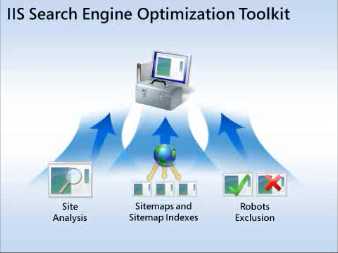
image The IIS Search Engine Optimization (SEO) Toolkit helps Web developers, hosting providers, and Web server administrators to improve their Web site’s relevance in search results by recommending how to make the site content more search engine-friendly. The IIS SEO Toolkit includes the Site Analysis module, the Robots Exclusion module, and the Sitemaps and Site Indexes module, which let you perform detailed analysis and offer recommendations and editing tools for managing your Robots and Sitemaps files.

Improve the volume and quality of traffic to your Web site from search engines

The Site Analysis module allows users to analyze local and external Web sites with the purpose of optimizing the site’s content, structure, and URLs for search engine crawlers. In addition, the Site Analysis module can be used to discover common problems in the site content that negatively affects the site visitor experience. The Site Analysis tool includes a large set of pre-built reports to analyze the sites compliance with SEO recommendations and to discover problems on the site, such as broken links, duplicate resources, or performance issues. The Site Analysis module also supports building custom queries against the data gathered during crawling.

Control how search engines access and display Web content

The Robots Exclusion module enables Web site owners to manage the robots.txt file from within the IIS Manager interface. This file is used to control the indexing of specified URLs, by disallowing search engine crawlers from accessing them. Users have the choice to view their sites using a physical or a logical hierarchal view; and from within that view, they can choose to disallow specific files or folders of the Web application. In addition, users can manually enter a path or modify a selected path, including wildcards. By using a graphical interface, users benefit from having a clear understanding of what sections of the Web site are disallowed and from avoiding any typing mistakes.

Inform search engines about locations that are available for indexing

The Sitemaps and Site Indexes module enables Web site owners to manage the sitemap files and sitemap indexes on the site, application, and folder level to help keep search engines up to date. The Sitemaps and Site Indexes module allows the most important URLs to be listed and ranked in the sitemap.xml file. In addition, the Sitemaps and Site Indexes module helps to ensure the Sitemap.xml file does not contain any broken links.

Site Analysis Features

  • Fully featured crawler engine
    • Configurable number of concurrent requests to allow users to crawl their Web site without incurring additional processing. This can be configured from 1 to 16 concurrent requests.
    • Support for Robots.txt, allowing you to customize the locations where the crawler should analyze and which locations should be ignored.
    • Support for Sitemap files allowing you to specify additional locations to be analyzed.
    • Support for overriding ‘noindex’ and ‘nofollow’ metatags to allow you to analyze pages to help improve customer experience even when search engines will not process them.
    • Configurable limits for analysis, maximum number of URLs to download, and maximum number of kilobytes to download per URL.
    • Configurable options for including content from only your directories or the entire site and sub domains.
  • View detailed summary of Web site analysis results through a rich dashboard
  • Feature rich Query Builder interface that allows you to build custom reports
  • Quick access to common tasks
  • Display of detailed information for each URL
  • View detailed route analysis showing unique routes to better understand the way search engines reach your content

Robots Exclusion Features

  • Display of robots content in a friendly user interface
  • Support for filtering, grouping, and sorting
  • Ability to add ‘disallow’ and ‘allow’ paths using a logical view of your Web site from the result of site analysis processing
  • Ability to add sitemap locations

Sitemap and Sitemap Index Features

  • Display of sitemaps and sitemap index files in a simple user interface
  • Support for grouping and sorting
  • Ability to add/edit/remove sitemap and sitemap index files
  • Ability to add new URL’s to sitemap and sitemap index files using a physical or logical view of your Web site
  • Ability to register a sitemap or sitemap index into the robots exclusion file

DOWNLOAD/DOCUMENTAION:  http://www.iis.net/expand/SEOToolkit

HOW-TO-INSTALL: http://www.bing.com/community/blogs/webmaster/archive/2009/08/17/setting-up-iis-7-before-installing-iis-seo-toolkit.aspx

DEBUGGING: http://www.bing.com/community/blogs/webmaster/archive/2009/08/03/get-detailed-site-analysis-to-solve-problems-sem-101.aspx

« Newer Posts - Older Posts »

Categories