UPDATE 2/27/2010:
Correction:  Make that “Team USA  GOLD MEDAL-WINNING Olympian”!

———-

image Steven Holcomb is a reigning world champion in the four-man bobsled and a tech addict. 

Interesting quotes from the article:

  • "I’m a huge gamer. I’m A+ certified and a Microsoft Certified Professional"
  • "…definitely a PC guy"
  • "The whole hand-eye coordination thing is a big factor.." [then mentions FPS and Halo]

…I’m a PC and I’m proud to be an American.

image For folks paying the premium for Solid State storage, speed & performance are obviously of interest to you.  (Otherwise you wouldn’t be paying that 150%-200% margin for less capacity than what could be obtained using magnetics alone.)

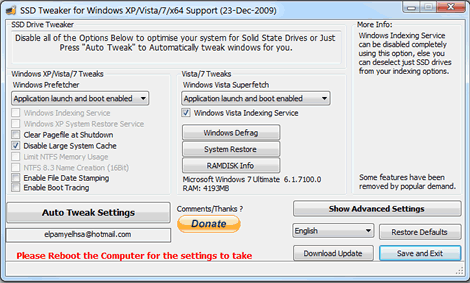
So this little find might be of interest to you.  Someone named “elpamyelhsa” from Elpamsoft wrote a tool specifically for SSD users saying, “With all the advice online for SSD hard drives it can take hours of research and fiddling to properly setup your SSD drive. Now with this Utility you can adjust Windows settings in seconds including:”

– Windows Indexing Service
– System Restore
– Windows Defrag
– Use Large System Cache
– NTFS Memory Usage
– Disable 8.3 Filenames
– Disable Date Stamping
– Disable Boot Tracing
– Windows Prefetcher
– Windows Vista Superfetch
– Windows Services

Personally, I haven’t experienced much of a dramatic change however I don’t directly know how to use the tool to it’s maximum efficiency so click the link below for the download as well as advice on usage.

(found off of TechSpot)

clip_image001

Security Compliance Manager version 1.0 provides centralized security baseline management features, a baseline portfolio, customization capabilities, and security baseline export flexibility to accelerate your organization’s ability to efficiently manage the security and compliance process for the most widely used Microsoft technologies. Join the beta review program for Security Compliance Manager version 1.0, and get the tools and guidance you need to better balance your organization’s needs for security and functionality.

This end-to-end Solution Accelerator is designed to help you plan, deploy, operate, and manage the security baselines of your Windows® server and client operating systems, and Microsoft applications.

The beta review program will run through early March 2010. We encourage you to take advantage of the opportunity to provide feedback on this new tool. The release of Security Compliance Manager version 1.0 is scheduled for April/May 2010.

Features and benefits:

  • · Centralized management and baseline portfolio.
  • · Security baseline customization.
  • · Security baseline comparison and export.
  • · Security baseline compliance monitoring and verification.

Join the Beta by registering at:
https://connect.microsoft.com/InvitationUse.aspx?ProgramID=2682&InvitationID=SUN-TJKJ-7XWY&SiteID=715

clip_image001
Microsoft invites you to an exclusive briefing with Citrix and HP!

Virtualization can dramatically improve scalability, data security, and IT efficiency. Join experts from Citrix, HP and Microsoft to discover how you can develop an end-to-end virtualization strategy that encompasses the entire technology stack, from the datacenter to the desktop, from inception to implementation.
You’ll hear how to take back control by virtualizing desktops, applications, and servers in a centralized datacenter for delivery as flexible, secure on-demand services for users anywhere.

What You’ll Get
Go virtual now and get the tools you need to leave with a defined action plan for your desktop virtualization efforts. Join us for this information-packed live briefing and you will learn how to:

  • Provide desktop and application virtualization with a “high-definition” user experience via any device.
  • Minimize downtime and server workload to ensure business continuity and fast, efficient application performance for local, remote, and branch users.
  • Integrate software, hardware, desktop, server, storage, and client solutions to become an agile, adaptive enterprise ready to meet competitive, compliance, and cost challenges.
  • Avoid costly “virtual sprawl,” centralize virtual desktops in the datacenter, and simplify management and desktop lifecycles.

And Much More!

Don’t Wait – Registration is Limited
Whether you are a large enterprise or a small or midsize business, or whether you are piloting or rolling out company-wide, come see how this game-changing partnership among Citrix, HP and Microsoft can bring you best-in-class tools for virtualizing your complete IT infrastructure and transform your IT organization from a cost center into a powerful enabler of business.

Location/Date:
Los Angeles
March 24, 2010

Registration:
Please contact me for registration details if you are a customer of mine.

image Max Adams presented a “How Do I” video that reviews 4 core core scenarios in which Microsoft’s Windows Azure Platform is becoming very useful for modern organizations.

The scenarios are:

  • Scalable Web Applications
  • Web Applications with Background Processing
  • Parallel Computing
  • Data Storage in the Cloud

VIDEO: How Do I: Scenarios IT Pros can use Azure in?
http://technet.microsoft.com/en-us/ee920349.aspx

image Microsoft SQL Server Migration Assistant (SSMA) 2008 is a toolkit that dramatically cuts the effort, cost, and risk of migrating from MySQL to SQL Server 2008 and SQL Azure. SSMA 2008 for MySQL v1.0 CTP1 provides an assessment of migration efforts as well as automates schema and data migration.

Microsoft SQL Server Migration Assistant (SSMA) 2008 for Access is a tool for migrating databases from Microsoft Access to Microsoft SQL Server 2008. SSMA for Access converts Access database objects to SQL Server database objects, loads those objects into SQL Server, and then migrates data from Access to SQL Server.
SSMA for Access supports Access 97 – Access 2007 databases.

SQL Server Migration Assistant (SSMA) 2008 for Oracle is a complete suite of tools that dramatically cuts the effort, cost, and risk of migrating from Oracle to SQL Server 2008. SSMA 2008 for Oracle automates almost every aspect of the migration process including assessment, schema and data migration, business logic conversion, and validation. Companies such as Motorola and Simon & Schuster have used SSMA to migrate their business-critical databases quickly, easily and accurately.  With SSMA, IT organizations now have the freedom to move to SQL Server and take advantage of SQL Server’s exceptional security, scalability, developer productivity, and the industry’s lowest total cost of ownership.

image The Microsoft System Center Configuration Manager 2007 Dashboard lets customers track application and operating system deployments, security updates, the health status of computers, and IT compliance with key regulations—with an easy to use, customizable Web interface.  Because the Dashboard is built on Windows® SharePoint® Services, IT staff can access information without using the Configuration Manager console. The Dashboard is a free Solution Accelerator, and fully supported by Microsoft.

Key features of the Dashboard include:

  • Easy access to key information without using the Configuration Manager console  
  • Centralized view of Configuration Manager data sets
  • Data can be viewed in graph, table, or Dundas gauge formats
  • You can create custom dashboards for different departments, based on site user’s group membership.

How the Dashboard Works
The Configuration Manager Dashboard is designed to work with an existing Configuration Manager 2007 infrastructure. The Dashboard queries the Configuration Manager site database and uses the resulting data set to present key infrastructure metrics in a graphical format.

The Configuration Manager Dashboard uses SharePoint Web parts to manage and display data sets:

  • Microsoft Dashboard Configuration Web Part. Use this Web part to create and modify the SQL queries that produce the data sets and the other properties that govern how the Dashboard displays the data sets.
  • Microsoft Dashboard Viewer Web Part. Use this Web part to display the data sets. A Dashboard Viewer Web Part displays one data set at a time. The Configuration Manager Dashboard can contain multiple copies of the Dashboard Viewer Web Part at once, each copy displaying a different data set.

The Configuration Manager Dashboard process flow involves the following sequence of activities:

  1. An IT Service Manager requests a new data set.
  2. The IT Administrator uses the Dashboard Configuration Web Part to define the new data set.
  3. The IT Administrator stores the configuration information for the new data set (the information is saved in the Windows SharePoint Services Content database).
  4. The IT Administrator adds a new copy of the Dashboard Viewer Web Part to the default Configuration Manager Dashboard and then modifies the Web part to display the new data set.
  5. The IT Service Manager browses to the Configuration Manager Dashboard site.
  6. Windows SharePoint Services queries the Configuration Manager site database as specified by the data set configuration.
  7. Windows SharePoint Services renders the new data set using the Dashboard Viewer Web Part.

BETA:  Join the Beta program for the SCCM 2007 Dashboard
The Configuration Manager Dashboard is now in Beta release (English only).  Click here to join the beta.
http://technet.microsoft.com/en-us/library/ff369719.aspx

image OFFER: Windows Azure Platform Cloud Development & Test… at no additional cost for MSDN developers!
Did you know that MSDN Premium subscribers get access to Windows Azure at no additional cost? This promotional offer provides monthly compute hours, storage, data transfers, SQL Azure databases, Access Control transactions and Service Bus connections.

How do I try this?
To get started, you’ll want to get the following:

  • Windows Azure Platform Training Kit
  • Windows Azure Tools & SDK for Visual Studio
  • Windows Azure Sample App & code

Download all of these from the following link:
http://www.microsoft.com/windowsazure/getstarted/

Training?
There is also a free training going on entitled, “MSDN Events presents: Take Your Applications Sky High with Cloud Computing and the Windows Azure Platform” on February 25th in Burbank, in case you’re interested.
http://msevents.microsoft.com/CUI/EventDetail.aspx?EventID=1032438180&Culture=en-US

clip_image002CSO Magazine’s Seminar on Business-Aligned Identity Management – Irvine
As a key security executive, you are invited to join us as our guest on March 18th in Irvine California for CSO magazine’s exclusive Seminar on Business-Aligned Identity Management.

Identity management is no longer simply a stand-alone solution. Properly and securely managing identity and access control has to be an integrated component of a carefully considered and diligently deployed security infrastructure. Attend this CSO Seminar and you’ll hear about the entire process of properly aligning business initiatives with security initiatives.

A Special CSO Magazine Event for Key Executive Decision Makers
Session Highlights Include:

  • Networking Breakfast
  • Opening Address: The CSO Perspective and the State of the Market
  • Business-Aligned Identity Management
  • Business Enablement
  • clip_image002Process Improvement
  • Effective Compliance
  • Enhanced Security
  • Extending to the Cloud
  • Lunch with Keynote Address
  • Bringing it All Together – A Strategic Approach to Business-Aligned Identity Management

This special seminar, featuring speakers from CSO magazine, Microsoft, Gemalto, Edgile, Omada, and ChosenSecurity will focus on solving business challenges with strategic capabilities and driving business value. After all, you’re responsible for every dollar spent on securing your infrastructure and ensuring hat no one is accessing your applications without the proper credentials.

A comprehensive approach to business-aligned identity management will take you in the right direction. At this special seminar, you’ll hear an overview of the market, how to align IDM with business objectives, how doing so can increase security, address issues with cloud computing, bolster the bottom line and generate business growth.

Space is limited – register today to secure your complimentary seat.

*Our audience consistently rates peer-to-peer networking opportunities as one of the top reasons they attend a CSO conference. That end, you must be a senior IT/security executive or a senior IT/security manager involved in the purchase of IT/security product and services to qualify for attendance. Additional criteria for qualification are available upon request. As such, analysts, venture capitalists, sales, marketing and consulting positions from non-sponsoring vendor companies do not qualify for attendance. CXOMedia Inc. reserves the right to deny enrollment to anyone who does not meet the qualifying criteria. Thank you for understanding.

REGISTRATION:
This is an invite only event.  If you are a customer of mine interested in participating, please contact me for registration information.

Live%20Meeting Microsoft also offers free instructor-led sessions on Office Live Meeting. Visit a class and explore key Live Meeting usage scenarios through live demonstrations and hands-on activities. Classes are held in a virtual classroom and allow hands-on experience to build knowledge, skills, and confidence to use Office Live Meeting more effectively. Students are able to ask questions of the instructor in these highly interactive trainings. On demand courses are also available.

Courses include:

    • Introducing Office Live Meeting: This course introduces the features and functionality available within Live Meeting through live demonstrations and hands-on activities.
    • Office Live Meeting Quick Start: A first step for all Office Live Meeting users, this 30-minute introduction covers the fundamentals of scheduling and presenting.

Come learn more about how you can get more out of your Live Meeting experience! Visit for a complete course catalog.

LINK: http://office.microsoft.com/en-us/livemeeting/HA102429721033.aspx

« Newer Posts - Older Posts »

Categories