This past month, two major announcements were made that you might have missed:

The National Science Foundation is responsible for research in thousands of areas including food production for the 3rd world, robotics, 3D modeling for surgery, computer-based programming, cancer & disease detection, extraterrestrial communications, and other human endeavors.

By providing access to Microsoft cloud computing fabric, the NSF will be able to:

  • Take advantage of existing, pre-built research & development
  • Improve collaboration amongst researchers by providing a uniform place to share information
  • Increase performance and velocity of research through the sheer computation power of the cloud

Intuit, makers of financial software such as Quickbooks & TurboTax, have a base of independent developers that extend the capabilities & reach of their products but leveraging APIs built into their software.

In partnership with Microsoft, Intuit selected Windows Azure as their preferred cloud infrastructure for extending their software.   By providing the free Windows Azure software development kit (SDK) as part of the Intuit Partner Platform today at http://developer.intuit.com/azure, hundreds of thousands of application developers can now extend their financial services software & extensions via the web in a highly scalable, secure, and available infrastructure.

Posted by: kurtsh | February 4, 2010

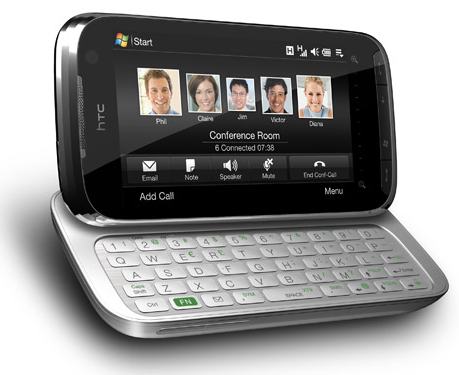
INFO: Verizon HTC TouchPro 2 tweaks

image For anyone that owns a Verizon HTC TouchPro 2, here’s a bunch of fixes and utilities that I’ve found that fix a lot of annoying things about the device.  Enjoy.

  • DISABLE “SENT MESSAGE” NOTIFICATION?
    Have you used the SMS text messaging on the device and gotten annoyed by the stupid dialog box that keeps popping up that reads, “Sent Message”?  This CAB file applies a registry change that stops notifying you of the sent text message every time you send one.
    http://evilkoala.org/download/WindowsMobile/HTCTP2/DisableVerizonSMSMessageSent.cab
  • END CALLS FASTER
    Did you ever notice that it takes an eternity to end a phone call when you hit the red “END” button? (To be more accurate, it takes 3 seconds for the call to end from the moment you press ‘END’)  This is a software/registry tweak believe it or not and you can actually end the call in a single second.  Simply copy over this .CAB file to your device and double click on it.  It’ll make the right registry change and upon rebooting, you’ll find that calls end in 66% less time.
    http://evilkoala.org/download/WindowsMobile/HTCTP2/apristel_FasterEndCall.cab
  • IMPROVE APPLICATION PERFORMANCE
    Does your device get noticeably slower as you use it?  The primary reason for this is that RAM is not relinquished by applications that are dormant making performance difficult for applications that are actively running.  The easiest way is to simply have your device do some housekeeping on a regular basis to ensure that memory is always available to applications that need it.  cleanRAM is a free program that will regularly sweep your device on a scheduled basis (hourly if you want) to ensure it’s running tip top.
    http://evilkoala.org/download/WindowsMobile/HTCTP2/htcAddictscleanRAMv1.8.zip
  • MAKE THE SPEAKERPHONE LOUDER
    The speakerphone on the HTC Touch Pro 2 is one of the best mobile phone speakerphones ever – the quality if fantastic and the availability of a mute button on the back is a great touch, but the volume could be louder.  Fortunately, this is just a software modification.  Install this mod to increase the maximums speakerphone volume.
    http://evilkoala.org/download/WindowsMobile/HTCTP2/AudioPara3.csv.cab
  • TWEAK THE KNOWN REGISTRY SETTINGS FOR YOUR PHONE
    It turns out that most of the registry tweaks on your phone are already documented and don’t really require you to go trouncing through the registry.  Scrollbar dimensions, colors, TCP window sizes, etc.  There’s a program called HD Tweak that provides most of these registry changes in a simple, easy to apply fashion.
    http://evilkoala.org/download/WindowsMobile/HTCTP2/HDTweak0.5.4_English.cab

Want more?  How about a program that allows you to remap the buttons & keys on the button to do other things and execute other programs?  There’s a lot of other .CAB files and utilities available here:

image Unified Communications Ignite 2 Day Event
Seating is limited – Reserve your spot today!

Dates: [Contact me if you are a customer of mine for details]
Time: 8:30am – 5pm
Location: Microsoft Office in Los Angeles, CA
Registration: 
[Contact me if you are a customer of mine for details]

As a valued member of the Microsoft community, we would like to extend to you an official invitation to the 2 day Unified Communications (UC) Ignite training event. Day 1 will cover the essentials of Office Communications Server 2007 R2. Day 2 will cover features of Exchange Server 2010.

Please note that we can only guarantee your seat for a limited time, so please RSVP early!

The UC Ignite Instructor lead, hands-on technical training is the best way for you to get a first look at Office Communications Server 2007 R2 and Exchange Server 2010. During the event, you will have the opportunity to learn about technical details and key features, complemented by multiple hands-on labs.

Workshop Agenda
8:00AM Check-in/ 8:30AM Start

  • DAY 1: Office Communications Server R2
    • Lecture: Architecture, Planning & Deployment
    • Lecture: IM and Presence
    • Lab: Install and Use Office Communicator 2007 R2 and the Office Communicator 2007 R2 Attendant
    • Lab: Install and Configure Communicator Web Access R2
    • Lab: Install and Configure Group Chat Functionality and enable users for Group Chat Console
    • Lecture: Conferencing
    • Lab: Configure and Use Conferencing in Office Communications Server 2007 R2
    • Lecture: OCS 2007 R2 and Unified Messaging Coexistence
    • Lab: Configure and Use Microsoft Exchange Server 2007 SP1 Unified Messaging
  • DAY 2: Exchange Server 2010
    • Lecture: Overview New Features and Server Roles
    • Lecture and Lab: Exchange Server 2010 Client Access
    • Lecture and Lab: Management Tools and Role-Based Access Control
    • Lecture and Lab: Information Leakage Protection and Control
    • Lecture and Lab: Exchange Server 2010 Transport and Routing
    • Lecture and Lab: Exchange Server 2010 High Availability

Note: Lunch will be provided each day.
We look forward to having you participate in this exciting training event!

Posted by: kurtsh | January 31, 2010

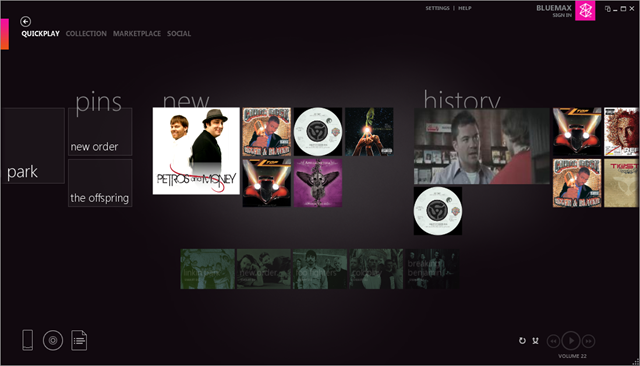
RELEASE: Zune Desktop Software 4.2

image Zune 4.2 Desktop Software hit the Microsoft Downloads site. Upgrade now, dammit!

1. Download this setup package
2. Run Zune package to extract Zune 4.2 setup files to your computer
3. Go to location of files extracted in step 2
4. Run startzune.exe by double-clicking the file
5. Proceed with Zune setup

What’s new in this version?  Not much point in me reiterating it all, and I frankly don’t have the time.  So here’s what Inside the Circle wrote about the new features of 4.2.

POST:  What’s New In Zune 4.2 – A Zune Nation Post Roundup
http://www.insidethecircle.net/2010/01/whats-new-in-zune-42-zune-nation-post.html

DOWNLOAD:  Zune Desktop Software 4.2 (471MB)
http://bit.ly/9eUskx

Posted by: kurtsh | January 30, 2010

BTW: I’m back.

I'mBack Yeah, my life’s been… “interesting” recently.  And it has nothing to do with the baby. 

But I’m back.  The tweeting will always go 24×7 since 140 characters is easy to crank out from the ol’ Windows Phone… but the blogging takes a lot more time and effort.  And I don’t like to publish crap.  Or at least substandard crap.

So suffice it to say, I’m back in the saddle and plan on catching up on all the new from the last 2 weeks that I haven’t been posting.  I have a backlog of 50 posts or so.

Brace yourselves people:  Here it comes.

image The ACT Connector provides the following functionality for those organizations that have SystemCenter Configuration Mgr. deployments with inventories already accessible:

  • Inventories installed software applications and creates reports that will assist with determining which applications are Windows compatible.
  • Retrieves device driver compatibility for installed devices and creates reports that will assist with determining which device drivers will need to be upgraded to support the new Windows operating system. This includes device drivers for 32 bit or conversion to 64bit.
  • System requirements reports have been condensed into a single report, support 64-bit operating systems, and allow the administrator to report on computers by one of the following criteria:
    • Meets minimum system requirements
    • Does not meet minimum system requirements
    • Meets recommended system requirements
    • Does not meet recommended system requirements

System Center Configuration Manager 2007 Service Pack 1 is a minimum prerequisite for installing the Configuration Manager 2007 ACT Connector 4.00.6044.200. Configuration Manager 2007 Service Pack 2 is recommended for full Windows 7 deployment support.

This is a free download and available here:
http://www.microsoft.com/downloads/details.aspx?FamilyID=567be755-1d64-471d-8376-6b463491654b&displaylang=en

Posted by: kurtsh | January 22, 2010

BETA: Microsoft Theme Builder Tool for Office 2007

imageThe Theme Builder tool enables the creation of document themes for Microsoft Office 2007.  Document themes provide a quick and easy way to apply a consistent look across all your Microsoft Office documents.  You can apply the same theme to PowerPoint presentations, Word documents, Excel spreadsheets, and even Outlook emails.

To get started, download and install the application using the links on the left.  Open Theme Builder, and click on the help menu.  There you’ll find all the information you need to create amazing document themes!

Before you can run the tool, you’ll need to install the following items:
.Net Framework 3.0
http://www.microsoft.com/downloads/details.aspx?FamilyId=10CC340B-F857-4A14-83F5-25634C3BF043&displaylang=en
Office 2007 Primary Interop Assemblies
http://www.microsoft.com/downloads/details.aspx?familyid=59daebaa-bed4-4282-a28c-b864d8bfa513&displaylang=en

DOWNLOAD:
http://connect.microsoft.com/themebuilder

hdr 
Exchange Server 2010 has arrived and as with any major release, questions, concerns, rumors and speculations are everywhere. Whether you’re planning to make the move sooner rather than later or are in the more conservative wait-and-see research mode, everyone is looking for answers to separate fact from fiction once and for all. So here’s your chance to start the New Year off on a high note with an exclusive opportunity to discover all the pros and cons of Exchange Server 2010 and what they mean to you – without paying a dime to find out or wasting countless hours scouring the Web in vain.

Gain FREE admission to “Strategic Messaging–Exchange Server 2010” and return to the office with a rock-solid understanding of all the new performance and reliability enhancements, potential cost savings, updated security initiatives and definitive answers to any and all compatibility and complexity questions that you might have. (You’ll also be the first to receive a comprehensive breakdown of all the little-known features and functions that have yet to be revealed.) PLUS, this is a rare opportunity to ask your toughest Exchange 2003 and Exchange 2007 questions directly to Microsoft’s top tech gurus in addition to hearing an independent expert’s unbiased opinion at the very same time. Any and all questions and comments, compliments and complaints will be taken in a no-holds-barred interactive forum that sets this unique event apart from the rest.

This free half-day seminar features 20-year messaging industry veteran and Microsoft MVP, Lee Benjamin as he discusses the evolution of Exchange Server, the limits and the pain points of previous versions, and considerations to keep in mind when making the decision about moving to Exchange Server 2010. In addition, Lee reviews real-life migration scenarios so you can benefit from those that have gone before you.

Space is limited so apply for FREE admission today.

Admission is granted on a first-come, first-serve basis so apply online today or call Jen Tobin at 781-657-1329 and she’ll take your application to attend in less than 2 minutes.

Session 1: Exchange 2010: Accelerate Your Understanding

Led by Lee Benjamin

This session begins by examining the history of Exchange and the issues and pain points of the earlier versions, such as memory, database, and scalability limits, as well as DR and clustering complexity, to name just a few. It will then go on to examine Exchange Server 2010 as the next evolutionary step from Exchange 2003 and Exchange 2007. Our expert speaker Lee Benjamin also discusses the architecture of Exchange 2010, and drills down into some of the improved features in the latest version, such as:

  • Topology changes: what are implications in moving from the Front-End/Back-End topology of 2003, to the 5 Role’s in 2007, and enhancements in 2010 such as moving MAPI/Outlook access to the CAS and off the Mailbox server role
  • The Database Availability Group (DAG): perhaps the single most significant change in the Exchange Server design, a look at the storage model that supports DAGs, and what does this say about good old backup and recovery
  • High availability and resilience features: IT can now configure up to 16 Microsoft Exchange Server 2010 mailbox servers to provide automatic database-level recovery from a database, server or network failure
  • Performance: learn how transitioning to Exchange 2010 decreases IOPS by 70% for Exchange 2007 users and by 90% for Exchange 2003 users
  • Transition and migration: how to get from Exchange 2007 or Exchange 2003 or potentially earlier versions, what tools are available, and where to go for the most up to date information
  • And more

Lee finishes his session with a live Q&A session during which he will take questions from the audience and provide his personalized expert advice.

Session 2: Introduction to Exchange Server 2010

Led by Microsoft

Exchange Server 2010 is the cornerstone of Microsoft’s unified communications solution.  Hear how this latest release helps customers achieve new levels of reliability and performance, by delivering features that help simplify administration, protect communications, and delight users.  This session will highlight key innovations and enhancements made in Exchange 2010 across three product investment areas: “Flexible and Reliable”, “Anywhere Access”, and “Protection and Compliance”.

Technical Solution Sessions

  • Exchange 2010: Three Server and Storage Architecture Models from Dell to Maximize Your ROI
    Led by Dell
  • Assisting and Accelerating Upgrades to Exchange Server 2010
    Led by CommVault
  • Best Practices for Migrating to and Managing Exchange 2010
    Led by Quest Software

Agenda

Location:
5855 West Century Boulevard
Los Angeles, California 90045

Date/Time:
March 2nd 8AM

Registration:
http://events.techtarget.com/exchange2010/

SESSION 1: The Next Wave: Windows Azure

The future of highly available, high-performance, secure, dynamically scalable, hosted computing is here.  It’s Microsoft’s new online service computing platform: Windows Azure.   In this session, we’ll discuss and demonstrate the basics of Windows Azure and how you can leverage it in your work.  We’ll show you real-world examples of how companies are using Azure today, help you think about applying it for customer-facing applications, or quickly and dynamically add horsepower to your own computing infrastructure.  We’ll also touch on the exciting future of the platform – including what you can expect to see in the coming months and years.

Highlights include:

  • What exactly is “Cloud Computing”?  What applications are best suited to the cloud?
  • Microsoft’s commitment to the Cloud:  The virtualization platform and data centers
  • The Azure architecture: How it all fits together
  • How to get started in the cloud: Deploying and managing applications
  • Will I save money by doing this?  (Using the Azure TCO tool)
  • What will Windows Azure look like a year from now?

SESSION 2:  Hyper-V: Tools to Build the Ultimate Virtual Test Network 

Windows Server 2008 R2 and Hyper-V version 2.0 provide a powerful base upon which you can build a highly realistic, effective test bed for servers, clients, and networks. In this session, you’ll learn how to use the resources of a TechNet subscription, Windows Server 2008R2, Hyper-V, and a new, free sysinternals tool called Disk2vhd, to build the ultimate test or training environment.  We’ll show you how to import existing virtual machines and export virtual hard disks. You’ll see how to take point-in-time snapshots, and to build snapshot hierarchies that allow you to move both backward and forward to specific points in the time of a VHD.  We’ll also demonstrate how to create a virtual machine from a running physical machine, and then import that VHD into Hyper-V.  By the end of this session, you’ll have a solid understanding of the tools and techniques currently available for building a great virtual environment in Hyper-V.

Highlights include:

  • TechNet subscription: What is it? How do I get one? What does it cost?
  • Virtual Hard Disks: format interoperability and disk types
  • Working with virtual networks and network connections
  • Connectivity with legacy network adapters and network adapters
  • Using wireless interfaces
  • Importing and exporting VHD files
  • Effects of importing and exporting a VHD in Hyper-V
  • How to take, apply and consolidate snapshots

SESSION 3: Windows 7 Deployment

Deploying Windows 7 is easy if you’re using the Microsoft Deployment Toolkit (MDT) 2010.  This session will walk you through the various tools that can help simplify your deployments.  We’ll drill down in the MDT Workbench and look at how the MDT process helps you create a reference image, which can then be easily deployed to the target computers.  We’ll look at how to configure the deployment environment, show how you can add operating systems, applications, drivers, and language packs using the Deployment Workbench, and then finish up by creating a task sequenced deployment to a target computer.

Highlights include:

  • Microsoft Deployment Options
  • Review the MDT 2010 Deployment Process
  • Deployment Tools
    • Windows Automated Installation Kit (WAIK )
    • Microsoft Deployment Toolkit 2010
  • Configure MDT 2010 to perform a Lite Touch Installation (LTI) of Windows 7

Date/Time:
Thursday, February 25, 2010 8:00 AM – Thursday, February 25, 2010 12:00 PM Pacific Time

Location:
Theater – AMC Burbank 16

125 E Palm Ave

Burbank California 91502

Registration Options:

Event ID:

1032438352

Register by Phone

1-877-673-8368

Register Online:
http://msevents.microsoft.com/CUI/EventDetail.aspx?EventID=1032438352&Culture=en-US

MSDN Events presents:  Take Your Applications Sky High with Cloud Computing and the Windows Azure Platform

Join your local MSDN Events team as we take a deep dive into cloud computing and the Windows Azure Platform. We’ll start with a developer-focused overview of this new platform and the cloud computing services that can be used either together or independently to build highly scalable applications. As the day unfolds, we’ll explore data storage, SQL Azure, and the basics of deployment with Windows Azure. Register today for these free, live sessions in your local area.

SESSION 1: Overview of Cloud Computing and Windows Azure

The Windows Azure platform is a set of high-performance cloud computing services that can be used together or independently and enable developers to leverage existing skills and familiar tools to develop cloud applications. In this session, we’ll provide a developer-focused overview of this new online service computing platform. We’ll explore the components, key features and real day-to-day benefits of Windows Azure.

Highlights include:

  • What is cloud computing?
  • Running web and web service applications in the cloud
  • Using the Windows Azure and local developer cloud fabric
  • Getting started – tools, SDKs and accounts
  • Writing applications for Windows Azure

SESSION 2: Survey of Windows Azure Platform Storage Options

Durable data storage is a key component of any cloud computing offering. The Windows Azure Platform offers many options, which can be used alone or in combination. Windows Azure itself offers ready-to-use and lightweight storage in the form of tables, blobs, and queues. Another choice for storage is SQL Azure, a true relational database in the cloud. In this session, we’ll explore the highlights of these implementations and how to both create and use storage in each form. We’ll give you guidance on choosing the right forms of storage for your application scenarios.

Highlights include:

  • Understanding table & blob storage
  • Programming against table & blob storage
  • Working with queue storage
  • Managing credentials and connection strings
  • Scaling and configuration
  • Understanding SQL Azure databases versus local SQL Server databases
  • SQL Azure firewall, logins and passwords
  • Database creation, deployments and migrations
  • Database management using SQL Management Studio
  • Programming against SQL Azure databases

SESSION 3: Going Live with your Azure Solution

Windows Azure features a powerful, yet simple deployment model. By focusing on your application and abstracting away the infrastructure details, you can deploy almost any app with minimal fuss. In this session, we’ll walk you through the basics of Windows Azure deployment, including site monitoring, diagnostics and performance issues.

Highlights include:

  • Start-to-Finish Visual Studio demonstration of a realistic XML data driven business web site from the desktop to the cloud.
  • Windows Azure Deployments
  • Start-to-Finish Visual Studio demonstration of a realistic SQL Server data driven business web site from the desktop to the cloud.
  • Configuration of your application in the cloud
  • Guidance and Suggestions to ensure your success

Location:
Theater – AMC Burbank 16
125 E Palm Ave
Burbank California 91502

Date/Time:
Thursday, February 25, 2010 1:00 PM – Thursday, February 25, 2010 5:00 PM Pacific Time

Registration Options:

Event ID:
1032438180

Register by Phone
1-877-673-8368

Register by Online
http://msevents.microsoft.com/CUI/EventDetail.aspx?EventID=1032438180&Culture=en-US

« Newer Posts - Older Posts »

Categories