Posted by: kurtsh | February 8, 2010

NEWS: The 10 Most Vulnerable Software Apps of 2009

image Ziff Davis released their list of the 10 Most Vulnerable Software Apps of 2009.  Question the authority of the list?  Here’s the first 2 items that they start out with.  Read the rest and you be the judge:

  • Adobe Acrobat, Adobe Reader
    Vulnerabilities that allow attackers to cause a denial of service (memory corruption) or possibly execute arbitrary code via unspecified vectors. Buffer overflow in Adobe Reader 9.0 and earlier, and Acrobat 9.0 and earlier, allows remote attackers to execute arbitrary code via a crafted PDF document, related to a non-JavaScript function call and possibly an embedded JBIG2 image stream, as exploited in the wild in February 2009 by Trojan.Pidief.E. allows remote attackers to execute arbitrary code or cause a denial of service (memory corruption) via (1) a crafted Flash application in a .pdf file or (2) a crafted .swf file, related to authplay.dll, as exploited in the wild in July 2009.
  • Adobe Flash Player
    Does not properly remove references to destroyed objects during Shockwave Flash file processing, which allows remote attackers to execute arbitrary code via a crafted file, related to a “buffer overflow issue.” Allows attackers to cause a denial of service (application crash) or possibly execute arbitrary code via unknown vectors, related to a “privilege escalation vulnerability.” Allows attackers to cause a denial of service (application crash) or possibly execute arbitrary code via unspecified vectors, related to a “null pointer vulnerability.”

LINK:  10 Most Vulnerable Software Apps of 2009
http://bit.ly/cnHRgy
Posted by: kurtsh | February 8, 2010

VIDEO: Microsoft “How do I” videos

image Microsoft has recently assembled a list of “how do I” videos for customers to learn how to accomplish specific tasks with Microsoft products.  These videos provide step-by-step instructions to help you further develop your skillset .  We currently offer videos for the following list of Microsoft products:

You can also subscribe to our TechNet videos RSS feed to learn about new videos as they are released.  Please peruse at your convenience and let me know of any questions you have.

Posted by: kurtsh | February 8, 2010

NEWS: Microsoft Outpaces Apple in Customer Satisfaction

clip_image002

Interesting results from the customer feedback we’ve been listening to and the hard work the product teams have been applying.

Microsoft Outpaces Apple in Customer Satisfaction: Chart of the Day
By Dina Bass

Feb. 1 (Bloomberg) — Microsoft Corp. got a bigger boost in customer satisfaction from its latest computer operating system than rival Apple Inc. did from its most recent upgrade.

The CHART OF THE DAY shows that respondents giving Microsoft a positive grade for satisfaction rose to 67 percent in the week after the Oct. 22 release of Windows 7, from 64 percent the day before it went on sale, according to YouGov Plc, a London-based market-research firm. Microsoft’s satisfaction rates rose 14 percent through the end of the year.

…read more at jump…

FULL STORY:
http://www.bloomberg.com/apps/news?pid=20601109&sid=aajIjMcEp.E4&pos=15

image There are lots of reasons to be excited about DPM 2010.  Here are a few:

  • Virtualization folks get item-level restore from within VM backups, as well as support for LiveMigration (CSV) scenarios for Hyper-V R2
  • SharePoint folks lose the need for a Recovery Farm and gain auto-protection of new content databases
  • SQL Server administrators get auto-protection at a SQL instance level, huge scalability increases and a self-service restore utility for DBAs
  • Exchange managers get support for Exchange 2010, including DAG configurations, as well as CCR/SCR
  • Windows client users get protection and recovery for remote laptops, with protection online and offline
  • Disaster Recovery planners get lots of new options around multi-site chaining and protection between sites
  • And everyone gets new enterprise scalability, reliability and manageability enhancements

For more information, check out these resources:

The System Center folks just produced a video going over the changes made to the upcoming release of the RC of DPM2010.  Check it out:

Posted by: kurtsh | February 8, 2010

ARTICLE: “Word Automation Services: How it Works”

image Do your produce documents for customers?  Do those documents have to be created and published in PDF format?

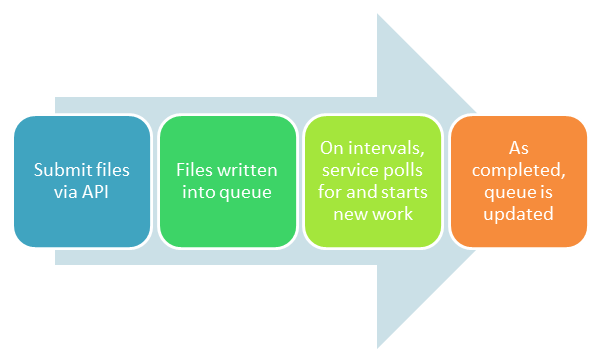
Check out the upcoming Sharepoint Service – “Word Automation Services”.  It provides customers with the ability to leverage the power of a multi-threaded, multi-core server infrastructure for producing large quantities of documents that originate from Word templates, are populated from database information and are published in Adobe Acrobat PDF format.

Financial Services institutions?  Are you reading this?  [grin]

image Interested in knowing how to use your Microsoft Business Productivity Online Services implementation from an end user perspective?

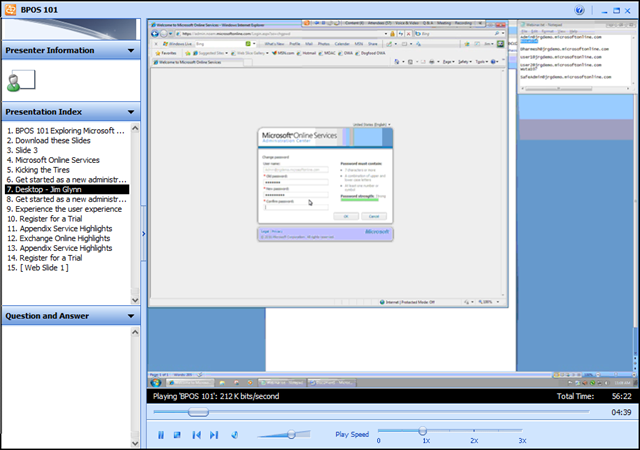
Jim Glynn demonstrates how to explore Microsoft Online Services and demos the basic BPOS feature set. During this webinar, Jim does the following:

  • Install the sign in application
  • Send and receive e-mail via Outlook and Outlook Web Access
  • Create and receive a meeting invitation
  • Create a SharePoint site collection and a SharePoint workspace
  • Schedule a Live Meeting
  • Start a Meet Now meeting and invite an attendee
  • Install and start Communicator

WEBCAST: BPOS 101
http://blogs.technet.com/msonline/archive/2010/01/19/webinar-bpos-101.aspx

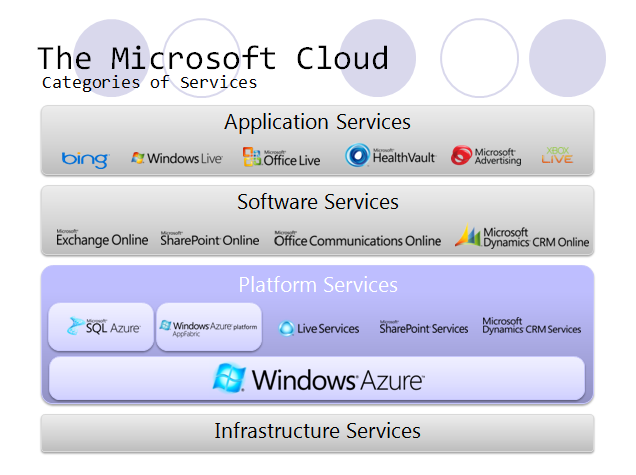
Interested in Cloud Computing?  Here’s a quick slide that’ll help you understand the technology space and how Microsoft’s offerings addresses these areas:

image

The space of most immediate impact for many organizations currently running their messaging, collaboration, and real-time communications services on-premise is the area of “Software as a Service” or SaaS.  This is a space where Microsoft has made demonstrable investments in to ensure customers can choose to move part or all of their investment in these infrastructure services into the “cloud” and into a hosted datacenter environment. managed & monitored by Microsoft.

This is an area not fully understood by many customers however a great way to get an understanding of these technologies is to review this 3rd party webcast recording done by SaaS-IT Consulting.  It goes over the importance of this area of cloud computing, what Microsoft offers, and why they believe the Microsoft SaaS implementation to be the best available on the market:

(The recording is also downloadable – it’s about a 8MB file)

image This was unique enough to highlight:  An overview of our motion capture controller, “Project Natal” for Xbox 360

There really hasn’t been much in the way of an explanation on how Natal works until now.  This interview with Scientific American goes over the components of the Natal “camera” along with the technology that enables the device to interpret movement in real time across multiple body types and differentiate between individuals even when the overlap.

Instead of trying to preprogram actions, Microsoft decided to teach its gaming technology to recognize gestures in real time just like a human does: by extrapolating from experience. Jamie Shotton, a researcher at Microsoft Research Cambridge in England, devised a machine learning algorithm for that purpose. It also recognizes poses and renders them in the game space on-screen at 30 frames per second, a rate that conveys smooth movement. Essentially, Natal-enhanced Xboxes will do motion capture on the fly, without the need for the mirror-studded spandex suit of conventional motion-capture approaches.

Training Natal for this task required Microsoft to amass a large amount of biometric data. The firm sent observers to homes around the globe, where they videotaped basic motions such as turning a steering wheel or catching a ball, Kipman says. Microsoft researchers later laboriously selected key frames within this footage and marked each joint on each person’s body. Kipman and his team also went into a Hollywood motion-capture studio to gather data on more acrobatic movements.

"During training, we need to provide the algorithm with two things: realistic-looking images that are synthesized and, for each pixel, the corresponding part of the body," Shotton says. The algorithm processes the data and changes the values of different elements to achieve the best performance.

To keep the amount of data manageable, the team needed to figure out which elements were most relevant for training. For example, the system doesn’t need to recognize the entire body mass, but only the spacing of skeletal joints. After whittling down the data to the essential motions, the researchers mapped each unique pose to 12 models representing different ages, genders and body types.

imageimage image

image With the Microsoft cloud strategy, organizations can now move towards cloud computing models with the confidence that their existing investments in their datacenter are safe, and can be leveraged in this new paradigm. Existing applications and services will be able to move to the private cloud without the need to learn unproven technologies, or introduce unnecessary complexity. At the same time Microsoft will evolve its private cloud offerings by bringing learning and technology from running Microsoft’s global datacenters and the Windows® Azure platform.

The Microsoft Private Cloud enables:

  • Management of the datacenter fabric as a single pool of resources.
  • Delivery of scalable applications and workloads.
  • Focus on the management of the datacenter service and it’s dependencies.

HOW TO BUILD A PRIVATE CLOUD TODAY
Today customers can begin their journey to the private cloud by deploying the Microsoft products and technologies they know and trust. The flexible and familiar platform and tools you use today will be the foundation for your private cloud. As we enable our customers on this path, Microsoft will deliver the technologies that allow enterprises to build private cloud within their existing datacenters based on enhancements to Windows Server and System Center.

Microsoft is enabling customers to build the foundation for a private cloud infrastructure using Windows Server® and System Center family of products with the Dynamic Infrastructure Toolkit for System Center (availability scheduled in the first half of 2010).

WHAT IS THE DYNAMIC INFRASTRUCTURE TOOLKIT FOR SYSTEM CENTER?
The Dynamic Infrastructure Toolkit for System Center is a free, partner-extensible toolkit that will enable datacenters to dynamically pool, allocate, and manage resources to enable IT as a service. Whether you’re an enterprise customer, a systems integrator, or an independent software vendor, the toolkit will help you create agile, virtualized IT infrastructures. You’ll get:

  • Tested guidance and best practices to help configure and deploy a private cloud infrastructure.
  • Automated web portals and a light provisioning engine that are tightly integrated with System Center products.
  • Guidance to help partners easily extend functionality.

For individuals interested in the Microsoft “Private Cloud” concept, pay close attention to what’s happening with Microsoft’s Dynamic Infrastructure Toolkit for System Center which will provide customers with a great blueprint for laying down the necessary elements to create such an infrastructure.

For more details on the Dynamic Datacenter Toolkit for System Center, visit:
http://www.microsoft.com/virtualization/en/us/private-cloud.aspx

imageMicrosoft Office Communicator empowers users to communicate and collaborate easily using a range of tools accessible from a single application, including instant messaging (IM), voice & video, and desktop sharing.

This virtual, instructor-led session introduces key Office Communicator usage scenarios through live demonstrations and hands-on activities.

In this high-level overview, we will explore the following features:

  • Instant Messaging: Need a fast answer to a question? Use Office Communicator to easily find a contact and start an Instant Messaging (IM) conversation.
  • Presence: Use presence status to determine if and when a contact is available for an IM conversation or audio call. Set your own presence status to indicate how and when contacts can reach you.
  • Contact Management: Build your Communicator contact list for the way you work. You can add distribution groups or organize contacts into your own custom groups.
  • Audio and Video: Make or receive audio calls using your computer. If you have a webcam, you can add real-time video to your conversation.
  • Desktop Sharing: Share your desktop during an instant messaging session to collaborate or edit documents with a single colleague or an entire team.
  • Office Application Integration: View a contact’s presence status and start communicating from within your Office applications, including Microsoft Office Outlook and SharePoint.
  • Add a Live Meeting: Use the Meet Now option to quickly start a new conference and invite people who are either inside or outside of your organization.
  • Communicator Web Access: Stay connected with Communicator while at home or traveling — all you need is an Internet connection.

Join us to learn more about Office Communicator and what it can do for you!

DATES/TIMES:
Various… See registration for availability.

REGISTRATION:
https://events.livemeeting.com/967/15027/reg.aspx?pc=04

« Newer Posts - Older Posts »

Categories