image The folks at Xbox Live had a little gift for folks that were paying attention this week. If you were following along, you noticed that they were illusively releasing 5-digit blocks of numbers for some reason.  Well, lo-and-behold the blocks formed a redeemable Xbox Live code which provides the user with an exclusive accessory for your avatar: A backyard grill, complete with burgers and spatula! Your avatar has a little fun with it too when you accessorize it with the grill.

And after all, ain’t it time you tried using something with your avatar other than that lame light saber? Hmm?

  • KEY:  Xbox Live Block Party “Backyard Grill” accessory for your Avatar
    9xbx9 9rcd9 9bck9 9prty 9rckz

(BTW: You can either login to your Xbox 360’s Live account and enter the key directly into your console, or, if you’ve associated your Xbox Live account with a Windows Live ID, you can go to https://live.xbox.com/en-US/accounts/RedeemToken.aspx and enter the token there and it will be redeemed to your Xbox Live account automatically without you even logging into Xbox Live on your console!)

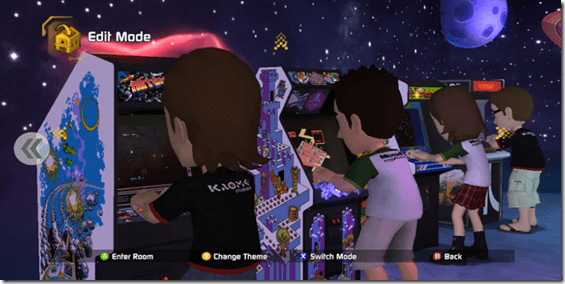
image If you’re recently installed the Microsoft Games for Windows Live release, “Microsoft GameRoom”, you might run into this error after installation:

  • “…the program can’t start because d3dx9_40.dll is missing…”

I encountered this on a couple of my machines running Windows 7 x64.  The file being referred to is a DirectX 9 library that may have not installed correctly on your machine or may be corrupt. 

The simple solution is to do an install of DirectX that updates your Windows PC to the most current version of DirectX libraries.  After downloading, executing the package will unpack all DirectX libraries into a directory of your choice.  Once unpacked. go to that directory and run the DXSETUP.EXE executable which will install all the XNA compliant DirectX libraries onto your system.

If you have an Xbox 360 you’ve seen the hype machine going for this thing there but the Windows version is just getting warmed up.

GameRoom is an utterly phenomenal new download available for both Windows PC’s as well as Xbox 360.  It’s effectively a universal emulator similar to what people know as “MAME” however it takes the concept to a completely new level.  Instead of relegating the concept of running original video games ROMs to the illegal download backrooms of the Internet, GameRoom makes them available in an arcade atmosphere for a mininmal charge AND brings about the competitive element of 80’s style video gaming to today’s PC’s and Xbox’s.

WHY GAMEROOM?
GameRoom is more than just an emulator for video games.  It provides features from old school arcades missing from traditional emulation.

  • THE ARCADE ATMOSPHERE
    Remember the sound of hundreds of video games playing at the same time?  The themed deco and the low lights of each gaming room?  How about the artwork along the side of each game cabinet?  The soda and candy machines?  GameRoom brings all of that back in wonderful new environment that allows you to walk through from game to game with your Xbox 360 Avatar.image
  • XBOX 360 & WINDOWS
    You can play each game on both Xbox360 & on Windows by “buying” the game on each platform for $3, or $5 for both.  Each contributes to your high scores on the game in a central database – and it doesn’t matter what platform you obtained the score on.  It all counts.
  • PAUSE OR REWIND
    Playing at work on your Windows PC and it’s time to go home… but you’ve got an awesome score running?  Pause the game!  Then… pick up where you last left off on your Xbox 360 at home!  Or maybe you’re just practicing and your screw up a move because someone called you.  Press the ‘rewind’ button and undo your mistake LIVE in the game!  (Rewinding is only available in practice games – not games that are eligible for high scores… of course.)
  • YOUR OWN ARCADE
    Set up your personal arcade with its own decorations and your own games, arranged the way you want!  Obtain that childhood dream of yours of finally having your own arcade and allow friends to come by and play your games FOR FREE one time.  Earn ‘tokens’ to play other un-purchased games for free whenever people come by your arcade to play.  Go to other people’s arcades and play their games as well.
  • HIGH SCORE BANNERS
    This is where is gets wicked:  Whenever you get the high score on a video game amongst your friends, a RED banner with your name and high score appears above the video game in the community arcade or your other friend’s arcades – virtually taunting everyone else with your score – and there’s nothing they can do about it until they BEAT your score.  In your arcade, a green banner appears over every arcade game that you own the high score to.  You can even issue challenges to friends to dare them to beat your score.
  • BIG TITLES & CROSS-CONSOLE ROMS
    Asteroids Deluxe, Centipede, Tempest, Gravitar, Lunar Lander, Crystal Castles… remember these classics?  They’re up and available right now with all their audio & video.  And games aren’t just available from stand up arcade titles.  Games from the Atari 2600, Mattel’s Intellivision, Colecovision, etc. are all available.

…and the best part:

  • THOUSANDS OF ROMS
    Microsoft has contracted with all your favorite game manufacturers (many of which don’t exist any more by the way, and we had to go try to hunt down who the IP owner is of those titles now that they’re long gone) to LEGALLY license their games and port them over to the GameRoom, guaranteeing that you’re playing the original game in it’s entirety.  We’ve even hired experts in these games to run through them to see how they ‘feel’ when played on Xbox 360 & Windows.  The number of titles already licensed by Microsoft number in the 1000’s however we anticipate releasing an average of 1 game per day… for the next several years apparently.

Personally, one of the great things about this title is the quality of the product.  The software was developed by Krome Studios, the same fine people that developed “SceneIt?: Box Office Smash”, the fantastic game for the Xbox 360 that proved this developer’s mettle.  They didn’t mess around SceneIt?:BOS – they produced a very high quality product that got all the nooks & crannies in the game to make it perfect.  GameRoom follows a very similar pattern.  Excellent product, very well produced.

The engine is free, so what are you waiting for?!?

clip_image001
How Microsoft Handles Security and Compliance

As part of Microsoft’s commitment to its customers, many of the products we ship are tested on a large scale in Microsoft’s own IT environment. What this means is that by the time our software ships it has been tested in a live production environment on over 600,000 PC’s and devices and 140,000+ end users.

We’d like to invite you to a half day session where you can “Ask the Experts” from Microsoft IT and learn how they balance regulation, improve Microsoft software, and run one of the largest Windows ecosystems on the planet. After the session concludes you will have an opportunity to enjoy a glass of wine or beer while networking with the Experts and your peers.

SESSIONS WILL INCLUDE:

  • Data Loss Prevention – How do you determine what data is important to protect when you have 20 million emails per day, 125 terabytes of data and 120,000 SharePoint sites? How long do you retain the data? Once you find it what do you do and who do you notify? Learn how Microsoft, using a combination of RSA DLP technology and its Rights Management Server, has successfully addressed this problem over the last 10 years.
  • Endpoint and messaging security – With over 600,000 PC’s and devices Microsoft has always presented a tempting target for hackers. Learn how Microsoft IT protects it assets from these attacks and learn more about its overall security infrastructure at the endpoint.
  • Identity Management – In March of 2010, Forefront Identity Manager shipped and Microsoft IT was up and running on it. At any given time Microsoft IT manages 140,000 end users and 2300 line of business applications. Automating this access is critical both from a business productivity perspective and for compliance.
  • Networking Session – Immediately following the event we’d like to invite you to a wine and beer reception where you can meet the speakers and network with your peers.

WHO SHOULD ATTEND:

  • IT Executives, IT Managers and Senior IT Professionals.

April 2010

Agenda

  • 11:00am – 4:00pm  Security Briefing (Catered lunch will be provided)
  • 4:00pm – 5:00pm Wine and Beer Reception and Networking

Microsoft Irvine
3 Park Plaza Suite 1600
Irvine, CA 92614
949.263.3000

Registration:
If you are a customer of mine and are interested in attending this event, please contact me for registration information and the date the event is occurring on.

The folks at MakeUseOf.com wrote a really nice article about 3 functions of Bing they love that are unique to Bing alone and not available from Google.  I’ll paraphrase the article here and let you read in it’s entirety at the jump.
  1. LinkFromDomain:
    Ever wanted to see which pages a site links to? Well, no search engine will tell you this except Bing. Yes, this search command is unique and incredibly useful.
    Search pattern
    : LinkFromDomain:anydomain.com
    Suggested usage
    : Well, these are quite a few. I am sure you can think of the ways this search trick may be useful for you. As a search marketer, I personally use LinkFromDomain: operator to see if there are any “shady” pages the site under question links to.
  2. Feed:
    This Bing search operator finds RSS or Atom feeds on a website for the terms you search for.
    Search pattern: feed:term
    Suggested usage: This one is pretty simple and straightforward. I use it as an additional (or alternative) way to find blogs related to my topic because this search finds what Google Blog Search doesn’t.
  3. Contains:
    This Bing search operator lets you find pages that link to particular file types.
    Search pattern: contains:filetype
    Suggested usage: These are plenty, I am sure you will come up with many more ways to use this trick.


    FULL ARTICLE: 3 Unique Bing Search Operators You Will Definitely Love
    http://www.makeuseof.com/tag/3-unique-bing-search-operators-love/

Here’s a few examples that I’ve crafted that I KNOW a lot of you reading will like:

  • Search for podcasts about Xbox 360:  feed:xbox podcast
  • Search for video files on my blog:  site:kurtsh.spaces.live.com contains:wmv

This is so cool it’s disgusting.  Check this out: 

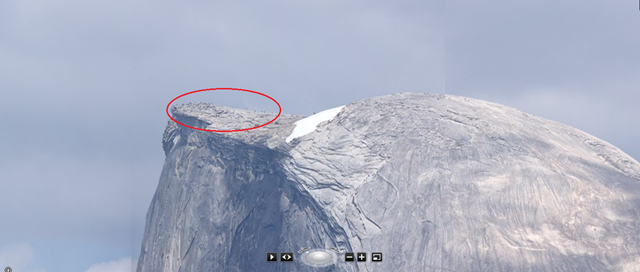
This is a Microsoft Photosynth-presented panorama created using multiple moderate resolution photos of Yosemite’s Glacier Point.
http://photosynth.net/view.aspx?cid=1592a782-1ed6-457b-9023-31424db7ec34

Q:  Can you count the number of people on the peak? 

Let’s DeepZoom in, shall we? 
(Notice the smooth transitions from view to view… all courtesy of Microsoft Research.)

image

image

image

image

We have about a hundred of these ultra-high resolution photos posted already, ranging all the way up to more than 10 gigapixels.

Please check them out at http://photosynth.net. The list of the community’s favorite panoramas so far is here.  If you like what you see please install the latest version of ICE and add to the fun!  More information is available at our respective team blogs: Photosynth & ICE.

clip_image002This is a subset of the Windows 7 Resource Kit that you folks might find very useful regarding your efforts around Deployment. I posted this a while ago but it seemed like it would be worthwhile to repost again in case you hadn’t downloaded it yet.

  • DOWNLOAD: Deploying Windows® 7 Essential Guidance from the Windows 7 Resource Kit and TechNet Magazine
    Microsoft’s eBook Deploying Windows® 7 Essential Guidance from the Windows 7 Resource Kit and TechNet Magazine combine selected chapters written by industry experts Mitch Tulloch, Tony Northrup, Jerry Honeycutt, Ed Wilson, and the Windows 7 Team with select Windows 7 articles from TechNet Magazine. Sample topics include: Deployment Platform, Planning Deployment, Testing Application Compatibility, and 8 Common Issues in Windows 7 Migrations.
    http://www.microsoft.com/downloads/details.aspx?FamilyID=EE2A1D38-88A9-43B3-95BC-7E962F0B6030&displaylang=en

There’s also a few recorded webcasts specific to Windows 7 Deployment & WinXP-to-Win7 migrations that y’all might find useful as well.

  • SCREENCAST:  Windows XP to Windows 7 Migration Part 1: Building the Deployment Environment (9 min 56 sec)
    Learn how to build media that will automatically migrate computers from Windows XP to Windows 7 with user data, custom applications and drivers. This demonstration will walk you through the Microsoft Deployment Toolkit (MDT) Deployment Workbench and how it works.
    http://technet.microsoft.com/en-us/windows/ee410767.aspx
  • SCREENCAST:  Windows XP to Windows 7 Migration Part 2: Initiating the Install and Migrating the PC (9 min 33 sec)
    Explore the user experience for migrating the Windows XP computer to Windows 7 and how brief – or "lite touch" – interaction is required up front to automate the entire process of data migration, OS installation, driver and application customization, and domain join
    http://technet.microsoft.com/en-us/windows/ee410769.aspx
  • SCREENCAST:  Windows 7 Deployment Tools Part 1: Preparing an Image using Sysprep and ImageX (1 min 50 sec)
    This demonstration shows how to capture a custom Windows system image using the System Preparation Tool (sysprep) to generalize the installed image and ImageX to capture the contents of the generalized system image for re-deployment to other computers – including different hardware types
    http://technet.microsoft.com/en-us/windows/ee530017.aspx
  • SCREENCAST:  Windows 7 Deployment Tools Part 2: Deployment Image and Servicing Management (3 min 0 sec)
    This demonstration shows the Deployment Image Servicing and Management (DISM) command line tool and how it can be used to audit and manage offline Windows System Images.
    http://technet.microsoft.com/en-us/windows/ee524789.aspx
  • SCREENCAST:  Windows 7 Deployment Tools Part 3: Deployment Workbench in Microsoft Deployment Toolkit 2010 (1 min 50 sec)
    This demonstration shows how the Microsoft Deployment Toolkit is used to create deployment media to install Windows 7. The process includes migration of user files and settings, automated installation of the Windows 7 operating system, automated installation custom applications and performing additional configurations needed when migrating from Windows XP or Windows Vista to Windows 7.
    http://technet.microsoft.com/en-us/windows/ee529974.aspx
  • SCREENCAST:  Windows 7 Deployment Tools Part 4: Windows XP to Windows 7 Migration (1 min 45 sec)
    This demonstration shows the migration experience from Windows XP to Windows 7 using the Microsoft Deployment Toolkit. We will show how user files and settings are migrated quickly using hard-links, applications can be installed and customized according to user roles, and Windows 7 is installed and configured with minimal up-front initiation from the IT administrator.
    http://technet.microsoft.com/en-us/windows/ee530027.aspx
  • VIDEO:  TechNet: Automating Your Windows 7 Deployment with MDT 2010 (1 hour 8 min 54 sec)
    Deploying Windows 7 is easy if you’re using the Microsoft Deployment Toolkit (MDT) 2010.  This session will walk you through the various tools that can help simplify your deployments.  We’ll drill down in the MDT Workbench and look at how the MDT process helps you create a reference image, which can then be easily deployed to the target computers.  We’ll look at how to configure the deployment environment, show how you can add operating systems, applications, drivers, and language packs using the Deployment Workbench, and then finish up by creating a task-sequenced deployment to a target computer.
    http://edge.technet.com/Media/TechNet-Simulcast-Automating-Your-Windows-7-Deployment-with-MDT-2010/

For more video walkthroughs, check the following lists we have up on Microsoft.com:

Posted by: kurtsh | March 23, 2010

OFFER: Free Bing T-Shirt for your Xbox Live Avatar

image This is pretty sweet.  Wanna free piece of digital clothing for your Xbox Live Avatar? 

The next time your open your browser, swing over to Bing and and when you enter the magic search term, you’ll end up with the results of your search…PLUS a very special gift for your Xbox LIVE Avatar from the two teams. Grab it while you can, not sure how long it will be around.

Note: You’ll need to sign into the US version of Bing to see the gift.
[taken from Major Nelson’s blog]

Once you get your 25-digit token, you can either login to your Xbox 360’s Live account and enter the token directly into your console, or, if you’ve associated your Xbox Live account with a Windows Live ID, you can go to https://live.xbox.com/en-US/accounts/RedeemToken.aspx and enter the token there and it will be redeemed to your Xbox Live account automatically without you even logging into Xbox Live on your console!

Citrix & Microsoft announced two radically new promotional offers targeted at customers either looking at or currently using Virtual Desktop Infrastructure configurations and want to both increase their capabilities while lowering their cost of VDI-related software licensing relative to VMWare View.

[taken from the Citrix & Microsoft offer web site]

image VDI KickStart – “Get started with VDI for only $7K”
Interested in VDI? Kick start your VDI implementation today and save 50% on Microsoft VDI Standard Suite and Citrix XenDesktop VDI Edition. With the VDI Kick Start promotion, eligible customers only pay $28 per device2 for up to 250 devices, giving them the opportunity to launch a VDI implementation for only $7K1. The offer includes Microsoft VDI Standard Suite subscription and Citrix XenDesktop VDI Edition annual licenses.

  • Eligibility:  Customers with Microsoft Core CAL or Enterprise CAL suites with Software Assurance through Enterprise and Select family of agreements are eligible for this offer starting immediately. In addition, Open Value & Campus Agreement and School Agreement (CASA) family of agreements are also eligible starting July 1, 2010. Discount is limited up to 20% of Core CAL or Enterprise CAL covered desktops or 250 devices, whichever is less.
  • Discount:  Eligible customers will receive a 70% discount on Microsoft VDI Standard Suite subscription license and a 50% discount on Citrix XenDesktop VDI Edition annual license.
  • License Duration:  Microsoft VDI Standard Suite subscription is valid until termination of VL agreement or maximum of 3 years. Citrix XenDesktop VDI Edition annual license is valid for one year.
  • Offer Period:  The VDI Kick Start promotion is available until December 31, 2010.

imageRescue for VMware VDI – “Get the best virtual desktop solution – for FREE!”
Struggling with VMware VDI? Replace your VMware View licenses today with the best virtual desktop solution from Microsoft and Citrix VDI – for free3. Through the Rescue for VMware VDI promotion, eligible customers can trade-in their VMware View licenses with same number of Microsoft VDI Standard Suite subscription and Citrix XenDesktop VDI Edition annual licenses, up to a maximum of 500, at no cost3.

  • Eligibility:  Customers with existing VMware View licenses for desktops covered by Microsoft Core CAL or Enterprise CAL suites with Software Assurance through Select, Enterprise & CASA family of agreements can take advantage of this offer. Determination of eligibility will be done by Citrix and Microsoft sales representatives.
  • License Duration:  Microsoft VDI Standard Suite subscription is valid until termination of VL agreement or maximum of 3 years. Citrix XenDesktop VDI Edition annual license is valid for one year.
  • Offer Period:  The Rescue for VMware VDI promotion is available until December 31, 20103

1 Based on US estimated retail price for 250 devices; assumes customer has Windows Client Software Assurance. Prices will vary based on volume agreement, location and other factors.
2 Based on US estimated retail price with 70% discount on Microsoft VDI Standard Suite subscription license and 50% discount on Citrix XenDesktop VDI Edition annual license; assumes customer has Windows Client Software Assurance. Prices will vary based on volume agreement, location and other factors
3 Based upon determination of eligibility by Citrix and Microsoft sales representative; Microsoft will be able to transact starting in April

Contact me if you’re a customer of mine for more information about how to get on this promotion before it expires.

image

Within most IT environments, one of the most significant cost drivers is the datacenter. Organizations that are able to optimize their datacenters are able to get more out of their datacenter resources while reducing operational costs.

The Optimized Datacenter Workshop will help you understand how to get more value out of existing datacenter resources.

With separate tracks for architects and IT management, the workshop provides overviews, technical discussions, an actual proof-of-concept deployment, and “Question and Answer” (Q&A) sessions focused on how Microsoft can help you get an immediate return on investment (ROI) on your datacenter initiatives.

Workshop Benefits
Learn how you might be able to:

  • Reduce labor costs on core server workloads by over 30 percent
  • Reduce hardware footprint and facilities costs by up to 80 percent
  • Provision a new business application up to 95 percent more quickly
  • Reduce management time through a central management console by 50 percent

Workshop Takeaways

  • Take part in the delivery of a proof-of-concept deployment with Microsoft Consulting Services architects
  • Receive a customized report that examines your datacenter environment and quantifies cost savings from optimization

Who Should Attend?

  • Senior technology architect focused on servers or datacenter technologies
  • IT managers in your company who make decisions regarding datacenter technologies

Date: April 8th, 2010

Time: 9:00a-3:30p

Location: 3 Park Plaza, Suite 1600, Irvine, CA 92614

Registration:
If you are a customer of mine and are interested in participating, please contact me directly and I will provide you with details on how to register.

« Newer Posts - Older Posts »

Categories