image The HP Sizer for Microsoft Hyper-V 2008 R2 is an automated, downloadable tool that provides quick and helpful sizing guidance for “best-fit” HP server and storage configurations running in a Hyper-V R2 environment. The tool is intended to assist with the planning of a Hyper-V R2 virtual server deployment project. It enables the user to quickly compare different solution configurations and produces a customizable server and storage solution complete with a detail Bill of Materials (BOM) that includes part numbers and prices.

The HP Sizer for Microsoft Hyper-V 2008 R2 allows users to create new solutions, open already existing solutions, or use other types of performance data collecting tools, such as the Microsoft Assessment and Planning tool (MAP), to build rich Hyper-V R2 configurations based on HP server and storage technology. The tool allows rapid comparison of Hyper-V R2 characterizations using various HP server and storage choices.

The System Center Configuration Manager team would like to announce that the following has been released and available for download:

imageConfiguration Manager 2007 R3 Beta
This is the official Beta release for Configuration Manager 2007 R3.
Yesterday at the Microsoft Management Summit, Brad Anderson announced during his keynote the release of ConfigMgr07 R3 Beta. Power management is at the core of the R3 release, it addresses the need that many organizations have to monitor and reduce the power consumption of their computers. ConfigMgr07 R3 Power Management leverages the power management features built into Windows to apply relevant and consistent settings to computers in the organization. There are three major components to power management in ConfigMgr07 R3:

  1. Monitoring and Planning: Power Management collects information about computer usage and power settings for computers in the origination. Reports are provided to allow the administrator to analyze this data and determine optimal power management settings for computers.
  2. Enforcement: Power management allows the administrator to create power plans which can be applied to collections of computers. These power plans configure Windows power management settings on computers, and different power plans can be configured for peak and non-peak working hours.
  3. Compliance: After applying power plans to computers in the organization, the administrator can run reports to validate that power settings were correctly applied and to calculate power and carbon footprint savings across collections of computers.

In addition to power management, ConfigMgr07 R3 will provide customers with enhanced scale and performance support (scale to 300K managed clients per hierarchy, delta AD discovery, dynamic collection updates), as well as enablement of further capabilities for operating system deployment. A full list of the R3 features can be found on Microsoft Connect at the “What’s new in R3” post.

Navigate to Microsoft Connect today and download the ConfigMgr07 R3 Beta. Please review the Release Notes before performing any installation and the help (chm) file for specific deployment and supportability guidance.

Feedback and Support:

  • All registered Open Beta users can submit bugs and make product suggestions using the Feedback tools provided on Microsoft Connect. This feedback is triaged daily by members of the Product Group. It is your feedback that helps drive feature changes and improvements. See the help link on the ConfigMgr MSConnect homepage for more instructions.
  • Newsgroups are a great way to post questions and receive general support for specific R3 related questions and answers.

If you experience any issues with the download or the ConfigMgr Microsoft Connect site please contact, sccmtap@microsoft.com

Regards,
The Configuration Manager Customer Team

Posted by: kurtsh | April 23, 2010

INFO: Project 2010 Resources

 Christophe Fiessinger’s Blog had a post on it that went over an immense number of Project 2010 specific resources.  Here’s a sample:

imageMicrosoft Project 2010 Resources and Content – April 2010

With the imminent virtual launch of Office 2010, SharePoint 2010, Project and Project Server 2010 on May 12th (http://www.the2010event.com) we wanted to remind  you what key Project 2010 resources are available today depending on your role (Business Decision Maker, end user, IT Professionals, Developers etc…) A popular medium for this release are interactive content such as videos and webcasts (see the two links below).

For instance today you have access to:

In summary you have access to about 150 hours/6 days of Project 2010 content today!

For more information from this post, go to:
http://blogs.msdn.com/chrisfie/archive/2010/04/14/microsoft-project-2010-resources-and-content-april-2010.aspx

image We’re thrilled to publish another free ebook: Introducing Microsoft SQL Server 2008 R2, by Ross Mistry and Stacia Misner!

The book contains 10 chapters and 216 pages, like so:

PART I   Database Administration
CHAPTER 1   SQL Server 2008 R2 Editions and Enhancements 3
CHAPTER 2   Multi-Server Administration 21
CHAPTER 3   Data-Tier Applications 41
CHAPTER 4   High Availability and Virtualization Enhancements 63
CHAPTER 5   Consolidation and Monitoring 85

PART II   Business Intelligence Development
CHAPTER 6   Scalable Data Warehousing 109
CHAPTER 7   Master Data Services 125
CHAPTER 8   Complex Event Processing with StreamInsight 145
CHAPTER 9   Reporting Services Enhancements 165
CHAPTER 10   Self-Service Analysis with PowerPivot 189

SysCnt-DPM2010_h_rgb

System Center Data Protection (DPM) 2010, meantime, delivers unified data protection for Windows servers such as SQL Server, Exchange, SharePoint, Virtualization and file servers — as well as Windows desktops and laptops. Microsoft has re-engineered DPM 2010 to be more scalable so that both midsize and enterprise-class organizations can take advantage of it.

Key additions in DPM 2010 include:

  • The ability for roaming laptops to get centrally managed policies around desktop protection, so that your laptop data is protected, whether you are connected to the corporate network or remote
  • Enhanced virtualization protection, including Hyper-V R2 LiveMigration scenarios and the ability to recover single-files from within host-based backups
  • Additional protection and recovery capabilities for Windows application servers like SQL Server, Exchange or SharePoint
  • Native site-to-site replication for disaster recovery to either another DPM server or an off-site cloud provider
  • Significant enterprise-scalability increases for deploying DPM in large environments
  • Centrally managed System State and Bare Metal Recovery

We are very excited about two offerings because we think they address a critical need among midsize businesses: the struggle to find great IT management solutions that are tailored to provide that elusive combination of rich features and ease of use.

[taken from System Center blog]

Posted by: kurtsh | April 23, 2010

RELEASE: Microsoft Touch Pack for Windows 7

image

The Microsoft Touch Pack for Windows 7 is a collection of games and programs that you interact with using your fingers. To use these games and programs, you need either a laptop with a screen that supports multitouch or a desktop PC connected to a touchscreen that supports multitouch (including all-in-one PCs with touchscreens).

To find this capability, look for a laptop, all-in-one PC, or touchscreen with the Windows 7 logo that says it supports Windows Touch.

The Touch Pack comes preinstalled on some multitouch PCs running Windows 7, but it isn’t included in Windows 7.

What’s in the Touch Pack

The Touch Pack includes six games and programs that highlight the capabilities of Windows Touch:

  • Microsoft Blackboard, an intricate game of physics in which you solve a puzzle by creating a fanciful machine on a blackboard.
  • Microsoft Garden Pond, a tranquil game that takes place in serene Japanese water gardens.
  • Microsoft Rebound, a game in which you use your fingertips to control Tesla spheres with an electrical field between them to catapult a metal game ball into your opponent’s goal.
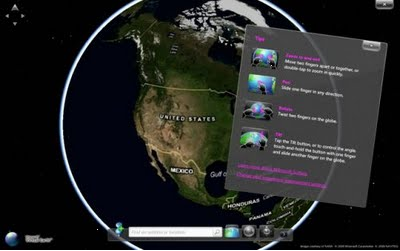
  • Microsoft Surface Globe, a program that you can use to explore the earth as a flat 2-D map or as an immersive 3-D experience.
  • Microsoft Surface Collage, a program that you can use to explore and interact with your photos and arrange them as a desktop background.
  • Microsoft Surface Lagoon, a screen saver and interactive water simulation, complete with a meditative rock arrangement and playful, shy fish.

DOWNLOAD: Microsoft Touch Pack for Windows 7
http://www.microsoft.com/downloads/details.aspx?displaylang=en&FamilyID=b152fadd-82e4-4ddb-a46a-aebe49944428

BLOG: Introducing the Microsoft Touch Pack for Windows 7
http://windowsteamblog.com/blogs/windows7/archive/2009/05/27/introducing-the-microsoft-touch-pack-for-windows-7.aspx

Posted by: kurtsh | April 23, 2010

RELEASE: Microsoft SQL Server 2008 R2 posts to the web

image The released Express & Eval versions of the SQL Server 2008 R2 have been posted to the web.

  • Microsoft SQL Server 2008 R2 – Express
    Microsoft® SQL Server® 2008 R2 Express is a powerful and reliable data management system that delivers a rich set of features, data protection, and performance for embedded applications, lightweight Web Sites and applications, and local data stores.
  • Microsoft SQL Server2008 R2 – Express with Advanced Services
    Microsoft® SQL Server® 2008 R2 Express is a powerful and reliable data management system that delivers a rich set of features, data protection, and performance for embedded applications, lightweight Web Sites and applications, and local data stores
  • Microsoft SQL Server 2008 R2 – Management Tools
    Microsoft SQL Server 2008 R2 Management Studio Express (SSMSE) is an integrated environment for accessing, configuring, managing, administering, and developing all components of SQL Server Express.
  • Microsoft® SQL Server® 2008 R2 End User License Agreements
    The Microsoft SQL Server 2008 R2 End User License Agreements provide the legal terms and conditions for using the SQL Server 2008 R2 core software
  • Microsoft SQL Server 2008 R2 Evaluation : Trial Experience for IT Professionals
    Download SQL Server 2008 R2 180-day Trial Software. Building on SQL Server 2008, R2 provides an even more scalable data platform with comprehensive tools for managing your databases and applications, improving the quality of your data, and empowering your users to build rich analyses and reports using tools they are already familiar with.
  • Microsoft® SQL Server 2008 R2 Evaluation : Trial Experience for Developers
    Download SQL Server 2008 R2 180-day Trial Software. Building on SQL Server 2008, R2 provides an even more scalable data platform with comprehensive tools for managing your databases and applications,improving the quality of your data, and empowering your users to build rich analyses and reports using tools they are already familiar with.
  • SQL Server Driver for PHP 2.0 CTP
    Download the SQL Server Driver for PHP v2.0 CTP1 to enable a PHP application to use the PDO (PHP Data Objects) API for using SQL Server for data storage
  • SQL Server Modeling CTP Nov 2009 Release 3 (formerly “Oslo”)
    SQL Server Modeling (formerly code name "Oslo") is a set of future technologies that provide significant productivity gains across the lifecycle of .NET applications by enabling developers, architects, and IT professionals to work together more effectively with SQL Server at the center of the application lifecycle.
Posted by: kurtsh | April 23, 2010

INFO: Technet Forums Priority Subscriber Support

imageQ: What are these “Technet Subscriptions” I get with Software Assurance?

I get this question a lot.  People that own Software Assurance (also referred to as “SA” or “Maintenance”) on their Volume Licensed Microsoft products, have a variety of really cool benefits.  One of these is “Priority Subscriber Support” from the Technet Forums.  SA customers are given a limited number of subscriber licenses that allow employees to access these forums at no charge.  (Traditionally, customers have to either be full Technet Plus Subscribers or full MSDN Subscribers to access these forums)

The way it works is you simply post your technical questions in the TechNet Forums to receive a response from a Microsoft engineer within 2 business days if the community hasn’t already gotten you the answer.  To receive Priority Support in the TechNet Forums designated below, please make sure to sign in with the same Windows Live ID you use to access your other subscription benefits; no special configuration is needed.

You can get answers to your technical questions in a variety of subject areas.  Here’s a small sample of the forums where Microsoft engineers answer questions:

  • Windows Server General
    Windows Server Clustering
    Windows Server Directory Services
    Windows Server File Services and Storage
    Windows Server Group Policy
    Windows Server Hyper-V
    Windows Server Management
    Windows Server Migration
    Windows Server Network Access Protection 
    Windows Server Network Infrastructure Servers
    Windows Server Platform Networking
    Windows Server Print/Fax
    Windows Server Security
    Windows Server Setup Deployment
    Windows Server Server Core
    Windows Server Server Manager
    Windows Server Terminal Services
    Windows Server WSUS
    Windows Server Windows PowerShell
  • Exchange Server General
    Exchange Server Transport
    Exchange Server Secure Messaging
    Exchange Server Monitoring
    Exchange software updates
    Exchange Server Admin
    Exchange Server Anti Virus/Anti Spam
    Exchange Server Clients
    Exchange Server Compliance
    Exchange Server Deploy
    Exchange Server High Availability/Disaster Recovery
    Exchange Server Migration
    Exchange Server Mobility
  • Sharepoint General
    Sharepoint Setup and Admin
    Sharepoint Design and Customization
    Sharepoint Development and Programming
    Sharepoint Business Data Catalog
    Sharepoint Business Intelligence
    Sharepoint InfoPath Form Services
    Sharepoint Workflow
    Sharepoint Excel Services
    Sharepoint Search
    Sharepoint Enterprise Content Management
    Sharepoint Accessibility
    Sharepoint Social Computing
    Sharepoint Community Advancement
    Sharepoint Collaboration

FORUMS: TechNet Forums
http://technet.microsoft.com/en-us/subscriptions/ms788697.aspx

image The following products are now available for download for Technet & MSDN Subscribers:

  • Office Professional Plus 2010 (x86/x64)
  • Office Web Apps 2010 (for SharePoint Server 2010 – x64)
  • Project 2010 (x86/x64)
  • SharePoint Server 2010 (x64)
  • Visio 2010 (x86/x64)

Download these products from the Technet Plus Subscriber’s Download site at:
https://technet.microsoft.com/en-us/subscriptions/securedownloads/default.aspx

The following products are available for download on Microsoft.com’s downloads:

This is pretty cool:
image

Why would you want an installation of Internet Explorer 8.0 that was optimized for Amazon?

Internet Explorer 8 Optimized for Amazon.com Features

  • Amazon Outlet and Gold Box Web Slices
    New deals, every day. Use Web Slices to access Amazon.com daily deals directly from your favorites bar. Find great deals on everything from Electronics to Tools to Sporting Goods. Deals are refreshed regularly and you’ll be notified automatically when new deals are available. You are always one click away from deep savings on great products.
  • Amazon Search Suggestions
    Search Amazon.com from anywhere on the web using the Instant Search box on your browser. Search better and faster by seeing instant product suggestions as you type. Click on a suggested product to go straight to the product’s page on Amazon.com.
  • Accelerate Your Searches
    The new Accelerators in Internet Explorer 8 help you quickly perform your everyday browsing tasks without navigating to other websites to get things done. Simply highlight text from any webpage, and then click on the blue Accelerator icon that appears above your selection to search on Amazon.com for related products.
  • Amazon Button
    With just one click you can go directly to the Amazon.com home page or any department on Amazon.com.
  • Universal Wish List Button
    The Universal Wish List button allows you to add products from any website to your Amazon.com Wish List with one simple click, making it easier than ever to keep track of all the gifts you wish for, all in one place.
  • Amazon Feeds
    Whether you’re wondering about the top selling book on Amazon.com or just want to know when new DVDs are released, the Amazon Feeds feature in the new Internet Explorer 8 Optimized for Amazon.com gets you instant access to live updated Amazon.com content like Bestsellers, New Releases, and Gold Box Deals.
  • Amazon MP3 Tweets
    Instant access to the latest Tweets from Amazon MP3.

DOWNLOAD:  Internet Explorer 8.0:  Optimized for Amazon.com
http://amzn.to/9TFZZQ

« Newer Posts - Older Posts »

Categories