If you’re interested in Microsoft 365 Copilot, we have 2 training courses available online & on-demand. The following are 2 multi-module “Learning Paths” that are available online at no cost for 2 different audiences:

  • Get Started with Microsoft 365 Copilot (3 Modules – 1hr 50min) – FOR END USERS
    imageIn this course, delve into how Microsoft 365 Copilot can streamline communication and power up your content creation. This learning path, crafted to be both practical and enlightening, spans three key modules. These modules will walk you through the basics of Microsoft 365 Copilot, showcase its versatility across various Microsoft 365 applications, and offer advice on maximizing its potential. Designed with all professionals in mind, this beginner-friendly course requires no previous AI expertise.
    https://learn.microsoft.com/en-us/training/paths/get-started-with-microsoft-365-copilot/

Additionally there are the following “learning tools” available for Microsoft 365 Copilot:

DOCUMENTATION
We’ve also published our documentation for Microsoft 365 Copilot for IT Professionals that are looking to understand the service. 

The docs include:

Posted by: kurtsh | October 8, 2023

INFO: Microsoft Ignite “Virtual Event”

imageMicrosoft Ignite, Microsoft’s conference for IT Pros, IT Decision Makers, Security Pros, Data Pros &  Developers, has sold out for it’s in-person event in Seattle, WA.

ATTEND “IGNITE”… ONLINE & FREE!
But you can still register for the Microsoft Ignite virtual event, available for FREE to attend online November 15-16.

ATTENDING THE VIRTUAL EVENT FOR MICROSOFT IGNITE

  1. Register for the virtual experience at https://register.ignite.microsoft.com/, if you haven’t already done so.
  2. Start with the recommended curated sessions by job role – IT Pro, IT Decision Maker, Security Pro, Data Pro or Developer
  3. Explore the full session catalog of 417 sessions and filter by topic, level, and session type
  4. Check out the speaker directory of 178 session speakers

CHECK OUT “IGNITE UNPLUGGED”
Have you checked out the latest episode? Get a behind the scenes preview of what to expect from this year’s event to get the most out of your experience.

SOCIAL SWAG FOR MICROSOFT IGNITE
The Ignite team has released their "digital swag".

If you’re attending the in-person event or the free online/digital event, check out the:

  • animated GIFs
  • desktop or phone wallpapers
  • profile picture frames
  • Teams backgrounds

Get the digital downloads here:

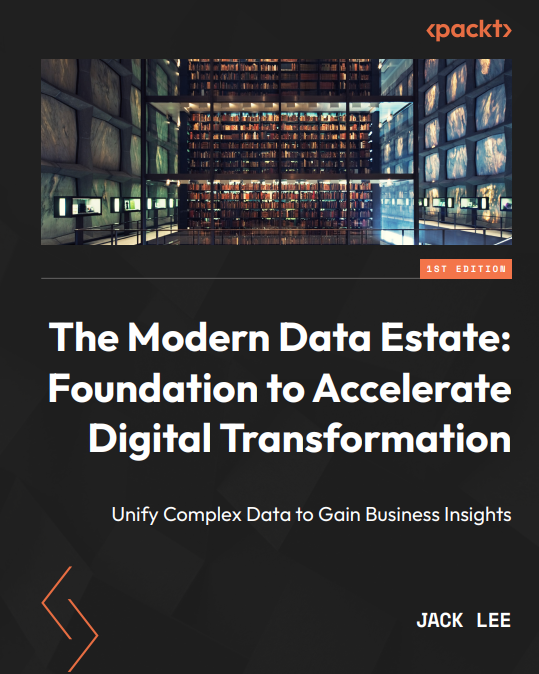
imageLearn how to get more flexibility to scale, reduce costs, and build a solution that helps you get the most out of your data. Read the e-book, The Modern Data Estate: Unify Complex Data to Gain Business Insights, to see how to modernize and streamline your entire data estate—all with Azure services.

Read the e-book to:

  • See a walk-through of the entire data lifecycle and understand how to work with data.
  • Find out which data solutions are best for your organization.
  • Explore business use cases to see how real-time data can be analyzed in Azure to inform business decisions.

Download the FREE eBook here:

Planning to implement Azure VMWare Solution to hybridize your on-prem VMware infrastructure with the Azure cloud?

If you have a “Microsoft Enterprise Agreement” or “Software Assurance on their Windows Server & SQL Server licenses”, you’re in luck! You have a unique benefit called the “Azure Hybrid Use Benefit” that entitles you to use your licenses within Azure in various cost-savings configurations.

For starters, our main page for “Azure Hybrid Use Benefit” – along with the “Hybrid Cost Calculator” is available here:

MIGRATING SQL SERVER LICENSES FROM “ON-PREM VMWARE” TO “AZURE VMWARE SOLUTION”
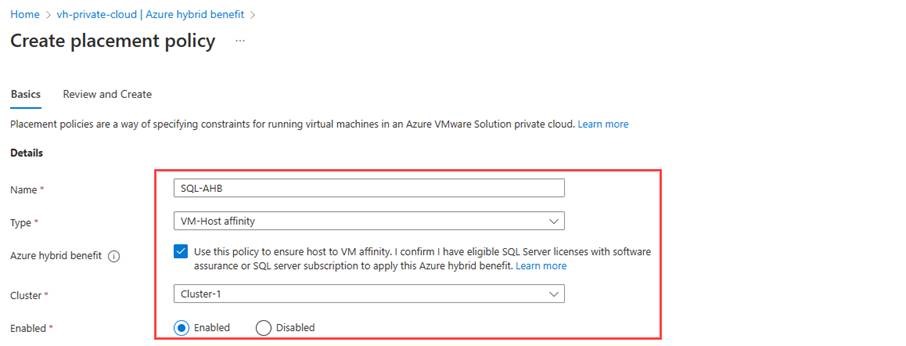
clip_image002Microsoft SQL Server Enterprise licenses are required for each Azure VMware Solution ESXi host core that is used by SQL Server workloads running in a cluster. You can reduce this however by specifically configuring the “Azure Hybrid Benefit feature within Azure VMware Solution”, using placement policies to limit the scope of ESXi host cores that need to be licensed within a cluster.

There are also 180 days of “dual-use rights” between on-premises and Azure to provide  migrating. This is outlined in:

  1. Azure Hybrid Benefit for Windows Server, SQL Server, or Linux subscriptions – Azure VMware Solution
  2. Enable Azure Hybrid Benefit for SQL Server in Azure VMware Solution – Azure VMware Solution

MIGRATING WINDOWS SERVER LICENSES FROM “ON-PREM VMWARE” TO “AZURE VMWARE SOLUTION”
Microsoft Windows Server Datacenter licenses on-prem have physical core licenses that are applied respectively to the physical cores of Azure VMware Solution, similar to how this is applied to Azure dedicated servers. 

This is outlined here:

  1. Explore Azure Hybrid Benefit for Windows VMs
  2. Azure Hybrid Benefit for Windows Server

MIGRATING RED HAT ENTERPRISE LINUX (RHEL) VIRTUAL MACHINES “ON-PREM VMWARE” TO “AZURE VMWARE SOLUTION”
Azure Hybrid Benefit (AHB) for Linux lets you easily switch the software subscription model for your VM. You can remove licensing cost by bringing your Red Hat and SUSE Linux subscriptions directly to Azure, or utilize a model where you pay for subscriptions as you use them.

This is outlined here:

  1. Azure Hybrid Benefit for Linux virtual machines

imageFinally! "Universal Print" services has landed in Microsoft 365 GCC for government customers – at no additional cost to existing G3 or G5 subscribers.

WHAT IS IT?
Imagine eliminating your printer queues & print servers & replacing them with a single cloud service hosted within & administered from Microsoft 365 Admin console.

Then imagine replacing all your print DRIVERS on your desktops with a single “Universal” print driver that serves all the printers of your organization.

WHAT REGIONS?
Universal Print is available in 2 Microsoft 365 GCC government regions today.

  • US Gov Texas
  • US Gov Arizona

ANNOUNCEMENT:
For more on this announcement, visit:

DOCUMENTATION:
To learn more about Universal Print in GCC/GCC High and understand licensing and pricing, please visit http://aka.ms/UP_TryNow.

WEBINAR:
We will also be hosting an AMA webinar on Tech Community on Wednesday, October 11th at 9AM PT. Register at http://aka.ms/UP/GCC/webinar/20231011.

image“If we play our cards right, the next decade could be some of the best 10 years ever in human history”, says Stanford Professor Erik Brynjolfsson.

Check out the WorkLab podcast to learn how AI can help create a whole new world of careers and economic opportunity.

imageMicrosoft focuses heavily on both the security of our cloud and providing our customers with the security controls they need to protect their cloud workloads. 

As a leader in cybersecurity, we embrace our responsibility to make the world a safer place. This is reflected in our comprehensive approach to ransomware prevention and detection in our security framework, designs, products, legal efforts, industry partnerships, and services.

This eBook provides our customers with guidance on how to leverage our Azure cloud native controls to optimize their defenses against ransomware attacks.

imageWindows Server 2012/R2 is end of life in less than 2 weeks at the time of this post.

Additionally, for those looking for “MAK Keys” to enable “Extended Security Updates” (ESUs) as was done with Windows Server 2008, they are not available.

Q: But what about Microsoft’s documentation that implies I can still get a MAK key?

The language used referencing the availability of MAK keys was for Windows Server 2008.  Today, there are no “Extended Security Update” SKUs to purchase from the commercial price list used by resellers on behalf of  customers with Enterprise Agreements or Select.

In English, there’s no “Extended Security Updates” to buy from your reseller to put on your Microsoft contract.  Go ahead.  Ask them.

Q: So what does one do if your Windows Server 2012 VMs/Servers have no direct connection to Azure Arc?

Customers need to set up a proxy gateway, enabling your servers to specifically communicate with Azure Arc.  If you do not have one established, you’ll need to get one working before October 10, 2023.

Review the following for a brief summary.

Posted by: kurtsh | September 29, 2023

INFO: Azure Arc for SQL for “Server/CAL” licensing

imageThis came up recently that I thought warranted posting a note around: 

Customers that are licensed for SQL Server via the legacy “Server/CAL” licensing are unfortunately not eligible for the majority of the listed in-box benefits of “Azure Arc for SQL” .

WHAT SQL SERVER/CAL LICENSED CUSTOMERS CAN & CAN’T DO WITH AZURE ARC FOR SQL
As shown in the Azure Arc for SQL Server docs:
(https://learn.microsoft.com/en-us/sql/sql-server/azure-arc/manage-configuration?view=sql-server-ver16&tabs=azure#license-types)

SQL Server/CAL licensed customers can use the following:

  1. Connect to Azure
  2. SQL Server Inventory
  3. Entra ID Authentication
  4. Defender for Cloud
    (Requires subscription)
  5. Govern through Microsoft Purview
    (Requires subscription)

SQL Server/CAL licensed customers cannot use the following:

  1. Best Practices Assessment
  2. Detailed Database Inventory
  3. Automated Backups
  4. Automated Patching

Azure Arc for SQL is largely a solution for SQL Servers licensed “per Core”.

imageFor a limited time – September 1, 2023 – November 30, 2023 – you can save up to 50% compared to pay-as-you-go pricing when you purchase one-year Azure Reserved Virtual Machine (VM) Instances for Dv3s VMs in the Azure US West region.

For any EA, PAYGO or MCA customer, simply purchase a one-year term for Azure Reserved Virtual Machine Instances for qualified Dv3s instances in the US West region to take advantage of this offer.  The offer applies to any of the following VM series:

  • D2v3
  • D4v3
  • D8v3
  • D16v3
  • D32v3
  • D48v3
  • D64v3

For further details, visit:

« Newer Posts - Older Posts »

Categories