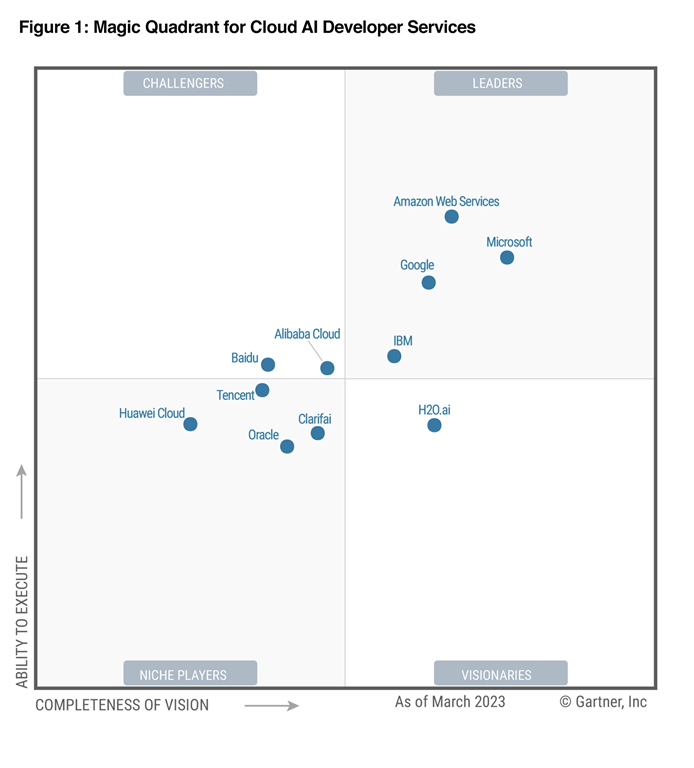
imageIdentify how to accelerate your company’s success with AI. Read Building a Foundation for AI Success: A Leader’s Guide to discover insights informed by Microsoft, Microsoft customers and partners, industry analysts, and AI leaders—to help your organization thrive on your path to AI transformation.

You’ll learn how to get started and continue with the pillars of AI success, including:

  1. Business strategies, such as objectives, use cases, and measurement of AI.
  2. Technology readiness for successful AI deployments.
  3. AI expertise that embeds AI into the fabric of your business.
  4. An organization and culture that supports AI.
  5. Governance to help ensure AI systems are developed responsibly.

Download the eBook here:

Posted by: kurtsh | October 16, 2023

DOWNLOAD: eBook, “Create new business value with AI”

imageMake AI real for your organization today. Read AI Use Cases for Business Leaders: Realize Value with AI to discover the common scenarios and processes where AI is poised to have the biggest impact—and see how to bring AI to your organization to boost productivity, optimize efficiency, and create new value.

Get the e-book to:

  • Discover how AI is being applied across industries, including manufacturing, retail, finance, and healthcare.
  • Learn about the principles and practices for responsible and secure AI that Microsoft offers to help you build trustworthy AI systems.
  • Explore how Microsoft is infusing next-gen AI across every Microsoft Cloud product and service to empower every organization to take advantage of AI.

Download it here:

imageHave you purchased a new Surface device recently?

Remember that you have only 45 days after your purchase to obtain a “Microsoft Complete” extended warranty on it.  White your new Surface comes with a “1 year limited warranty”, the Microsoft Complete Protection Plan is the Premium warranty that ensures your device is protected from the following incidents that are NOT COVERED by the standard limited warranty:

  • Cracked screen
  • Physical damage
  • Damage from liquids

As they say, “With Microsoft Complete, if something goes wrong, you’re covered—simple as that.”

KEY DETAILS
A few things purchasers should know about Microsoft Complete:

HOW MUCH IS “MICROSOFT COMPLETE”?
The cost depends on the device type & the length of the Protection Plan you select. 

As of 10/15/23, these are the rates for various different Surface devices:

  • Surface Book/Surface Laptop Studio:
      • 2 years: $249
      • 3 years: $319
      • 4 years: $399
  • Surface Go
      • 2 years: $99
      • 3 years: $139
      • 4 years: $189
  • Surface Studio
      • 2 years: $399
      • 3 years: $499
      • 4 years: $599
  • Surface Pro
      • 2 years: $149
      • 3 years: $219
      • 4 years: $299
  • Surface Laptop
      • 2 years: $149
      • 3 years: $219
      • 4 years; $299
  • Surface Type Cover
      • 2 years: $19

HOW DO I GET A MICROSOFT COMPLETE PROTECTION PLAN?
Again, for those in the back row: You MUST get Microsoft Complete with 45-days of your purchase.  The folks at the Microsoft Store will not allow you to get a warranty after that.

The web page says that you have to “schedule an appointment” – this isn’t necessary.  Simply follow the instructions below to get this taken care of in 5-10min.

  1. LOG IN TO MICROSOFT ACCOUNT
    Sign into https://account.microsoft.com.
  2. GO TO “DEVICES” PAGE
    Click on the “Devices” pane & click “View All Devices” or
    go to https://account.microsoft.com/devices
      1. If you have setup & logged into your device already with your Microsoft Account, your device should already be displayed in the list of devices associated with your account.
      2. Otherwise, you’ll need to register it manually.
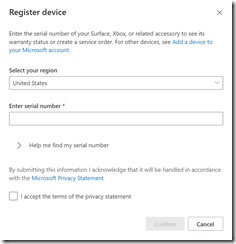
          1. Click the “Register Device” button.
            image
          2. Enter the serial number of your device.  Remember to do this only when you’re ready to hook up your device & want to start your Microsoft Complete. (Note: Once submitted, this may take as much as 5 minutes to register
            image
    1. CALL MICROSOFT STORE SALES
      In the US, call (877)696-7786 and state that you’d like to purchase “Microsoft Complete for your Surface”.  They will ask for your:
        1. Microsoft account identity (name@outlook.com, for example)
        2. The Serial Number of the newly registered Surface
    2. VERIFY REGISTRATION OF YOUR NEW “MICROSOFT COMPLETE FOR SURFACE” WARRANTY
      You should receive a 12-digit “Complete Service Request Number” from the sales agent.
      Go back to the Registered Devices page for your Microsoft Account and you should see an “In warranty” date that is roughly 2-4 years from your date of registration depending on the length of the plan purchased.

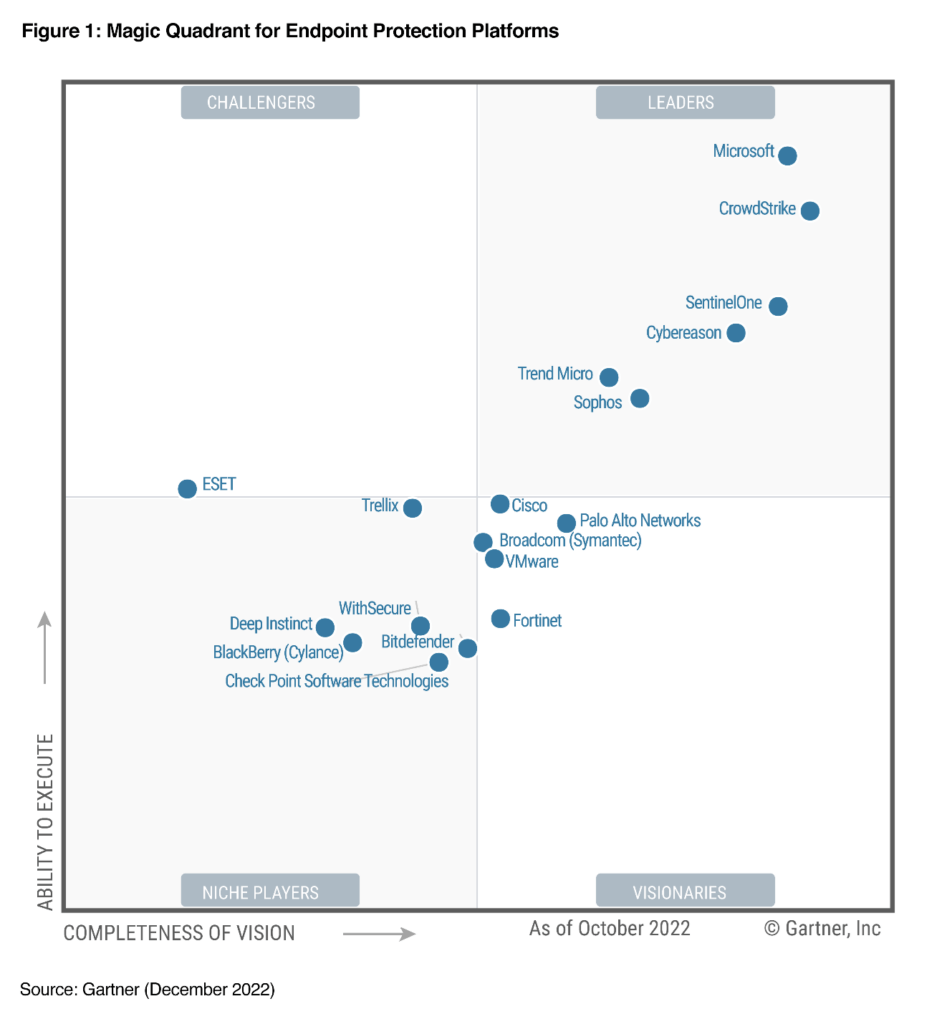
Microsoft 365 Defender is the only XDR platform that protects against ransomware attacks at the organizational and device levels – as well as Man-in-the-Middle & Email Compromise attacks.

image

image

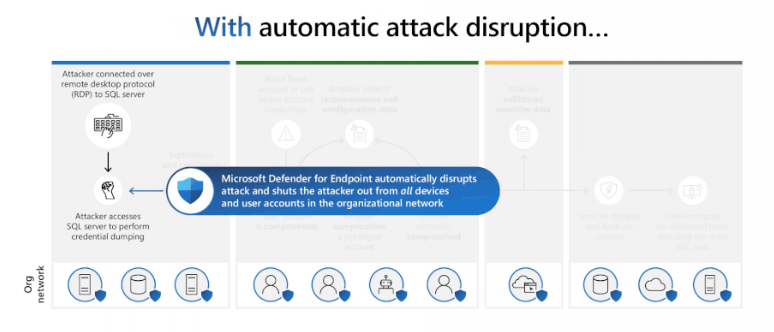
Utilizing "automated attack disruption" to respond to adversary hands-on-keyboard activity at scale gives defenders a significant advantage in cost of attack vs defense. However this degree of automation can only be successfully utilized where sufficiently high confidence detections are available. Thanks to our advancements in #AI, we can bring those high confidence detections to bear automating defense for more scenarios and greater scope than ever before.

Microsoft Defender for Endpoint shifts the paradigm with Automatic Attack Disruption – from Detect-&-Alert to Detect-&-Disrupt. This AI-powered capability uses signal across the Microsoft 365 Defender workloads to disrupt advanced attacks with high confidence.

As reported by Geekwire:
(I’m explicitly pointing to Geekwire’s article because they hyperlink to various sources of their reporting to expand folks understanding of the acquisition.)

imageMicrosoft completed its $68.7 billion acquisition of Activision Blizzard on Friday morning, nearly 21 months after the deal was announced, finalizing its biggest acquisition ever and the largest in the history of video games.

The deal adds blockbuster franchises including Call of Duty, World of Warcraft, and Candy Crush Saga to Microsoft’s portfolio. Activision Blizzard, headquartered in Santa Monica, Calif., employed 13,000 people as of the end of 2022.

Read the complete article here:

image

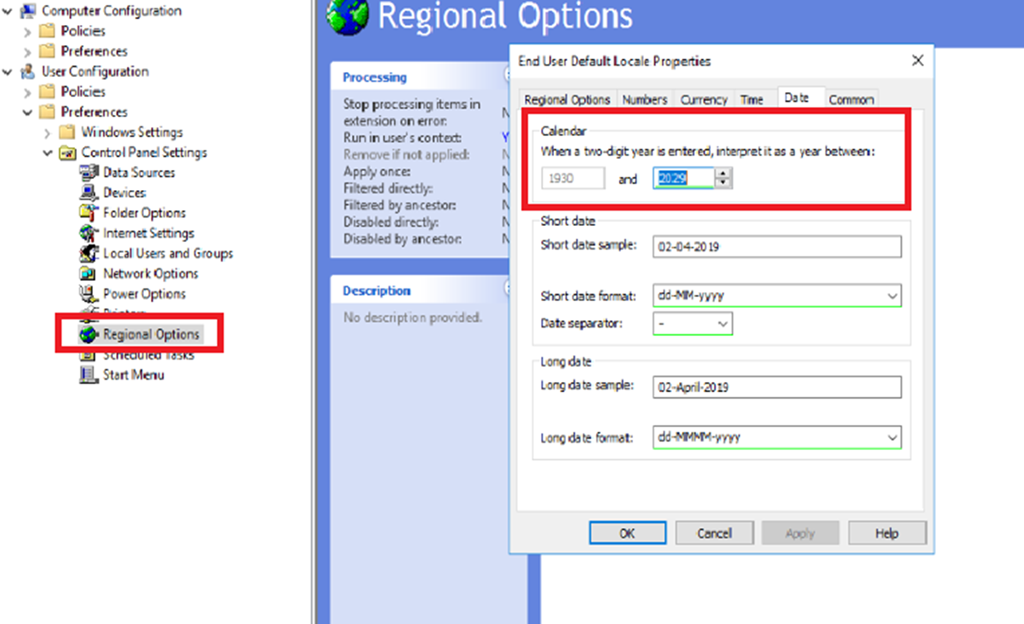
Today in Windows 10/11 the default behavior is, if you type in 12/31/29, this resolves to 12/31/2029.

If you type 12/31/30, this resolves to 12/31/1930.

Changing this behavior on a Windows 10/11 workstation:
If you are looking to change this behavior on an individual Windows 10/11 workstation, this is documented

in the article below:

Windows 10

1. In the search box on the taskbar, type control panel, and then select Control Panel.

2. Under Clock, Language and Region, click Change date, time, or number formats

3. Click Regional and Language Options.

4. In the Region dialog box, click Additional settings.

5. Click the Date tab.

6. In the When a two-digit year is entered, interpret it as a year between box, change the upper limit for the century.

As you change the upper-limit year, the lower-limit year automatically changes.

7. Click OK.

Creating a Group Policy Object to distribute this change organization wide
clip_image002Applying this across an organization’s workstations would require the creation of a Group Policy Object (or modifying an existing one) that makes this change on every organization-managed workstation.

A general tutorial on how to do this from the “Group Policy Management” console is written about here.
https://theezitguy.wordpress.com/2014/08/07/group-policy-use-regional-settings-to-change-date-format/comment-page-1/

Posted by: kurtsh | October 11, 2023

INFO: “Responsible AI” at Microsoft

Microsoft has published a tremendous about of information – documents, videos, podcasts, books, case studies & tools – about:

  • how we believe AI should be used
  • how we communicate this to our employees
  • what we do in practice to adhere to our principles around responsible AI use
  • how other organizations can benefit from this work & research

Microsoft’s public position on how AI should be used:
We are committed to the advancement of AI driven by ethical principles.  Read the latest on AI policy, research, and engineering.

Microsoft guidance for our employees on how to use AI:
clip_image004Explore Microsoft’s own internal guidance on how to design, build, and test AI systems in The Microsoft Responsible AI Standard (v2), a 27 page document that goes over the goals of accountability, transparency, fairness, reliability & safety, privacy & security and inclusiveness.

(Additionally, we have published an addendum “reference guide” for our “Responsible AI Standard” for customers to review, transparently showing where we originated this principles from including researchers, ethicists, & others: Microsoft Responsible AI Standard Reference Guide)

Microsoft’s guidance on how government institutions should govern AI:
clip_image006Microsoft’s report “Governing AI: A Blueprint for the Future” is a 42 page report begins with the legal & regulatory blueprint that Microsoft believes government institutions should adhere to. The first part of the report details five ways governments should consider policies, laws, and regulations around AI. The second part focuses on Microsoft’s internal commitment to ethical AI, showing how the company is both operationalizing and building a culture of responsible AI.

(Additionally, for those looking for a summary, a post about the forward of this report is available at How do we best govern AI? – Microsoft On the Issues)

imageMost people are aware that SharePoint Online storage is not “unlimited” in the same way that OneDrive for Business is. 

SharePoint Online storage is a higher “quality” of storage in that it’s performance, availability & connectivity is higher than OneDrive for Business.  It’s a superior storage medium in every way for multi-user access and consequently a most costly service.

Specifically, customers of Office 365 E3/G3/E5/G5 get:

…that allows a 10,000 User Subscription License owner to consume 101TB in its current SharePoint Online service at no additional cost.

(Additional storage may be purchased as needed under a agreement subscription SKU called “Office 365 Extra File Storage” for a rough retail cost of $0.20/GB/month or $200/TB/mo)

imageEffective cybersecurity relies on proactive strategies empowered by cutting-edge tools. At the forefront of modern security, AI empowers you to stay ahead of cyberattacks’ growing frequency and sophistication.

The Microsoft 2023 Digital Defense Report reveals the state of cybersecurity and how the threat landscape is evolving. Join this two-part event to learn about key findings in the report and uncover the latest trends in the threat landscape from a panel of experts, master the art of bolstering your digital defense strategies, and engage in a lively discussion about the future of AI in cybersecurity.  

During this webinar, you’ll learn:

  • What we know about cybercrime today 
  • How to integrate AI-empowered cybersecurity into your security strategy 
  • How you can use the newest strategies to defend critical infrastructure, multicloud environments, hybrid workers, and more 
  • How to overcome blockers to make collective defense across organizations and industries stronger, safer, and more efficient 

Speakers:

  • Amy Hogan Burney, General Manager, Associate General Counsel, Cybersecurity Policy & Protection, Microsoft
  • Jim Eckart, Chief Security Advisor, Microsoft
  • Milan Patel, Global Head of Managed Security Services, BlueVoyant
  • Dr. Sarah Bird, AI Product Leader, Microsoft
  • Lou Manousos, AI – CVP (Former CEO Risk IQ), Microsoft
  • Steve Ginty, AI Expert, Microsoft

Don’t miss this opportunity to be proactive about security prevention—register now.

Limageearn about the newest features across Dynamics 365 and Microsoft Power Platform at the tenth Microsoft Business Applications Launch Event. Join us for an in-depth look at industry-leading, AI-powered capabilities that help your employees be more productive, deepen customer relationships, and drive meaningful future growth.

Microsoft leaders and engineers will share insights and demonstrate how 2023 release wave 2 updates and advancements will help you:

  • Improve insights, save time, and enhance creativity across your organization with AI.
  • Empower your employees to focus on revenue-generating work and avoid repetitive tasks using automation.
  • Connect people, data, and processes across your organization with modern collaboration tools.
  • Innovate without limits using the latest in low-code development and next-generation AI.

Plus, get your questions answered during the event in our live Q&A chat.

« Newer Posts - Older Posts »

Categories