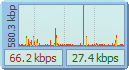
image A favorite tool of mine is Hagel Technologies, “DU Meter”.  It tells you in real time what your upload and download performance is like and what connections your PC has open.  The tool remains on the top of your desktop and gives you an idea as to whether or not a given application is transmitting, receiving, and so forth. 

  • SIDEBAR/GADGET INTEGRATION
    It would even integrate with Windows Vista’s/7’s desktop sidebar as a desktop gadget.  Or if you wanted it hovering elsewhere, you could have it be a freeform program that just hovered on the desktop.  (See the photo to the right for a glimpse.
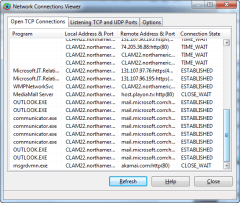
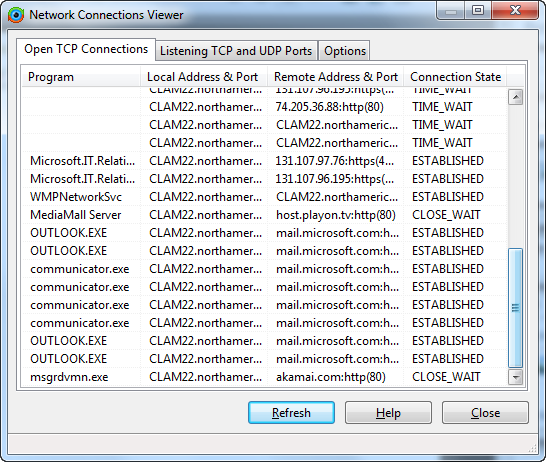
  • imageNETWORK CONNECTIONS
    Another thing it does is breakdown what it is that your software is connecting to externally.  It will tell you the actual domain name or IP address that a given application is transmitting or receiving from and how active the connection is, through something called the Network Connections Viewer.
SOUNDS GOOD.  WHAT’S WRONG THEN?
Here’s the thing:  Historically, this tool’s not exactly cheap relative to what it does as far as I’m concerned.  However in the past, DUMeter used to really be the only app that did what it did, as well as it does, for Windows 2000/XP/Vista/7. 

Over time however, some glaring issues became evident with the 4.0 revision:

  1. NO x64 SIDEBAR SUPPORT
    However with the release of Windows Vista/7 x64, it no longer supported the sidebar as a true desktop gadget.  This is of course really annoying if you depended on Windows Sidebar support to arrange and align your gadgets.
  2. EXPENSIVE
    There are other tools – like the FREE Network Meter 6.3 Windows Gadget from Addgadget.com – that provides much of the same functionality as a Windows Desktop Gadget at no cost.  DU Meter still to this day costs $29.95 PER PC.  They released a “family pack” of 5 installations for $59.90 which for IT pros makes more sense… however $60?  For a bandwidth meter?  CRIPES – You can buy a full copy of Microsoft Word for the same price on eBay.

ENTER RELEASE 5.0 OF DUMETER
To be honest, I never anticipated upgrading DU Meter again, being that it seemed to lack innovation relative to the free tools available on the market.  But along came 5.0 and I changed my mind.

Yes, they fixed the sidebar support.  Yes, they now fully support x64.  Yes, it’s still relatively expensive to license for a simple desktop gadget.  For folks that had licensed previous versions, they did knock 40% off the retail price dropping a family pack of 5 licenses to $35.95, so I think I can personally swallow that.

image SO THAT’S IT?  THAT’S ALL THEY DID IN 5.0?
Actually no.  They’ve introduced a new “discriminate between Internet & LAN connections” feature.  As they describe it:

“DU Meter can discriminate between Internet and local LAN traffic, and monitor either of them. It can figure out what is Internet and what is LAN traffic automatically, or you can supply a list of IP subnetworks you wish to monitor or ignore.”

There are obvious benefits to this.

Also they’ve introduced a new “deskband view” along with numerous other graph types.  DU Meter can attach itself to Windows taskbar for unobtrusive and prominent display.

PERSONAL BENEFITS TO ME
I’m very bandwidth conscious, mainly because I connect via 5 means:

  1. WORK LAN CONNECTIVITY – Wired/Wireless connections to IPv6 networks while in the office.
  2. HOME DSL INTERNET CONNECTIVITY – Wired connections to my home router
  3. HOTEL WIRELESS CONNECTIVITY – Wireless connectivity while in the airport/hotel
  4. WORK VPN CONNECTIVITY – Tunneled connectivity over L2TP/IPsec connections over the Internet
  5. CELLULAR/DIAL UP CONNECTIVITY – EvDO Internet connectivity using tethered cellphone

Keep in mind:  Your computer views all of these networks differently so they’re represented differently in the OS.  What has made DU Meter special is that no matter WHAT the connection method, it automatically reports the bandwidth activity & consumption without reconfiguration.  You don’t need to change the networking source or anything to view stats within the graph.  Virtually every other tool requires this making their usage inconvenient compared to DU Meter.

CONCLUSION
So, if you have some disposable income and bandwidth monitoring is of critical importance to you, you may want to consider purchasing DU Meter.  It’s a very solid product that can be very useful to folks in IT.
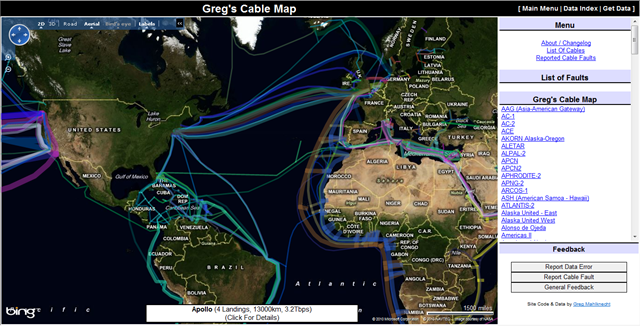
imageDid you ever wonder how it is that the Internet is connected worldwide?  Contrary to popular belief, most of the connectivity is done via underwater cable which has tremendously higher bandwidth than satellite transmission.  A single, thin Transpacific cable can have 9.6Tbps connectivity.

Greg Mahlknecht designed a very rich map that shows graphically the layout of all these cables and equally interesting, shows cable faults – i.e. breaks in connectivity.

Give it a look see!
(Note the usage of Bing Maps to articulate worldwide connections)

imageJoin a select group of developers for an event near you and get hands-on experience with Windows Phone 7.

Windows Phone 7 Developer Launch

Windows Phone 7 is here – and with it comes a new world of opportunity for passionate, creative developers. Windows Phone 7 gives you the power to build complex, robust applications using consistent hardware specs, a comprehensive development toolkit, and the all-new, full-service Marketplace for selling your apps. Get ready to capitalize on this exciting new frontier with two days of fast-paced learning and Windows Phone 7 development sessions. Pick the day that best fits your needs – or join us for both. Either way, you’ll get the information you need to build high-demand apps with Windows Phone 7.

Day 1: Jump-Start Your Mobile Development | 8:30am – 5:15pm
In the first of this two-day launch event, we’ll take you under the hood of Windows Phone 7 and the Windows Phone 7 platform with a progressive set of learning sessions. We’ll start with the basic tools and fundamentals of Windows Phone 7 application development and as the day unfolds, we’ll go deeper into development scenarios using Silverlight, XNA and the Windows Phone 7 SDK. You’ll also see how to earn cash for your apps in the fully loaded Marketplace.

Day 2: Unleash Your Best App Workshop | 9:00am – 4:00pm
This hands-on workshop is designed to help you turn those napkin sketches and subway scribbles into real, sellable apps. You’ll apply fundamental Windows Phone 7 design principles to build an app and upload it to the fully revamped Marketplace. Go at your own pace or follow along with a proctored group lab. Either way, you’ll get step-by-step advice from Microsoft and community experts. It’s an unprecedented opportunity to stake your claim in the marketplace – using familiar tools and consistent specs.

Looking forward to seeing you there!

LOCATION:
image Orange County, CA
Hilton Orange County
September 29 – 30, 2010

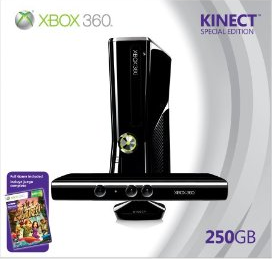
imageShipping on November 4th, looks like there’s a bundle available after all for the new Xbox 360 Console with the 250GB Hard Drive and the Xbox Kinect Sensor Controller… along with a copy of “Kinect Adventures”, a launch title for Kinect.

DON’T HAVE AN XBOX 360 YET?
This is a perfect opportunity to buy both the Xbox 360 with the latest technology in it.  It runs cool and is extremely quiet.  It’s got a smaller profile and it uses the Valhalla Chipset – with a single integrated CPU/GPU in it, meaning the console has fewer ICs and thus consumes only half as much power as previous Xbox 360s.

GET THE KINECT SENSOR
The Kinect Sensor is the single best controller I’ve used in a long time.  It watches you hands, arms, head, body, legs and feet all in real time and makes playing games with your body really fun… while getting a ton of exercise while you’re at it.

This will be the hottest ticket this holiday season.  I urge you to preorder to make sure you get one this Christmas!

  • AMAZON:  Xbox 360 ‘Slim’ Console w/ 250GB Hard Drive, Kinect Sensor Controller & “Kinect Adventures” game
    http://bit.ly/95ndRy
Posted by: kurtsh | September 8, 2010

RELEASE: Bing Travel Add-in for Outlook 2007/2010

image Researching travel options can be challenging. It takes time to review all the options and determine the best time to fly, what airline has the lowest fares, and where you will stay at your destination. Bing Travel makes these tasks easier by processing large amounts of travel related data and presenting it in ways that help travellers make better decisions.

The Bing Travel add-in puts this technology in the place where many people spend a large part of their day – in Outlook. Just by clicking the Bing Travel button in the Add-Ins menu, or right-clicking in your calendar, you’ll have access to Bing Travel’s decision making tools and all your favorite online travel agencies and airlines.

(Note:  This is a Visual Studio Tools for Office extension to Office and is delivered as an Office customization.)

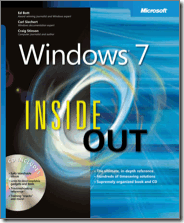
image Holy cow.  I haven’t tried this but if Ed Bott speaks true… and he always does…

You can get all 5 eBook versions of any Microsoft Press title for just $4.95 if you already own the paper bound version.  This includes ePub, .APK, .MOBI, .PDF, and Daisy formats.  All of them.  $4.95 total.

This is no joke.  Of course the eBook version of the title needs to be available but if it is, you’re in fat city because the deal is ridiculously cheap. 

Go check out the article describing how to take advantage of this insane offer on Ed’s site.

Posted by: kurtsh | September 8, 2010

RELEASE: Office 2010 Migration Guides

clip_image002

Thinking about upgrading to Microsoft Office 2010?

Each upgrade brings exciting new features, but new versions of your favorite programs can take some getting used to. It’s no different for those of us here at Microsoft who create the Office programs than it is for our customers.

To ease the transition, we’ve put together six handy Office 2010 migration guides to help you step up to the newest versions of Microsoft Access, Excel, OneNote, Outlook, PowerPoint, and Word. 

Whether you’re coming from an older version of Office and just want to find the most frequently used commands in a program, or you’re entirely new to Office and want a quick overview of how the ribbon works and how to get to the most important things, each guide provides helpful information that we’ve based on direct feedback from you — our customers.

All six guides are available as a separate download, so you can grab just the ones you need:

  1. Install the free Adobe Reader or the free FoxIt Reader (if you don’t already have it on your computer)
  2. Browse and download our free Office 2010 migration guides.

While you’re viewing any guide, you can save a copy of it to your computer for later viewing, navigate through all of its pages (each guide has 7-8 pages in total), zoom in to get a closer view at any of the screenshots, or search for feature names or keywords to quickly find something in the text.

clip_image004

[Taken from http://blogs.office.com/b/office_blog/archive/2010/09/07/download-our-free-office-2010-migration-guides.aspx]

Posted by: kurtsh | September 8, 2010

WHITEPAPER: Windows User State Virtualization Guide

image Windows user state virtualization helps IT find the right balance between centralized management of business-critical data and a rich user desktop experience. Follow the stepwise approach in this IPD guide to gather relevant user and IT requirements. Then compare and contrast Windows USV technologies (Folder Redirection, Offline Files, and Roaming User Profiles) in light of scenarios that are relevant to your business. Also, leverage the subjective real-world guidance based on analysis of Windows USV deployments in mid to large organizations, and interviews with domain experts.

Reduce time and planning costs by following the processes in this IPD guide to design a successful Windows USV strategy. Additional Infrastructure Planning and Design Series guides are available as beta releases on the Connect Web site. They are open beta downloads.

To join the Infrastructure Planning and Design beta, do the following:

  1. Visit the Microsoft Connect Web site. If you have not previously registered with Microsoft Connect, you might be required to register before continuing with the invitation process.
  2. Sign in using a valid Windows Live ID to continue to the Invitations page.
  3. Scroll down to Infrastructure Planning and Design.

LINK:  Windows User State Virtualization Guide
http://technet.microsoft.com/en-us/library/ff877478.aspx

DOWNLOAD:  Windows User State Virtualization Guide
http://go.microsoft.com/fwlink/?LinkId=200543

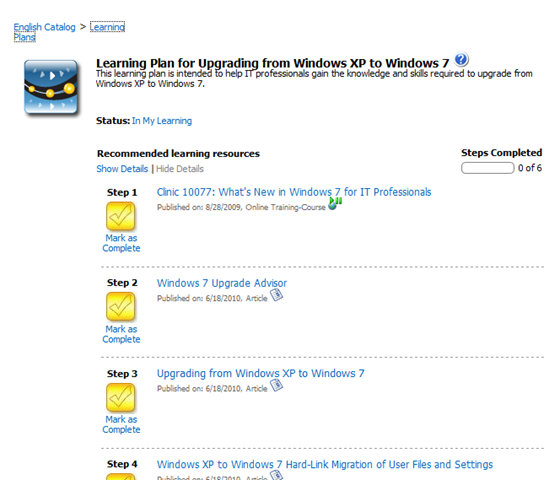
image This learning plan is intended to help IT generalists, CIOs and other IT decision makers learn about the latest line of Microsoft server technologies; including:

  • Windows 7
  • Windows Server 2008 R2
  • Microsoft Exchange 2010
  • Microsoft Forefront
  • Microsoft System Center
  • Microsoft SQL Server
  • Microsoft SharePoint 2010

A Learning Plan is a set of learning resources that are designed to provide training on a specific skill. Learning Plans provide a recommended step-by-step learning process, but with the freedom to complete the steps in any order that you want. Additional Learning Plans can be found here, including those for Office 2010.

image

To say that I’m disappointed that Twitter Sidebar Gadget from BuildAGadget hasn’t been released with oAuth support (now a mandatory requirement for any Twitter client) would be the understatement of the century.   Not only have they had ample time to engineer the support but they’ve not communicated much in the way of where they’re at dev wise via EITHER their blog OR their Twitter feed.  Being someone that depends heavily on Twitter, I can only respond with one comment:  SONNAFAB-TCH!

So off I go to find a replacement tool. 

SO WHAT AM I USING NOW?
Tweetz from BlueOnion Software seems to be a viable alternative although I wish the font size could be made even smaller than it’s current version.  Tweetz features (in no particular order):

  • Home timeline
  • Mentions timeline
  • Direct Messages
  • Favorites
  • OAuth authentication protects your twitter account
  • Search
  • Single click access to user profiles
  • Click #tags to search
  • Follow/Unfollow
  • Number of unread tweets shown in header
  • Reverse lookup of shortened links (for most services)
  • Docked and undocked sizes
  • Reply/Retweet
  • Link shortener (uses http://is.gd for the shortest links)
  • Optional font sizes
  • Audible notification of new status updates (configurable)
  • Configurable intervals
  • Uses new twitter 2.0 API for increased security
  • Clean, concise UI with small desktop footprint
  • Adjustable height
  • On demand refreshes
  • Hot keys to shorten links and send tweets
  • More funner to use than version 1.5

Because tweetz is a Windows Sidebar gadget it stays on your desktop where it’s always available. And if you’re a fan of Windows 7’s Aero Peek, you’re going to love tweetz. Simply move your mouse over the "Show Desktop" bar at any time to reveal your gadgets, including tweetz, and read your tweets.

Tweetz also respects the gadget guidelines. The docked version (pictured right) is 130 pixels wide and plays with other "docked" gadgets correctly. Want more real estate? No problem, the undocked version is wider and also displays the user’s picture.

« Newer Posts - Older Posts »

Categories