Posted by: kurtsh | November 3, 2023

RELEASE: Secure Future Initiative (SFI)

MicrosoftSecureFutureInitiativeMicrosoft has just unveiled the Secure Future Initiative (SFI), a groundbreaking roadmap for tomorrow’s cybersecurity, innovatively crafted to protect our digital existence.

Here’s a sneak peek at the core pillars of the Secure Future Initiative (SFI):

  • Faster Vulnerability Response: Proactive defenses and swift threat mitigation will define the new era of cybersecurity response times.
  • Secure Identities: Next-level authentication mechanisms are set to create an unbreachable shield around user identities.
  • Secure Development: Integrating security DNA into every strand of our development process, ensuring the software of tomorrow is safe today.

For a deeper dive, into these pillars and how they will shape our digital landscape, check out the insightful blog posts by Microsoft’s senior executives:

Detailed announcement by Microsoft President, Brad Smith:

Detailed blog by Microsoft Executive VP of Security, Charlie Bell:

Deep perspectives on Secure Future Initiative by Microsoft Corporate VP of Security, Vasu Jakkal:

(Image courtesy of Sameh Younis, Sr Microsoft Cybersecurity Specialist)
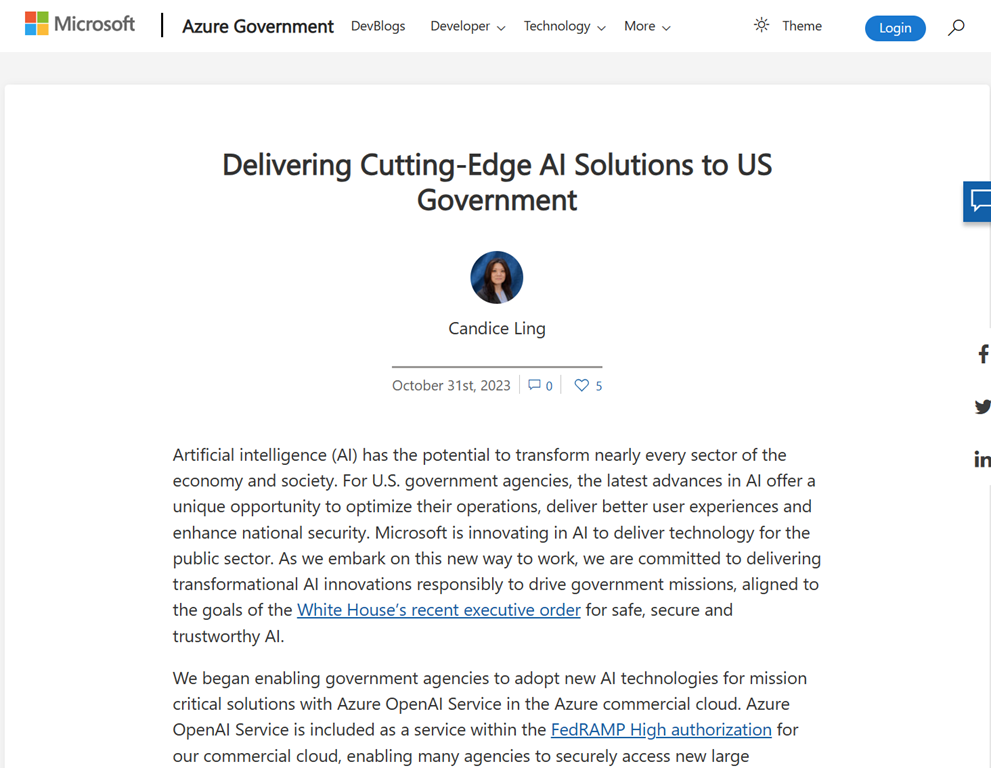
imageThe release schedule for Microsoft artificial intelligence in US Government posted.  The GCC roadmap includes:

  • Azure OpenAI Service for Government
    Q1 CY2024
  • Microsoft 365 Copilot for Government 
    Summer 2024
  • Teams Intelligent Recap for Government
    Spring 2024
  • Open Source LLMs via Azure ML (Llama-2, etc.) for Government
    Available today

Read the full article here:

Heads up that everyone needs to either prepare to have their clients upgraded to the new Teams Client or proactively upgrade their clients to the new Teams Client.

The following noticed was just posted to the Microsoft 365 Admin Console in the Message Center:

Classic Teams Users Will be Automatically Updated to New Teams After March 31, 2024

MC686187

imageOn October 5, 2023, we announced general availability of the new Microsoft Teams app for Windows and Mac. Read the message center post MC679451 for details.

We mentioned in our GA announcement that classic Teams users will be automatically updated to new Teams in the coming months. Today, we want to inform you that after March 31, 2024, any classic Teams users who have not updated to new Teams, will be automatically updated to new Teams.

With just one click, you can join millions of users who are relying on new Teams to stay connected with colleagues, partners, and customers.

How will this affect your organization?

· New Teams is a performance-focused update. New Teams is up to 2x faster and use 50% less memory. There is no major impact to the user experience for new Teams. This means you don’t need to invest in any additional training.

· Between now and March 31, 2024, you can continue to use classic Teams without interruption.

We encourage you to review the service agreement that governs Teams app updates.

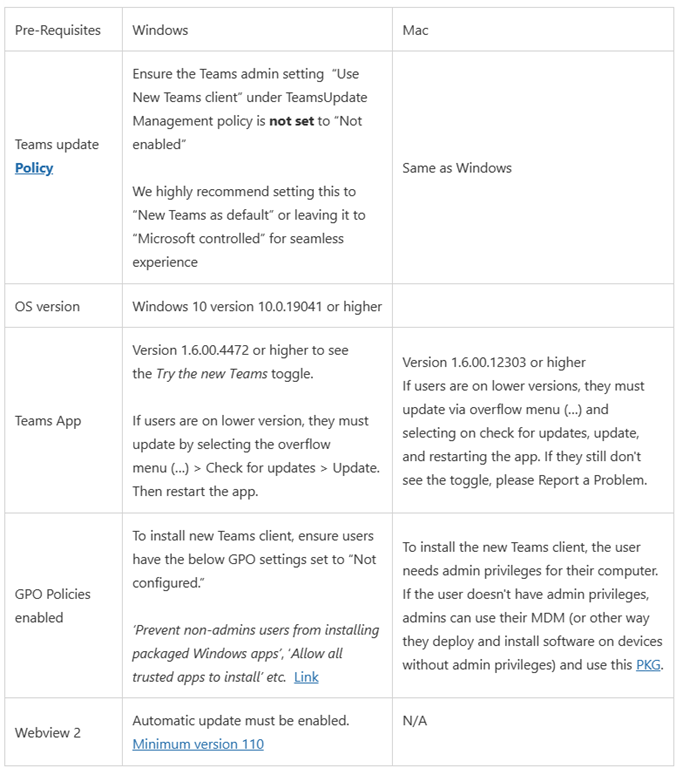
If you haven’t already updated to new Teams yet, review the prerequisites and policy updates for the update to new Teams.

How can I prepare for a seamless update to new Teams?

· Admins can enable new Teams in their organizations by leveraging robust IT admin policies and taking advantage of deployment options such as office update channels that allow them to enable users and groups within their organizations as needed.

· Admins who currently have the Teams update policy set to ‘Not enabled’ for the ‘Use new Teams client’ setting, we suggest setting the value as ‘New Teams only’ after selecting the Teams update policy to ‘Microsoft controlled’ in the Teams admin center.

Notes:

· We have not made the new Teams in the Virtual Desktop Infrastructure (VDI) environment generally available yet, so the VDI users will not be affected by the auto-update timeline of March 31, 2024.

· Microsoft Teams Rooms (MTR) and Surface Hub devices will also not be affected by the March 31, 2024, timeline.

· For our education users, the update option to new Teams is available now and they can be seamlessly updated at any time. Please visit this page for more information.

To learn more about this announcement, view this page.

View in the Microsoft 365 admin center

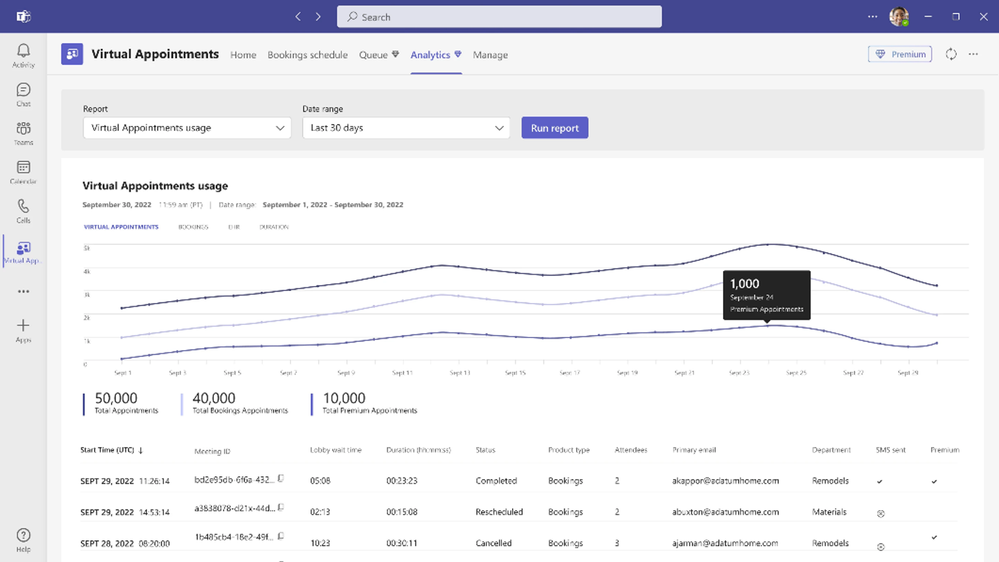
    imageTeams Premium has made quite a name for itself, having thousand of customers in just a short time.  The showcase feature that attracts the most attention is usually “Intelligent Recap”.

But there’s SO MUCH MORE to Teams Premium for:

  • IT management & control
  • Information & meeting security
  • Engagement & sentiment analytics
  • Appointment schedulers & assistance
  • Webinar trainers & marketers

Here’s a quick 10minute overview of what else there is to experience with Teams Premium:

Check some of these features out:

Read more here:

This was actually released earlier this year but I forgot to post about it.  So here’s a summary of one of the lesser known secrets of Microsoft Teams, starting with the announcement:

imageToday, I am excited to introduce the Games for Work app,* developed by Microsoft Casual Games, an Xbox Games Studio.** Now, you can easily add a game in the context of where work happens: in Microsoft Teams meetings. Choose from a selection of favorite casual games including Microsoft IceBreakers, Wordament, Minesweeper, and Solitaire—all easy to play in quick, interactive, and multi-player versions (from 2 to 250 players). They are safe for work (verifiably “E” rated) and ad-free. To address the various needs of teams, each game within the app emphasizes a different element of team building.

VIDEOS ABOUT GAMES FOR WORK:
Seeing is believing so:

FAQ:
A few things that I’ll add:

  • Does “Games for Work” require a Microsoft Teams meeting?
    YES.  Games for Work is a Microsoft Teams meeting add-in.  It works when assigned to a previously scheduled meeting & run within an actual Teams meeting only.  It can also be added to a meeting during the meeting itself on the fly.
  • Does this require a Microsoft 365 Enterprise subscription?
    YES.  This is only available to Microsoft 365 Enterprise & Education customers.
  • Does this work with Microsoft Teams on Mobile devices or browsers?
    YES.  The apps scale to the form factor that is using it.  It works on iPhones, Android-based phones as well as tablets. It will also render in a browser when using Teams for the Web.
  • Can you use Games for Work with people in other Microsoft 365 tenants?
    YES.  The Teams experience within a browser will render “Games for Work” games with people outside of your Microsoft 365 tenant.
  • Can we disable/enable Games for Work for our tenant?
    YES.  Read the following post for details.
    https://techcommunity.microsoft.com/t5/microsoft-teams/how-to-use-and-disable-the-teams-games-for-work-app/m-p/3680971

Read the announcement for “Games for Work” with Microsoft Teams here:

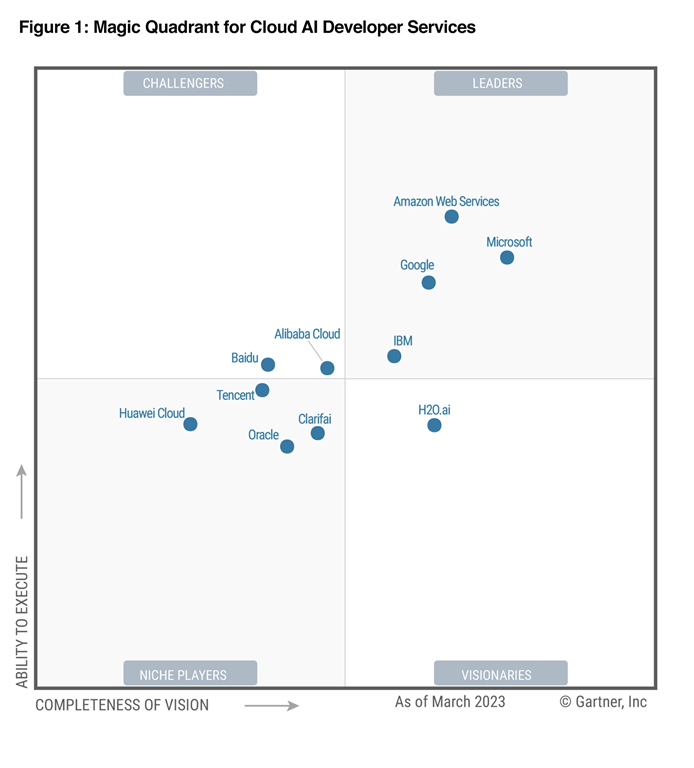
imageWe are excited to announce that Microsoft is recognized as a Leader for the fourth year in a row in the Gartner Magic Quadrant for Cloud AI Developer Services and are especially proud to be placed furthest for our Completeness of Vision.

NOTE: The above Gartner Magic Quadrant for March 2023 did not consider or evaluate any Azure OpenAI Services including ChatGPT, GPT-4, and DALL-E.  The report’s evaluation cut off was January 1, 2023 which happened a few weeks before Azure OpenAI’s general availability.

To download the licensed report, visit:

imageQ: I want to be able to type 12/31/30 and have the date be resolved as 12/31/2030 instead of 12/31/1930?
(In the same way that 12/31/29 is resolved to 12/31/2029?)

A: Changing this behavior on a Windows 10/11 workstation by hand is documented in the article below:

Windows 10

1. In the search box on the taskbar, type control panel, and then select Control Panel.

2. Under Clock, Language and Region, click Change date, time, or number formats

3. Click Regional and Language Options.

4. In the Region dialog box, click Additional settings.

5. Click the Date tab.

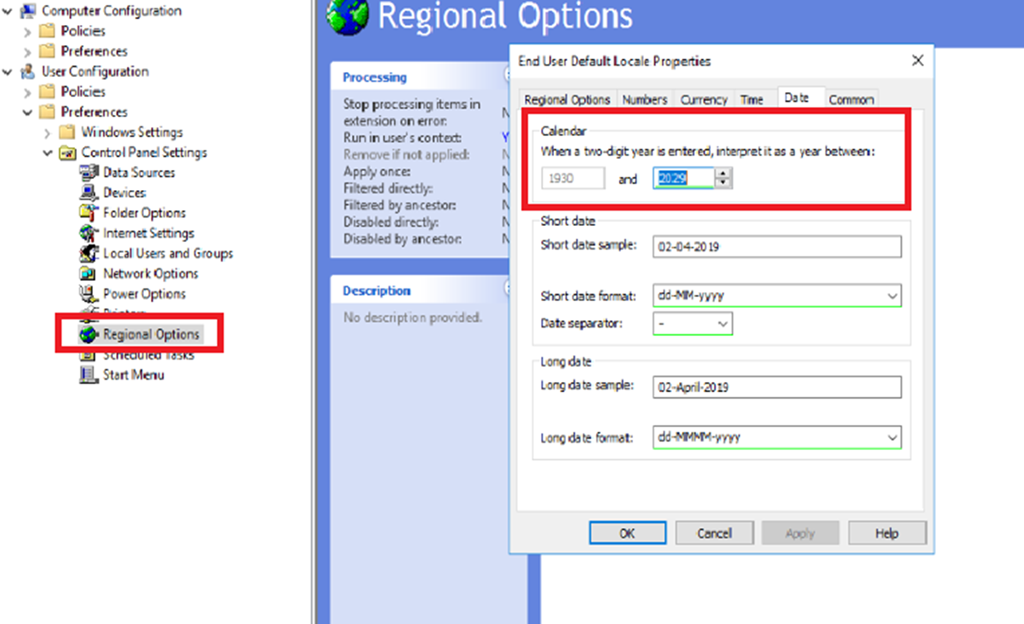
6. In the When a two-digit year is entered, interpret it as a year between box, change the upper limit for the century.

As you change the upper-limit year, the lower-limit year automatically changes.

7. Click OK.

For broader organizational deployment via a Group Policy Object:

imageA customer of mine has been working with a “FastTrack for Azure” engineer to help them:

  • Manage & Monitor Azure services & VMs
  • Secure & Govern Azure services & VMs

This has been such an phenomenal engagement, I decided to simply drop all the resources here that have been cited over the past 2 months for others to reference.

NOTE: “FastTrack for Azure” is a Microsoft-funded service for customers deploying $5K/mo in new Azure services that would like expert guidance. For any of my customers that are interested in engaging FastTrack for Azure engineers for direct remote guidance in deploying Azure Monitor & Azure Policy, please ping me directly.

Azure Monitor

Security & Azure Policy

SQL in Azure – SQL Server VMs & Azure SQL Database

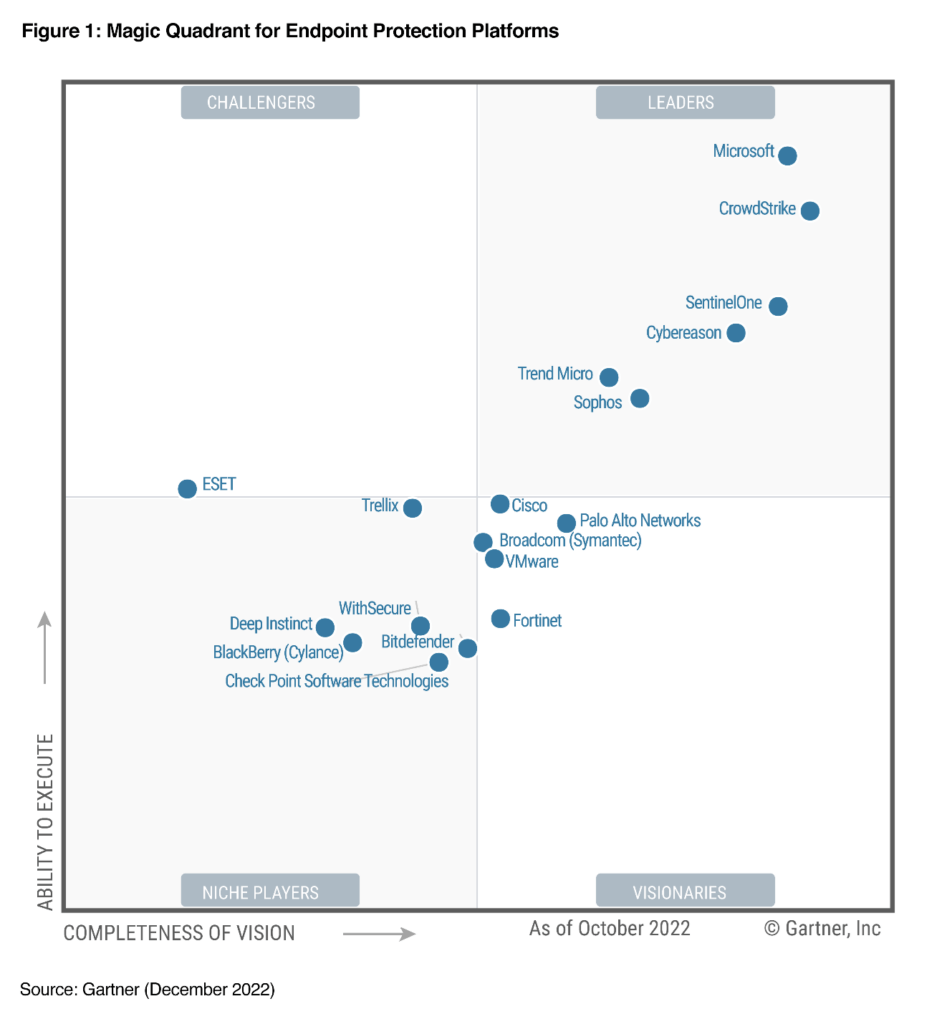
Microsoft Defender for Endpoint is a cloud-powered endpoint security solution offering endpoint protection, endpoint detection and response, mobile threat defense & integrated vulnerability management.

To download the complete Gartner Magic Quadrant for Endpoint Protection (December 2022), visit the link below:

https://www.microsoft.com/en-us/security/blog/2023/03/02/microsoft-is-named-a-leader-in-the-2022-gartner-magic-quadrant-for-endpoint-protection-platforms/

#gartner #Microsoft #magicquadrant #Defender #Security #endpointprotection

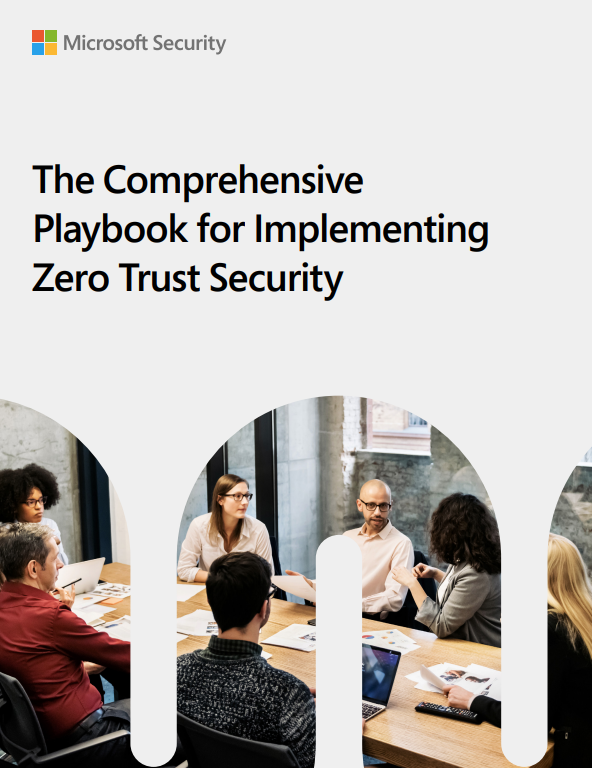
imageCreate a Zero Trust adoption plan that accommodates your organization’s unique risks and capabilities. With this flexible playbook, get foundational action items that help you strengthen security across six key risk areas.

Download The Comprehensive Playbook for a Zero Trust Security Strategy to:

  • Identify small changes that can make big improvements to your security.
  • Understand how deeper integration of key security pillars can simplify policy enforcement.
  • Learn how Zero Trust can increase efficiency and productivity in security posture management.

Get the eBook from the link below:

« Newer Posts - Older Posts »

Categories