Posted by: kurtsh | March 17, 2011

RELEASE: Internet Explorer Administration Toolkit 9.0

imageOkay.  So it took us a few more days but the release of the Internet Explorer Administration Toolkit 9.0 is up and available for download.

The Internet Explorer Administration Kit (IEAK) 9 simplifies the creation, deployment and management of customized Internet Explorer 9 packages. IEAK 9 can be used to configure the out-of-box Internet Explorer 9 experience or to manage user settings after Internet Explorer 9 deployment.

Documentation is available on the IEAK9 web site and includes:

DOWNLOAD: Internet Explorer Administration Toolkit 9.0
http://www.microsoft.com/downloads/en/details.aspx?FamilyID=671b9cf6-546c-4889-8a6d-eeaa56c76deb

Posted by: kurtsh | March 15, 2011

EVENT: MIX11 is coming in 24 days!

imageOur first batch of MIX sessions have been published, with another 100 yet to come! 

Below are some of the exciting sessions to look forward to!  Get signed up for MIX today.

  • XNA Game Studio for Fun, Profit, Danger, Excitement and Windows Phone 7 Games with Rob Miles
    Ever wonder what it takes to create a top game for Windows Phone 7? Rob will show you how easy it is to get XNA programs running, whether you are a C# and Visual Studio newbie or a grizzled veteran of .NET. You will find out how to use the touch and accelerometer sensors and how to add a smattering of physics to your games. All the demos will be provided with full source so you can take them away and use them to begin creating your own games based on the abilities of this wonderful device. If you want to know how to take game ideas and give them life then this session is for you. And you might be in danger of winning the odd prize. Which should be exciting.
  • Flickr API: Tap into Billions of Photos for Windows Phone 7 with Markus Spiering
    Do you want your app to integrate with one of the world’s leading photo sharing site? The Flickr for Windows Phone 7 app is a full featured mobile application that is pushing the boundaries of UX design and is 100% built on Flickr’s API methods that are available for developers. This talk will introduce the mobile app, highlight some of the complex design decisions, and provide insights into the Flickr API methods. Attendees will learn how to enrich their applications using Flickr’s rich content via the Flickr APIs.
  • HTML5 Canvas Mastery with Lanny McNie and Shawn Blais
    In this boot camp we will take a comprehensive look at everything from simple shape and image drawing, to advanced techniques for building interactive experiences and games. We will also look at available tools to streamline development, and share some helpful tips on implementation, performance, and optimization. Lanny McNie and Shawn Blais are senior developers at gskinner.com, a leading interactive production shop focused on providing cutting-edge experiences in HTML5, Flash, iOS, and Android.
  • Introducing Microsoft Media Platform with Alex Zambelli
    The Microsoft platform for delivery of video and rich media experiences has fundamentally changed and grown significantly since the introduction of Silverlight and IIS Media Services several years ago. Come learn about the encoding tools, digital rights management components, transcoding services, player development frameworks, analytics tools, content management systems and other tools and frameworks which comprise the Microsoft Media Platform (MMP).
  • Good JavaScript Habits for C# Developers with Elijah Manor
    It seems that far too many people come to jQuery thinking that their previous knowledge with object-oriented languages like C# or Java will help them be successful at client-side scripting. In many cases, you can be successful with this approach, however, the more JavaScript you write you will inevitably find yourself uncovering strange bugs because you didn’t take time to learn JavaScript properly. This session is targeted for developers that use jQuery, but haven’t invested adequate time to learn some of the foundational JavaScript concepts that differ from C#. If you would like to avoid some of these common mistakes when bringing your existing expertise to JavaScript, then please join me as I try to explain some of the differences.
  • Mono: State of the Union with Miguel de Icaza
    Come learn how Mono can help every one of your current projects: from our C# compiler as a service to running your .NET code on iPhone, Android and Mac. All demos will feature our amazing MonoDevelop cross platform IDE. Come to be energized and fall in love with .NET all over again. This is your second honeymoon. Do not miss it.
  • Effective Validation Techniques with MVVM in Silverlight with Zoltan Arvai
    All input is evil! Protect your application and provide great user experience in your Silverlight application. Learn about the synchronous and asynchronous validation techniques Silverlight 4.0 offers and see how to implement these techniques in the most effective way with MVVM. Customize your validation feedback with Expression Blend for the maximum experience.
  • Creating Windows Phone Applications Using Expression Blend with Unni Ravindranathan
    If you want to create applications for Windows Phone that stand out from the rest, you should be using Expression Blend. Come to this session to learn how to take full advantage of the rich platform features, efficient workflow and tools to showcase your unique design skills.
  • JavaScript Panel with Luke Hoban, Doug Crockford, Allen Wirfs-Brock, and Tomasz Janczuk
    JavaScript is one of the most widely used general purpose functional, dynamic and prototype-based object-oriented programming languages on the web with considerable amounts of JS even running outside of the browser in other hosts. The language has matured and is currently in version 5 (officially, this is known as EcmaScript 5). Where did it come from? What problems was it initially designed to solve? How has it managed to scale to so many different usage scenarios? What are these scenarios, exactly? What does EC5 add to the language and what specific problems do these new additions solve? What’s missing from the language? How will it evolve? How general purpose is JavaScript, really? The folks who will be on stage can answer all of these questions, but most importantly, YOU will drive the panel with your own questions. What do you want to know? What’s the most burning question you have in your mind related to JavaScript? Answers await.
  • Riding the Geolocation Wave with Tatham Oddie
    It’s pretty obvious by now that geolocation is a heavy player in the next wave of applications and APIs. Now is the time to learn how to take advantage of this information and add context to your own applications. In this session we’ll look at geolocation at every layer of the stack – from open protocols to operating system APIs, from the browser to Windows Phone 7. Building a compelling geo-enabled experience takes more than simple coordinates. In this session we will introduce the basics of determining a user’s location and then delve into how to make geo data a useful addition to your application instead of a bolt-on “me too”.
  • Designing Infographics for Web Applications with Des Traynor
    The infographics bug has bitten, and now the web alive with tightly kerned upper-case Helvetica and scatter plots to showing us everything from what a billion dollars looks like all the way through to how hard it is for singer songwriters to make a living. In the midst of all the nonsense, there have been some significant changes in design trends that can make company dashboards or analysis tools more powerful. This session will: 1) Explain the goals of data visualization and the benefits for business, 2) Walk through some great examples of stunning, but most importantly, *useful* visualizations of data sets that will leave attendees better equipped to tackles mountains of data in their applications, and 3) Present case studies showing companies getting a real return on investing in their data. This session will be driven by real practical examples, and will be of interest to designers, application owners, and web developers. Also, it will be fun 🙂
  • Facebook Development in .NET with Jim Zimmerman
    Over 500 million users! That is the universe for your app. So “learning Facebook” is critical. Come learn how to use the Facebook C# SDK built in cooperation with Microsoft and Thuzi, a Facebook Preferred Partner. Thuzi will also share lessons from creating Facebook promotions that have been architected to handle over 10,000 signups an hour. We will show how to build Facebook applications with .NET using ASP.NET MVC, Web Matrix, Web Forms, Silverlight and WP7 and how to host them on Windows Azure.
Posted by: kurtsh | March 15, 2011

RELEASE: Microsoft Internet Explorer 9.0

UPDATE 3/15/11:
imageThis was too good not to post.  Geekwire wrote a great post/interview about/with Jason Weber, Lead Program Manager for Internet Explorer 9.0 Performance.

Jason actually breaks down and explains in English all the major changes in performance.  It’s not anything that hasn’t been discussed before but it’s so concisely put together and well formatted that for anyone that hasn’t been following IE9’s development, this is a fantastic review of the dramatic changes that were made to make IE9 the browser performance champion that it is.

———————
ORIGINAL POST:
Three words: Faster.  Than.  Chrome.

http://www.microsoft.com:80/presspass/silverlightApps/videoplayer3/standalone.aspx?contentID=YearOfIE9&src=/presspass/presskits/internetexplorer/channel.xml

Yes. It’s finished! Microsoft’s greatest – and fastest – browser release… ever! And it’s available for download today!

THE LAUNCH
The launch of Internet Explorer 9 was recorded on video here:
http://www.microsoft.com/presspass/presskits/internetexplorer/videogallery.aspx?contentID=YearOfIE9

THE SURPRISE
We’ve released two new features not available in the original Release Candidate with the RTM of Internet Explorer 9.

  1. ACTIVEX CONTROL TRACKING PROTECTION
    (a.k.a. Flash Cookie blocking)
    You read that right – this is HUGE.  If you have a Flash object that tries to store one of those infamous “flash cookies” that most find difficult to eradicate, unlike traditional Internet cookies, IE9 will first check it’s Tracking Protection Lists to see if the 3rd party site that the cookie is associated with should be black listed and if so … NO COOKIE FOR YOU!  This applies to all ActiveX controls including Java, Silverlight, .COM objects, etc.  No action other than “enabling TPL support” is necessary.
  2. “DO NOT TRACK” HEADER SUPPORT
    The browser can now overtly state on behalf of the user that you do not wish to be tracked directly within the header of the browser identifier.  This is a complimentary solution to Tracking Protection Lists and can signal legitimate web sites that you are not interested in persistently being tracked and is automatically enabled when you enable Tracking Protection.

SOME INTERESTING FACTS
Here’s some things you may not have known about Internet Explorer 9.

  1. IE9 is the fastest adopted beta in IE browser history.  With over 40M downloads and a usage share on Windows 7 well over 2% globally, IE9 adoption has more than surpassed expectations.
  2. IE9 is enterprise ready.  IE9 has the highest LOB compatibility pass rate of any product in MSIT dogfood history –  99% – coupled with one of the lowest IE helpdesk contact rates (number of helpdesk calls/number of installs) to date.  And for our customers, IE9 is ready to go with their Windows 7 deployments.
  3. IE9 has the fastest JavaScript engine in the industry.  Script is one of many factors in performance. On a commonly used micro-benchmark, IE9’s improved JavaScript performance now holds the top spot in the industry, an improvement of almost 18 times from IE8.
  4. IE9 is the only fully hardware-accelerated browser.  All graphics, video and text in IE9 are hardware-accelerated.  We re-architected IE9 to take full advantage of the Windows PC.  IE9 was the first to introduce this concept and other browsers have been scrambling to catch-up.  See the difference for yourself.
  5. IE9 treats your favorite sites like apps.  The site is the center of attention in IE9’s new frame.  When you pin a site to the taskbar, your experience is even better.  Over 250 of the world’s top sites have already taken advantage of Jump Lists, notifications, and thumbnail previews to make their sites more app-like.  Web site publishers are seeing close to a 50% increase in engagement from their IE9 customers through pinned sites. 
  6. IE9 protects against 99% of socially-engineered malware.  Malware is the #1 threat on the internet today.  With Microsoft SmartScreen and the new SmartScreen application reputation feature in IE9, no other browser comes close in protecting consumers from these real-world threats.  IE9 is 33 times better than Chrome and over 5 times better than Firefox. 
  7. IE9 is the only browser with integrated online tracking protection for consumers.   Microsoft changed the browser and industry landscape with the introduction of IE9’s Tracking Protection, providing the only built-in browser solution protecting consumers today.
  8. IE9 is leading with site-ready HTML5 support.  IE9 is all in when it comes to delivering developers new standards-based capabilities with HTML5.   Microsoft co-chairs the W3C HTML5 working group and during the IE9 release has contributed almost 6000 test cases to the W3C and international standards bodies.  Currently, IE9 has the best conformance with W3C HTML5.
  9. IE9 has had the strongest press in IE history:   Here is a small sample of what reviewers are saying:

clip_image001

Microsoft Alumni:  Stay Connected and Get Great Benefits!

With the Microsoft Alumni Network (MSA), you can keep in touch and get great benefits, such as spending up to $600 at the Company Store. To celebrate 15 years of success, new members can join free until May 31, 2011. All former blue-badge Microsoft employees who are first-time MSA members can register for this special anniversary offer.

Join today, visit: http://www.microsoftalumni.com. Enter MSAlumni2011TF in the Promo Code box.

The MDOP, App-V and MED-V teams are excited to announce the release today of the Microsoft Desktop Optimization Pack (MDOP) 2011 with App-V 4.6 Service Pack 1 and MED-V 2.0!

clip_image001App-V 4.6 SP1 makes application virtualization…

Easy

  • A simplified packaging experience – new packagers are productive right away
  • Step-by-step guidance for common packaging tasks
  • Diagnostic that alert you to potential issues before they become problems

Fast

  • App-V Package Accelerators speed packaging of complex applications
  • App-V Templates provide a way to quickly and easily reuse common settings
  • Eliminate the App-V Sequencing learning curve

Predictable

  • Consistent, repeatable application packaging
  • Built-in best practices make you a sequencing expert
  • Streamlined command-line scripting enables automation

App-V 4.6 SP1 rolls-up existing App-V hotfixes and also extends support for the App-V read-only shared cache to RDS as well as VDI scenarios. With this new support, you can save storage space no matter which desktop virtualization technology you choose for server-based computing.

Check out videos that demonstrate the new features in App-V 4.6 SP1. And when you’re ready to get started, you can download the App-V 4.6 SP1 Trial Guide. If you’re already an expert at App-V, then the updated App-V 4.6 SP1 Sequencing Guide is for you.

MED-V 2.0 helps you bridge “the last mile” of application compatibility as you move from Windows XP to Windows 7 by allowing older applications, including web-based application, to run in a Windows XP-based compatibility workspace within Windows 7.

Don’t confuse MED-V with Microsoft’s consumer and small business compatibility tool, Windows XP Mode. MED-V expands on the capabilities in Windows XP Mode by adding enterprise features, such as the ability to use a custom Windows XP image, automating first time setup and controlling URL redirection for Internet Explorer.

clip_image002What’s new in MED-V 2.0?

  • No dedicated MED-V infrastructure to deploy – MED-V 2.0 workspaces are deployed and managed using existing electronic software distribution (ESD) systems, including System Center Configuration Manager (SCCM) 2007 R2 or higher.
  • Streamlined sign-on to the MED-V workspace – Users can save their passwords for seamless sign-on to the MED-V workspace.
  • Automatic application publishing – New applications deployed to MED-V workspaces, including App-V virtual applications, are available to the Windows 7 host automatically.
  • My Documents and Desktop redirection – Legacy applications work just like locally installed applications when it comes to opening, saving and printing documents.
  • USB device/SmartCard support – USB devices, including thumb drives and Smartcard readers can be shared between the host and applications running in the MED-V workspace.
  • New Internet Explorer redirection options – IT administrators can redirect legacy web applications using wildcards (http://*.example.com), sites (http://www.example.com/hr), at the page-level (http://www.example.com/hr/benefits.asp) or by specifying a port (http://vpn.example.com:1234)
  • Automated guest hibernation at shutdown – The MED-V workspace is seamlessly suspended when the user logs off or shuts down the Windows 7 host.

See for yourself how MED-V looks from a user’s point of view. Want a deeper look? There are more videos that show you how to create and deploy MED-V workspaces, and a MED-V 2.0 Trial Guide to help you get started.

clip_image002Don’t miss a game… with our Outlook March Madness Tournament Calendar!”

Subscribe to the free March Madness calendar in Outlook, and keep track of all 67 games in the 2011 NCAA Men’s Basketball Tournament. Get updates automatically and stay on top of game matchups as the teams advance. The calendar can be viewed side-by-side with your main Outlook calendar or in overlay mode. Drag the games you don’t want to miss to your main calendar to get reminders and sync with your mobile phone. Subscribe to the 2011 March Madness calendar today — it’s fun and free!

Posted by: kurtsh | March 9, 2011

VIDEO: User Community Videos for Windows Phone 7

Tired of Windows Phone 7’s slow evolutionary advertising & marketing?  Looks like the people that love Windows Phone 7 have decided to take things into their own hands.  And DAMN – they’re good.  Really good.  Remember:  These are NOT commercially funded in any way by Microsoft.

User community created video for Windows Phone 7: “We Love WP7”

[SOURCE:  http://brandonfoy.tv/]

User community created video for Windows Phone 7: “Connect With You”


[SOURCE:  http://www.creative.vesinet.com/]

I seriously can’t wait to see what else the community creates.  I’ll shout about these ads from the top of the hills.

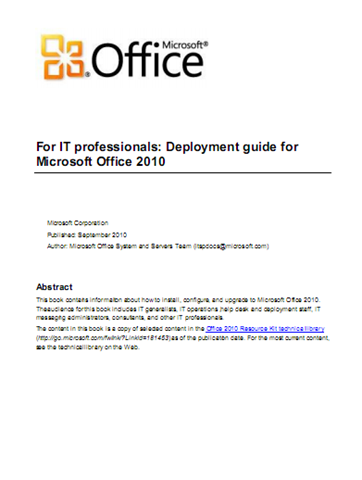
imageThis book provides how-to information: the recommended steps to execute specific deployment tasks, such as customizing the installation, installing Microsoft Office 2010 system on users’ computers, implementing the deployment in many languages, and migrating to the new file format.

The audiences for this book are IT professionals who plan, implement, and maintain Office installations in their organizations.


imageWe have an awesome web site that y’all need to check out:

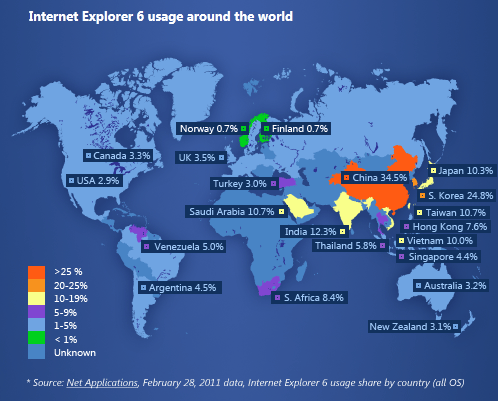
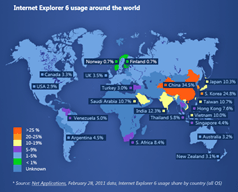
Here’s the thing:  Consumers will eventually upgrade… hopefully to IE9.  But Corporate IT:  This needs to happen sooner rather than later, and I still have customers with pockets of their end user population using IE6.x instead of IE7 or IE8.

The majority have plans already in place, thank goodness, but there are some that still have the following excuses for not upgrading:

  • In-house Application Compatibility
    ”We have applications developed internally that won’t work with IE7/8/9 and we haven’t retrofit them.”
  • 3rd Party Web App Incompatibility
    ”Our business depends on a 3rd party application that uses IE6 and won’t work on anything else so we’re beholden to them.”
  • IT Priorities/Deployment Issues
    ”Our company doesn’t have this as a priority.”

WHY YOU SHOULD GET OFF OF IE6.X:
Here’s a short list of reasons IE6 needs to be upgraded in your company:

  1. Support.  Once support on IE6 expires, there’s no more security patches & the risk of malware will reside entirely on IT.  No more calling into support.
  2. Compatibility.  Ironically, IE6 is completely incompatible with new web standards.  Advanced AJAX used in most of today’s web applications will not function under IE6.  Examples?  Sharepoint Web Apps.  Office Web Apps.  Microsoft Skydrive.  YouTube.  Google Apps.  The future is completely dependent on getting off of IE6.
  3. Speed.  IE6 is upwards of 10x slower than IE9 on traditional applications.  Not just Javascript execution but also HTML rendering.  Graphics processing.  Simple stuff.  And this is on the same desktop hardware you’re using today.
  4. Expectations.  End users expect Tabs to be available…crash recovery to be enabled… privacy protection to be operational.  None of this is there until you upgrade to IE7/8/9.
  5. Security.  The obvious concern.  No browser Microsoft supports today has more malware threats posed against it, more security flaws, & more support issues – and yet, it remains in use.

HOW TO GET OFF IE6.X:
There are many ways to continue to deliver IE6 functionality or compatibility while upgrading the infrastructure to a more modern, secure, and manageable Enterprise class browser… and they don’t require violating Microsoft licensing & terms of usage agreement by attempting to ‘package IE6’ using Application Virtualization.  Extracting out an packaging IE6 for the purposes of app compatibility is illegal and may constitute the need for a 2nd Windows Client License.

Now Desktop Virtualization is a different thing.  When you use Desktop Virtualization, you are repackaging the entire operating system and with the right licensing, this is possible for providing web app compatibility for desktops without IE6.
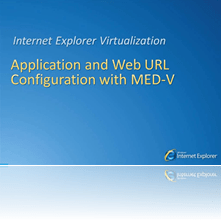
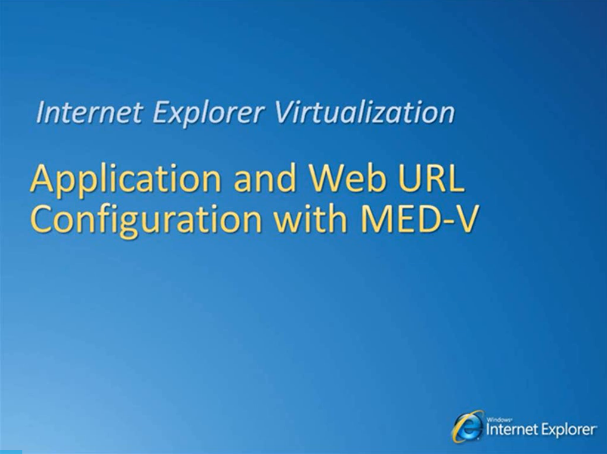
imageHere is a video explaining the process of using MED-V, or Microsoft Enterprise Desktop Virtualization to provide an IE6 experience to desktops using Windows 7 & Internet Explorer 8.   Essentially what is happening is a fully managed VM of Windows XP w/ IE6.02 is placed on every desktop… and when a user clicks on a shortcut for a web-app-that-only-runs-on-IE6, it opens IE6 in the VM and only displays the IE6 window.  The rest of the OS desktop is hidden from view, providing the end user with the belief that they are only running that web app and not an entire VM.
imageFor actual web app remediation by configuring IE8 for IE6 compatibility to enable IE8 to run IE6 web apps in ‘compatibility modes’, here are some videos on migrating off of IE6 to IE8 with compatibility in mind:

imageUPDATE 3/4/11:
So I’m looking at some web sites and I see this logo ad pop up to the right: 

Awesome!  It leads to the following URL which provides an ever growing list of Touch-enabled Windows applications for your Slate PC or Tablet PC:

Here’s a few that I gleaned from the site listed under Apps for Slate PCs:

Here’s a few I got listed under Touch Apps:

—————–

imageHere’s some touch-enabled or touchscreen aware software for you to download & show off to others once you receive a Tablet PC with a touchscreen:

[Last updated: 3/3/11]

And if you’re in the mood to spend $500… (No joke. That’s what they charge for this monster suite of Touch enabled Windows 7 software.)

« Newer Posts - Older Posts »

Categories