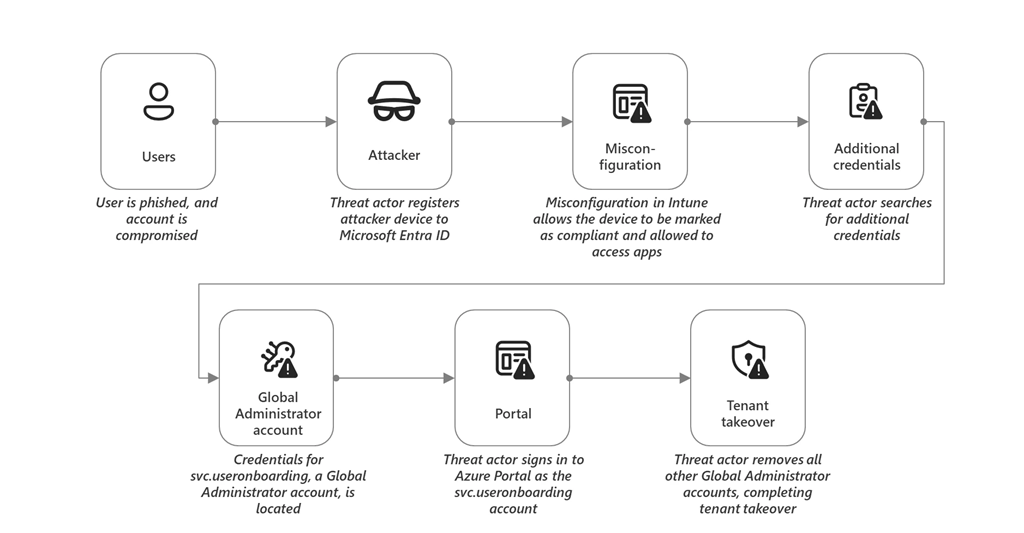
imageThe Microsoft Incident Response team has observed common misconfigurations for Microsoft Entra ID across various industry verticals.

In their recent post, they present details on the common misconfigurations observed in their engagements and provide guidance on how to properly configure Microsoft Entra ID to remove risks and harden environments against cyberattacks.

For example:

  • Accounts that are used to administer Microsoft Entra ID should be native to Microsoft Entra ID and not synced from on-premises Active Directory
  • Any account that holds privilege in on-premises Active Directory, such as Domain Administrators and the respective groups such as Domain Admins, should be completely excluded from being synced to Microsoft Entra ID
  • To remove the attack vector of direct phishing attempts, users that hold privilege in Microsoft Entra ID should not have a mailbox assigned

For over 100+ recommendations on how to best configure your Entra ID, visit:

Posted by: kurtsh | December 18, 2023

INFO: Creating a ChatGPT bot for your Enterprise Data

imageIn the context of enterprise applications, the question we hear most often is “how do I build something like ChatGPT that uses my own data as the basis for its responses?”

The combination of Azure Cognitive Search and Azure OpenAI Service yields an effective solution for this scenario. It integrates the enterprise-grade characteristics of Azure, the ability of Cognitive Search to index, understand and retrieve the right pieces of your own data across large knowledge bases, and ChatGPT’s impressive capability for interacting in natural language to answer questions or take turns in a conversation.

Read the post below to learn more on how to leverage these services for your own ChatGPT bot for your Enterprise data.

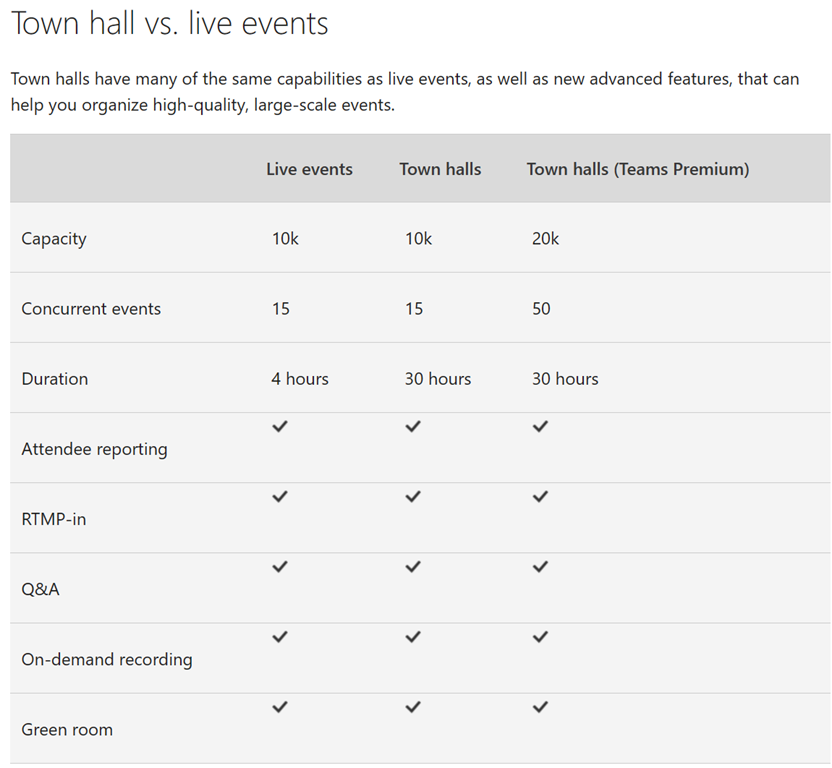
If you’re interested in differentiating between what’s available with Teams Live Events and what the new Teams Town Hall feature will make available, this post may help. 
imageWhile the services will be extremely similar, I’ve been informed that there will be some differences that you should be aware of.  The core differences are documented here: Switch from Microsoft Teams live events to town halls – Microsoft Support

Some of the new announcements around what else we are releasing for Town Halls is listed below – including GCC availability.

Following our recent announcement of the general availability of the new town hall in Microsoft Teams and the retirement of Microsoft Teams Live Events, below are several key updates to share with customers regarding the existing Teams Live Events experience and the new town hall experience.

‌Teams Live Events Updates

Teams Live Events Capacity Extensions: We previously announced the introduction of town hall for commercial customers that will replace Teams Live Events, along with the retirement of Teams Live Events for commercial customers on September 30, 2024. To help our customers with a smooth transition from Teams Live Events to Town halls, we are extending the capacity limits for Teams Live Events that are currently set to expire on December 31, 2023 – we are extending the timeline for capacity limits to now expire on June 30, 2024. This means that customers using Teams Live Events will continue to have a view-only broadcast experience for up to 20,000 attendees (previously up from 10,000 attendees); 50 events hosted simultaneously across a tenant (previously up from 15 events); and event duration of 16 hours per broadcast (previously up from 4 hours). Note, as the capacity limits expire in June 2024, customers that require more than 10,000 attendees and more than 15 concurrent events, will need to use the new town hall experience and purchase relevant Teams Premium licenses for the additional capacity. Learn more.

Teams Live Events for New Teams: Currently, only presenter and attendee roles can use Teams Live Events on new Teams. Organizer roles will be able to start using Teams Live Events on new Teams by end of January 2024. Presenter roles will be able to start using Teams Live Events on new Teams by end of March 2024. Teams Live Events will be fully supported for all roles on new Teams by end of March 2024.

‌Teams Town Hall Updates

Town Hall for Government Clouds Availability: Town hall general availability for government cloud customers (including GCC, GCC-High, and DoD) will be announced in Q1 2024, along with the retirement timeframe of Teams Live Events.

3P eCDN support for Town Hall in Teams Premium: We previously announced 3P eCDN providers will be supported with advanced town hall functionality in Teams Premium that includes scaling of up to 20,000 attendees with Q&A support and concurrency of up to 50 tenants across a tenant. This support for third-party eCDN with advanced town hall in Teams Premium will be available in early February 2024 where we will enable admins to have the ability to disable Microsoft first party eCDN at a user level within a tenant for users licensed with Teams Premium and switch the users back to using a third-party eCDN as they prefer. Learn more.

Microsoft eCDN Support and Licensing for Town Halls: Microsoft eCDN (first-party) support is included as a part of the Teams Premium offer, however, as this is an attendee-based feature for town hall, it is recommended that all attendees have either a Teams Premium or standalone eCDN license in order to benefit from the eCDN capabilities. Learn more.

Posted by: kurtsh | December 17, 2023

VIDEO: Microsoft Copilot Studio

Microsoft CEO Satya Nadella explains what Copilot Studio provides customers of Microsoft 365 Copilot at Microsoft Ignite 2023.

By empowering them to build their own custom AI Assistants for their applications, including integrating them through pre-built connectors with SAP, Workday & ServiceNow, Copilot Studio make it possible to build your own Copilot for your own in-house applications… leveraging your organization’s own internal data.

Recently, I’ve had a number of customers question whether their organization requires Microsoft 365 Government Community Cloud (GCC).

We have a straight forward guide around determining whether GCC is required – and whether an organization is even eligible to obtain a GCC tenant.

Determine whether your organization needs Microsoft 365 Government – GCC and meets eligibility requirements.

The Microsoft 365 Government – GCC environment provides compliance with US government requirements for cloud services, including FedRAMP Moderate, and requirements for criminal justice and federal tax information systems (CJI and FTI data types).

In addition to enjoying the features and capabilities of Microsoft 365, organizations benefit from the following features that are unique to Microsoft 365 Government – GCC:

  • Your organization’s customer content is logically segregated from customer content in the commercial Microsoft 365 services from Microsoft.
  • Your organization’s customer content is stored within the United States.
  • Access to your organization’s customer content is restricted to screened Microsoft personnel.
  • Microsoft 365 Government – GCC complies with certifications and accreditations that are required for US Public Sector customers.

You can find more information about the Microsoft 365 Government – GCC offering for US Government customers at Microsoft 365 Government plans, including eligibility requirements.

The Microsoft 365 US Government service description describes the platform’s benefits, which are centered around meeting compliance requirements within the United States.

You might want to transfer the tables of information in the service description into an Excel workbook and add two columns: Relevant for my organization Y/N and Meets the needs of my organization Y/N. Then you can review this list with your colleagues to confirm that this service meets your organization’s needs.

More information is available at

We recently released an updated list of Office applications and features available in Government plans such as Office 365 Government Community Cloud (GCC).  It presents a table that specifically goes over:

  • Excel
  • Forms
  • OneNote
  • Outlook
  • PowerPoint
  • Whiteboard
  • Word

image

Visit the following site for the full table:

imageThe following solutions are a scalable part of the Project family, depending on expertise & intensity of an individual’s project management role.  All integrate with Azure AD identity, Outlook & Teams, and provide a path for Project Management growth for the end user.

The following presentation reviews both Planner & Project for the Web & the use cases:

Here’s a summary of some resources for Planner & Project for the Web:

  1. Microsoft Planner
    Natively integrated into Microsoft 365, Microsoft Planner costs nothing additional to use by M365 G3+ customers.  It’s designed for casual task & timeline management but is the future of Microsoft Project Management solutions.  It’s being connected into “Project for the Web” & expanded to take advantage of all the power of Project.
    1. Roadmap: The new Microsoft Planner: A unified experience bringing together to-dos, tasks, plans and projects
      https://techcommunity.microsoft.com/t5/planner-blog/the-new-microsoft-planner-a-unified-experience-bringing-together/ba-p/3977998
    2. Learning: Video training for Microsoft Planner
      https://support.microsoft.com/en-us/office/microsoft-planner-video-training-4d71390f-08d8-4db0-84ea-92fb078687c7
    3. Help: Online help & assistance for Microsoft Planner (Integration with Teams, Android/iOS, Outlook, Accessibility, etc.)
      https://support.microsoft.com/en-us/planner
    4. IT Admins: Administrative information for IT
      https://learn.microsoft.com/en-us/office365/planner/planner-for-admins
  2. Microsoft Project for the Web
    “Project for the Web” is Microsoft’s web-based project management solution for Enterprises.  It’s targeted at informal project manager & designed for simplicity & has an intuitive interface – while still embracing Enterprise collaboration & integration requirements like usage with Microsoft Teams, Outlook, SharePoint, etc. It is licensed through Project Plan 1+ & retails for $10/user/mo.  It will be integrated into Microsoft Planner in Spring 2024.
      1. Overview: A simple, end user explanation of Project for the Web is available here: What is Project for the web? – Microsoft Support
      2. Video overview: https://aka.ms/ProjectforthewebandProjectOnline
      3. Learning:
        1. Unified Support workshop – See attached datasheet
        2. Project for the Web – Youtube Videos
          1. Introducing Microsoft Project for the web
          2. Getting started with Project for the web
          3. Agile, Goals, Workloads, and more in Project for the web
          4. Leverage Microsoft Project for the web with the Project Accelerator
          5. Project for the web for work management
          6. Advanced deployment for Project for the web
          7. Extensibility in Project for the web – YouTube
      4. Help:
          1. Admin help – https://learn.microsoft.com/en-us/project-for-the-web/projectforweb-admin-hom
          2. End user help – https://support.office.com/project
      1. IT Admins:
        Project for the Web – Getting Started & Deployment
        https://learn.microsoft.com/en-us/project-for-the-web/project-for-the-web-get-started-guide-for-admins
  3. Microsoft Project
    Microsoft Project is usually considered the “easy” project management solution for full-featured, Enterprise class customers – but has the benefit of integrating with purpose-designed Project Management solutions like the Project Online service, Primavera, etc. as well as Portfolio Management & Power BI visualization & reporting.
    1. Product: Project management built to keep track of all your work (microsoft.com)
    2. Synopsis: Overview of Microsoft Project – YouTube
    3. Video: Microsoft Project Management video series – Microsoft Project

imageIt’s a bit buried in our documentation however customers subscribing to Microsoft 365 E3 are entitled to 3 Premium templates of their choice for Purview Compliance Manager at no charge.

These templates can be interchanged as needed as long as no greater than 3 templates are used at any given time.  If more than that 3 templates are required, additional template entitlements can be “purchased” or subscribed to to increase the quantity available.

For example, I installed the CJIS, IRS 1075, & HIPAA Hitech compliance templates which ran its audit scan regularly. I swapped out the HIPAA Hitech scan for GDPR a month later without an additional charge or penalty.

For more details, read the following documentation:

Posted by: kurtsh | December 7, 2023

INFO: Windows 10 Extended Security Update availability

imageYesterday, we announced that options for Windows 10 licensees/users that can’t upgrade to Windows 11 by the end of life date – October 14, 2025.

These Windows 10 customers will have 3 options:

  1. Move out-of-support Windows 10 users to cloud-based desktops using Azure Virtual Desktop running Windows 10 where they will receive ESUs at no additional cost – only in Azure.
  2. Allow out-of-support Windows 10 users to remote/”RDP” into cloud-based Windows 365 PCs running Windows 11 & receive ESUs for their on-prem Windows 10 devices at no additional cost.
  3. Purchase Extended Security Updates (ESUs) per qualified Windows 10 device in 1-year subscription increments.

WARNING: Be aware, if past history is any metric:

  • Extended Security Updates for the 1st year generally costs roughly the same amount as repurchasing the entire Windows OS license.
  • Extended Security Updates for a 2nd year are typically 2x the cost of the 1st year.  The 3rd year is usually 4x the cost of the 1st year.  There are no ESUs available beyond 3 years.

Here’s the clip from the announcement:

Extended Security Update program for Windows 10

While we strongly recommend moving to Windows 11, we understand there are circumstances that could prevent you from replacing Windows 10 devices before the EOS date. Therefore, Microsoft will offer Extended Security Updates.

Like the Windows 7 ESU program, your organization will be able to purchase a yearly subscription to security updates. The yearly commitment is renewable for three years. Devices enrolled in ESUs will receive monthly security updates to keep these Windows 10 PCs secure.

The ESU program for Windows 10 will include critical and/or important security updates. ESUs do not include new features, customer-requested non-security updates, or design change requests. Technical support beyond the ESU itself is also not available.

  • For Windows 365 customers, ESUs will be provided for the Windows 10 devices that connect to a Cloud PC running Windows 11 at no additional cost.
  • If you run a Windows 10 instance in Azure Virtual Desktop, ESUs will also be available at no additional charge on those virtual machines (consumption not included).

Stay tuned for more ESU program updates as we approach availability, including an ESU program for individual consumers

For more details, visit:

Posted by: kurtsh | December 7, 2023

DOWNLOAD: Microsoft Copilot Adoption Kit

imageAre you interested in Microsoft Copilot but not sure how to get started? Download the "Copilot Adoption Kit"!

  • Learn how to use Copilot with a user-training PowerPoint deck
  • Discover 5 tips for maximizing the benefits of Copilot at work
  • Explore the features of Copilot with an interactive intro
  • Get support from IT Admins with adoption kit instructions & change mgmt templates
  • Communicate the value of Copilot with email templates

Get the kit here!

« Newer Posts - Older Posts »

Categories