
Oooooooh. Scary! ROFL!
Oooooooh. Scary! ROFL!
Comments Off on Happy Halloween!
Posted in Uncategorized
Did you ever want to get Ink Crossword working for Windows 7 Tablets/Slate devices?
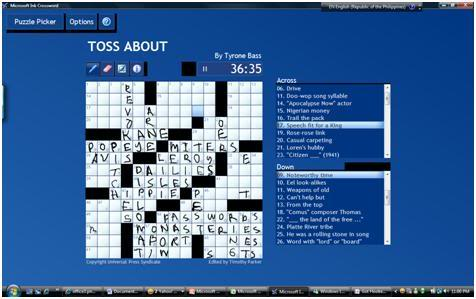
My friend Dan Dickerson got it goin’. I had everything working except the ability to download the Daily Crossword and he figured it out.
Here’s his instructions on how to get it installed:
Comments Off on HOWTO: Get “Ink Crossword” working on Windows 7 Tablets/Slates (or Windows 8!)
Posted in Uncategorized
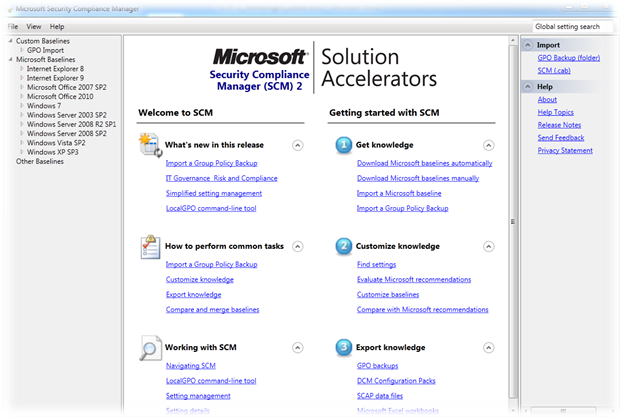 Version 2 of the Microsoft Security Compliance Manager (SCM 2) is now available for download!
Security Compliance Manager 2 is a free tool from the Microsoft Solution Accelerators team that enables you to quickly configure and manage your computers, traditional datacenter, and private cloud using Group Policy and Microsoft® System Center Configuration Manager.
SCM 2 provides ready-to-deploy policies and DCM configuration packs that are tested and fully supported. Our product baselines are based on Microsoft Security Guide recommendations and industry best practices, allowing you to manage configuration drift, address compliance requirements, and reduce security threats.
Easily configure Windows® operating systems, Microsoft® Office applications, and Internet Explorer with industry leading knowledge and fully supported tools.
Take advantage of SCM 2 to import the configuration of a “golden master” reference machine or existing Group Policy. Compare your standards to industry best practices, customize them using rich knowledge, and seamlessly create new policies and DCM configuration packs in the user-friendly UI designed to work with System Center Configuration Manager 2007 R2.
Key Features Include:
Next steps:
Comments Off on RELEASE: Microsoft Security Compliance Manager v2
Posted in Uncategorized
 Simplify your cloud migration planning with MAP 6.5
We are pleased to announce that the next version of the Microsoft Assessment and Planning (MAP) Toolkit—version 6.5—is now available for beta download.
The journey to the cloud is now smoother than ever with the Microsoft Assessment and Planning (MAP) Toolkit 6.5 Beta. The MAP Toolkit’s new capabilities help users to securely assess heterogeneous IT environments while enabling the evaluation of workloads for migration to Microsoft’s private and public cloud platforms. Consolidate existing server workloads using the updated Hyper-V Cloud Fast Track capacity planning feature. The revamped Azure Migration feature in MAP 6.5 provides more in-depth analysis of the suitability of migrating on-premises applications to the Windows Azure platform. Other significant new features in MAP 6.5 include the discovery of active Windows devices, Software Usage Tracking for Forefront Endpoint Protection (FEP), and the discovery of Oracle instances on Itanium-based servers with HP-UX to assist in the planning of migration to SQL Server.
Key features and benefits of MAP 6.5 help you:
MAP works with the Microsoft Deployment Toolkit and Security Compliance Manager to help you plan, securely deploy, and manage new Microsoft technologies—easier, faster, and at less cost. Learn more.
Next steps:
Get the latest tips from Microsoft Solution Accelerators—in 140 characters or less! Follow us on Twitter: @MSSolutionAccel.
Comments Off on BETA: Microsoft Assessment and Planning Toolkit 6.5
Posted in Uncategorized
 Interested in Xbox 360 game launch promotions/events at the Century City/LA Microsoft Store?
Join the Meetup group! This appears to be really the only way to get local notifications about events and launches going on at the Microsoft Store. There’s a Facebook site but it’s driven exclusively by corporate notifications and nothing local.
So join up!
Comments Off on HOWTO: Get Xbox 360 Launch event notifications for Microsoft Store, Century City/Los Angeles
Posted in Uncategorized
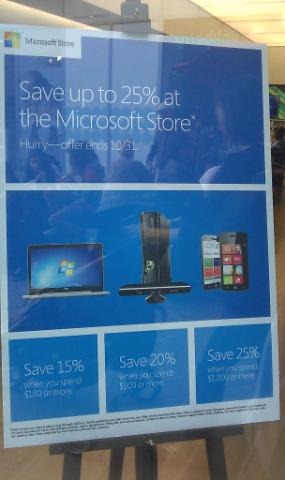 The Microsoft Stores are having an anniversary sale until October 31st.
Let’s review this in English, shall we?
Yes, this is a pretty big deal. After all, where else are you going to see discounts like these on these products? Microsoft NEVER discounts Xbox 360s. Even Dell doesn’t discount the Zino. And the Samsung Series 7’s in such demand, no one’s going to discount it – if you can even find one available.
So get down to your local Microsoft Store. If you live in Los Angeles:
Comments Off on NEWS: Microsoft Store 15% off all purchases $100 or more until Oct 31st (…and it gets better the more you buy!)
Posted in Uncategorized
PSSST.
In case you’re interested in such things or have family members that want to participate, here are the details for the next upcoming “Midnight Launch” event that we are doing at the Microsoft Store in Century City.
 MIDNIGHT LAUNCH: “BATTLEFIELD 3” –
10/24-10/25 10PM-1AM
LOCATION: Microsoft Store – Westfield Century City Shopping Mall
10250 Santa Monica Blvd., Century City
310-228-3550
http://www.westfield.com/centurycity/directory/detail/store?retailer=44263
Consider yourselves & your families invited. Line gets let in at 10:00PM. You may want to preorder the title just to make sure you get one at the store in the event there aren’t enough for everyone. (Pre-orders are guaranteed a copy) And don’t forget that pre-orders are discounted by $5 and get a free $25 gift card when you pick it up. Note: This is one of the “Big 4” Xbox 360 titles that are launching this year. (Gears of War 3 launched last month) Parking is free underground.
Hope to see you there!
Comments Off on EVENT: Midnight Launch Event for “Battlefield 3” for Xbox 360 at the Microsoft Store Century City – Oct 24, 10PM-1AM
Posted in Uncategorized
According to GigaOm, Silverlight will be the framework upon which applications will be developers for the Xbox 360 when Microsoft releases the November 2011 dashboard update which provides a new Xbox App Marketplace:
We’ve confirmed that the apps expected to be added with the next major update to Xbox Live will be based on Silverlight — at least to a point. The framework they’re being built on is codenamed “Lakeview”, which is essentially a prettied up version of Silverlight with new features like Xbox Kinect’s voice recognition and gesture control. Surprisingly enough, partners are not using Microsoft’s Smooth Streaming for video delivery, but have chosen to use H.264-encoded video with Apple’s HTTP Live Streaming (HLS) instead.
[taken from GigaOm]
This is in addition to the 30,000 applications written & published for Windows Phone 7 that are ENTIRELY based on either Silverlight & XNA:
If you have Silverlight and C# experience, you are significantly prepared to build applications on Windows Phone 7, but the fact of the matter is, the phone is very different device from the PC, with limited battery life, poor network connectivity, different performance characteristics, smaller screens, and wildly different input mechanisms like touch and accelerometer. All of these factors need to be considerations in phone software development from the very beginning, when designing your end user experience.
These principles were at the front of people’s minds here while designing and building Windows Phone 7. They were also in the front of the minds of the folks who built the new Windows Phone 7 version of Silverlight. In order for you to build outstanding, high performance applications in Silverlight, you’ll need to understand the steps that were taken to optimize the Silverlight runtime on Windows Phone, and take advantage of defined characteristics like the discrete GPU, (required on every Windows Phone 7 device). To better do so, we’ve published the following resources:
- A video interview with Shane Guillet, Test Lead of the Silverlight team, available on Channel 9 at: http://channel9.msdn.com/shows/Inside+Windows+Phone/Inside-Windows-Phone-03-Optimizing-Windows-Phone-Silverlight-applications/
- A full white paper, complete with code samples, documenting strategies and best practices, available for download at: http://www.microsoft.com/downloads/en/details.aspx?displaylang=en&FamilyID=3a8636bf-185f-449a-a0ce-83502b9ec0ec. Rohan Thakkar, a PM on the Silverlight team, has also posted the full text of this paper on his blog at: http://blogs.msdn.com/b/rohantha/archive/2010/09/09/optimizing-silverlight-applications-for-windows-phone-7.aspx. The entire article will be online in the MSDN Library shortly.
[taken from the Windows Team Blog & MSDN]
Interesting for a supposedly “dead” platform. 
Comments Off on NEWS: Silverlight to power applications on Xbox 360 this November 2011
Posted in Uncategorized
 This was an interesting enough tool that I decided to post about it. It’s called the User Access Control Process Analyzer and it was written by the folks at ITknowledge24.com.
The description they give it is:
UAC Process Analyzer 1.0 is a free software program offered by us. UAC Process Analyzer 1.0 is a utility that provides details about any running process. The main idea is to allow administrators to analyze running applications, information provided is: Integrity level, UAC Virtualization (i.e. is the process using the UAC Virtualization feature), Trusted directory, and Software Digital Signature.
Here’s the scenario: You’re running a program and suddenly you’re wondering, “Why is the program running a little weirdly? Where is it writing it’s save data to?” UAC Process Analyzer tells all of that information to you run all running programs in memory. Additionally, if you’re writing an application and your software gets flagged by UAC, this tool will help you understand what it is that you’re doing that makes UAC suspect that your program is suspect.
System requirements:
OS: Windows 7 or Windows Vista.
CPU: x86 or x64
File details:
Filename: upa.zip
File size: 553 KB
SHA1: A309D4274C3DC2B949F665C47245B799466D3B1C
(Incidentally, there are a lot of other tools that ITknowledge24 publishes for Windows 7 and Internet Explorer – check them out at http://www.itknowledge24.com/downloads.html#)
Comments Off on TOOL: UAC Process Analyzer 1.0 (3rd party)
Posted in Uncategorized
In preparation for Office 2007’s “end of mainstream support” coming up in April 2012, the Office Sustained Engineering team has announced the coming release of Office 2007/SharePoint Server 2007’s Service Pack 3.
Today we’re pleased to announce the 3rd (and likely final) Service Pack release for Office 2007 and SharePoint Server 2007. We are targeting a release date within Calendar Q4 2011. As we approach the date we will have more to share on exact timing.
We are offering this release in preparation for the April 2012 end of mainstream support for the 2007 client and server products. The October 2011 release provides a 6-month window to test and deploy the release prior to exiting mainstream support.
Upgrading to Office 2010 is also an option for those who are still using Office 2007. Office 2010 will remain in mainstream support until 2015, and this path provides a much better option for those looking to upgrade from Office 2003 prior to its end of life, scheduled for April 2014.
…
For more about the Service Pack, what it contains for SharePoint Server 2007 and Office 2007, and the rough time frame of release, visit the announcement page at:
Comments Off on NEWS: Office 2007 & SharePoint 2007 Service Pack 3 coming
Posted in Uncategorized


 kurtsh
 Kurt Shintaku's Blog
You must be logged in to post a comment.