image

AI-powered innovations in cybersecurity are reshaping how businesses of every size—and across every industry—secure and protect their data.

Join Microsoft Corporate Vice President, Microsoft Security Business, Vasu Jakkal, at the 2nd annual Microsoft Secure digital event to learn how to bring world-class threat intelligence, complete end-to-end protection, and industry-leading, responsible AI to your organization.

Register today to:

  • Be among the first to hear about new products, capabilities, and offerings.
  • Get demos on the latest AI-powered innovations.
  • Learn from industry luminaries and influencers.

Date/Time:
Wednesday, March 13, 2024 | 9:00 AM-11:00 AM Pacific Time (UTC-7)

Registration:
https://mssecure.eventcore.com/

Add to Calendar:
https://regcdn.event.microsoft.com/cdn/event/32386/web/Digital%20Event%20Microsoft%20Secure%20Security%20for%20all%20in%20the%20age%20of%20AI.ics

Connect with Microsoft Security are these other events:

  • Microsoft Secure Tech Accelerator
  • Microsoft AI Tour
  • RSA Conference
  • Identiverse
  • Microsoft Build
  • Black Hat USA
  • Microsoft Ignite

Review this web site for details about these events:
https://www.microsoft.com/en-us/security/blog/2024/02/01/connect-with-microsoft-at-these-cybersecurity-events-in-2024/

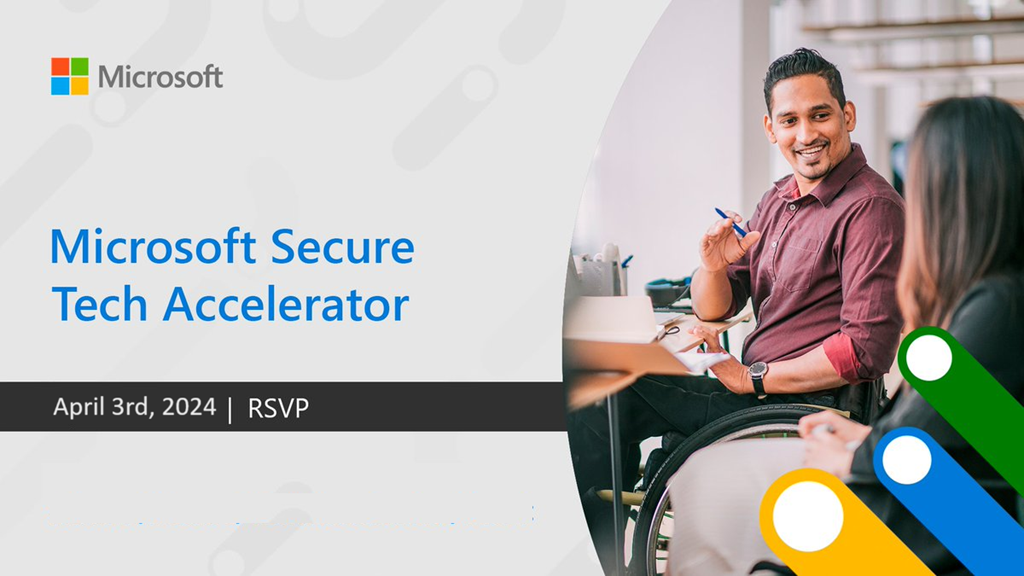
imageJoin us on April 3rd at the Microsoft Secure Tech Accelerator for a deep dive into the announcements from the Microsoft Secure digital event on March 13th.

You’ll have an opportunity to learn technical information that will help you and your team implement Copilot, learn how to Secure your AI, see demonstrations, and get answers to your questions from the product team. All sessions will be streamed live here on the Microsoft Tech Community as well as on YouTube and X.

I’m in! How do I sign up?
There’s no registration necessary. Simply sign in to the Tech Community, then select RSVP on this page to receive important event reminders and updates — and select Add to calendar to save the date.

What topics will be covered?
We’ll reveal the full agenda soon. RSVP for updates!

Date/Time:
April 3rd, 2024

RSVP:

  1. Visit the following page:
    https://techcommunity.microsoft.com/t5/tech-community-live/microsoft-secure-tech-accelerator/ev-p/4043706
  2. Sign in at the top right of the page with your Microsoft Account
    (The RSVP button may not appear if you do not sign in)
  3. Click the “RSVP to entire event” button at the bottom right

    image

  4. Add the event to your Calendar
    https://techcommunity.microsoft.com/gxcuf89792/downloadCalendar?message.id=4043706

imageAre you a data & analytics professional interested in:

  • Power BI
  • Data Warehousing
  • Data Activator
  • Realtime Analytics
  • Fabric Platform
  • SQL Server
  • Azure SQL
  • Azure PostgreSQL
  • Azure MySQL
  • Azure CosmosDB
  • Azure Arc
  • Azure AI
  • Data Science
  • Data Engineering

…register now for “FabCon”, the First Annual Microsoft Fabric Community Conference!

Join us at the first annual Microsoft Fabric Community Conference and see firsthand how Microsoft Fabric and the rest of the data and AI products at Microsoft can help your organization prepare for the era of AI. You’ll hear from leading Microsoft and community experts from around the world and get hands on experiences with the latest features from Microsoft Fabric, Power BI, Databases, Azure AI, Microsoft Purview, and more.

Register today to immerse yourself in the future of data and AI and connect with thousands of data innovators like yourself eager to share their insights.

Registration details:

  • The Microsoft Fabric Community Conference
    Las Vegas, MGM Grand
    Conference: March 26-28, 2024
    Workshops: March 24, 25, 19, 2024
    https://www.fabricconf.com/

imageWatch this presentation to understand current best practices for managing data protection challenges within hybrid and remote environments—and discover strategies for closing exposure gaps using Microsoft Purview, a comprehensive solution for data governance, protection, and compliance.

Learn how to:

  • Understand and govern data by managing visibility across your environment.
  • Safeguard data, wherever it lives, by protecting sensitive data across clouds, apps, and devices.
  • Improve your risk posture by identifying data risks and managing data protection requirements

Register here:

#MicrosoftPurview #governance #purview #compliance #datasecurity #microsoft #msftadvocate

Posted by: kurtsh | January 28, 2024

INFO: Microsoft 365 E3/E5/G5 Extra Features license

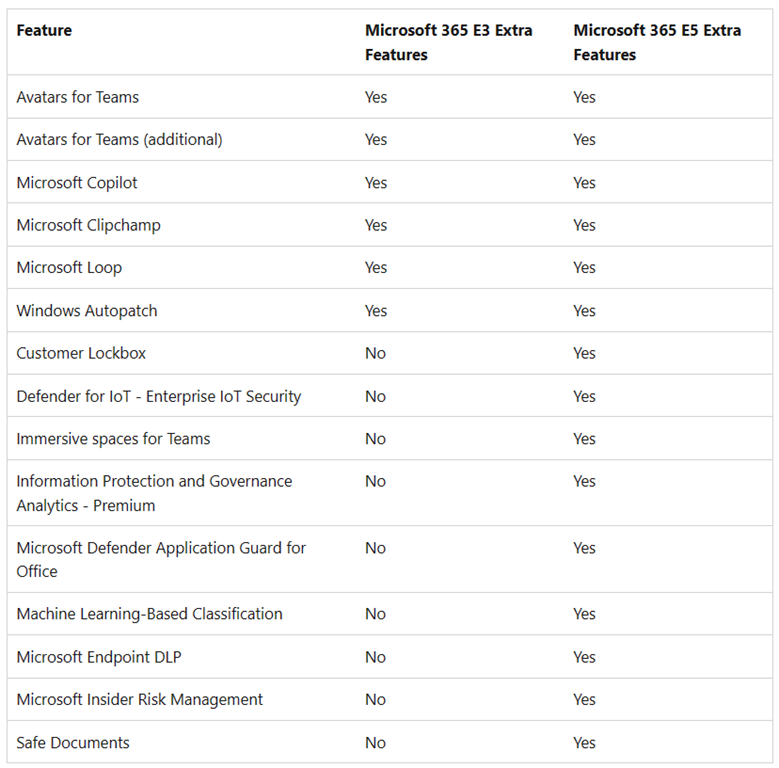
imageDid you know there’s an extra license that you have rights to called “Microsoft 365 Extra Features” if you have any of the following suite licenses:

  • Microsoft 365 E3
  • Microsoft 365 E5
  • Microsoft 365 G5

The table to the right shows what extra features & services are available to “Microsoft 365 Extra Features” assigned users.

HOW DO I USE IT?

If you’re a Microsoft 365 Administrator, this license should automatically appear on the Licenses page in the Microsoft 365 Admin Center & available to assign to your users.

UM, WHAT ABOUT MICROSOFT 365 G3?

There is no license for Microsoft 365 G3 subscribers today.  It is only available for Microsoft 365 G5 subscribers right now. (No, I don’t know the reason for this yet & don’t have an ETA. Don’t shoot the messenger.)

I DON’T SEE THIS LICENSE.  WE HAVE THE MICROSOFT 365 BUT IT’S BROKEN UP IN OUR ENTERPRISE AGREEMENT INTO 3 LICENSES FOR O365, EMS & WIN ENTERPRISE

Ah. You’re the special case. If are one of the rare customers that have an Enterprise Agreement with Microsoft 365 E3/E5 but the suite is broken up into 3 separate licenses on your EA (O365, EMS & WinEnt) then you need to specifically request – through your LAR – that the “M365 Extra Features” license be added to your EA.

The short explanation is that for customers that purchased M365 E3/E5 a long time ago… instead of a single M365 license, they may have 3 licenses.  Because of this, they didn’t get the “M365 Extra Features” so this has to be added manually.

For more details on this visit:

I’ve had a customer that asked for "24 hour retention policies” for Microsoft Teams chat messages.  In other words, they wanted chat messages deleted after only 24 hours.

I will say that initially there were some challenges with fulfilling this requirement:  We didn’t actually support “24 hour retention policies” initially back in 2020 – I think the minimum was a few days or something like that, but if I remember correctly, there was an “design change request” escalation done by a few customers through Microsoft Unified Support (which is really the only way to formally request changes from product engineering) and “24 hour retention policies” were eventually developed by the Teams product group & made available due to a couple other customers also asking for it. It was later expanded to all customers & documented.

VISIBLE “DELETED” MESSAGES IS A KNOWN THING
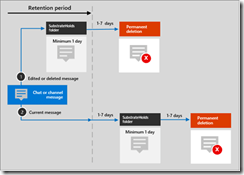
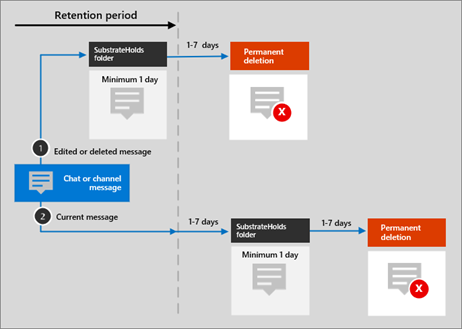
imageDon’t get it twisted however: Some messages can and do remain visible past the 24 hour retention period.  This is documented here but if you look at the image I’ve pasted on the right, you can see that messages – even if they are manually deleted from Teams – aren’t actually immediately deleted but rather they are moved to something called the “SubstrateHolds” folder for a minimum of 1 day PLUS up to another 7 days and which point it gets marked for deletion for, again, a minimum of ANOTHER 1 day PLUS up to another 7 days or so to actually delete the object.  This sounds convoluted but there’s very good reasons for this.

SUBSTRATE EVALUATION FOR HOLDS

So what’s this SubstrateHolds folder?  It’s a holding area where messages are stored and evaluated for other tenant policies that may supersede the organizational Retention Policy – for example, Litigation Hold.  Litigation Hold is a very intensive process that by definition supersedes retention policy deletion & requires evaluating objects 24/7 all throughout a Microsoft 365 tenant which may contain PETABYTES of data. (In cases where customers have 10,000 mailboxes for instance, it easily does, having 100GB per user in email alone across 14,000 users – never mind OneDrive, SharePoint & Teams objects) 

This volume of data can take days, even a week to scout for operations like “holds” or worse, “full tenant eDiscovery” so objects are put up for permanent deletion until all processes/policies have had a chance to evaluate the object.

DELETION IS HARD WORK!

Additionally, the deletion process (which runs in Azure) takes a bit because, well,  it’s deleting a lot of objects.  Per the documentation:

When the retention period expires and moves a message to the SubstrateHolds folder, a delete operation is communicated to the backend Azure chat service, that then relays the same operation to the Teams client app. Delays in this communication or caching can explain why, for a short period of time, users continue to see these messages in their Teams app.

BTW: You can read a specific example of how 1 day retention policies work here:

There’s other things that may prevent a message from immediately deleted and as a result – if I remember correctly – our statement around “24 hour retention policies” was that it was not guaranteed to be deleted in 24 hours but rather a “best effort”.  This was accepted by the customers that “24 hour retention policies” were being built for because the alternatives weren’t attractive – including drastically raising the price of your Microsoft 365 tenant so we can increase the computing power for object search evaluation, transfer & deletion.

clip_image002Today, a new promotional offer for free credit to use the advanced services of Microsoft SharePoint Premium was announced for Microsoft 365 Enterprise customers. Anyone with:

  • an existing Microsoft 365 Enterprise cloud instance
  • an existing Azure commercial enrollment

…can get access to this promotional offer for SharePoint Premium.

WHAT DOES THE OFFER PROVIDE
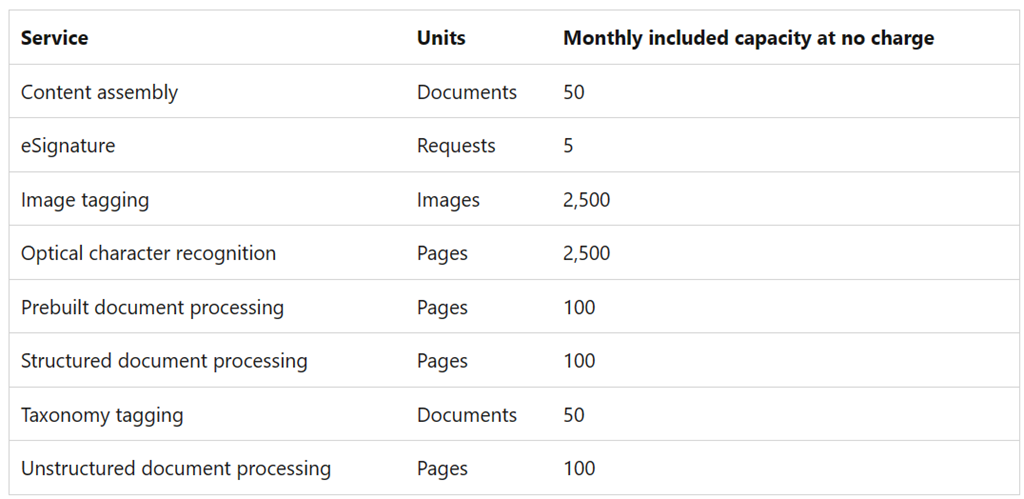
This promotion grants a monthly allocation of credit for 9 services that are part of SharePoint Premium. This includes the items in the table below & as you can see, it’s a fair amount of credit for each service:

clip_image003

HOW TO GET IT
Microsoft 365 Enterprise customers can take advantage of the offer by doing nothing but setting up the connection to your Azure enrollment as documented here:

That’s it. Your Microsoft 365 cloud instance will receive the credit automatically. The promotional offer for SharePoint Premium is available to customers now through June 30, 2024.

For background on the new promotional offer, visit:

(Note: SharePoint Premium is not yet available in GCC cloud instances, so this offer is only available to Enterprise/Commercial subscribers)

Posted by: kurtsh | January 8, 2024

INFO: Bring external data into Microsoft 365 Copilot

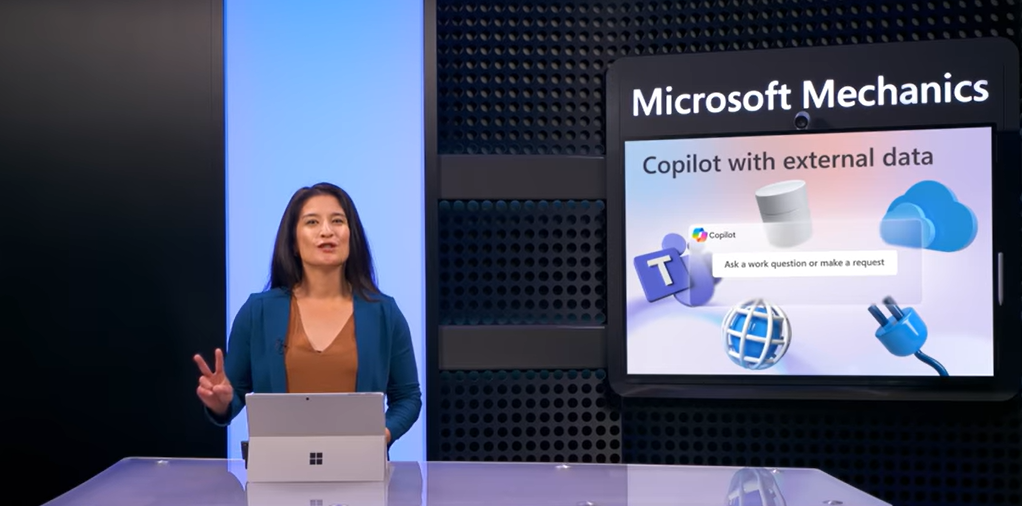
imageBring external data into your Microsoft 365 Copilot experience to ground generative AI results using connectors and plugins.

  • Use Microsoft Graph connectors to integrate the data sources you want with Semantic Index for Copilot. This option pre-indexes defined read-only information used for retrieval with your prompts to drive the most relevant AI-generated responses.
  • Use managed and trusted plugins, such as OpenAI plugins, Microsoft Teams message extensions, and Power Platform connectors. Instead of pre-indexing information, plugins optimize for real-time API based data retrieval, and they can optionally write-back data.

Mary David Pasch, Microsoft 365 Copilot Principal Product Manager, shares how both options follow Microsoft’s comprehensive security, compliance, and privacy approach, while respecting defined boundaries within your organization’s data services and can work together when responding to a single prompt.

#copilot #ai #microsoft #msftadvocate #extensibility

Posted by: kurtsh | January 7, 2024

RELEASE: The new Security Adoption Framework

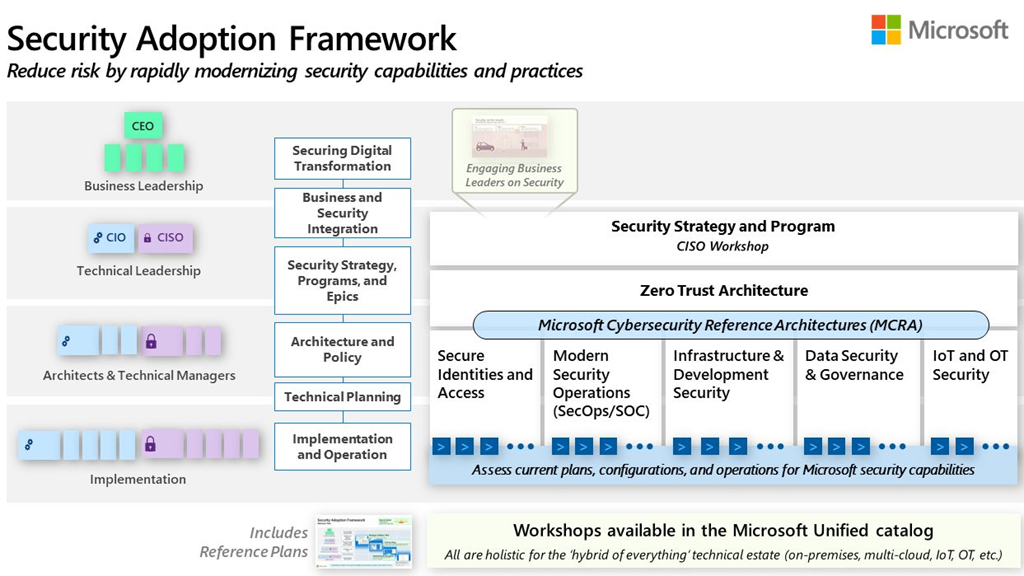
imageA new year and new things come from the right and left. New Security Adoption Framework (SAF) from #Microsoft is here to help your organization for End-to-End Security Modernization.

The SAF helps organizations to develop and implement a #security strategy and #architecture that fits their business, security, and technical platform requirements. It uses #ZeroTrust principles for all parts of security modernization and offers a realistic way to improve your security in a hybrid, multicloud, and multi-platform, from strategic and programmatic level to architectural and technical design.

The SAF consists of several elements, such as:

  • Security Modernization Overview: A collection of security learnings, principles, and recommendations for modernizing security in your organization. This training workshop is a combination of experiences from Microsoft security teams and learnings from customers.
  • The Microsoft Cybersecurity Reference Architectures (#MCRA) are the component of Microsoft’s Security Adoption Framework (SAF) that describe Microsoft’s cybersecurity capabilities and technologies. The diagrams describe how Microsoft security capabilities integrate with Microsoft platforms and third party platforms
  • Business Guidance: Multiple planning and execution guides for common focus areas, such as identity and access management, threat protection, information protection, and cloud security.
  • Expert Led Workshops: Optional workshops that Microsoft offers for Unified customers to help accelerate their planning and execution of security modernization.

For more details visit:

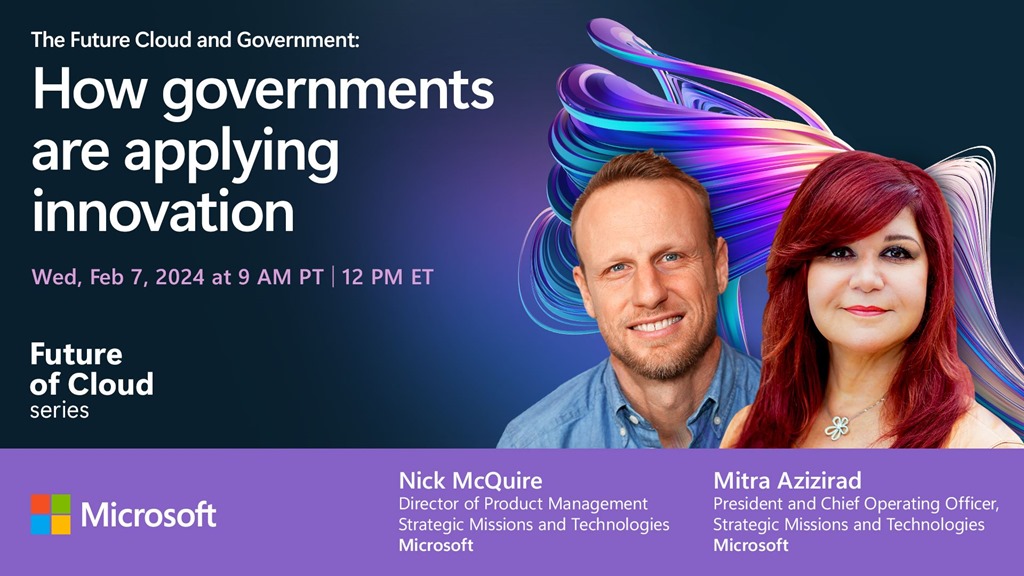
The Future Cloud and Government - How governments are applying innovation - Feb 7 2023 - 9AM PTThe tech trends of today are foreshadowing three disruptive shifts of tomorrow—ubiquitous computing, AI co-reasoning and Quantum at scale. These forces are collectively shaping the future direction of the cloud and will enable innovation that transforms government and society in the coming years. ​

Join us for this episode where we will look more closely at the ground-breaking innovations that will influence the trajectory of governments in the coming years. We will explore how departments, agencies and ministries are applying future innovation and emerging technologies. Find out how 5G, Space, AI, quantum computing and other technologies support government missions and tackle some of society’s greatest challenges with innovation, transformation, and trust.

« Newer Posts - Older Posts »

Categories