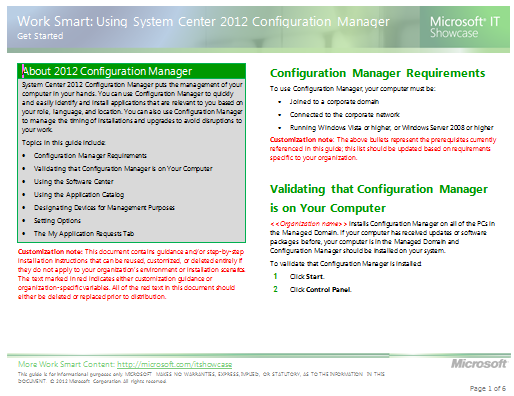
imageSystem Center 2012 Configuration Manager puts the management of your computer in your hands. You can use Configuration Manager to quickly and easily identify and install applications that are relevant to you based on your role, language, and location. You can also use Configuration Manager to manage the timing of installations and upgrades to avoid disruptions to your work.

The System Center 2012 Service Manager – Exchange Connector 3.0 connects System Center 2012 – Service Manager to Exchange for processing incoming emails related to incidents and change requests. The emails can update the incident action log or change the status of an incident to resolved or closed. Incoming emails with special keywords allow a change request reviewer to approve or reject a review activity and activity implementers can mark activities assigned to them as completed. The SendEmail solution allows analysts to send messages to users via email from the console.

Feature Summary: The Exchange Connector 3.0 release is compatible only with System Center 2012 – Service Manager. It contains the bug fixes and still contains the original set of features including:

  • Create incident from email
  • Update incident action log from email
  • Resolve or close incidents from email
  • Approve/reject change requests from email
  • Update change request “action log” from email
  • Mark manual activities completed from email
  • Add email file attachment to work items as attachments
  • Send notifications to users from the console

New features include:

  • Support for impersonation so you can now have multiple Exchange connectors monitoring different mailboxes each with their own unique configuration
  • Each user in the To/CC of each email is added as a Related configuration item to the work item
  • Works with Office 365
  • The Exchange Web Service URL to connect to can be configured instead of relying on auto discovery
  • Works with service requests
  • Any kind of work item can be created from a template – incident, service request, etc.
  • Update problem records
  • Much more detailed logging
  • Detailed event log logging is turned off by default
  • The email itself can be optionally added as an attachment to the work item

DOWNLOAD: System Center 2012 Service Manager – Exchange Connector 3.0 Release Candidate
http://www.microsoft.com/en-us/download/details.aspx?id=29423

Check out all the new Management Packs for System Center 2012 that released!

The Microsoft SQL Server 2012 BPA is a diagnostic tool that performs the following functions:

  • Gathers information about a Server and a Microsoft SQL Server 2012 instance installed on that Server
  • Determines if the configurations are set according to the recommended best practices
  • Reports on all configurations, indicating settings that differ from recommendations
  • Indicates potential problems in the installed instance of SQL Server
  • Recommends solutions to potential problems

DOWNLOAD: Microsoft® SQL Server® 2012 Best Practices Analyzer (April 2012)
http://www.microsoft.com/en-us/download/details.aspx?id=29302

image

The latest TechNet Magazine March 2012 edition is out and available for download as a .PDF.

Here’s a few articles in there:

ONLINE EDITION:
http://technet.microsoft.com/en-us/magazine/hh859744.aspx

DIGITAL DOWNLOAD:
http://download.microsoft.com/download/D/E/7/DE792766-E46A-428D-A037-66F5EEE54ED6/March2012.pdf

This 3rd party seminar using Microsoft’s cloud platform should be good.

imageNimboSync and Windows Azure: Give Employees a Better Way to Work Without Sacrificing Security
May 17, 2012 at 12:30 PM – 1:30 PM
This event requires registration: https://www4.gotomeeting.com/register/922887575

There is a growing need for employees to have access to company documents on their mobile device which is currently being satisfied by consumer applications—putting the entire organization at risk. NimboSync is a powerful new solution built on the Windows Azure Platform that connects all of the systems, applications and people within an organization.

NimboSync gives employees an intuitive interface for accessing, storing and sharing company documents without sacrificing security. NimboSync is built on Microsoft’s Platform-as-a-Service (PaaS) and it is simplifying the enterprise IT environment even as the strategic initiatives driving IT mushroom.

It is likely your organization is looking for a secure, user-friendly solution for sharing company documents internally and with partners. Join us to find out how NimboSync meets this requirement while providing an integrated platform for long-term development, growth and strategic initiatives in the cloud.

Event Organizer: Kristine Drier (Business Development at Nimbo)

Event Link: http://linkd.in/JtV1M0

Posted by: kurtsh | May 4, 2012

RELEASE: Microsoft Server Performance Advisor 3.0

imageMicrosoft Server Performance Advisor (SPA) 3.0 helps IT administrators collect metrics to identify, compare, and diagnose potential performance issues in deployments of Windows Server 8 Beta, Windows Server 2008 R2, or Windows Server 2008. SPA generates comprehensive diagnostic reports and charts and provides recommendations to help you quickly analyze issues and develop corrective actions.

SPA 3.0 features an improved interface design, automated data collection, and a consistent SQL data schema. The SPA framework requires Microsoft SQL Server or SQL Express (free version) but does not need to install anything on the servers under test. SPA can be run entirely using freely downloadable software from Microsoft.

This page provides a brief introduction to SPA 3.0 and links to download the SPA 3.0 software and the accompanying user’s manual and development guide.

Read more: http://msdn.microsoft.com/library/windows/hardware/hh367834

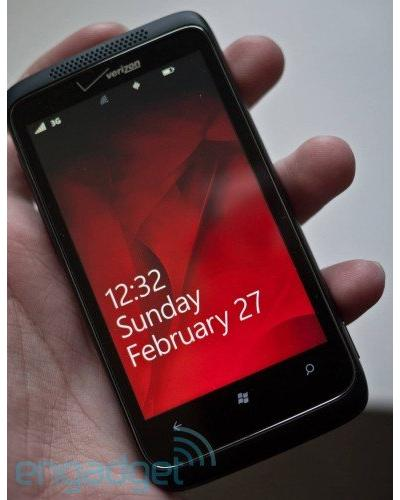
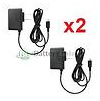
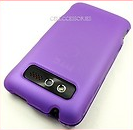
imageHere’s a list of accessories that I’ve gotten for my Verizon HTC Trophy.  (Verizon’s showcase device running the Windows Phone 7.5 operating system)

WARNING:
It’s very important to know for future reference that there are actually two HTC “Trophy” phones on the market from DIFFERENT carriers that are virtually identical however one is GSM based, uses DIFFERENT batteries, DIFFERENT accessories, etc. from the Verizon HTC Trophy.

When searching for accessories and stuff, it’s important to get them for the HTC Mozart (T8698) i.e. the Verizon-specific HTC Trophy if you’re a VZW customer.

ACCESSORIES THAT WORK WITH THE VERIZON HTC TROPHY:
(I’ve bought all of the devices below.  Some take a while to arrive because they come from Hong Kong but they work)

imageimageimageimageimageimage

ONLINE REFERENCES/DISCUSSIONS ABOUT THE VERIZON HTC TROPHY:

The recent uproar over Advanced Persistent Threats & actual evidence seems to have resulted in some commentary in the Microsoft Security Intelligence Report’s latest issue.  It’s a good read for security folk and is always published at http://www.microsoft.com/sir.

Taken from our Press Release on the topic:
http://www.microsoft.com/en-us/news/Press/2012/Apr12/04-25SIRvApr12PR.aspx

imageMicrosoft Corp. today released the Microsoft Security Intelligence Report volume 12 (.pdf file), which found that the Conficker worm was detected approximately 220 million times worldwide in the past two and a half years, making it one of the biggest ongoing threats to enterprises. The study also revealed the worm continues to spread because of weak or stolen passwords and vulnerabilities for which a security update exists.

According to the SIRv12, quarterly detections of the Conficker worm have increased by more than 225 percent since the beginning of 2009. In the fourth quarter of 2011 alone, Conficker was detected on 1.7 million systems worldwide. In examining the reasons behind Conficker’s prevalence in organizations, research showed that 92 percent of Conficker infections were a result of weak or stolen passwords, and 8 percent of infections exploited vulnerabilities for which a security update exists.

“Conficker is one of the biggest security problems we face, yet it is well within our power to defend against,” said Tim Rains, director of Microsoft Trustworthy Computing. “It is critically important that organizations focus on the security fundamentals to help protect against the most common threats.”

The SIRv12 also revealed that many of the threats often referred to as Advanced Persistent Threats (APTs) are no more advanced or sophisticated than other types of attacks. In most cases, these attacks leverage known vectors such as exploiting weak or stolen passwords and vulnerabilities for which security updates exist, but their success lies in the persistence and determination in trying different tactics to compromise the target. This is why Microsoft refers to these types of threats as Targeted Attacks performed by Determined Adversaries, rather than APTs.

Read the rest of the release at http://www.microsoft.com/en-us/news/Press/2012/Apr12/04-25SIRvApr12PR.aspx.

Posted by: kurtsh | May 3, 2012

RELEASE: Microsoft Deployment Toolkit (MDT) 2012

We are pleased to announce that Microsoft Deployment Toolkit (MDT) 2012 is now available for download!

Download the latest release to stay up-to-date on your deployment needs. New features and enhancements make large-scale desktop and server deployments smoother than ever!

Key Benefits:

  • Support for Configuration Manager 2012
  • Customizable deployment questions
  • Ease Lite Touch installation
  • Secure deployments
  • Reliability and flexibility
  • Support for Windows 8

Support for Configuration Manager 2012:
This update provides support for Configuration Manager 2012 RC2 releases. MDT 2012 fully leverages the capabilities provided by Configuration Manager 2012 for OS deployment. The latest version of MDT offers new User-Driven Installation components and extensibility for Configuration Manager 2007 and 2012. Users now also have the ability to migrate MDT 2012 task sequences from Configuration Manager 2007 to Configuration Manager 2012.

Customize deployment questions:
For System Center Configuration Manager customers, MDT 2012 provides an improved, extensible wizard and designer for customizing deployment questions.

Ease Lite Touch installation:
The Microsoft Diagnostics and Recovery Toolkit (DaRT) is now integrated with Lite Touch Installation, providing remote control and diagnostics. New monitoring capabilities are available to check on the status of currently running deployments. LTI now has an improved deployment wizard user experience. Enhanced partitioning support ensures that deployments work regardless of the current structure.

Secure Deployments:
MDT 2012 offers integration with the Microsoft Security Compliance Manager (SCM) tool to ensure a secure Windows deployment from the start.

Reliability and flexibility:
Existing MDT users will find more reliability and flexibility with the many small enhancements and bug fixes and a smooth and simple upgrade process.

Support for Windows 8:
MDT 2012 provides support for deploying Windows 8 Consumer Preview and Windows Server “8” Beta in a lab environment.

Learn more
Visit the MDT home page: www.microsoft.com/MDT

Get the latest news straight from the MDT team: http://blogs.technet.com/mniehaus/

MDT works with the Microsoft Assessment and Planning Toolkit and Security Compliance Manager to help you plan, securely deploy, and manage new Microsoft technologies—easier, faster, and at less cost. Learn more at www.microsoft.com/solutionaccelerators.

« Newer Posts - Older Posts »

Categories