imageThe first week of June 2012.  That’s the release week of the Windows 8 Release Preview. 

It was announced in Japan at the Windows 8 DevDays event by Microsoft’s President of the Windows Division, Steven Sinofsky.

Not much more to say than that.

http://blogs.msdn.com/b/dohollan/archive/2012/04/23/windows-8-release-preview-coming-june-2012.aspx

Posted by: kurtsh | May 15, 2012

BETA: Microsoft Assessment & Planning Toolkit 7.0

Join the MAP Toolkit 7.0 Beta Program!

Accelerate your journey to the cloud with MAP 7.0 Beta!
The Microsoft Assessment and Planning (MAP) Toolkit’s new capabilities help you assess the readiness of your environment for deploying Windows 8 and Windows Server 2012 Beta. This update adds eight new scenarios that help you build the fabric of the future while supporting your business needs of today. Included are hardware and infrastructure readiness assessments to plan your deployment of Windows 8 and Windows Server 2012 Beta, size your desktop virtualization environment, ready your information platform for the cloud with SQL Server 2012, and virtualize your existing Linux servers onto Hyper-V. The VMware migration assessment helps you identify opportunities to lower your virtualization costs with Hyper-V, and the licensing assessments now cover Lync 2010 Standard and reporting for active users. Download the MAP Toolkit 7.0 Beta and jumpstart your future today!

Key features and benefits of MAP 7.0 Beta help you:

  • Determine your readiness for Windows Server 2012 Beta and Windows 8
  • Virtualize your Linux servers on Hyper-V
  • Migrate your VMware-based virtual machines to Hyper-V
  • Size your server environment for desktop virtualization
  • Simplify migration to SQL Server 2012
  • Evaluate your licensing needs for Lync 2010
  • Determine active users and devices

Key features and benefits in more detail:

Determine Windows 8 readiness
MAP 7.0 Beta assesses the readiness of your IT environment for your Windows 8 deployment. This feature evaluates your existing hardware against the recommended system requirements for Windows 8. It provides recommendations detailing which machines meet the requirements and which machines may require hardware upgrades.

Key benefits include:

  • Assessment report and summary proposal to help you to understand the scope and benefits of a Windows 8 deployment.
  • Inventory of desktop computers, deployed operating systems, and applications.

Assess Windows Server 2012 Beta readiness
MAP 7.0 Beta assesses the readiness of your IT infrastructure for a Windows Server 2012 Beta deployment. This feature includes detailed and actionable recommendations indicating the machines that meet Windows Server 2012 Beta system requirements and which may require hardware updates. A comprehensive inventory of servers, operating systems, workloads, devices, and server roles is included to help in your planning efforts.

Virtualize your Linux servers on Hyper-V
MAP 7.0 Beta extends its server virtualization scenario to include Linux operating systems. Now, MAP enables you to gather performance data for Linux-based physical and virtual machines and use that information to perform virtualization and private cloud planning analysis for both Windows and Linux-based machines within the Microsoft Private Cloud Fast Track scenario.

Key features allow you to:

  • Incorporate non-Windows machines into your virtualization planning.
  • View consolidation guidance and validated configurations with preconfigured Microsoft Private Cloud Fast Track infrastructures, including computing power, network, and storage architectures.
  • Get a quick analysis of server consolidation on Microsoft Private Cloud Fast Track infrastructures to help accelerate your planning of P2V migration to Microsoft Private Cloud Fast Track.
  • Review recommended guidance and next steps using Microsoft Private Cloud Fast Track.

Migrate your VMware-based virtual machines to Hyper-V
MAP 7.0 Beta performs a comprehensive inventory of VMware vCenter and VMware vSphere and recommends which virtual machines are ready to migrate to Hyper-V. Use MAP along with the Microsoft Virtual Machine Converter (MVMC) for an end-to-end migration solution. Key features include:

  • Support for virtual machine migration requirements for Windows Server 2012 Hyper-V and System Center 2012 – Virtual Machine Manager (VMM).
  • A list of underutilized servers that can be virtualized using Hyper-V.
  • A VMware Discovery Report that identifies already-virtualized servers running under VMware that can be managed with VMM or migrated to Hyper-V.
  • A Microsoft Workload Discovery that identifies SQL Server, SharePoint Server, and Exchange Server workloads deployed on VMware guests along with recommendations for migration to Hyper-V.

Size your server environment for desktop virtualization
MAP 7.0 Beta extends its desktop migration and virtualization capacity-planning capabilities with a new feature that supports desktop virtualization. With this, you can create a set of desktop workload models based upon performance data gathered from your environment and perform host capacity sizing for both Virtual Desktop Infrastructure (VDI) and session-based virtualization. Additionally, your desktop machines and devices are assessed for their ability to run Windows Thin PC. This feature helps customers and partners target candidate user populations for desktop virtualization, migrate to Windows Thin PC, and plan for the server capacity required to host and run session-based virtualization and VDI-based environments.

Simplify migration to SQL Server 2012
MAP 7.0 Beta simplifies your SQL Server inventory efforts. The latest version of the toolkit supports SQL Server 2012, with an updated SQL Server summary proposal, an overview of the benefits of SQL Server 2012, and a list of SQL Server editions discovered. This feature also includes a comprehensive report on the SQL Server licensing within your environment, reflecting the new SQL Server 2012 Licensing Models.

Assess your software usage and evaluate your licensing needs for Lync
The Software Usage Tracking feature in MAP 7.0 Beta is broadened to include Lync 2010. For Lync 2010, MAP provides a server inventory and software usage by device and user for Lync Standard features. MAP’s updated Software Usage Tracking feature provides consistent software usage reports for key Microsoft products including Windows Server, SQL Server, System Center, Forefront Endpoint Protection (FEP), and now Lync.

Enhance active devices scenarios
In response to the prevalence of user-based Enterprise Agreements, this MAP 7.0 Beta feature extends the existing active devices scenario by providing the ability to count users. Within an Active Directory environment, customers and partners can access both user and device counts in order to evaluate and manage their licensing requirements.

imageIn all the hype over ARM this and ARM that… did you forget about Intel Clover Trail?

Dual core.  32 nm trace size. Integrated graphics acceleration. 9+ hrs of battery life.  And 100% x86 compatible.  It’s the more powerful big brother of Medfield.  In a small ceramic package.  Fit for portability.

Shipping in November.  Right after Ivy Bridge.  People that have ignored Intel, haven’t been very successful so y’better get ready.  Just sayin’.

imageAre you a SharePoint administrator?  Does your company lack a Learning Management System?  Do you wish they did?

Guess what?  SharePoint has a FREE lightweight Learning Management System available for it.  It’s been around for a quite a while but a lot of folks don’t know about it because it’s essentially open source.

It’s called the SharePoint Learning Kit for SharePoint Server 2007 or 2010 and it’s pretty amazing for a free tool.

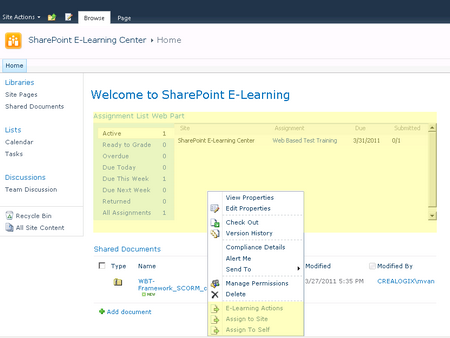
  • imageE-learning delivery and tracking application built as a Windows SharePoint Services 3.0 solution
  • Supports SCORM 1.2, SCORM 2004, and Class Server content, allowing users to store and manage this content in SharePoint document libraries
  • Supports learner-centric and instructor-led (assigned) workflows
  • Allows assignment, tracking and grading of both e-learning and non-e-learning content
  • Certified SCORM 2004 compliant

This means that Microsoft eLearning downloads made by administrators should be able to import them into the SLK LMS for internal training purposes, negating the need to use the online facilities at http://www.microsoftelearning.com.

Download the entire module from the Codeplex site at:
http://slk.codeplex.com/

(The lead coordinator for the project has a blog here about the work he’s doing.  He’s pretty active and last posted late April.  http://blog.salamandersoft.co.uk/)

imageMicrosoft IT deployed Microsoft BitLocker Administration and Monitoring (MBAM) which builds on BitLocker in Windows 7. MBAM offers an enterprise solution for BitLocker provisioning, monitoring, and key recovery. MBAM also helps to simplify BitLocker provisioning and deployments, improve compliance and reporting, and reduce support costs.

Published Date: April 13, 2012

VIDEO: http://technet.microsoft.com/en-us/edge/video/how-microsoft-it-deployed-bitlocker-administration-and-monitoring-at-microsoft

imageThe recordings of the presentations given at the Service Industries Virtual Summit have been posted for the Architecture, Engineering, and Construction space.

  • The State of the AEC Industry and How it Will Impact Your Business Over the Next Two Years
    Construction economists agree that things will get better, but when and what does that really mean. Optimists are hoping healthy markets will return in 2013, the pessimists are hoping for 2014 or even 2015. Join us to learn where opportunities exist today and what you can really expect over the next two years.
    – Steve Jones – Senior Director, McGraw-Hill Construction
  • Utilizing CFMA’s Construction Industry Annual Financial Survey to Make Strategic Decisions
    Each year, CFMA publishes its Construction Industry Annual Financial Survey, a highly anticipated tool construction CFOs and Controllers across the U.S. use to benchmark their companies against their peers. But, the Survey is so much more than that. Please join us as two CFMA veterans discuss the ins and outs of the Survey, its applications for construction finance industry professionals, and how to use the Survey to drive strategic decisions in your construction company.
    – Joe Burkett and Tom Emison, CFMA
  • It’s 2022: Where Does Your Company Stand?
    Being aware of current global trends will help leaders navigate the volatile market in the short-term. What about the long-term? It is critical that leaders focus on their long-term organizational vision amidst the chaotic markets that currently surround us. Join Rusty Sherwood to see why your organization can’t afford to be complacent between now and 2022. He’ll show you how to prepare your organization for a future of sustainable growth.
    – Mark ‘Rusty’ Sherwood – Senior Consultant, FMI
  • Forces of Change: Technology Deployment Is Gaining Momentum
    The pace of technological innovation in the capital projects industry is gaining momentum. Ray Topping, Director of Fiatech – a recognized global leader for advancement of technology and innovative practices in the capital projects industry, hosts candid conversations with the Alaska Native Rival Health Consortium and Infrastructure Corporation of America who tell their stories about technology deployment. Find out what major pain points are driving the need for new solutions; what was the forcing function to make panelists say "that’s enough;" and how did they apply technology to deliver the highest business value.
    – Ray Topping – Director, Fiatech
  • Microsoft Point of View on Architecture/Engineering/Construction
    AEC today is focused on Business Development, Documentation & Resources, Financial Control, and Projects/Job Sites.  From another dimension, motivating factors include Client Pull, a changing workforce, agile adaptation, and collaborative execution.  How do we best approach these challenges with today’s technology?
    – Ted Kempf, Services Industries Solutions Specialist

Register for these recordings here:
http://www.microsoft.com/en-us/dynamics/service-industries-virtual-summit.aspx

I’ve recently seen some discussion around the limitations in core usage for SQL Server 2012.  There is an explanation of what scenarios this applies to on MSDN which presents the following table: 

SQL Server Edition

Maximum Compute Capacity Used by a Single Instance (SQL Server Database Engine)

Maximum Compute Capacity Used by a Single Instance (AS, RS)

Enterprise Edition: Core-based Licensing 1

Operating system maximum

Operating system maximum

Developer

Operating system maximum

Operating system maximum

Evaluation

Operating system maximum

Operating system maximum

Business Intelligence

Limited to lesser of 4 Sockets or 16 cores

Operating system maximum

Standard

Limited to lesser of 4 Sockets or 16 cores

Limited to lesser of 4 Sockets or 16 cores

Web

Limited to lesser of 4 Sockets or 16 cores

Limited to lesser of 4 Sockets or 16 cores

Express

Limited to lesser of 1 Socket or 4 cores

Limited to lesser of 1 Socket or 4 cores

Express with Tools

Limited to lesser of 1 Socket or 4 cores

Limited to lesser of 1 Socket or 4 cores

Express with Advanced Services

Limited to lesser of 1 Socket or 4 cores

Limited to lesser of 1 Socket or 4 cores

1 Enterprise Edition with Server + Client Access License (CAL) based licensing is limited to a maximum of 20 cores per SQL Server instance.
(Taken from: http://msdn.microsoft.com/en-us/library/ms143760(v=sql.110).aspx)

You may also want to look at the Licensing guide found at http://www.microsoft.com/sqlserver/en/us/get-sql-server/licensing.aspx On page 16 it clearly states:

Software Upgrade Path for SQL Server 2008 R2
SQL Server 2008 R2 Upgrade to SQL Server 2012 Enterprise Edition processor licenses

Datacenter Edition processor licenses Enterprise Edition core licenses (No CPU limitation)
Enterprise Edition server licenses Enterprise Edition server licenses (subject to 20-core limit)
Standard Edition processor licenses Standard Edition core licenses
Standard Edition server licenses Standard Edition server licenses

This table shows upgrade options available to customers with SQL Server licenses. SQL Server 2012 use rights apply.

Posted by: kurtsh | May 7, 2012

INFO: Web Analytics for SharePoint Server 2010

imageDid you know that SharePoint Server 2010 has built in Web Analytics?

Check this out:

Introducing Web Analytics in SharePoint 2010

As part of SharePoint Server 2010, we have created a new set of features to help you collect, report, and analyze the usage and effectiveness of your SharePoint 2010 deployment – whether it’s used as an internal or external web portal, a collaboration tool or a document and records management repository. These features are part of the Web Analytics capabilities of SharePoint 2010.

This blog post is the first of several that will give you more insight into the enhanced Web Analytics features that we have built into SharePoint 2010. This first post will provide an overview of the new Web Analytics features and we’ll take a deep dive in to specific scenarios in future posts.

Read more about SharePoint 2010’s Web Analytics & Reporting here:
http://blogs.msdn.com/b/ecm/archive/2010/03/21/introducing-web-analytics-in-sharepoint-2010.aspx

Two new updates for our Macintosh products:

imageMicrosoft Office for Mac 2011 Service Pack 2 Now Available
The Office for Mac 2011 14.2 update includes the following improvements for all Microsoft Office for Mac 2011 applications:

  • Document Connection support for SkyDrive documents are improved: This update enables users to view and access documents that are located in the root level of a SkyDrive folder.
  • The drag-and-drop feature in Document Connection is added in Mac OS X 10.7 (Lion): This update adds a drag-and-drop feature for files in Document Connection in Mac OS X 10.7.
  • Upload functionality for SharePoint sites is improved: This update fixes an issue in which you receive the following error message when you upload a file to a SharePoint site: “Upload Failed You must sign in to save your changes to the server.”
  • The Italian grammar checker is improved: This update fixes an issue in which the Italian grammar checker does not check a complete document.
  • The German grammar checker is improved: This update fixes an issue in which the German grammar checker does not check a complete document when the document contains certain German sentences.

See KB article 2685940 for further details on improvements included in this update. NOTE: On April 19th, Microsoft withheld the Office for Mac 2011 SP2 update through Microsoft AutoUpdate while investigating issues that affected a small percentage of users. As of April 25th, Microsoft posted a 14.2.1 update that fixes a number of issues, including the Outlook for Mac database issue, and you can read more about the update in KB article 2705358.

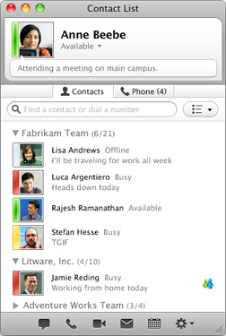
imageMicrosoft Lync for Mac 2011 14.0.2 Update Released
This update resolves the following issues for Microsoft Lync for Mac 2011:

  • Several issues with Cisco and Juniper VPN clients
  • An issue that causes an Active Directory lockout when the Kerberos protocol is used
  • Several issues that cause Lync for Mac 2011 to sign out unexpectedly or to crash

We recommend that all users install this update. Before you install the Lync 2011 14.0.2 update, make sure that you have Lync 2011 14.0.0 installed on your computer. Also, make sure that the computer is running Mac OS X v10.5.8, or a later version of the Mac OS X operating system. For further details, see KB article 2690036.

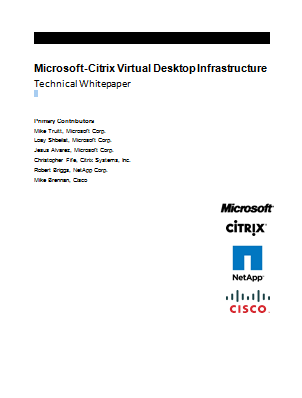
imageThis Microsoft-Citrix virtual desktop infrastructure (VDI) technical whitepaper describes the results of a study conducted at the Microsoft Enterprise Engineering Center (EEC) to evaluate the scalability of the Citrix XenDesktop 5.6 and Provisioning Services 6.1 (PVS) environment on Cisco UCS B-Series Blade Servers running Windows Server 2008 R2 Service Pack 1 (SP1) with the Microsoft Hyper-V role connected to a NetApp storage array.

« Newer Posts - Older Posts »

Categories