imageInterested in Hyper-V for Windows Server 2012?
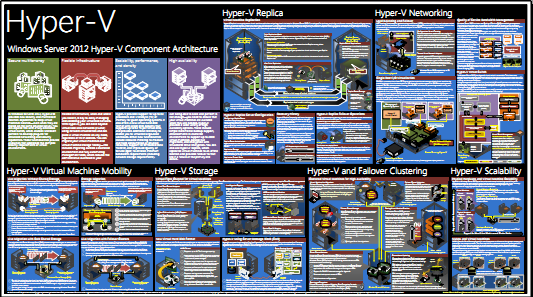
This poster provides a visual reference for understanding key Hyper-V technologies in Windows Server 2012.

This Hyper-V poster focuses on:

  • Hyper-V Replica
  • networking
  • virtual machine mobility (live migration)
  • storage
  • failover clustering
  • scalability

DOWNLOAD: Windows Server 2012 Hyper-V Component Architecture Poster
http://www.microsoft.com/en-us/download/details.aspx?id=29189

——————-

You can find previously published posters here:

Posted by: kurtsh | June 10, 2012

RELEASE: IIS Media Services 4.1 (32/64-bit)

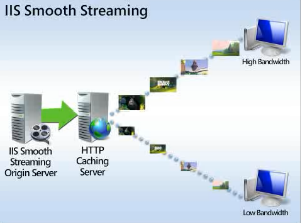
imageIIS Media Services 4.1 posted last week.  For a detailed breakdown of the improvements, check out http://www.iis.net/download/ServeMedia & even better, http://blogs.iis.net/akucer/archive/2011/11/09/iis-media-services-4-1-released.aspx.

Do you already have IIS Media Services 4.0 installed?
This download adds additional features and enhancements to your existing IIS Media Services 4.0 installation, including:

  • Performance enhancements for the On-Demand Smooth Streaming and Live Smooth Streaming modules.
  • Support for managing Live Smooth Streaming publishing points programatically by using IIS Smooth Streaming Management REST Services.

Is this a new installation of IIS Media Services?
This download installs the features for both IIS Media Services 4.0 and IIS Media Services 4.1 at the same time.
IIS Media Services is a set of media-related extensions for Internet Information Services (IIS) 7 and higher. IIS Media Services provides an integrated HTTP-based media delivery platform, and includes:

  • Smooth Streaming. Enables adaptive streaming of on-demand media files for Smooth Streaming-compatible clients, including Microsoft® Silverlight®.
  • Live Smooth Streaming. Enables adaptive streaming of live media broadcasts for Smooth Streaming-compatible clients and for Apple® mobile digital devices.
  • Bit Rate Throttling. Meters the speed at which media is delivered to a player.
  • Web Playlists. Enables secure sequencing and server-side control of media content.

You can also download additional IIS extensions related to IIS Media Services:

  • Advanced Logging, providing real-time client- and server-side logging.
  • Application Request Routing, providing HTTP proxying and caching.
  • Transform Manager, supporting media workflows, watch folders, and batch encoding/transmuxing of H.264-encoded content for Smooth Streaming and HTTP Live Streaming.

DOWNLOAD: IIS Media Services 4.1
64-bit: http://www.microsoft.com/en-us/download/details.aspx?id=27955
32-bit: http://www.microsoft.com/en-us/download/details.aspx?id=27956

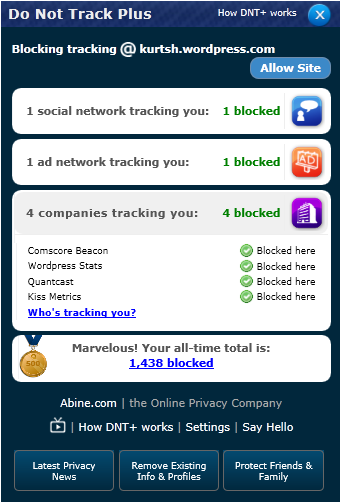
imageThis is one of the most exciting plug-ins for Internet Explorer I’ve seen in a while.  It actively blocks cookies and other tracking mechanisms used on web sites as you surf using Internet Explorer.

What make this plug in interesting is that it’s VERY stable, very thorough, and does a great job reporting what it’s blocked.  There are other tools like Ghostery that I’ve tried that were unfortunately unstable and in my case, extremely difficult to uninstall.  (Ghostery required that I boot into “safe mode” to get rid of it’s install files – unbelievable.)

It’s also educational, telling you what trackers are on each site, why advertising trackers are different from normal cookies that exist for convenience, and why trackers in many cases should be considered unacceptable.

http://www.abine.com/videos.php

Here’s a description of the product.  I encourage you to check it out.  It’s a great compliment to Internet Explorer 9’s tracking protection.

Do Not Track Plus
Stop companies from tracking you

Ad companies and social networks are tracking everything you do on the web. They know what sites you visit, when you visit them and how often you do…and they know who you are. DNT+ blocks the tracking so you can browse freely and safely.

  • Free tool that puts you back in control of your information
  • Best available blocking stops more than 600 trackers
  • Compatible with Mac or PC for Chrome, Firefox, Safari, and Internet Explorer
  • Automatically updates to catch new trackers

imageHave you seen this web site?

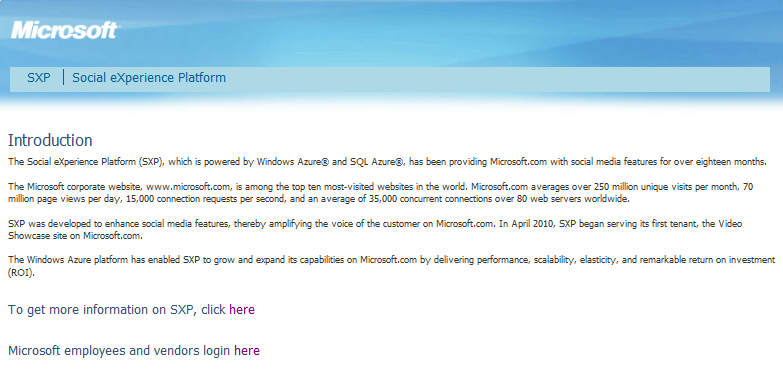
Wonder what it is?  It’s the Microsoft “Social eXperience Platform”.

The Social eXperience Platform (SXP), which is powered by Windows Azure® and SQL Azure®, has been providing Microsoft.com with social media features for over eighteen months.

The Microsoft corporate website, http://www.microsoft.com, is among the top ten most-visited websites in the world. Microsoft.com averages over 250 million unique visits per month, 70 million page views per day, 15,000 connection requests per second, and an average of 35,000 concurrent connections over 80 web servers worldwide.

SXP was developed to enhance social media features, thereby amplifying the voice of the customer on Microsoft.com. In April 2010, SXP began serving its first tenant, the Video Showcase site on Microsoft.com.

The Windows Azure platform has enabled SXP to grow and expand its capabilities on Microsoft.com by delivering performance, scalability, elasticity, and remarkable return on investment (ROI).

Check out the case study here for more information about this verrrry interesting site:

Posted by: kurtsh | June 5, 2012

BETA: Windows Server 2012 Release Candidate

imageIn case y’hadn’t heard, Windows Server 2012 Release Candidate hit the web.  It’s available as either a .ISO or a .VHD.

For an overview, a datasheet, videos of features, or a whitepaper about the Release Candidate, check this page out:

The Windows Server blog announced the release candidate and also provided links to previous posts about key features and capabilities of the product.

Posted by: kurtsh | June 5, 2012

DOWNLOAD: TechNet Magazine – April 2012

imageTechNet Magazine for April posted.  Go get it!

Taken from http://technet.microsoft.com/en-us/magazine/hh924781.aspx.

Just announced. Grab it!

Free ebook: Introducing Windows Server 2012

I’m excited to announce the most recent free ebook offered by Microsoft Press. Introducing Windows Server 2012, by Mitch Tulloch, is now ready for free download! Please see the links below to download one or all of the available formats.

clip_image001

FORMAT

LINK

PDF

Introducing Windows Server 2012 PDF ebook

EPUB

Introducing Windows Server 2012 EPUB ebook

MOBI

Introducing Windows Server 2012 MOBI ebook

If you prefer a hard copy of the book, you can order it here for $14.99.

Introducing Windows Server 2012 is 256 pages and includes 5 chapters loaded with insider information from the Windows Server Team.

Table of Contents

Chapter 1 The business need for Windows Server 2012
The rationale behind cloud computing Making the transition
Technical requirements for successful cloud computing
Four ways Windows Server 2012 delivers value for cloud computing Foundation for building your private cloud

Chapter 2 Foundation for building your private cloud
A complete virtualization platform
Increase scalability and performance Business continuity for virtualized workloads

Chapter 3 Highly available, easy-to-manage multi-server platform
Continuous availability
Cost efficiency
Management efficiency
Chapter 4 Deploy web applications on premises and in the cloud
Scalable and elastic web platform
Support for open standards
Chapter 5 Enabling the modern workstyle
Access virtually anywhere, from any device
Full Windows experience
Enhanced security and compliance

Full post here:
http://blogs.msdn.com/b/microsoft_press/archive/2012/06/04/free-ebook-introducing-windows-server-2012.aspx

I think I just saw my next laptop.

Super thin dual display ultrabook – with a second touch tablet display ON THE FRONT. Think Zenbook ultrabook with a touch screen on the other side of the display cover.  Core i7.

Take a look at the photos below.  Yes, this is the same laptop. WANT.

clip_image002 clip_image004

Interested in Windows Server 2012? Are you in Irvine?

Learn What’s Hot and New in Windows Server 2012!

The Windows Server 2012 Community Roadshow is coming to over 20 countries—and a location near you!

  • What’s hot and new in Windows Server 2012? Microsoft MVPs bring you all you need to know about Windows Server 2012.
  • Sponsored by Dell, Microsoft and GITCA. Join the industry experts at a Windows Server 2012 Community Roadshow that will keep you up to date and ahead of the pack!

A Microsoft Windows Server 2012 Community Roadshow event will show you how to

  • build your private cloud, offer private cloud services, or securely connect to public cloud services.
  • increase your efficiency, availability, and manageability.
  • leverage an open application and web platform for the datacenter and the cloud.
  • provide secure access to your personalized work environment from anywhere.

Target Audience

The primary audience for this event is IT Professionals and partners who are excited about the upcoming release of the Windows Server 2012 technology.

Dell is excited to support the launch of Windows Server 2012. Our focused strategic partnership with Microsoft and our deep knowledge of the Microsoft suite of applications enables smarter deployment of solutions using Dell hardware and services. Together, we give you the ability to modernize and grow your infrastructure over time to meet business objectives. Dell and Microsoft have engineered solutions that combine our best virtualization, system management and infrastructure capabilities to deliver strong workload performance and low total cost of ownership, including our joint virtualization and private cloud offerings. Dell’s pre-engineered vStart solutions are based on proven solutions and best practices from thousands of Dell and Microsoft integration, engineering and implementation projects. When paired with Dell’s implementation services they accelerate the journey to the cloud and provide a rapid time-to-value for virtualization and private cloud projects.

This event will showcase presentations and demos from Microsoft MVPs on the following topics

Manageability

  • Simplifies configuration processes
  • Improved management of multi-server environments
  • Role-centric dashboard and integrated console
  • Simplifies administration process of multi-server environments with Windows PowerShell 3.0

Virtualization

  • More secure multi-tenancy
  • Flexible infrastructure, when and where you need it
  • Scale, performance, and density
  • High availability

Storage and Availability

  • Reduces planned maintenance downtime
  • Addresses the causes of unplanned downtime
  • Increases availability for services and applications
  • Increases operational efficiency and lower costs

· Networking

  • Manage private clouds more efficiently
  • Link private clouds with public cloud services
  • Connect users more easily to IT resources

DATE:
June 8th, 2012

LOCATION:
Microsoft Irvine

EVENT REGISTRATION:
https://ws2012rocks.msregistration.com/abstract.aspx?id=c8ebefba-a627-4aef-8b51-ff1a9636d973&Eventid=140

“Office Web Apps” is in the Volume Licensing Service Center web site however it’s listed under “Office Professional Plus 2010”.

Here’s the steps to get it downloaded from the VLSC:

  1. Login to https://www.microsoft.com/licensing/servicecenter/
  2. Click through to Downloads – Office Professional Plus 2010
  3. Click “Download” link – select Operating System Type = 32-bit in the drop down list box.
    You should see your “Office Web Apps Setup Key” on this page however you must select OS = 32-bit or you won’t see the download. Yeah, I know.  Sigh.
  4. Click the button titled, “Continue Download”. The following should appear:
    Office Web Apps 2010 64Bit English (for SharePoint 2010), 200 MB, ISO

clip_image002

« Newer Posts - Older Posts »

Categories