Interested in Windows RT devices * x.509 certificate enrollment?

imageWindows RT devices run on ARM processor, which is different from a typical computer, but it does have a full version of the Windows® operating system. Windows RT devices cannot be Active Directory Domain Services (AD DS) domain members. Otherwise, a Windows RT device is no different than a typical Windows computer from certificate enrollment and certificate management perspective. In another words, when it comes to certificate enrollment and certificate management, Windows RT devices share the same story with typical Windows computers that are not joined to an AD DS domain.

Prior to Windows RT, a typical Windows computer, could have a certificate in both the computer context and user context. Certificates in the computer context are stored in the computer account profile, these certificates are organized into different certificate stores, (My store, Root store, and so on). Each user would also have its own certificate stores in the user profile (with certificate stores similar to those in the computer context). The Windows Store apps used on Windows 8 and Windows RT devices also have their own profile and  owner certificate stores.

This means that Windows 8 and Windows RT devices can place their certificates in the Local Machine/My certificate store, User/My certificate store, or an application specific My certificate store. Further, a Windows Store app could use certificates from the computer Root store for certificate validation (chain building). Also, if a Windows Store app has SharedUserCertificate capability, the App can use certificates from the user context My store.

Read more of the article to see the following implementation steps.

  1. Enroll for a computer or user certificate by using a Windows RT device
        1. Establish trust to the Certificate Enrollment Policy Web Services and Certificate Enrollment Web Services
        2. Enrollment for a certificate
        3. Configure certificate for auto renewal
        4. Test the renewal
  2. Getting certificate for a Windows Store App
Posted by: kurtsh | February 16, 2013

RELEASE: Microsoft Assessment & Planning Toolkit 8.0

[Taken from the MAP blog… pardon my blatent plagarism of our other blogs but I’m trying to catch up on 2 months of backlog here and I just plain don’t have the time]

I am pleased to announce the Microsoft Assessment and Planning (MAP) Toolkit 8.0 is now available for download.

In this version of the MAP Toolkit, there has been numerous improvements to improve overall usability, to help you accelerate your migration to Windows Server 2012, Windows 8, Windows Azure Virtual Machine, Office 2013, and Office 365.

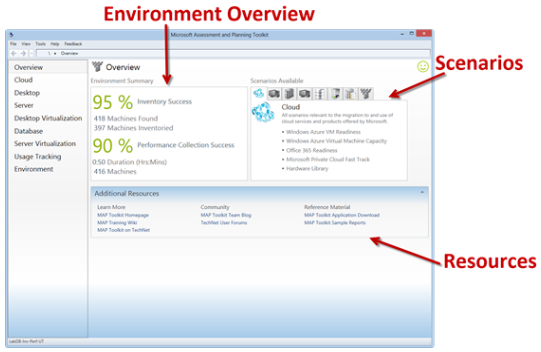
imageThe New MAP User Interface

One of the most obvious improvements is a completely new user interface. The Overview page of the new user interface serves as a homepage for the application and provides a basic overview of the data collected in your environment, descriptions of all the scenarios available in the product, and supporting resources. For a complete overview of the new user interface, see http://blogs.technet.com/b/mapblog/archive/2012/11/29/the-new-map-toolkit-user-interface.aspx.

Determine your Windows Server 2012 readiness

MAP 8.0 assesses the readiness of your IT infrastructure for a Windows Server 2012 deployment. This feature includes detailed and actionable recommendations indicating which machines meet Windows Server 2012 system requirements and which may need hardware updates. A comprehensive inventory of servers, operating systems, workloads, devices, and server roles is included to help in your planning efforts.

Determine your Windows 8 readiness

MAP 8.0 assesses the readiness of your IT environment for a Windows 8 deployment. This feature evaluates your existing hardware against the recommended system requirements for Windows 8. It provides recommendations detailing which machines meet the requirements and which may need hardware upgrades. 

Key benefits include:

  • Assessment report and summary proposal to help you understand the scope and benefits of a Windows 8 deployment
  • Inventory of desktop computers, deployed operating systems, and applications

Assess your environment for Office 2013 and Office 365

MAP 8.0 assesses readiness for Office 2013 and Office 365 and provides an in-depth assessment of client desktops for upgrading or migration. This feature also offers support for Office 365 features such as web apps, Exchange Online, SharePoint Online, or full Office 365 client support.

Migrate to Windows Azure Virtual Machines

MAP 8.0 performs a comprehensive assessment of Windows Server and Linux machines to determine feasibility of a migration to Windows Azure Virtual Machines. MAP then provides suggested changes to prepare targeted machines for migration. This feature helps you reduce the operating costs of hosting on-premise servers, as well as estimating the required size and monthly network and storage usage required to migrate on-premise Windows and Linux servers to Windows Azure Virtual Machines using actual data from the targeted environment.

Additional Resources

Posted by: kurtsh | February 16, 2013

INFO: Introducing content roadmaps for Office IT Pros

imageThe Office Resource Kit team is rolling out a series of content roadmaps for subject areas like Office 2013 deployment and compatibility. We designed these roadmaps with several goals in mind:

  • Give context and order to the articles so that you know what to read, when, and why.
  • Act as a central home page that articles will all point back to prominently, making it easier for you to find related content.
  • Highlight important subsections in articles that might be overlooked when you scan article titles in the table of contents.
  • Assemble pointers to relevant blog posts, downloads, scripts, and reference information in one place.

We’ve published our first two roadmaps:

…and would like to get your input. As you’ll see, the formats are slightly different. You’ll also notice that many articles now have a link back to a roadmap, along with a link to Office.com articles for end users who want related but less technical information.

We would love to get your feedback on the roadmaps. Let us know what you think by leaving a comment or sending us a note to feedork@microsoft.com.

[shamelessly stolen from the Office Res Kit blog]

Posted by: kurtsh | February 16, 2013

RELEASE: Lync for Macintosh 14.0.4

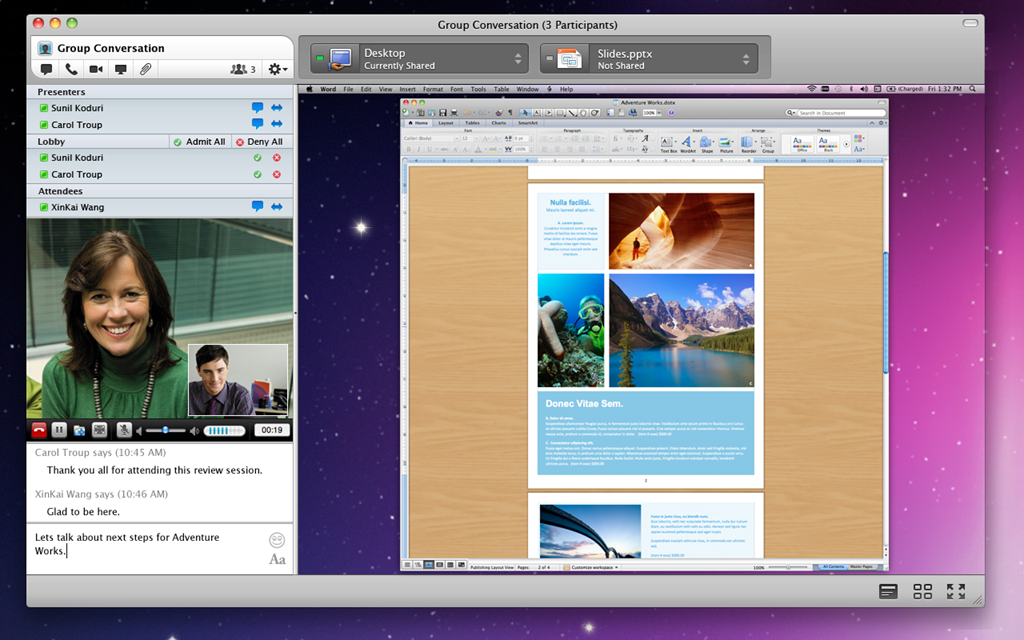
Unbeknownst to me, we apparently released Lync for Mac 14.0.4 earlier this month.   This update bring support for Mac OS X 10.8 Mountain Lion, sign in fixes and other minor updates. 

image

Improvements that this update provides

This update update provides call control functionality for Optimized for Lync USB audio devices. Microsoft and the OEMs that make USB audio devices have verified that this update qualifies for the Optimized for Lync logo on most devices.
For a list of Optimized for Lync devices that work best with the Lync for Mac 2011 client, please contact your preferred Lync device partner.  
A full list of qualified devices and device makers can be found on the following Microsoft website:  
Phones and devices qualified for Microsoft Lync

(http://optimizedfor.com)

Issues that the update fixes

The update fixes the following issues:

Details at http://support.microsoft.com/kb/2778095

RELEASE: Lync for Macintosh 14.0.4
http://www.microsoft.com/downloads/details.aspx?FamilyID=4429c8a7-1e22-44f2-b39c-4824292b1d25

clip_image001[5]UPDATE 2/21/13:
Due to factors beyond our control, the Century City store will no longer be having the Tomb Raider launch.  We apologize for the inconvenience.

——————-
Whaa?  Tomb Raider has a launch party?

Yup.  What does that tell you about this title?  That’s right.  Gonna be big.  Square Enix is putting together a big campaign for Tomb Raider because the developers, Crystal Dynamics (You know these guys.  They were the Soul Reaver guys and the original creators of many of the previous titles in the Tomb Raider series) didn’t just throw on a fresh coat of paint on the franchise… the redid the whole thing.  Brand new engine!  Vulnerability!  No guns! (Or fewer guns rather)  Heavy storyline!  Epic stuff.

Anyway, on Monday, March 4th at 10:00PM, the doors will open at the Microsoft Store in Century City/Los Angeles for another Midnight Madness launch for Square Enix’s highly anticipated series reboot, “Tomb Raider” for Xbox 360.

Microsoft Store Los Angeles
(Westfield Century City)

10250 Santa Monica Blvd
Los Angeles, CA 90067
Phone: (310) 228-3550

Don’t forget to pre-order your copy of Tomb Raider from the store (Requires a deposit of $10, which goes to the cost of the game when it’s available later that night) which will get you 1600 Microsoft Points!

…and there’ll be gifts for the first 50 people in line!

As usual, there will be a live gaming as well as food, drinks and giveaways care of a raffle for all people in line.  Pre-ordered games will be available at 12:01AM that night.

IGN’s 1 Hour Long Game Play Demo of Tomb Raider
Posted by: kurtsh | February 15, 2013

INFO: Accessories for your new Microsoft Surface Pro

imageHere’s a list of items that I’ve bought for my Surface Pro that you might want to consider getting as well:

imageOfficial Microsoft accessories:

Posted by: kurtsh | February 15, 2013

INFO: The Microsoft Wedge Mouse… great for Surface Pro!

imageHonestly, I hadn’t tried this mouse before.  This new “Wedge Mouse” of ours seems a little odd looking and frankly, not very ergonomic.  But with the release of the Surface Pro, I decided to live a little and give it a try when I was buying accessories.

Man, am I glad I did.  This thing is HELLA cool.

I’ve been reading our documentation on the device.  I was a little disappointed with the Microsoft Arc Touch Mouse in that it seemed to cramp my hand despite the fact that the arc in the unit was designed to provide some modicum of ergonomics.

Here’s what I see as valuable differentiators in this mouse:

  1. WORKS ON POLISHED SURFACES
    Have you ever used a mouse on a semi-reflective table (usually at a hotel) and discovered that it won’t track or move the mouse pointer correctly? It can’t be understated how well this mouse works on polished granite or other tables that used to not work with laser or camera-based optical mice.  Read more about it here:
    http://www.microsoft.com/hardware/en-us/bluetrack-technology
  2. SUPERLIGHT & PORTABLE
    This is a really small mouse with no cables and is almost undetectable in your pocket.  That’s what I’d liked about the Arc Touch mouse but it had one major drawback:  It has a BIG MAGNET on it which is a disaster if you have your wallet in your pocket. 
  3. AUTO-SHUT OFF
    The mouse shuts down after 30 seconds if you shutdown your PC.  No more replacing the battery just because you forgot to power it down.
  4. BLUETOOTH RELIABILITY
    This is the single best bluetooth mouse I’ve ever used.  The pairing with my Surface Pro was fast, the mouse is super-responsive, and most importantly… the connection is RELIABLE.  In my experience, bluetooth mice have the tendency to be unreliable, disconnecting frequently, going to sleep when you don’t want it to, causing all sorts of frustration while using it.  Not with the Wedge mouse.  This is very well designed.
  5. MOUSE & KEYBOARD CENTER 2.0 SOFTWARE COMPATIBILITY
    For configuration & per-application settings, Wedge mouse works with the free & incredibly useful “Mouse & Keyboard Center 2.0” software product from Microsoft.
    DOWNLOAD: http://www.microsoft.com/hardware/en-us/d/wedge-touch-mouse 
  6. NO CRAMPING
    Strangely, contrary to my original thinking, this thing doesn’t really cramp my hands.  I thought that because it was so small, it’d cause cramping over a long period of time but nope… it’s just fine.  Really interesting and I don’t know why.

If you want to pick one up, here’s the links:

Note:  The only difference between the Surface edition and the Standard edition is that the Surface edition’s sides use the same VaporMg casing metal of the Surface.  Functionally, they are otherwise identical.

Surface24WA friend posed the following question to me:

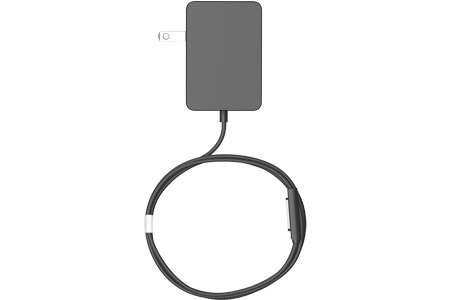
  • “Can I use the Surface RT power supply on a Surface Pro?”

SURFACE RT POWER SUPPLY ON SURFACE PRO
The answer was briefly addressed by the Surface team during their recent AMA on Reddit.  YES, you can although the charge will be much slower.

From my own observation, this makes complete sense:  They operate at the same voltage but charging will be much slower because the amperage of the RT power supply is almost half of what the Pro power supply is.  This matters to many primarily because of the disparity between the cost of these two accessories.

  • Surface RT has a 24W Power Supply (12V at 2A, $39.99 MSRP) – See photo above
  • Surface Pro is 44W Power Supply (12V at 3.6A, $79.00 MSRP) – See photo below

SURFACE PRO POWER SUPPLY ON SURFACE RT
Conversely, the Surface Pro Power Supply works on the Surface RT.  While I haven’t seen any specific documentation on this topic on the Surface support web site, I’ve snapped that onto my unit and it charges just fine.  Possibly even faster due to the higher amperage but I wouldn’t know since I’m not benchmarking the charge.

Ordering for either power supply is available at the Surface web site:
http://www.microsoft.com/Surface/en-US/accessories/home#power-supply

Surface48W

Posted by: kurtsh | February 15, 2013

INFO: Where are the drivers for Surface Pro?

imageUPDATE 5/2/13:
And there they are!  We just released a whole pack of drivers & firmware updates to enable IT professionals to update, provision, and image Surface Pro devices.

https://kurtsh.com/2013/05/01/release-surface-pro-driver-pack-for-windows-8/

—————–

ORIGINAL POST 2/15/13:
Where are the drivers for Surface Pro?  I was searching for the answer to this question myself and turned up the following on our support forums:

The basic answer is that Surface Pro firmware updates are delivered via Windows Update as described here:
http://www.microsoft.com/Surface/en-US/support/performance-and-maintenance/install-software-updates-for-surface

Other peripherals were pointed to here.  I haven’t tried these myself (I just rely on Windows Update) so caveat user:

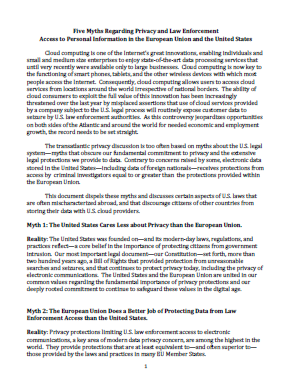
imageThe U.S. State Department released on 12/4/12 a document to help dispel common misperceptions about the Patriot Act.

The ability of cloud consumers to exploit the full value of cloud innovation has been increasingly threatened over the last year by misplaced assertions that use of cloud services provided by a company subject to the U.S. legal process will routinely expose customer data to seizure by U.S. law enforcement authorities. As this controversy jeopardizes opportunities on both sides of the Atlantic and around the world for needed economic and employment growth, the record needs to be set straight.

This document dispels these myths and discusses certain aspects of U.S. laws that are often mischaracterized abroad, and that discourage citizens of other countries from storing their data with U.S. cloud providers.

In addition, the State Department has created a useful webpage that compiles resources related to data privacy and law enforcement concerns. The page includes copies of several recent speeches made by U.S. officials and summary materials and links related to specific subject matters.

The page is: http://useu.usmission.gov/data_privacy.html.

« Newer Posts - Older Posts »

Categories