Xbox now has a new blog called Xbox Wire in which they’ve not only posted a ton of material around Xbox One but also posted an FAQ which answers a lot of questions that the media still hasn’t seem to catch on to.
It’s so new, it’s still being built out. It’s part of our move to the area labeled “Silicon Beach” by the city/county. We’ll be moving into the same location in which 5 other major label tenants will be, including Riot Games, TMZ, and a few others.
The address for your reference is:
Microsoft Los Angeles (coming this Fall 2013) 13031 W. Jefferson Boulevard, Suite 200 Los Angeles, California 90066 http://www.thereservela.com/
Parking is $10 (yay!) and it will have it’s own shared cafe – with good coffee I am told. It is also in proximity to a variety of good restaurants & snack places like The Counter, Pinkberry, and The Shack.
I don’t think I’m permitted to post photos of the inside yet so you’ll just have to come visit us when we open our doors in July/August 2013 when we do a big open house.
Comments Off on NEWS: Microsoft’s offices in Los Angeles… we’re moving!
We are pleased to announce that the SkyDrive Pro sync client is now available for Windows and can be downloaded here. This standalone client allows users of SharePoint 2013 and SharePoint Online in Office 365 to sync their personal SkyDrive Pro and any SharePoint 2013 or Office 365 team site document libraries to their local machine for access to important content on and offline. The SkyDrive Pro client can be installed standalone and does not require any version of Office to be installed. It can also be installed side-by-side with previous versions of Office (Office 2010, Office 2007).
Please note if you have one of the following versions of Office 2013 installed, then you already have the SkyDrive Pro sync client and do not need to install it separately:
Office 365 Pro Plus
Office 365 Small Business Premium
Office Professional Plus 2013
Once installed, simply click SYNC in the top right corner of your SkyDrive Pro library, SharePoint 2013 or Office 365 team site document library and you’ll be on your way to keep your files in sync across your machines. Happy syncing with SkyDrive Pro–cloud storage for employees!
Below is some messaging about the Xbox One announcement from our President of Microsoft’s Interactive Entertainment Business, Don Mattrick. Note carefully how each of these bullet points focus on something that, because of Microsoft’s great breadth of technology, relationships, & talent, other platforms simply can’t match.
With Xbox One, we are at the beginning of a new generation that forever changes how people across the world experience games, TV and entertainment in their living room and beyond. It’s a platform with power and functionality for the future that’s been designed from the ground up to be simple, instant and complete.
A New Generation of Games
At its core Xbox One is a system designed by gamers, for gamers. It’s a platform offering immense power and new opportunities through innovative technology, unique architecture and unparalleled cloud support. Xbox One will be home to the biggest blockbusters and best developers in the world.
Powered for the Future – The raw horsepower under Xbox One’s hood has been designed to empower story tellers to deliver a new generation of games that look and feel like nothing else. We’ve brought technology from across Microsoft to create an industry first, and married three distinct operating systems bringing a new level of power, performance and sophistication to the living room. Xbox One architecture provides deep and instant access to the hardware so creators have no limits in harnessing the power of our new console. The kernel of Windows provides consistent access to web-powered applications and experiences, and our third OS connects them together to create instant switching and multi-tasking for everything that Xbox One has to offer.
Connectedand Ready / New Generation of Xbox LIVE – For every Xbox One in the living room we put four more in the cloud to give customers unparalleled power, storage and access to the games and content they love. Everything is stored and saved in the cloud and instantly available any time, from any Xbox One and customers will never again have to wait for a system or software update. This new generation of Xbox Live is powered by more than 300,000 servers, will surround and power every experience, delivering persistent living worlds, lasting legacies and deep social connections. Your Xbox One will also act as a dedicated Game DVR to capture your magic moments and save them to the cloud, allowing you to edit and share amongst your friends.
Better with Kinect / Deep Skype Integration / Xbox Controller Made Better – Our revolutionary Kinect sensor has been re-designed for significantly greater precision, a wider field of view optimized for smaller spaces, and Skype fully integrated into the platform with full 1080p HD video chat. Every Xbox One will come with the new Kinect sensor, enabling more natural, intuitive voice and gesture controls across all forms of content. The Xbox controller has also undergone over 40 design innovations, making it the most comfortable and precise controller ever.
A New Generation of Entertainment
The Xbox One vision is about delivering a true all-in-one device that brings to life a new generation of games, TV and entertainment that’s built for the future with hardware, software and services that put people at the center. With Xbox One we will evolve the entertainment that you love and make it decidedly better.
More Intelligent TV – For the first time in console history, Xbox One will offer live TV viewing unlike anything you have ever experienced before. By simply saying “Xbox, watch TV” you will be able to enjoy the television shows you love or explore new programs by following what your friends are watching or what’s trending across Xbox Live. All the while your Xbox One will be learning, getting smarter the more you use it and offering custom tailored recommendations for new content to explore. It truly is more intelligent TV delivering personalized entertainment with you at the center.
Halo: The TV Series – Content is king and our new Xbox Entertainment Studios in Santa Monica, CA will be working to create original, interactive TV programming. The first major project from this team will be created in partnership with 343 Industries and one of the best storytellers of all time, Steven Spielberg. The Halo TV Series will bring the Halo universe to the television and create an exciting combination of storytelling and interactive innovation on Xbox One.
Landmark NFL Partnership – Microsoft and the NFL will deliver unique interactive NFL television experiences for Xbox One and leverage Microsoft devices and services to evolve the in-game, sideline experience for coaches, players and other personnel. For fans, the NFL on Xbox will provide the most complete way to enjoy live football by bringing the first fully-integrated fantasy football experience to the TV, exclusively through Xbox One.
Comments Off on NEWS: Introducing “Xbox One” – A New Generation Revealed
I just got a new Lenovo X1 Carbon Touch for my production machine. While I could probably roll just fine with my Surface Pro, I’ve decided to use my Surface Pro as a compliment to my X1 Carbon because I love them both sooooo much:
My X1 Carbon has a massive high resolution touch screen, 8GB RAM, & a 256GB hard drive.
My Surface Pro is a tablet with a Wacom digitizer on it for taking handwritten notes and it’s smaller, lighter, and much more ‘mobile’.
I use SkyDrive to ensure each has the exact same content on them (encrypted with BitLocker of course) and because they’re so light, I can actually carry BOTH everywhere.
DO NOT ATTEMPT TO REMOVE THE SCREEN FILM You may have noticed that this is a hazy protective film that covers the touch screen. This is by design however to many, it degrades the display quality compared to previous Lenovo displays. Some enterprising users have managed to actually peel off the film. “Lenovo has stated that removal of the screen film would void the warranty on the X1 screen at a minimum. Any machine that is denied warranty repair due the film being removed will not be repaired or replaced. You will be personally responsible for providing a replacement work machine.”
TARGUS ADAPTERS – POWER TIPS COMING It looks like the Targus consider for the Lenovo X1 Carbon Touch Power Adapter’s “tip” is called the “X9”. It may be available from Zone but it is not readily available from Targus at this time. http://www.zones.com/site/product/index.html?id=004083367
BIOS CONFIG = F1 During startup, press <Enter> to interrupt startup. Choose F1 to enter BIOS setting and this will allow you to do all the traditional changes to your machine. For instance, for folks that are really annoyed with the way they accidentally hit the Trackpad and prefer using the TrackPoint, choose Config, then Keyboard/Mouse. Disable the Trackpad in that submenu.
Windows Phone 8 was designed to operate completely without the need for a desktop. All firmware updates, software/app installations, and music downloads happen over either cellular or WiFi.
But what if I want to sync with my PC? If you’re running Windows 8 on your desktop, you have two options for syncing with your Windows Phone. One of which is the “Windows Phone app for Windows desktop”.
The Windows Phone app for Windows desktop makes it easy to:
Sync music, photos, movies, TV shows, and podcasts from your existing Apple iTunes library or your Windows Libraries to your Windows Phone 8.*
Automatically import pictures and videos you’ve taken with your phone to your PC.
See at a glance how much space you’re using for each type of content, so it’s easy to make sure you never run out of room on your phone.
Get your playlists on your phone.
Find songs that will work as ringtones and add them to your phone.
If you’re licensing & deploying System Center Configuration Manager 2012 CML… do you also need to license Windows Server CALs?
For answers to questions like this, read the Microsoft Software License Dependency Reference Guide!
Licensing Brief – Microsoft Software License Dependency Reference Guide
Summary
This brief provides Microsoft Volume Licensing program customers with a list of Microsoft software and the associated dependent Microsoft software licenses that are required to use that software. This is sometimes referred to as the “software stack.”
What’s New in this Brief
This brief replaces a previous version published in April 2012. Significant changes in this new version include updated references to Windows 8 and the addition of Microsoft Dynamics AX 2012.
For those of you that have to work for a living ;-)… we are broadcasting the live event, "XBOX: A New Generation Revealed" on May 21, 10am PDT on Xbox Live, Xbox.com or Spike TV!
Post Event Discussion with Major Nelson Larry Hyrb, Xbox Live’s Major Nelson, ishosting a special post-show panel at 3p ET/12n PT that you won’t want to miss. (Only available on Twitch.tv) http://mjr.mn/YWdQ98
Add XboxReveal to Calendar Major Nelson created two .ICS files for tomorrow’s events if you if you want to add them to your personal calendar http://mjr.mn/Z5T5YK
I bought a brand new Nokia Lumia 928 – just released this week – and there’s a number of reasons why this phone seems almost designed for me.
MUSIC CONCERTS & VEGAS. Some of you know I go to an occasional concert & sometimes go to Las Vegas. 🙂 Both are, frankly, places where photos are taken in low-light. If you know anything about the Nokia Lumia 928, that in itself should give you all the reasoning you need!
LOW-LIGHT VIDEO. The Nokia Lumia 928 is a phenomenal 8.7MP camera in it of itself for both ‘stills’ as well as ‘video’. It sports hardware-based optical image stabilization that prevents blurring during photos & ‘shaky cam’ syndrome during video clips. And to augment the LED flash, there’s an extra-killer Xenon flash on the unit, usually reserved for REAL cameras. But most importantly, the night time imaging with rapid movement is simply off the charts compared to anything else on the market, including my 8X.
Take a look at the following video that compares the Nokia Lumia 928’s low-light, fast motion video recording with some of the more popular competitors:
Nokia Lumia 928 takes on the Apple iPhone & the Samsung Galaxy S3
LOUD AUDIO RECORDING/PLAYBACK. Because I’m constantly using my smartphone as a speakerphone for business, having an amplified speaker is very important and they’ve done that right on the 928. This thing cranks sound, enough so that it is more than audible while driving & hearing ambient car noise around me.
Additionally, concerts with amplified music virtually always blow out the high end of the audio recording capabilities of a phone. Not with the Lumia 928 which has the ability to record high decibel music & audio, like that from concerts or stadiums for accurate, high quality, & enjoyable sounding recordings.
Nokia Lumia 928’s digital microphone provides distortion free recording in stadiums & concerts
STORAGE & APPS. Outside of that, the fact that it comes with 32GB is great leaving it plenty of room for media & most importantly, apps, which is something that I should address.
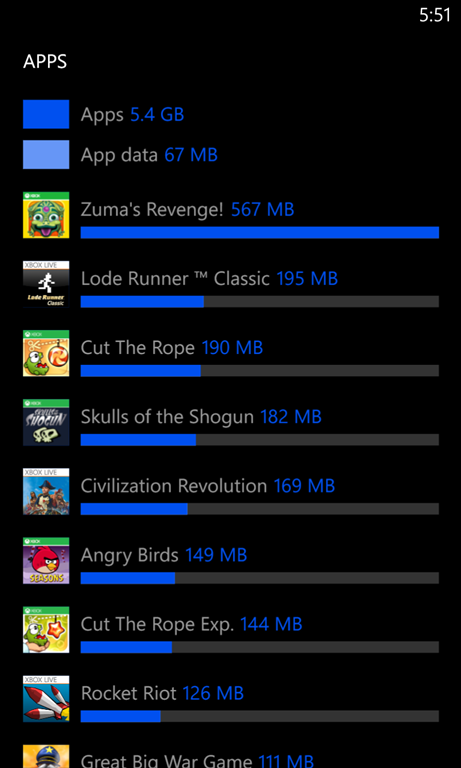
I never used to care about the exclusive Nokia apps until I stumbled upon a few unique & memorable apps that only Nokia has. One in particular is a favorite of mine called “Storage Check” which breaks down how your storage is being used. It shows storage consumed by photos, music, documents, email, etc. but it will also list out all your APPS and tell you how much space each is taking up. NO OTHER APP PROVIDES THIS & IT IS EXCLUSIVE TO NOKIA. *mind blown*
PRACTICAL DESIGN. I’ve really come to love the Qi Wireless Charging capability. You can’t really understand the convenience of not having to locate the charger cable… orient the jack correctly… and plug it into your phone to charge your phone until you’ve experienced the bliss of simply dropping your phone on a charging plate forgetting about it.
However, I’m not going to lie: I think the phone is frankly less attractive than other Windows Phones. It’s only available in a white (???) glossy finish and while both the back & the front glass are curved or “pillowed” out, it physically looks like a big ol’ blocky rectangle. It reminds one of a Volvo.
But like a Volvo, there’s a method to this design madness: Speaking from experience, I’ve compared other phones to the 928, and while the sides are flat & the back is slightly curved, this is very practical because it allows you to keep a firm grip on the phone.
If you’ve ever been concerned about maintaining a grip on your phone, the 928 will appeal to you because the surface area of contact between your palm/fingers & the phone’s side/back is really optimized… and while it’s not as elegant as some of our other designs, it really feels secure in your hand because of the glossy finish which delivers an additional level of friction & prevents slipping out of your palm.
 Xbox now has a new blog called Xbox Wire in which they’ve not only posted a ton of material around Xbox One but also posted an FAQ which answers a lot of questions that the media still hasn’t seem to catch on to.


 kurtsh


You must be logged in to post a comment.