Did you know Microsoft offers complete certification training courses online 100% FREE for over 28+ technologies?

…and many more shorter, 1 day courses like:

…and more!

Click here for the catalog:

Explore ways to use Azure AI tools to build cloud-native apps that elevate customer experiences and drive business growth.

Get the e-book Using AI to Build Intelligent Apps that Delight Customers to read how four enterprise companies are using Azure AI to deepen customer satisfaction, drive immediate business results, and position themselves for long-term success.

Read the e-book to:

  • See how to accelerate innovation by streamlining development and offering intelligent services that work across data types, environments, and skill levels.
  • Discover why intelligent apps are beloved by customers and why they outperform traditional apps in flexibility, scalability, and cost efficiency.
  • Explore case studies from Microsoft customers and see the Azure solutions they’re using to gain a competitive edge.

Download the eBook here:

Are you using Microsoft Defender for Office 365? Hopefully, you’re aware of the “Configuration Analyzer”.

Configuration analyzer in Microsoft Defender for Office 365 helps you find and fix security policies that are less secure than the recommended settings. It allows you to compare your current policies with the standard or strict preset policies, lets you apply recommendations to improve your security posture, and view historical changes to your policies. 

There are 3 new improvements made to the Configuration Analyzer:

New Recommendations:

  1. Safe links Policy: Create Custom safe links policy.
  2. Outlook: Configure External tag in Outlook.
  3. Anti Phishing Policy: Enable First contact safety tips.
  4. DKIM: Configure DKIM and SPF for your domains.
  5. Built-in Protection Policy: Remove Built-in protection exclusions.

New Flyout Experience:

  • Clicking on a recommendation will now open a flyout that has brief detail about why we are making the recommendation as well as targeted links to documentation to learn more about.

Exporting the Recommendations:

  • A new Export button should appear when you select one or multiple recommendations. Clicking on the Export button will download the selected recommendations as a CSV file which can be shared with your external partners who might not have access to your environment.

View the announcement post here:

Some folks have heard me use the generic term, “AI Czar”, as in an individual designated as the point of contact for knowledge, strategy & guidance around the use of artificial intelligence within a municipal entity.

Well, many organizations are taking this to a leadership level with a CxO title: The “Chief AI Officer”.

A quote for Jared Spataro, Microsoft’s Corporate VP of Modern Work & Business Applications:

In the midst of the #AI boom, a new leadership role is emerging: the rise of senior executives devoted to AI. This piece from The New York Times showcases Mayo Clinic‘s pioneering decision to appoint a Chief AI Officer, Dr. Bhavik Patel. Leading groundbreaking AI initiatives at Mayo Clinic, Patel is spearheading efforts to revolutionize healthcare. This move mirrors a trend seen across various sectors, with companies like Florida Blue and Accenture also appointing executives to spearhead AI endeavors.

From hospitals to law firms, the rise of #AILeadership positions signals a new era of innovation. As industries race to the potential of AI, executive roles such as Patel’s become crucial in navigating the transformative power of this technology. Dive into the full article to explore how companies worldwide are embracing AI leadership to shape the future of their respective industries.

Read the New York Times article Jared is referencing here:

Customers must migrate off the legacy Log Analytics agents (Microsoft Monitoring Agent (MMA), Operations Management Suite (OMS)) by August 31st, 2024 to remain supported.

Action required
Please be sure to plan appropriately to ensure you have ample time to complete the migration. All legacy agents need to migrated to Azure Monitor Agent (AMA) by August 31, 2024.

Resources to help you:

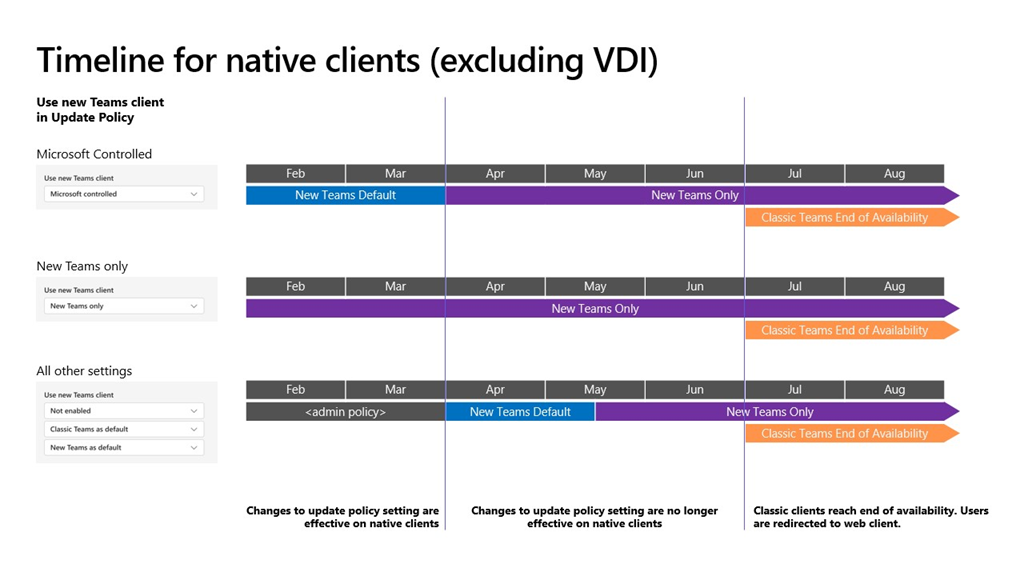
imageAs announced last year, after March 31, 2024, any classic Teams users that haven’t updated to new Teams will be automatically updated to new Teams. ‌It only takes one click to update to new Teams. Users can easily pick up and resume exactly where they left off in classic Teams and their chat messages, Teams and channels, and apps will appear in new Teams.

Note:

  • The classic Teams for Virtualized Desktop Infrastructure (VDI) will reach the end of availability on June 30, 2024.
  • Windows Server 2016 is not supported with new Teams. VDI Customers should plan to update to Windows Server 2019 (10.0.17763) or Windows Server 2022 (10.0.20348) or higher to get started on their new Teams journey. For details on VDI system requirements, visit this page.
  • The auto-update timeline of March 31, 2024, will not impact Microsoft Teams Rooms (MTR) and Surface Hub devices.
  • Users of the Teams Windows desktop app must have Windows 10 version 10.0.19041 or above to access new Teams. The prerequisites for new Teams can be found here.
  • If you are using the Admin-controlled policies for manage the New Teams client rollout, as outlined in Upgrade to the new Teams using policies, know that these policies will no longer be honored at the start of April, apart from your VDI users, and the following changes will happen:
    • New Teams will be installed and become the default client. The toggle to return to classic Teams will still be available if needed.
    • In mid-May, any users remaining on classic Teams will be switched to new Teams, and the toggle to return to classic Teams will no longer be available. We’ll attempt to uninstall classic Teams, currently after a period of 14 days.

Action:

  • With March 31, 2024, being less than two months away, we ask that if you are still on classic Teams, to update to new Teams as early as possible.
  • Know that starting from this month, any classic Teams users who haven’t updated to new Teams will see an informational banner to remind them about the timeline for the auto update.
  • We recently introduced the new Teams usage report in the Teams Admin Center. The client usage report gives customers an overview of the Teams desktop clients in use within their organization. It highlights platform (Windows or Mac), app version, and user type (preview or production) to help customers better understand the current state of their user’s desktop clients. Please try out the usage report tool.

Resources

Kijo Girardi, a security escalation engineer with Microsoft wrote a PowerShell script he calls, “MDE Tester”. MDE Tester tests the following features:

  • Microsoft Defender SmartScreen
  • Microsoft Defender Exploit Guard, Network Protection
  • Microsoft Defender for Endpoint, URL Indicators
  • Microsoft Defender for Endpoint, Web Content Filtering

Get his PowerShell script here:

Interested in Microsoft Surface or Windows AI?

Microsoft will be running an online event on March 21 entitled, “Advancing the new era of work with Copilot – Tune in here for the latest in scaling AI in your environment with Copilot, Windows, and Surface.”

The event is rumored to highlight the upcoming Surface Laptop 6 & Surface Pro 10, slated for later this month.

  • Date/Time:
    March 21, 2024
    9:00AM PT

Wish you could view recordings of the PL-300 Power BI Data Analyst instructor-led training?

ON DEMAND INSTRUCTOR-LED PL-300
Well, now you can with the On Demand Instructor-led Training Series.  There are several trainings available but this one, PL-300 Power BI Data Analyst, is quite remarkable, going through 13 modules – everything in the course.

Check it out below:

PL-300 LEARNING PATH:
This may be useful in concert with our written “Learning Path” training for PL-300 Power BI Data Analyst:

There are other learning paths for Power BI beyond the PL-300 training, such as:

Search for more at:
https://learn.microsoft.com/en-us/training/browse/?terms=power%20bi&resource_type=learning%20path

We’re honored to be named a Leader in the 2023 Gartner® Magic Quadrant™ for Endpoint Protection Platforms.

Learn how Microsoft Defender for Endpoint provides AI-powered, industry-leading detection and response across platforms, devices, and IoT:

« Newer Posts - Older Posts »

Categories