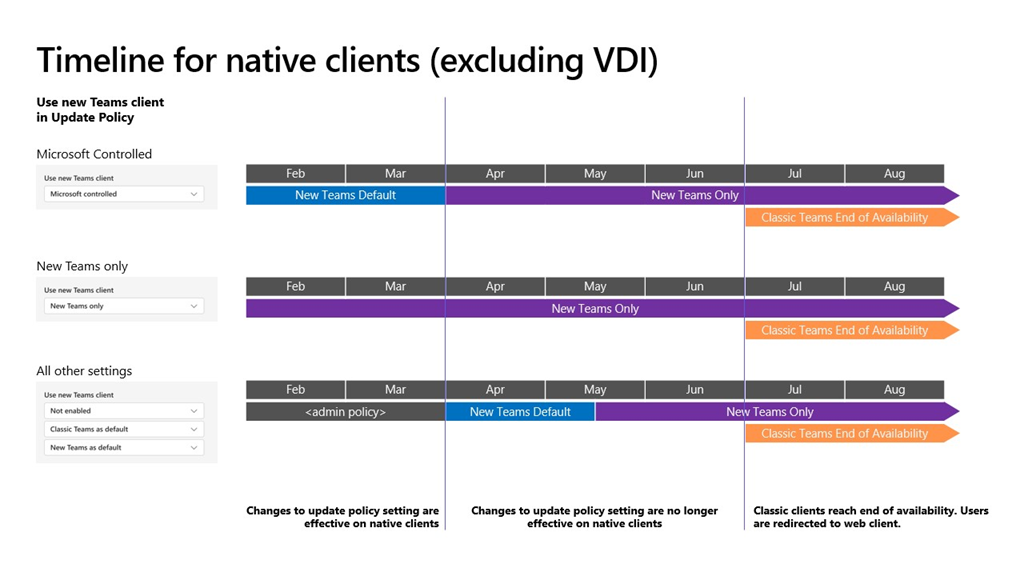
imageAs announced last year, after March 31, 2024, any classic Teams users that haven’t updated to new Teams will be automatically updated to new Teams. ‌It only takes one click to update to new Teams. Users can easily pick up and resume exactly where they left off in classic Teams and their chat messages, Teams and channels, and apps will appear in new Teams.

Note:

  • The classic Teams for Virtualized Desktop Infrastructure (VDI) will reach the end of availability on June 30, 2024.
  • Windows Server 2016 is not supported with new Teams. VDI Customers should plan to update to Windows Server 2019 (10.0.17763) or Windows Server 2022 (10.0.20348) or higher to get started on their new Teams journey. For details on VDI system requirements, visit this page.
  • The auto-update timeline of March 31, 2024, will not impact Microsoft Teams Rooms (MTR) and Surface Hub devices.
  • Users of the Teams Windows desktop app must have Windows 10 version 10.0.19041 or above to access new Teams. The prerequisites for new Teams can be found here.
  • If you are using the Admin-controlled policies for manage the New Teams client rollout, as outlined in Upgrade to the new Teams using policies, know that these policies will no longer be honored at the start of April, apart from your VDI users, and the following changes will happen:
    • New Teams will be installed and become the default client. The toggle to return to classic Teams will still be available if needed.
    • In mid-May, any users remaining on classic Teams will be switched to new Teams, and the toggle to return to classic Teams will no longer be available. We’ll attempt to uninstall classic Teams, currently after a period of 14 days.

Action:

  • With March 31, 2024, being less than two months away, we ask that if you are still on classic Teams, to update to new Teams as early as possible.
  • Know that starting from this month, any classic Teams users who haven’t updated to new Teams will see an informational banner to remind them about the timeline for the auto update.
  • We recently introduced the new Teams usage report in the Teams Admin Center. The client usage report gives customers an overview of the Teams desktop clients in use within their organization. It highlights platform (Windows or Mac), app version, and user type (preview or production) to help customers better understand the current state of their user’s desktop clients. Please try out the usage report tool.

Resources

Kijo Girardi, a security escalation engineer with Microsoft wrote a PowerShell script he calls, “MDE Tester”. MDE Tester tests the following features:

  • Microsoft Defender SmartScreen
  • Microsoft Defender Exploit Guard, Network Protection
  • Microsoft Defender for Endpoint, URL Indicators
  • Microsoft Defender for Endpoint, Web Content Filtering

Get his PowerShell script here:

Interested in Microsoft Surface or Windows AI?

Microsoft will be running an online event on March 21 entitled, “Advancing the new era of work with Copilot – Tune in here for the latest in scaling AI in your environment with Copilot, Windows, and Surface.”

The event is rumored to highlight the upcoming Surface Laptop 6 & Surface Pro 10, slated for later this month.

  • Date/Time:
    March 21, 2024
    9:00AM PT

Wish you could view recordings of the PL-300 Power BI Data Analyst instructor-led training?

ON DEMAND INSTRUCTOR-LED PL-300
Well, now you can with the On Demand Instructor-led Training Series.  There are several trainings available but this one, PL-300 Power BI Data Analyst, is quite remarkable, going through 13 modules – everything in the course.

Check it out below:

PL-300 LEARNING PATH:
This may be useful in concert with our written “Learning Path” training for PL-300 Power BI Data Analyst:

There are other learning paths for Power BI beyond the PL-300 training, such as:

Search for more at:
https://learn.microsoft.com/en-us/training/browse/?terms=power%20bi&resource_type=learning%20path

We’re honored to be named a Leader in the 2023 Gartner® Magic Quadrant™ for Endpoint Protection Platforms.

Learn how Microsoft Defender for Endpoint provides AI-powered, industry-leading detection and response across platforms, devices, and IoT:

Looking for training around Microsoft 365 Copilot? Your first step should be to download the Learning Pathway document which is a 3 page highly-hyperlinked guide to the available training & resources for people undertaking the adoption of Copilot for Microsoft 365:

The following are SELF-PACED LEARNING COURSES for Microsoft 365 Copilot:

The following are SELF-PACED LEARNING PATHS that contain multiple learning modules for Microsoft 365 Copilot:

Tech Accelerator for Copilot for Microsoft 365
We recorded 2 days of insights, demos, and deep dives on Copilot for Microsoft 365 in this event called the “Tech Accelerator for Copilot for Microsoft 365”. We had breakout sessions and live Q&A with Microsoft experts—all so you can learn more about how Copilot works, how you can prepare your tenant, strategies to help skill your users and drive adoption, and how you can measure and maximize the impact of Copilot for your organization.

Watch all the recordings at http://aka.ms/AccelerateCopilot. Here are the individual sessions:

7:00 a.m. PTIntroduction to Copilot for Microsoft 365
7:30 a.m. PTPrepare your organization for Copilot for Microsoft 365
8:00 a.m. PTDeploy Copilot for Microsoft 365: setup, admin controls, and more
8:30 a.m. PTHow to drive Copilot for Microsoft 365 usage and satisfaction
9:00 a.m. PTTips and tricks for IT pros deploying Copilot for Microsoft 365
9:30 a.m. PTGet your small business ready for Copilot for Microsoft 365
10:00 a.m. PTCopilot for Microsoft 365 AMA: Tech Accelerator edition (Day 1)
Day 1 Recordings
Start timeSession title
7:00 a.m. PTHow Copilot for Microsoft 365 works: A deep dive
7:30 a.m. PTBuilding user skills in the world of AI: Prompting fundamentals
8:00 a.m. PTMeasuring usage, adoption, and the impact of Microsoft Copilot
8:30 a.m. PTExtending Copilot: Building with Copilot Studio
9:00 a.m. PTExtending Copilot: Expanding knowledge with Graph connectors
9:30 a.m. PTCopilot for Microsoft 365 AMA: Tech Accelerator edition (Day 2)
Day 2 Recordings

Unified Support
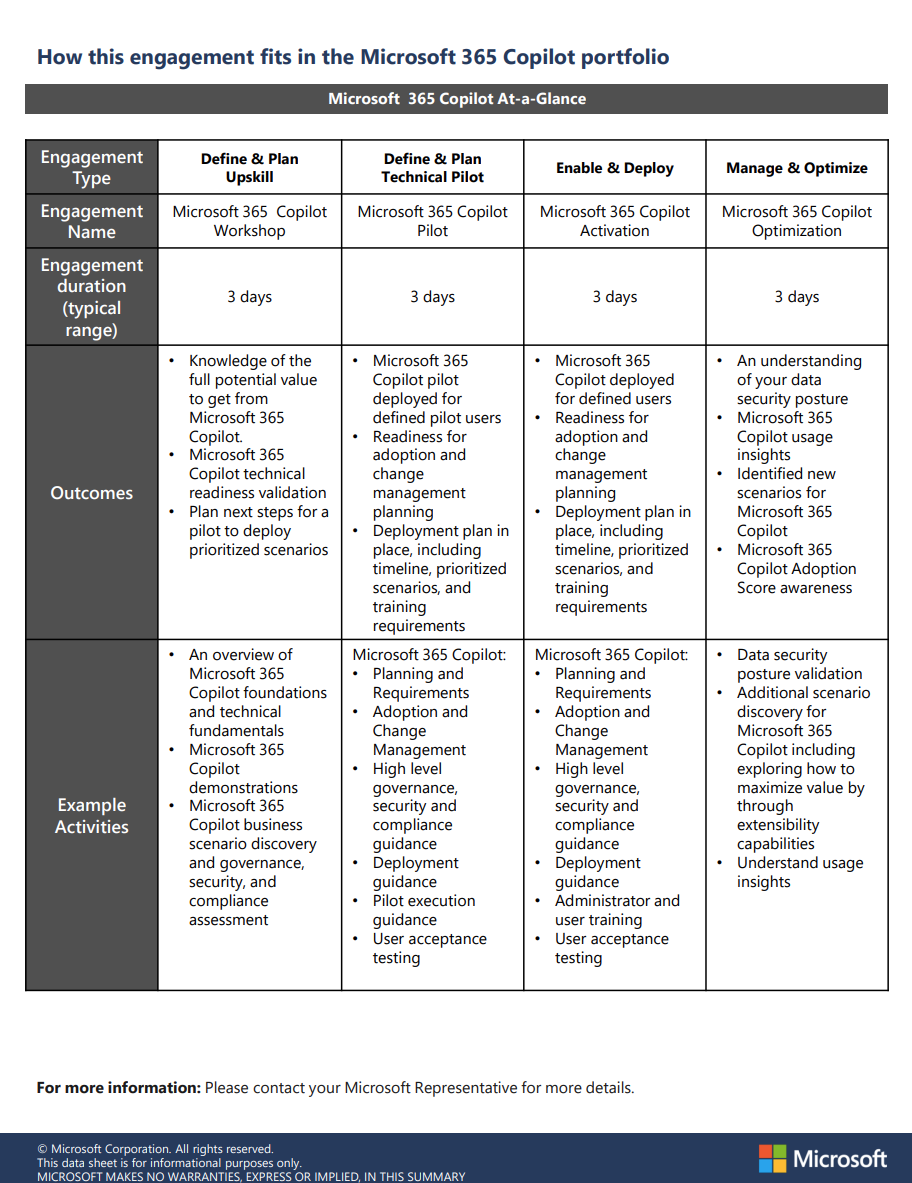
For folks with Unified Support contracts, there’s a lot of offerings available – each with different lengths & costs against your proactive credit allocation:

  • Microsoft 365 Copilot Activation (3 day)
  • Microsoft 365 Copilot Pilot (3 day)
  • Microsoft 365 Copilot Optimization (3 day)
  • Copilot for Microsoft 365 Extensibility Activation (3-5 day)
  • Copilot for Microsoft 365 Extensibility Pilot (2-3 day)
  • Copilot for Microsoft 365 Extensibility Workshop (1-2 day)
  • Microsoft 365 Copilot for Adoption Acceleration (3-5 day)
  • Microsoft 365 Copilot Workshop (3 day)
  • WorkshopPLUS – Power Platform – Copilot Studio (1 day)

Contact your Unified Support “Customer Success Account Manager” for more details.

Adopting Copilot for Microsoft 365
At a higher level, get all the details on Copilot for Microsoft 365, its functionality, and the Microsoft goal of implementing AI responsibly and ethically. Learn the purpose and functionalities of Copilot for Microsoft 365, the working principles behind it, and its core components.
https://learn.microsoft.com/en-us/collections/0d6so53jrrgpq

Microsoft is sponsoring a 3-day online conference for Postgres, including “Azure Database for Postgres“.

What is POSETTE (formerly Citus Con)—and why did we create it?
If you’re learning about POSETTE: An Event for Postgres for the first time, the key things to know are:

  • it is a free & virtual developer event
  • in its 3rd year
  • with 4 different & unique livestreams will happen Jun 11-13, 2024
  • livestreams will also have a live, interactive chat where you can connect with speakers and attendees
  • all talks made available on YouTube after the event is over, so you can watch at your convenience later at 2X speed even
  • event is brought to you with 🧡 by the Postgres team at Microsoft
  • the CFP is currently open for talk proposals until Apr 07
  • there is of course a Code of Conduct for POSETTE
  • formerly called Citus Con
  • you can stay connected by following @PosetteConf on X/TwitterMastodon, or Threads—or popping into the #posetteconf channel on the Microsoft Open Source Discord

Read the full announcement of the event here:

Date/Time:
Jun 11-13, 2024

Registration:
TBD at https://aka.ms/posette

Lukas Beran is a Senior Cybersecurity Consultant and part of Microsoft’s famed Diagnostics & Recovery Team (DART) now renamed Microsoft Incident Response Team (MIRT)  These are Microsoft’s cybersecurity shocktroopers that swoop in when you call 911 & need cybersecurity help now, now, now. (Breach, ransomware, DDOS, etc.)

His blog is loaded with great advice but one thing he’s written about recently that everyone could use some help with is break glass accounts for Entra ID.

Do you have a break glass account in Entra ID?  If not, read on:

When you start tightening the requirements for access to your corporate cloud, it can be easy to accidentally lock yourself out and cut yourself off from access to the admin interface.

Alternatively, some part of Microsoft Entra ID may fail. For example, there have been a couple of times in the past where multi-factor authentication in Microsoft Entra ID has had a failure and you couldn’t authenticate.

The above are the primary reasons why you should have break-glass accounts (or also known as emergency access accounts) in your environment. Break-glass accounts are special accounts with the highest privileges that are used for emergency access when standard options and methods are not available. Like just the two reasons mentioned above.

Break-glass accounts should be exempted from all restrictions, i.e. typically from all conditional access policies. They will not require MFA, they will not require compliant devices, there will be no restrictions on them at all.

Read the article here:

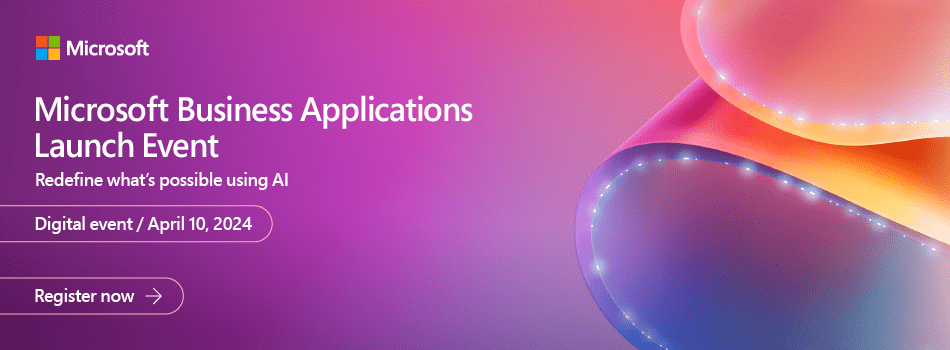
Registration is now open for the Microsoft Business Applications Launch event which kicks off at 9:00AM PST on Wednesday, April 10th, 2024.

Join Microsoft product leaders and engineers for an in-depth look at the latest features in Microsoft Dynamics 365 and Microsoft Power Platform. Learn how advances in AI and Microsoft Copilot can help you connect teams, processes, and data, and respond to changing business needs with greater agility. We’ll share insights and demonstrate how 2024 release wave 1 updates and advancements will help you:

  • Streamline business processes, automate repetitive tasks, and unlock creativity using the power of Copilot and role-specific insights and actions.
  • Unify customer data to optimize customer journeys with generative AI and foster collaboration between sales and marketing teams.
  • Strengthen governance with upgraded tools and features.
  • Accelerate low-code development  using natural language and streamlined tools.

Plus, you can get answers to your questions during our live Q&A chat!

In-Depth Training for Developers

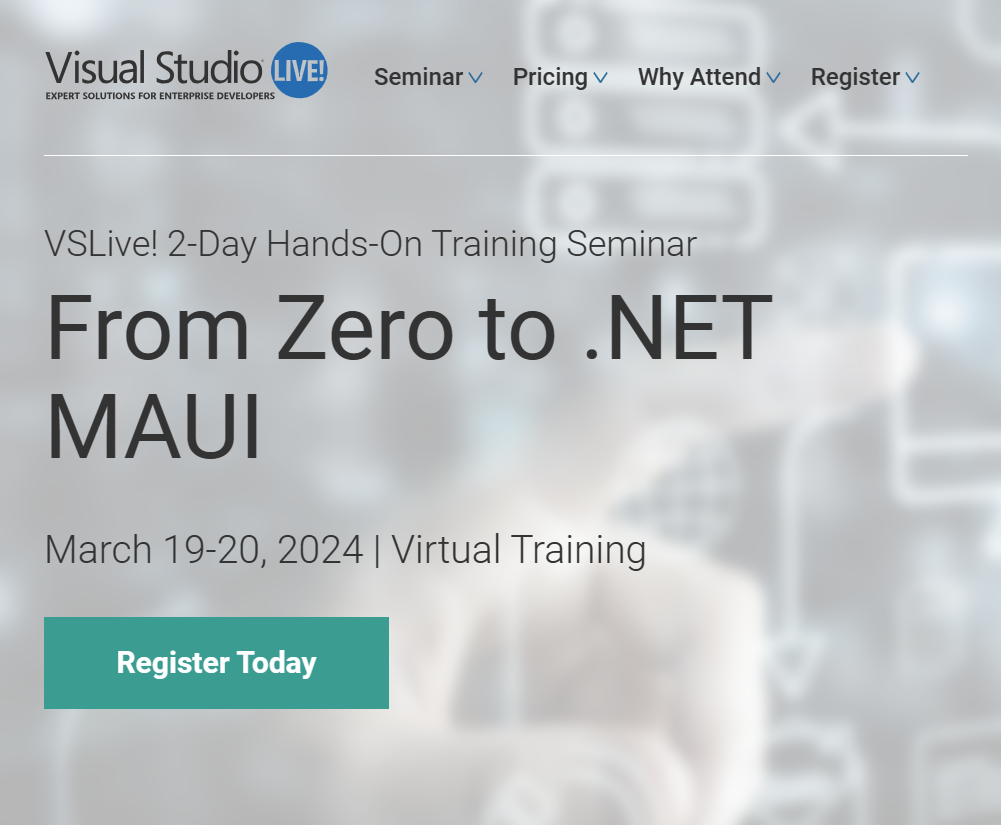
Looking for intense hands-on developer training to help you take your dev career to a new level? VSLive! Training Seminars take our world-class education to you in an intimate virtual setting with an industry expert as your guide. Keep up-to-date on some of the hottest trends in the developer world to drive your career forward. These engaging and high-impact training seminars provide in-depth education and knowledge-share, networking with fellow peers, and one-on-one interaction with a skilled instructor to take what you have learned back to your office.

Who Should Attend?

Whether you’re an aspiring developer or a seasoned pro, this hands-on seminar caters to individuals looking to build business applications using XAML and .NET MAUI effectively. If you are a C# Windows Forms developer or a WPF developer who wants to learn to use XAML in .NET MAUI applications, this is the course for you. If you are a development manager or a QA person who works with developers creating XAML applications, after attending this course you will be better equipped to work with those developers.

Date/Time:
March 19-20, 2024 | Virtual Training

Registration:
Main page: https://vslive.com/events/training-seminars/2024/mar19/home.aspx
Registration site: https://na.eventscloud.com/ereg/index.php?eventid=779866
($1400 student registration fee until March 8th)

« Newer Posts - Older Posts »

Categories