imageSQL Server professionals, save the dates! We have two fast-paced, demo filled days of training, live and online coming up October 16 and 18.

Administering SQL Server 2012 Jump Start

This one-day live event focuses on security, data management, and disaster recovery/high availability and its implications for the configuration of the enterprise. The demos will show what you want to know about storage design and capacity configuration, security configuration, optimization of the instance, and automation.

This Jump Start prepares you for the Implementing a Data Warehouse with SQL Server Jump Start on October 18, and if you are pursuing a MCSA: SQL Server certification, it will help you prepare for Exam 70-462

Date: October 16, 2013
Time: 9:00am – 5:00pm
Where: Live, online virtual classroom
Cost: Free!

Register now

Implementing a Data Warehouse with SQL Server Jump Start

Take this Jump Start to expand your understanding of SQL Server 2012 data warehousing concepts and implementation. This one-day live event focuses on the design of Dimensions to support BI in the organization, the implementation of Extract, Transform, and Load (ETL) processes, and the implementation of enterprise-level master data and data quality. If you’re interested in the MCSA certification, this Jump Start will help you prepare for Exam 70-463

Date: October 18, 2013
Time: 9:00am – 5:00pm
Where: Live, online virtual classroom
Cost: Free!

Register now

————————-

Taken from:
http://borntolearn.mslearn.net/events/b/weblog/archive/2013/09/27/free-sql-training-administering-sql-server-2012-and-implementing-a-data-warehouse-with-sql.aspx#fbid=8X_LeVIXNv3

A friend of mine & I got to talking the other day about the pros & cons of NFC relative to QR codes.  The fact of the matter is they both accomplish similar goals but while QR codes are free & require no hardware, NFC are more costly but they are eerily more attractive to use due to their convenience, accuracy, and the fundamental lack of effort it requires on the part of the recipient.

So let’s start at the beginning… because there’s a bunch of folks reading this that are already totally confused.

WHAT IS NFC?
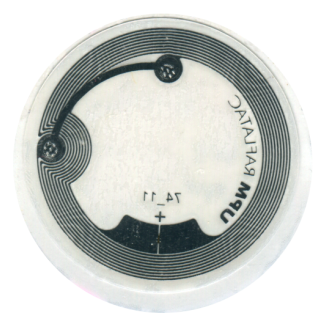
NFC stands for Near Field Communications.  The purpose of the technology is to allow people to embed around 1KB of information in small, cheap, paper-thin memory chip-laden electronics known as “NFC tags” that can be read/written using a “NFC reader” – the technology for which is typically embedded within a smartphone.

imageNFC tags are typically embedded within small quarter-sized stickers, purchasable on Amazon or any retailer for as little as $1.  They can be programmed with most smartphones or purchasable desktop NFC readers and can store usually 1KB-8KB worth of data, depending on the NFC tag type.  (The vast majority are 1KB)

WHAT MIGHT THEY BE GOOD FOR?
Here’s a few interesting things you can do with NFC tags:

  • Embedded your vCard in them and place them on your business cards
  • Store your voice in them for quick messages for people
  • Command the receiving device to “check in” to Four Square at the current location
  • Instruct the receiving phone to send a SMS text message to someone
  • Send the phone used to a web site for a particular product
  • Start a specific music playlist
  • Start installing a specific application for the recipient’s phone
  • Follow a particular user/company on Twitter
  • Like a particular company on Facebook

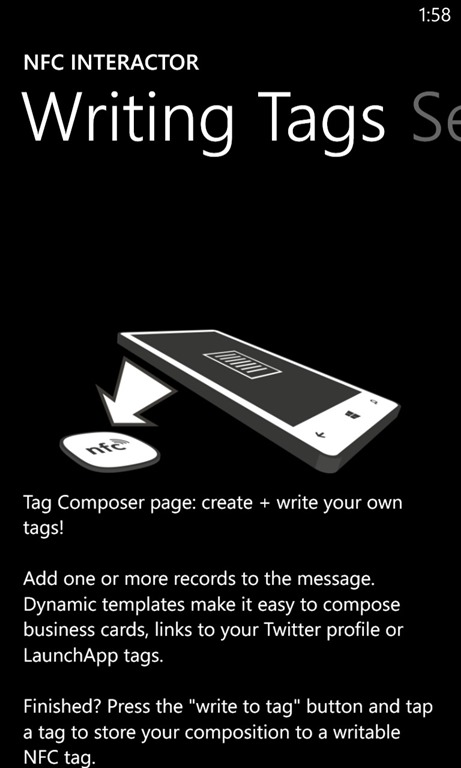
wp_ss_20131004_0001HOW DO I GET STARTED FOR WINDOWS PHONE?
It’s pretty simple.  Just make sure your phone supports NFC and install a NFC application.  If you have the Nokia Lumia 920, 925, 928 or the HTC 8X, you’re all set.  Just download a program from the Windows Phone Store like below:

Nokia also has a free NFC Writer available for download through the Nokia store for Nokia Lumia users called “Nokia NFC Writer”.  It is very user friendly & a very complete tool to start with although not as customizable as NFC Interactor.

WHERE DO I GET NFC TAGS?
You basically buy them from Amazon or any number of places that sell them.  They generally cost around $2-$3 each if not purchased in large quantities.  Here’s one of my favorites:

  • 5-Pack NFC sticker/ NFC tags Programmable Near Field Communication Tags for NOKIA NFC Lumia 920,820, 720, 620 and All Other NFC Enabled Phones
    5-Pack NFC sticker/ NFC tags Programmable Near Field Communication Tags for NOKIA NFC Lumia 920,820, 720, 620 and All Other NFC Enabled Phones
    NFC Chip Type: FM11RF08 (compatiable Philips NXP)/ Mifare S50 / Mifare S70) Memory Capacity: 1K EEPROM/ 8k Erasable:> 100,000 times) support NOKIA Lumia 920/820/720/620 and all other NFC Windows Phone can work http://www.amazon.com/5-Pack-sticker-Programmable-Communication-Enabled/dp/B00E3PSM3K/

IMPORTANT WARNING REGARDING WINDOWS PHONES & NFC TAGS:
The thing to remember is that the NFC tags you purchase for Windows Phone 8 need to be pre-formatted in a format called “NDEF” to work with any Windows Phone.  Usually the manufacturer will explicitly tell you that their tags will work with Windows Phone or they’ll say they’re NDEF pre-formatted.  (Note: This applies to Android-based & Symbian-based devices as well) 

This is an important point because many outlets sell unformatted NFC tags which can be written by desktop computers using low level instructions without preformatting – but not smart phones.  If they aren’t preformatted, you’ll need to use a Windows-based desktop/laptop to write the NFC tag.

Continued in the next post: 
Windows 7/8 & NFC programming & usage…

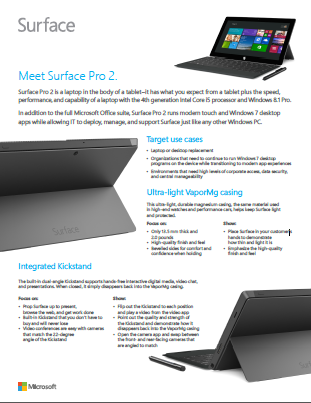
imageSurface Public Website: http://www.surface.com/
The public Surface website has all available product, accessories, and service details. It also details the list of current available markets and the retailers for Microsoft product, accessories, and services.

Direct Order Website: http://www.surface.com/commercialorder
This site provides Enterprise customers with the opportunity to bulk order Surface devices & peripherals in volume with the added benefit of being able to enroll in a special 3 year, Enterprise-only warranty.

Warranty Documentation and Service Requests: https://myservice.surface.com/ 
Frequently Asked Questions that cover product, availability, sales guidance, support, and services topics.

imageDescription

You need to have a Lync account to use this app. Also, some functionality might require an update to Lync Server or might not be available to all users. If you’re not sure about your account status, please contact your IT department.

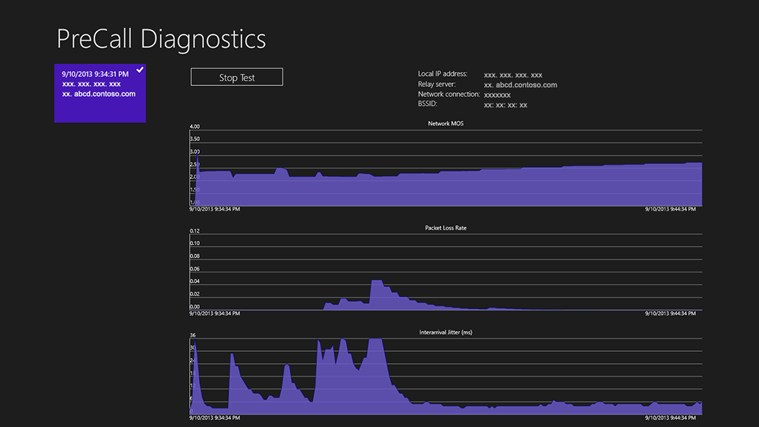
The Pre Call Diagnostic Tool (PCD) is a client-based application that allows a user to see how the current state of the network might impact the media quality in an upcoming call. PCD shows a graphical view of your network metrics – Network MOS, Packet Loss and Interarrival Jitter.

Features

  • About to get on an important call? Run a quick test in On Demand mode to make sure it will go smoothly.
  • Run a test in On demand mode to look at your network’s performance over extended periods of time.
  • Diagnose trends with a view of historical test runs
  • Having trouble signing in to Lync? PCD’s Signin flyout can help you figure out where the issue is.

Grab the app here!

image

Posted by: kurtsh | October 3, 2013

RELEASE: PowerBI for Windows 8 mobile app

clip_image002Stay connected to your favorite Office 365 based reports from wherever you are through a connected BI experience provided by the Microsoft’s Power BI for Windows app.

The Power BI mobile app allows you to view and stay connected to multiple live reports from Office 365 from your Windows tablet. Tag your favorite reports in the Power BI Site in Office 365 and have them appear in the mobile app or browse and discover new Office 365 reports from your tablet. Explore reports with the touch optimized experience and quickly share insights with colleagues.

Please note that in order to use your own reports the Power BI for Windows mobile app will require a Microsoft Power BI for Office 365 account. To find out more please visit www.powerbi.com.

Features:

  • Stay connected to critical live Office 365 based reports from your tablet.
  • Use Windows sharing to quickly share Office 365 based reports with your colleagues.
  • Quickly tag reports as favorites to access them later with one tap.
  • Browse your Office 365 based reports to easily find all your reports in the cloud.
  • Explore your live reports by filtering, sorting, and highlighting interactive content.

Grab the app for free from the Windows Store today!

image

Posted by: kurtsh | October 2, 2013

NEWS: Visual Studio 2013 Pricing Released

The pricing for Visual Studio 2013 hit the web site.  In a nutshell:

  • Upgrading from Visual Studio 2012 Professional to Visual Studio 2013 Professional: $99 (November 2013 – January 2014; after it’s $299)
  • Visual Studio 2013 Professional: $499
  • Visual Studio 2013 Professional with MSDN: $799
  • Visual Studio 2013 Premium with MSDN: $2,569
  • Visual Studio 2013 Ultimate with MSDN: $4,249
imagePricing and Licensing

In addition to all of the new and exciting capabilities detailed above, we are pleased to offer Visual Studio 2013 at Visual Studio 2012 pricing. Also, MSDN subscribers gained new benefits at no additional cost since the release of Visual Studio 2012, including dev and test use rights for Microsoft’s latest releases such as Windows 8.1 and Windows Server 2012 R2, monetary credits to spend on Windows Azure services, discounted rates for Windows Azure Dev/Test scenarios and developer accounts for the Windows Store, Windows Phone Store, and an Office 365 Developer subscription.

Buying Visual Studio with an MSDN Subscription is the most popular way to purchase Visual Studio and gain access to the most comprehensive collection of software, services, and benefits for targeting Microsoft platforms. Active MSDN Subscribers will have the earliest access to the final release of Visual Studio 2013 in mid-October. Visual Studio 2013 with MSDN will be available through Volume Licensing on November 1st, and from retail resellers soon after; however, you can purchase Visual Studio 2012 with MSDN today and receive Visual Studio 2013 upon its release.

As the entry-level professional product, Visual Studio Professional is the mainstay tool of choice for many developers around the world. With these developers in mind, we created a special, limited-time offer through the Microsoft Store for those who purchased Visual Studio Professional 2012 at retail to upgrade to Visual Studio Professional 2013 for only US$99 (pricing varies by region). For more information, see Visual Studio on the Microsoft Store in early November. After this offer expires on January 31, 2014, Visual Studio Professional 2013 Upgrade will be available from the Microsoft Store and through resellers at the estimated retail price of US$299. The estimated retail price for Visual Studio Professional 2013 is US$499.

Lastly, with the release of Visual Studio 2013, agile project planning capabilities are now more accessible for project managers with Backlog Management and Sprint Planning capabilities available for Team Foundation Server 2013 Client Access License (TFS CAL) customers at no additional cost.

Read more here:
http://www.microsoft.com/visualstudio/eng/visual-studio-2013

Read article from Visual Studio Magazine here:
http://visualstudiomagazine.com/articles/2013/09/30/microsoft-announces-vs-2013-pricing.aspx

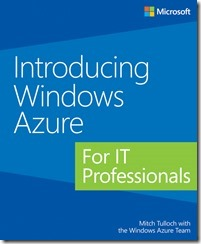
We just released a doozy of an eBook called “Introducing Windows Azure for IT Professionals” that covers how to use Windows Azure “Infrastructure as a Service”.  Or in English – how to set up full Virtual Machines in Microsoft’s datacenters through a web browser and run your own instances of Windows Server 2008, 2008 R2, 2012, and 2012 R2… or if you prefer a number of a Linux variants!  Set up your own virtual network, your own Active Directory, open your own ports, and provide your own virtual lab in Microsoft’s “cloud”!

imageWe are happy to announce a new free ebook – Introducing Windows Azure for IT Professionals by Mitch Tulloch with the Windows Azure Team!

Whether you’re new to the Windows Azure platform or are already using it in your business, this book has something that should interest you. Most Windows Azure services are described in some detail, with screenshots used to demonstrate some of the multitude of capabilities of the platform. And for the experienced we have lots of under-the-hood insights and expert tips written by Microsoft insiders who develop, test, and use the Windows Azure platform.

The PDF is available to download today. The Mobi and ePub files will be available through this post soon. I’ll update those links as soon as I have them.

imageICYMI, the Microsoft Management Summit has officially been merged into Microsoft TechEd 2014. And one conference shall rule them all. 

The net net is that the agendas of TechEd & MMS were so closely aligned they basically decided to combine the efforts (and likely the funding) into a single larger event.  Brad Anderson explicitly stated that this was not a “cost cutting” exercise, and given what I know to date, I believe this statement.

Here’s the full explanation:

Please keep in mind the other conferences being run as well, which I will link to later when I get the chance.

Microsoft just posted as America’s #1 most inspiring company according to Forbes.com.

imageMicrosoft, the 38-year-old Redwood, Wash.-based software giant, returned to the No. 1 spot after a two-year hiatus. In 2011 and 2012 Apple landed at the top of the heap—while Microsoft held the No. 3 and No. 5 spots, respectively. But thanks to the company’s philanthropic initiatives, passionate employees and stellar leadership, it reclaimed the title of America’s Most Inspiring Company this year.

“There is clearly an emphasis within Microsoft to give back,” Barber says. “In speaking with their employees, Bill Gates is often quoted saying, ‘we have been given much and therefore much is expected of us.’ What is impressive is that it is not just the Bill and Melinda Gates Foundation worthy of this reputation. The company has donated to over 31,000 nonprofits since 1983 and raised over $1 billion through employee giving. Every Microsoft employee is given the opportunity to have their personal cash contribution matched by the company, dollar for dollar, for up to $12,000. That’s impressive.”

He adds: “Many respondents were aware that Microsoft makes huge profits and they actually applauded because it was so obvious to them that Microsoft uses its profit and influence to help make the world a better place.”

…

Read more here:

Posted by: kurtsh | October 1, 2013

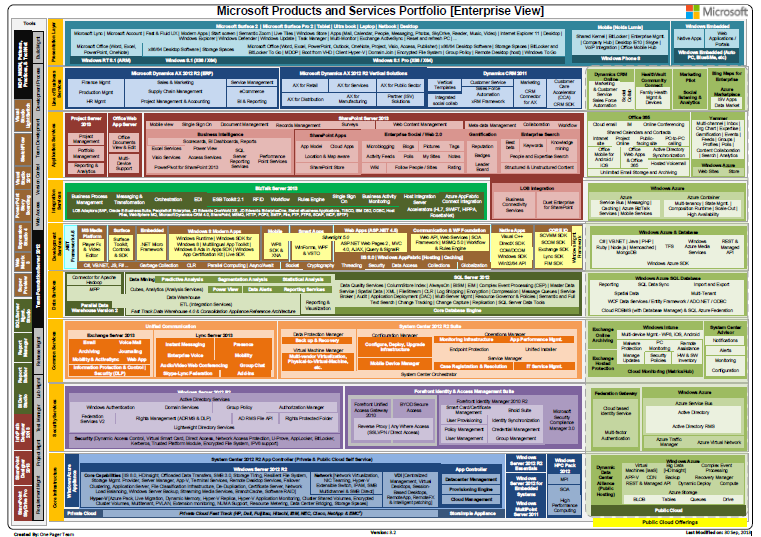
RELEASE: Microsoft Products Portfolio 3.2 (.PDF)

imageThe updated Microsoft Products Portfolio documentation has been updated.

There are two versions – one for all our products and one for ONLY ENTERPRISE products.  The following items have been added to both:

  • Microsoft Surface 2 and Microsoft Surface Pro 2 in Hardware area on the top
  • SFTP to BizTalk LOB Adaptors
  • eDiscovery, and Federated Search to SharePoint 2013 block
  • Office Mobile for Android /  iOS to Office 365
  • De-Duplication, Storage Tiring, Azure Pack to Windows server 2012 R2

The following items have been changed/removed:

  • All-up view:
      • “Xbox 360 & Kinect” to “Xbox One & Kinect”
  • Both views:
      • Windows 8 (X86/X64) to Windows 8.1 (X86/X64)
      • Windows RT (ARM) to Windows RT 8.1 (ARM)
      • Windows 8 Pro (X86 / X64) to Windows 8.1 Pro (X86 / X64)

Download the documents here:

« Newer Posts - Older Posts »

Categories