image

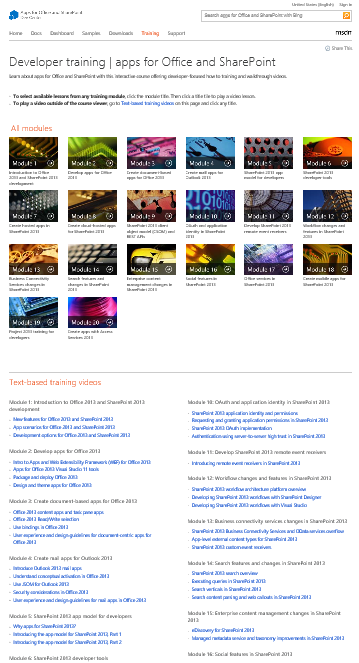
An entirely new set of video-based SharePoint 2013 & Office 2013 Developer training just hit MSDN.  And it’s a massive.

What was released?

The original training package released at Preview in July 2012 contained in-depth developer training content for many new features in Office and SharePoint. This version refreshes the previously released training package and provides updated materials to match the release-to-market (RTM) version of Office 2013 and SharePoint 2013. All videos are instructor-led and include slide shows. Most videos contain at least one demo that shows the concepts in detail.

The developer training package includes:

  • 56 videos
  • Over 20 hours of video instruction

The material is separated into the following 20 modules. Each module contains one or more videos lasting anywhere from five minutes to an hour.

  • Introduction to Office 2013 and SharePoint 2013 development
  • Develop apps for Office 2013
  • Create document-based apps for Office 2013
  • Create mail apps for Outlook 2013
  • SharePoint 2013 app model for developers
  • SharePoint 2013 developer tools
  • Create SharePoint-hosted apps in SharePoint 2013
  • Create cloud-hosted apps for SharePoint 2013
  • SharePoint 2013 client object model (CSOM) and REST APIs
  • OAuth and application identity in SharePoint 2013
  • Develop SharePoint 2013 remote event receivers
  • Workflow changes and features in SharePoint 2013
  • Business Connectivity Services changes in SharePoint 2013
  • Search features and changes in SharePoint 2013
  • Enterprise content management changes in SharePoint 2013
  • Social features in SharePoint 2013
  • Office Services in SharePoint 2013
  • Create mobile apps for SharePoint 2013
  • Project 2013 training for developers
  • Create apps with Access Services 2013

Read more here:

The 41MP Nokia Lumia 1020 on AT&T, powered by Windows Phone 8.
(If you’re wondering why you need a 41MP smartphone, here’s your reasons why)

image

Click for the full size infographic.

Taken from:

imageTIL that CTRL+ALT+H will “Highlight” a selection of text in Word 2013.  
Also, CTRL+ALT+M will “Comment” a section of text in Word 2013.

If you’re reviewing a document and want to mark it up visually, this is pretty important.  It used to be so easy to figure out what the keyboard shortcut is for a given feature in Office.  If you just hovered over the menu item, it would tell you.

Now, the closest I’ve found as an official reference is this, but it’s frankly incomplete:

Now, this fellow has written up a nice page that seems much more exhaustive:

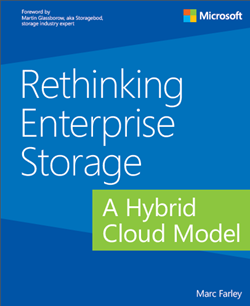
We’re offering a new free eBook from Microsoft Press called “Rethinking Enterprise Storage: A Hybrid Cloud Model”, as announced by the MSPress blog:

imageThe information technology (IT) world has always experienced rapid changes, but the environment we are in today is bringing the broadest set of changes that the industry has ever seen. Every day more people are accessing more data from more sources and using more processing power than ever before. A profound consequence of this growing digital consumption is that the corporate data center is no longer the undisputed center of the computing universe. Cloud computing services are the incubators for new applications that are driving up the demand for data.

IT managers are trying to understand what this means and how they are going to help their organizations keep up. It is abundantly clear that they need the ability to respond quickly, which means slow-moving infrastructures and management processes that were developed for data center-centric computing need to become more agile.  Virtualization technologies that provide portability for operating systems and applications across hardware boundaries are enormously successful, but they are exposing the limitations of other data center designs, particularly constraints that hinder storage and data management at scale.

It is inevitable that enterprise storage technologies will change to become more scalable, agile, and portable to reflect the changes to corporate computing. This book examines how storage and data management are being transformed by a hybrid cloud storage architecture that spans on-premises enterprise storage and cloud storage services to improve the management capabilities and efficiency of the organization. The Microsoft hybrid cloud storage (HCS) solution is an implementation of this architecture.

Posted by: kurtsh | July 27, 2013

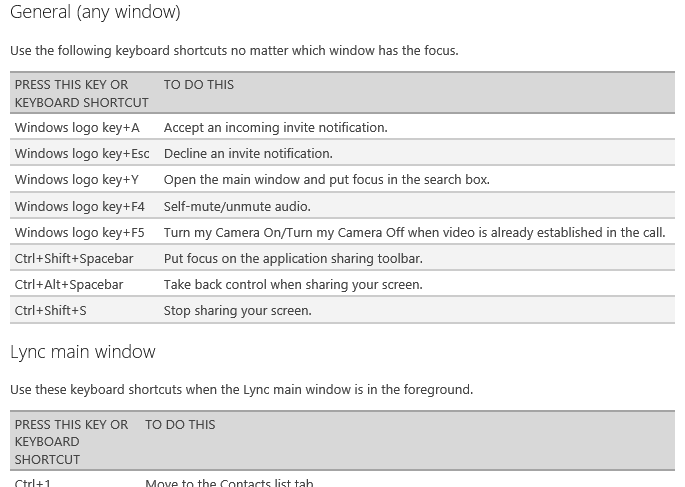
INFO: Lync 2013 Keyboard Shortcuts

imagePrint this page out and hang it in your office/cube.  You’re welcome.

Keyboard shortcuts are combinations of two or more keys that, when pressed, can be used to do a task that would typically need a mouse or other pointing device. The keyboard shortcuts described here refer to the United States keyboard layout. Keys on other layouts might not correspond exactly to the keys on a U.S. keyboard.

These Lync keyboard shortcuts relate to the feature areas of the Lync user interface (UI). So, for example, you’ve have to be in a contact card for the Esc key to close the contact card.

Tab and Shift+Tab are common ways of moving through any UI. Tab moves through the UI in order, whereas Shift+Tab moves through it in reverse order.

Some features might not be available for your account. We’ve indicated these.

Posted by: kurtsh | July 27, 2013

INFO: Lync 2013 & Support for Large Meetings

imageBy default, Lync 2010 & 2013 supports up to 250 simultaneous participants.

For meetings greater than this, it is possible to deploy the topology for Large Meeting Support (1000 users).  This is a very specific usage scenario for Large Meetings.

Support for Large Meetings – Lync 2013 On-Premise

Lync Server 2013 can support meetings with up to 1000 participants using audio/video (A/V) conferencing, including sharing PowerPoint presentations. This support requires a dedicated pool configured to support large meetings and managed in a way that ensures hosting of only a single large meeting at a time.

This section describes how to support large meetings using a dedicated Lync Server 2013 pool. It describes scalability considerations and the implementation requirements for a dedicated pool, including topology, hardware, software, and configuration requirements. It also provides a set of best practice recommendations for supporting large meetings, a summary of the test methods and results of server scalability testing conducted by the Lync Server engineering team, and the answers to frequently asked questions about support for large meetings.

Read more here:

TECHNET: Support for Large Meetings (Lync 2013 On-Premise)
http://technet.microsoft.com/en-us/library/jj205090.aspx

imageAs part of our release cycle, Microsoft deploys virtually all the products & versions that we create into production within Microsoft itself. 

But a lot of folks don’t know that Microsoft’s own IT department documents a fair amount of what they do when they deploy Microsoft technologies.  They have to go through most of the same challenges that our customers have to BEFORE the product ships. 

This helps improve the product before it reaches customers but also documents process & frankly, WORKAROUNDS, that are necessary in order to make things happen. 

Here are some of the more recent publications from Microsoft IT, a.k.a. MSIT, that may be useful to you.

clip_image001We’ll be launching the new Nokia Lumia 1020 at the Microsoft Store in Century City on Friday, July 26-28th.

Store advisors will be on hand to demo this revolutionary new phone.  If you hadn’t heard, the Lumia 1020 has a feature that no other current-gen Smartphone has on the market today:

A 41 megapixel camera. 

No, that’s not 4.1MP.  That’s a whopping 41MP, providing the clearest most precise oversampled photos of any smartphone available.  It surpasses the quality of most point-and-shoot cameras while providing a smartphone solution in a single body.

Attendees of the launch will not only get to see the new device and how it performs but also get a “swag bag” to take home.

Date/Time:
July 26-27 11AM-7PM
July 28 2PM-5PM

Location:
Microsoft Store Los Angeles
(Westfield Century City)

10250 Santa Monica Blvd
Los Angeles, CA 90067
Phone: (310) 228-3550

imageThis white paper addresses how to replace the social features in SharePoint Server 2013 with equivalent Yammer features in a SharePoint Server 2013 on-premises deployment.

The new Yammer app for SharePoint enables you to embed your Yammer feeds into SharePoint Server 2013 sites, making them more social and engaging.

Posted by: kurtsh | July 25, 2013

BETA: Microsoft Monitoring Agent 2013 Preview

Microsoft Monitoring Agent is a service that monitors computer infrastructure and application health.

It collects various diagnostic data, such as performance metrics, event logs, and traces. When connected to System Center Operations Manager, the agent calculates the health state of the monitored computers and objects, and then reports back to the management server.

The management servers centrally distribute the configuration to agents and store data received from the monitored computers. Microsoft Monitoring Agent includes the full functionality of System Center Operations Manager Agent, .NET Application Performance Monitoring, and IntelliTrace Standalone Collector, and it can be used for monitoring applications that are running in production environments.

« Newer Posts - Older Posts »

Categories