imageI don’t know why our Internet Explorer team got rid of the “Compatibility Mode” icon in the toolbar of Internet Explorer 11/Windows 8.1.  And this isn’t the time or the place to voice my displeasure about this inconvenience.

What I will explain however is how to quickly implement your own keyboard shortcut that will, in a single keystroke, TURN ON COMPATIBILITY MODE for the current website you’re visiting.

1) Install AutoHotKey which works on Windows XP, Vista, 7, 8, & 8.1. (See my previous post on AutoHotKey’s purpose)

2) Allow it to create the AutoHotkey.ahk script int your “My Documents” folder.

3) Ensure AutoHotKey is running & that it’s icon is in your SysTray. It should look like a green “H”.  If not, run it.

4) Edit AutoHotKey.ahk with Notepad from your My Documents folder.

5) Comment out all other instructions by adding a semi-colon (;) at the beginning of each line.  For example, I added the “;” to the beginning of the following lines:

;#z::Run http://www.autohotkey.com
;
;^!n::
;IfWinExist Untitled – Notepad
;    WinActivate
;else
;    Run Notepad
;return

6) Add the following to the script.

;PROGRAM CTRL-ALT-Z TO TURN ON COMPATIBILITY MODE
;(EXECUTE THE KEYSTROKES: ALT-T, B, [ENTER], ALT-A, ALT-C)
^!z::
Send !t
Sleep 100
Send b{enter}
Sleep 100
Send !a
Sleep 100
Send !c
return

7) Right click on the AutoHotkey icon in the Systray and select “Reload This Script”.

Now when ever you click CTRL-ALT-Z, the web site you’re on will be registered as a site to display in Compatibility Mode.  There may be easier ways to do this but this is how I accomplished the task.  Enjoy.

Posted by: kurtsh | November 8, 2013

OFFER: Windows 8.1 Now Available for Nonprofits

Big announcement!

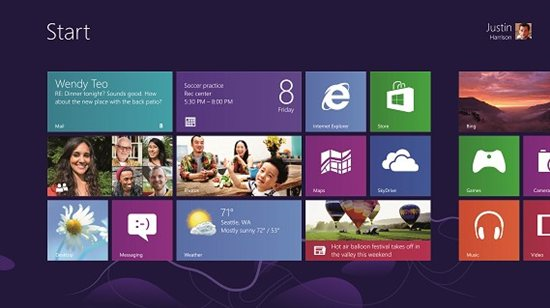
imageToday, we’re excited to announce the availability of Windows 8.1 for nonprofits.

Thanks to many of you, we received a tremendous response from the nonprofit community around the world with the launch Windows 8. Windows 8.1 is an evolution of the Windows 8 vision, bringing together powerful productivity apps and a range of ways to ensure your team can reach the resources they need from any device or location.

Now is a great time to make the move to Windows 8.1. Eligible nonprofit organizations and public libraries can request Windows 8.1 through Microsoft’s software donation program. Get started today.

Windows 8.1 introduces a fully customizable Start screen, new search experience, upgraded app store, and improved multi-tasking features.

Windows brings together everything you do – wherever you are, wherever you go.

If you’re ready to get started with Windows 8.1, here are a few steps you can take to learn more:

  1. Request Windows 8.1 for your nonprofit. Or, if you’re already on Windows 8, you can simply upgrade your PCs to Windows 8.1 through the Volume Licensing Service Center (VLSC).
  2. Register for the Windows 8.1 webinar on Thursday, November 14, 11:00 A.M. Pacific Time, hosted by TechSoup. Todd Rutherford, senior product marketing manager–Windows Consumer, Microsoft, will provide a demo of Windows 8.1.
  3. Tell your favorite nonprofit about Microsoft’s software donation program and encourage them to visit www.Microsoft.com/nonprofit.
Posted by: kurtsh | November 8, 2013

VIDEO: Surface 2… recent advertisements & fan videos

There’s recently been a lot of videos about Surface 2 that have been just awesome so I thought I’d post a couple of them.


The New Surface: Teacher


Why I Love my Microsoft Surface 2: Tips & Tricks

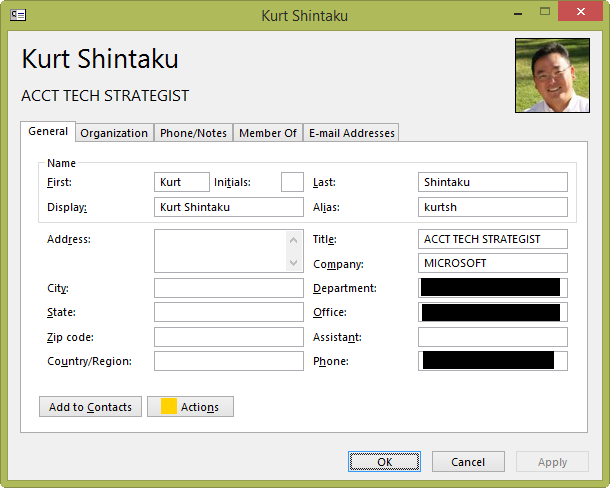
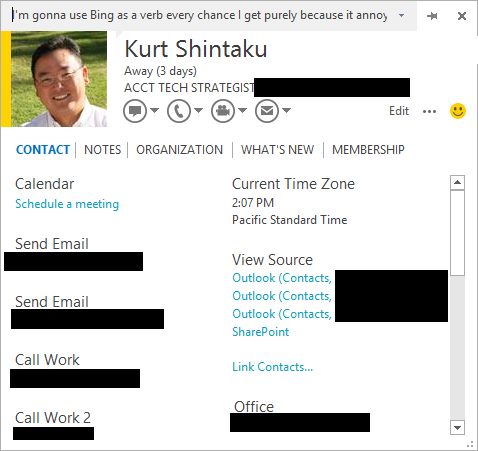
If you’re like me you prefer the old style Outlook contact dialog box over the new style.  The old-style (left) presented a concise interface that made the best use of space on the screen & didn’t require scrolling.  And it remained on the screen by default if you left the dialog, versus disappearing.  And even though the new-style is more powerful in displaying things like Source contact info from different sources, if you dwell primarily in an Active Directory/Exchange environment, the old way might be preferable to you too.

imageimage

It turns out there’s a registry fix to force the old style Contacts dialog box:  (You’ll need to create both the Key and the Value in the registry through REGEDIT.EXE)

  • Key: HKEY_CURRENT_USER\Software\Microsoft\Office\15.0\Common\Contactcard
  • Value name: turnonlegacygaldialog
  • Value type: REG_DWORD
  • Value: 1

Restart Outlook and you’ll find that every time you double click on a contact, the old-style Contact window appears.

Alternatively you can cut & paste the following into a text file called Retrocontactcard.reg, then double click it to have it added to your registry:

[HKEY_CURRENT_USER\Software\Microsoft\Office\15.0\Common\Contactcard]
"turnonlegacygaldialog"=dword:00000001

image

Wow.  We ain’t screwin’ around.  Y’know that Anime short that was done featuring the Internet Explorer 11’s world leading security & protection against malware & threats?
(https://kurtsh.com/2013/11/06/video-internet-explorer-11-the-anime-trailer/)

imageWell, the girl’s name is Inori Aizawa & she’s the Anime personification of Internet Explorer 11. 

  1. FACEBOOK:
    She has it’s own Facebook page which is cool and all that.
    https://www.facebook.com/
    internetexplorertan
  2. SKYDRIVE:
    And she has her own SkyDrive storage with desktop backgrounds and more coming.
    http://sdrv.ms/internetexplorertan
  3. HOME PAGE
    There is a custom Anime-themed home page for Internet Explorer 9+ with Windows 8-design stylings, displaying Anime-related news from Anime outlets like Crunchyroll, Anime News Network, JEFusion, & Otaku USA.
    http://www.internetexplorertan.com/home/
  4. INTERNET EXPLORER: INORI EDITION:
    But now we’re doubling down:  We’re creating a new build of our browser called, “Internet Explorer: Inori Edition”.
    https://www.facebook.com/internetexplorertan/app_1422641071287146

image

Posted by: kurtsh | November 6, 2013

VIDEO: Social Enterprise & Microsoft Collaboration

This video is entitled, “Change the way you work” & it demonstrates how anyone, anywhere, at anytime can leverage social in the Enterprise to collaborate, capture, & share ideas broadly.

http://player.vimeo.com/video/61680137?autoplay=1

This is part of a larger presentation about the role of Social in the Enterprise & our roadmap for Microsoft SharePoint & Yammer at TechEd 2013.

Posted by: kurtsh | November 6, 2013

VIDEO: “Internet Explorer 11: The Anime Trailer!”

No words can express how awesome this ad is… for the most secure browser in the world.

Internet Explorer 11: The Anime Trailer!

clip_image002

Join us for a midnight launch party to celebrate the launch of Xbox One on Day One at the Century City Microsoft Store. Starting at 10 PM local time on 11/21, we’ll showcase the latest Xbox One games like Ryse, Forza Motorsport 5, Dead Rising 3, and Killer Instinct. Entertainment and giveaways will be raffled off throughout the evening. Arrive early to secure your place in line – first 50 people will receive a special giveaway! Console preorders are sold out at this time, but we will be taking rain checks up until launch. See you there!

Come for one epic celebration, with giveaways, games, demos, and more.
Get there early. The first 50 in line will win an exclusive prize!

Microsoft at Westfield Century City
10250 Santa Monica Blvd
Los Angeles, CA 90067

Posted by: kurtsh | November 4, 2013

DOWNLOAD: Windows Azure Infographics & Posters bundle

image

We’ve released a bundle of Windows Azure posters that may be interesting to you.  (I’d previously posted two of these here & here & here)

If you’d like to download ALL of these in one ZIP file, click below:

Posted by: kurtsh | November 4, 2013

INFO: Dell Venue 8 Pro drivers are newer on Dell.com

imageThe drivers posted to Dell.com for the Dell Venue 8 Pro tablet appear to be much more recent than those posted to Windows Update. 

For those that are new to this, this is generally the case with most Windows Update-published drivers for any device because Microsoft has such stringent criteria (security reviews, regression testing, contractual agreements, etc.) for OEMs that wish to post drivers for distribution through Windows Update.

For example: “Dell Wireless 1538 WiFi/BT Driver”

For more updated drivers for the Dell Venue 8 Pro, visit: http://www.dell.com/support/troubleshooting/us/en/19/Product/dell-venue-8-pro

(Thanks to my collegue, Brian Larson, for pointing this out)

    « Newer Posts - Older Posts »

    Categories