image

NORAD’s Santa tracking system has gone 3D.

Every December, the North American Aerospace Defense Command (“NORAD”) serves the important role of ensuring that Santa’s journey around the world is safe. Since 1955, children of all ages have tracked his route with the help of NORAD’s radar, satellites and jet fighters.

This year, Microsoft has lent a hand to make the experience the most magical yet, putting a fresh spin on the time-honored tradition with the launch of the new www.NORADSanta.org.

Read more here:

We are excited to announce the broad availability of Microsoft Desktop Optimization Pack (MDOP) 2013 R2 for download. MDOP is a suite of virtualization, management and security technologies available as a subscription for Software Assurance customers that helps maximize the benefits offered by Windows.

In addition to support for Windows 8.1 and virtualization of Office 2013, this release of MDOP 2013 R2 includes the launch of Microsoft Application Virtualization (App-V) 5.0 Service Pack 2 (SP2) and User Experience Virtualization (UE-V) 2.0, which make it easier for customers to personalize, deploy and manage virtual applications across devices. MDOP 2013 R2 also offers enhancements to the Microsoft BitLocker Administration and Monitoring tool (MBAM 2.0 SP1), including multi language support.

image

Included in MDOP 2013 R2 are:

  • Microsoft Application Virtualization (App-V) 5.0 SP2
  • User Experience Virtualization (UE-V) 2.0
  • Advanced Group Policy Management (AGPM) 4.0 SP2 w/ Windows 8.1 compatibility
  • Diagnostics and Recovery Toolset (DaRT) 8.1
  • Microsoft BitLocker Administration and Monitoring (MBAM) 2.0 SP1 with multi-language support.

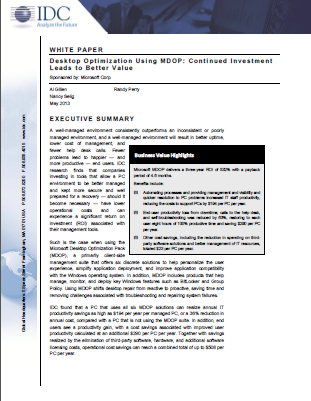
And there is a new IDC Study out documenting the TCO of MDOP for customers deploying desktops in the Enterprise:

IDC recently estimated that when MDOP solutions are fully utilized, the increased productivity and automation of systems can save an average company nearly $200 per PC per year. That’s a 36% reduction in annual cost. Coupled with productivity gains and elimination of third-party software, hardware and additional software licensing costs, operational savings can top $500 per year per PC.

(Report available here: http://download.microsoft.com/download/E/9/F/E9FA92F9-C3D2-45B3-8408-F3C850345370/MDOP_TCO_0513.pdf)

For more, read here:

UPDATE 12/12/13:
A post highlighting deep dive content on using App-V with Office 2013 was released.  Here’s the content:

Following our recent launch of MDOP 2013 R2, Microsoft has now published some deep dive content on virtualization of Office with App-V 5.0 which I would like to share with you.

Firstly for detailed guidance on virtualizing Office I suggest you review Virtualizing Microsoft Office for Application Virtualization (App-V) 5.0 solution. This article is intended for IT Professionals interested in using App-V 5.0 to deliver Microsoft Office as a virtualized application to computers in their organization. It provides an overview of benefits of using Office 2013 Volume Licensing Edition with App-V 5.0 SP2, the specific features that comes with the release, and a detailed walk through of important scenarios such as creating, deploying, and customizing supported versions of Office with App-V 5.0 SP2.

Secondly for a practical guide on implementation I would suggest you review the App-V 5.0 SP2 Support for Office 2013 Volume Licensing Editions blog post from the Office team which gives a step by step guide on how to use the Office Deployment Tool for click to run to create App-V 5.0 SP2 packages for volume license versions of Office 2013.

Finally, Microsoft has also published a knowledge base update Supported Scenarios for Deploying Microsoft Office as an App-V Package. This Knowledge Base article describes the supported scenarios for deploying Office App-V Packages.

If you already own MDOP, then you can download MDOP 2013 R2 with App-V 5.0 SP2 from the Volume Licensing Service Center.  MSDN and TechNet paid subscribers can also download it from MSDN or TechNet. For guidance on how to plan for and deploy App-V, visit the App-V zone on TechNet.

ORIGINAL POST:
Taken from the Garage Series post on the Office Resource Kit blog:

Announcing App-V 5.0 SP2 Support for Office 2013 Volume Licensing Editions
Corresponding with the release of App-V 5.0 SP2, we have updated the
Office Deployment Tool for Click-to-Run to enable creation of Office Professional Plus 2013 and Office Standard 2013 App-V packages. Until now, App-V could only be used with Office 365 ProPlus or previous Office releases.

These updates allow administrators to use Office 2013 Volume Licensing (VL) editions in order to activate Office with Key Management Services (KMS), Active Directory-based activation, or Multiple Activation Key (MAK) activation types. App-V provides a highly-manageable experience for delivering Office VL editions and Office 365 ProPlus, including support for installation in Remote Desktop Services (RDS) environments and the ability to de-select components from the Office suite at install time.

Detailed guidance can be found in the Virtualizing Microsoft Office for Application Virtualization (App-V) 5.0 solution, but in this blog I’ll explain the high level steps with screenshots along the way.

Included in the post is a important chart to know & understand if using App-V to package & deliver the new Office:

By using the Click-to-Run media to convert to an App-V package for Office deployment, do you get the same benefits as Office 365 ProPlus? What are some of the differences?
Office 365 ProPlus is designed to give users optimized Office experiences on all of their devices of choice and connect users to their content and personalized settings wherever they sign in – across PCs, phones and browsers. Office 365 ProPlus is the premier version of Office and will also entitle users to exclusive capabilities and technologies not included in Office Professional Plus 2013. The gap between features available to Office 365 ProPlus users and the lower Office Professional Plus 2013 edition will also continue to widen in the future. The following table represents a short list of benefits for Office 2013 VL delivery using App-V compared Office 365 ProPlus benefits.

Feature

Office 2013 VL with App-V

Office 365 ProPlus with App-V

Office 365 ProPlus Click-to-Run

5 installs per user on PCs or Macs

No

Yes

Yes

Roaming Settings and links to recent files when moving between devices

No

Yes

Yes

Rights to activate Office Mobile for iPhone and Office Mobile for Android Phones

No


Yes

Yes

Side-by-side installation with previous versions of Office

Yes

Yes

Yes

Includes rights to upgrades to future Office versions

No (requires Software Assurance)

Yes

Yes

Ability to de-select components from the Office suite, such as Access or InfoPath

Yes

Yes

No

May be used with or without persistent connection to the Internet

Yes

Yes

Yes

Full-featured Office with integration with other applications, add-ins, and Windows

Yes

Yes

Yes

Ability to extend Office with locally-installed add-ins and dependent apps

Yes

Yes

Yes

Ability to deploy add-ins and other dependent components using App-V with Connection Groups

Yes

Yes

No

Exclusive Office 365 ProPlus features, such as Office Mobile and Power Map for Excel

No

Yes

Yes

Requires App-V or System Center Config Mgr infrastructure

Yes

Yes

No

May be used with enterprise software distribution to perform push deployment

Yes

Yes

Yes

User-based activation tied to Office 365 – requires once per month connection to the Internet

No

Yes

Yes

Volume Licensing support and ability to perform offline activation with KMS and AD-based activation or online using Multiple Activation Keys (MAK)

Yes

No

No


For more, read the following post:

image

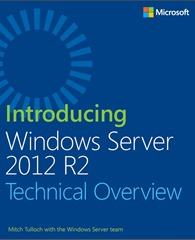
We finally posted the “release”/non-preview version of our free eBook, “Introducing Windows Server 2012 R2”.

This book is intended to provide you with an overview of the new features and enhancements introduced in Windows Server 2012 R2. The intended audience for this book is IT pros who deploy, manage, and maintain Windows Server workloads in data center, private cloud, and hosting provider environments.

We assume that you are at least somewhat familiar with the features and capabilities of the previous platform Windows Server 2012. If you are not familiar with all the new features and enhancements Microsoft introduced previously in Windows Server 2012, we recommend that you first read Introducing Windows Server 2012 RTM Edition (Microsoft Press, 2012).

A key feature of this book is the technical sidebars that have been contributed by Microsoft insiders. These sidebars were written by experts who have been closely involved in the Windows Server 2012 R2 development process and include Program Managers, Support Escalation Engineers, Technical Consultants, Data Center Specialists, and others who work at Microsoft in various capacities.

image

This month, Yung Chou, Mitch Tulloch and Keith Mayer have published a new book on Hybrid Cloud Management with System Center 2012 R2 App Controller, titled Microsoft System Center: Cloud Management with App Controller. As part of a series of specialized guides on System Center, this book focuses on using App Controller to manage virtual machines and services across private and public clouds.

  • Introduction
  • Chapter 1: App Controller Essentials
  • Chapter 2: Managing Private Clouds
  • Chapter 3: Managing Public Clouds
  • Chapter 4: Managing Hybrid Clouds
  • Chapter 5: Automating App Controller
  • Additional Resources

Download the book here:

  • RELEASE: Free MS Press eBook, “System Center Cloud Management with  App Controller” (118 pgs)
Posted by: kurtsh | December 5, 2013

RELEASE: Enhanced Mitigation Experience Toolkit 4.1

imageThe Enhanced Mitigation Experience Toolkit (EMET) is a utility designed to help IT Professionals and users block attackers from gaining access to their systems through common attacks. EMET enables users to manage security mitigation technologies that help make it more difficult for attackers to exploit vulnerabilities in a given piece of software.

Current Version
The latest release, EMET 4.1, is available for download. The toolkit includes several mitigation technologies aimed at disrupting many of the current exploit techniques. The mitigations are also designed so that they can be easily updated as attackers start using new exploit techniques. The toolkit also provides a configurable SSL/TLS certificate pinning feature, called Certificate Trust, aimed at detecting Man in the Middle attacks leveraging the Public Key Infrastructure (PKI).

The previous release, EMET 3.0, will be available and supported until June 2014.

Posted by: kurtsh | November 24, 2013

DOWNLOAD: Kinect Voice Commands. A Printable Guide.

Master Kinect’s new voice commands with this Xbox One cheat sheet.

With Kinect voice recognition, you can control and interact with your Xbox One console by using voice commands. To engage your Xbox console, just say “Xbox.” A list of available commands appears on the screen. Then, say any of the commands that appear in the list. For example, say “Bing” to search using Bing.

You can also interact with your Xbox One console by saying “Xbox, Select.” When you say “Xbox, Select,” some features appear in green text. This lets you say just that word. For example, if you say “Xbox, Select” while you’re in Xbox Video, you can just say “Movies Stores.”

For more, visit http://support.xbox.com/en-US/xbox-one/kinect/voice-commands.

Posted by: kurtsh | November 22, 2013

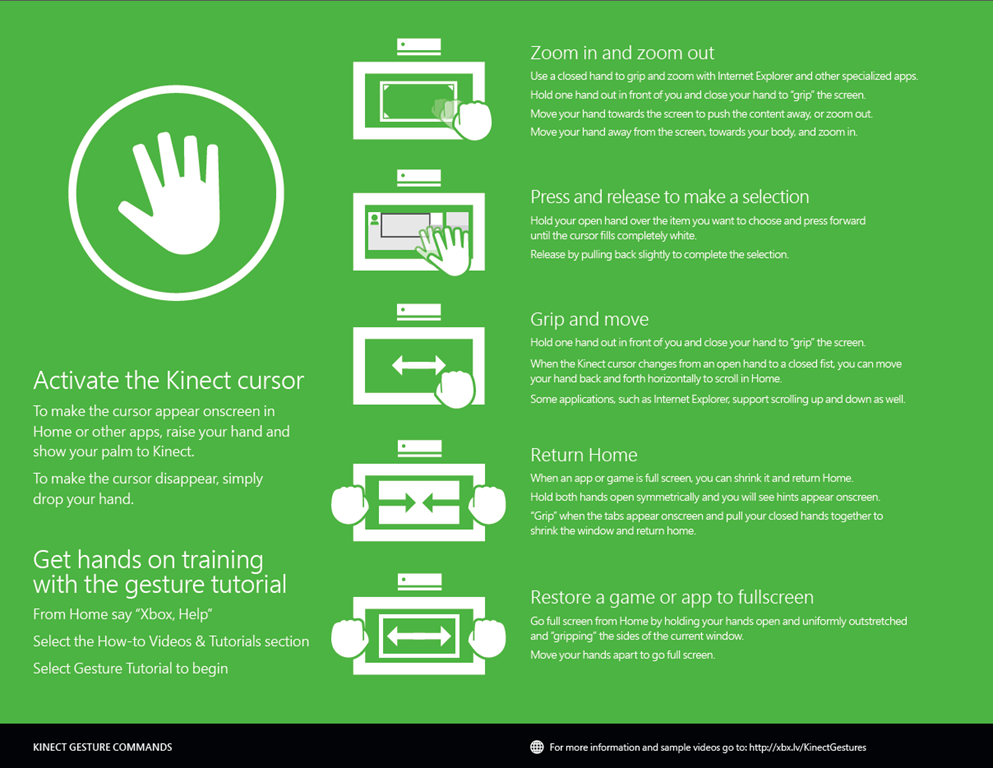
DOWNLOAD: Kinect Gestures for Xbox One. A Printable Guide.

Kinect Gestures for Xbox One.  A Printable Guide. Cool!

image

There are six common navigation gestures that you can use to get the best experience with your Xbox One and Kinect sensor.

You can review this information by going to Gesture Tutorial in the Help app on your console. To get to the console Help app, press the Menu button on your controller from Home screen, select Help, then select How-to videos & tutorials. You may have to scroll to another page to find the Gestures tutorial.

Note Your Kinect sensor must be set up and turned on for these gestures to work.

For more, visit http://xbx.lv/KinectGestures.

image

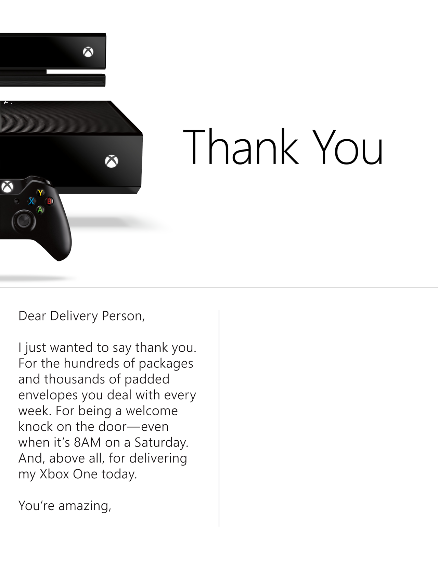
Download this image, then print, sign, and fold it to create your very own Xbox thank you card.

Dear Delivery Person,

I just wanted to say thank you.  For the hundreds of packages and thousands of padded envelopes you deal with every week.  For being a welcome knock on the door – even when it’s 8AM on a Saturday.  And, above all, for delivering my Xbox One today.

You’re amazing.


DOWNLOAD:
http://xbox.tumblr.com/post/67769146062/download-this-image-then-print-sign-and-fold-it

Posted by: kurtsh | November 22, 2013

DOWNLOAD: “Office 365 Admin” app for Windows Phone

Looks like we are shipping a new Windows Phone mobile app for Office 365 Administrators to enable them to monitor the health of the Office 365 service.

Check the service health of your Office 365 service on the go

Lawrence Chiu is a senior product manager on the Office 365 team.

As we discussed in a recent blog post,  Cloud services you can trust, "Transparency requires consistent communication."  We’re working to improve the transparency of the Office 365 service by continuously improving our communication with customers on changes that impact the Office 365 environment. Recently we deployed the improved Message Center, which delivers messages targeted to your organization. Now we’re introducing another communication tool, one that was recently demoed on the November 6 episode of The Garage Series– a new app for on-the-go service health checks.

Starting today, Office 365 service administrators can connect to their organization’s Office 365 service status from wherever they are with the Office 365 Admin app. The new app enables administrators to view service health information and maintenance status updates from their mobile device. They can also filter information by service subscriptions and configure app data refresh intervals.

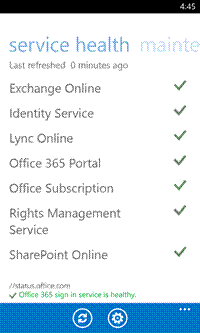
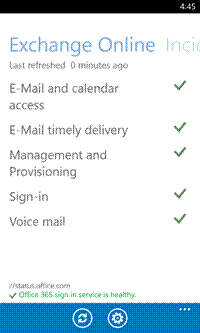
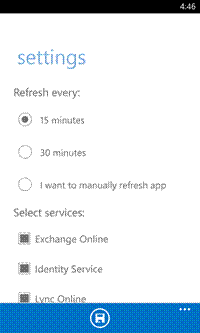
clip_image002clip_image004clip_image006

Administrators can use the Office 365 Admin app to check the overall health of their organization’s services, see the health of individual services, and set data refresh intervals.

To access service health data with the Office 365 Admin app, you must have an active Office 365 subscription with administrator user rights. Also, this app does not currently support Windows Azure Active Directory Multi-Factor Authentication.

The Office 365 Admin app is in the process of rolling out across multiple platforms, starting with Windows Phone 8 today and followed by Android (4.2.1 and up) and iOS 7 in the coming weeks. Stay tuned to this blog and your Message Center. You’ll be notified as soon as the app is available on Google Play and in the Apple App Store.

To access the frequently asked questions or to follow what the community has to say about the app, please click this link.

Download the app on the Windows Phone 8 Store.

(Taken from the Office 365 blog.)

« Newer Posts - Older Posts »

Categories