Posted by: kurtsh | April 28, 2014

INFO: Windows Phone 8.1 Links, Tips & Tricks

imageHere’s a few things to keep in mind as you explore Windows Phone 8.1:

Annnnd I also found this list of tips that might be useful for those of you that are just now getting interested in Windows Phone 8.1.

// Update

Q: How can I update my Windows Phone to 8.1 now?
A: Visit the App Studio site and register with your Microsoft Account details. Once that’s done, download the Preview for Developers app  from the Store. Once installed, open the app, sign in with the same Microsoft Account credentials and tick the ‘Enable Preview for Developers’ box. Then go to Setting > Phone Update > Check for Updates.
Q: What’s new on Windows Phone 8.1?
A: Look here to get started, continue here, and then look here if you want to go deep.


// Where did it go?

Q: Where did podcasts go?
A: Look for the dedicated Podcasts app on your phone.
Q: Where did Vision search go? (QR Code scanning)
A: Start the camera, select lenses and look for the Bing Vision lens.
Q: Where did Bing Music search go?
A: In Cortana, tap on the music note icon on the top right corner.
Q: Where did Background Apps go?
A: Look for the Battery Saver app or in settings.
Q: Where did the comma go?
A: You can bring it back by going to Settings > Keyboard > Advanced > Enable the option to "Show a comma key when available".
Q: Where did the screenshot button combo go?
A: Press and hold the Power and Volume Up buttons at the same time.


// Cortana

Q: What is Cortana?
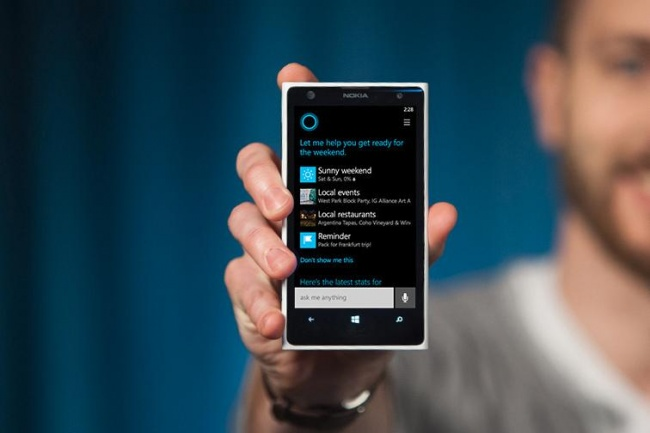
A: Cortana is a personal smartphone assistant powered by Bing. She replaces the Search functionality from previous versions of Windows Phone.
Q: How do I bring up Cortana?
A: Just press the Search button on your phone.
Q: I don’t see Cortana? And Search just looks like a Bing page?
A: If Cortana isn’t in the list of applications or on the Home screen, chances are she’s not available for your region yet. If you’re happy to experiment, in Settings, you can add the United States Language and Region, and Cortana should appear.


// Music and Video

Q: Where are my podcasts?
A: The podcasts have moved from the Xbox Music app into a separate app named Podcasts.
Q: What happened to Bing Music search?
A: You can now use Cortana to find out what music you’re currently listening to. Just bring up Cortana by pressing the Search button on your phone and then tap on the music note icon on the top right corner.
Q: What’s new in music?
A: You can now edit playlists directly on the phone. It’s under music>collections>playlists, then press "+" to add a playlist or tap a playlist to add songs to it.


// Shortcuts

Q: What’s the new screenshot button combo?
A: The screenshot button combo has changed. Press and hold the Power and Volume Up buttons at the same time to capture whatever is currently on your screen.


// Keyboard

Q: How can I bring back the comma?
A: Settings > Keyboard > Advanced > Enable the option to "Show a comma key when available".


// Settings

Q: Where can I manage background tasks?
A: Look for the Battery Saver app or in Settings.
Q: How does project my screen work?
A: http://download.microsoft.com/download/A/2/7/A271EFFF-6C9E-4E9B-9259-0F72FDEDD153/ProjectMyScreenApp.msi


// Notifications

Q: How do I acknowledge specific or single notifications in the notification center?
A: Swipe down to get to Notification Center, then swipe right on each notification that you want to acknowledge.

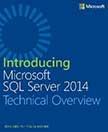
imageIntroducing Microsoft SQL Server 2014
Ross Mistry and Stacia Misner
April 2014
125 pages

In this book, the authors explain how SQL Server 2014 incorporates in-memory technology to boost performance in online transactional processing (OLTP) and data-warehouse solutions. They also describe how it eases the transition from on-premises solutions to the cloud with added support for hybrid environments.

imageMicrosoft System Center: Integrated Cloud Platform
David Ziembicki and Mitch Tulloch, Series Editor
April 2014
80 pages

This book is organized by cloud type and begins with a short overview of the Cloud OS strategy from Microsoft and a high-level hybrid cloud architecture. It also covers the design and deployment of private cloud solutions using Windows and System Center to deliver the software-defined datacenter where storage, network, compute, and management are all virtualized and delivered by the Microsoft platform.

imageWe just released a new paper developed by contributors across the company, including Azure, O365, GFS, CRM, WWPS, and others which discusses how Microsoft handles compliance for cloud services and provides customers compliance information they need in order to have confidence in Microsoft as their preferred cloud service provider (CSP).

The paper is 12 pages long, 506K.

More information can be found at the TwC Blog.

imageWe have an on going schedule of LIVE training events delivered by the Microsoft Virtual Academy – all FREE.  And the content is recorded for on-demand access after the event is over.

Again, these a LIVE events, presented online via a trainer, consultant, or support engineer.

Here’s a few of the upcoming LIVE events:

imageI guess some hooks needed to be added to support the current revision of RDP on Windows Phone because we recently released a Preview build of Remote Desktop exclusively for Windows Phone 8.1 users.

With the Microsoft Remote Desktop app, you can connect to a remote PC and experience the power of Windows with RemoteFX in a Remote Desktop client designed to help you get your work done wherever you are. Features

  • Rich multi-touch experience with remote desktop protocol (RDP) and RemoteFX supporting Windows gestures
  • Secure connection to your data and applications with breakthrough Network Level Authentication (NLA) technology
  • Simple management of all remote connections from the connection center
  • High quality video and sound streaming with improved compression and bandwidth usage

imageFor those looking for an explanation of how Google actually rifles through your email to profile you to target ads over time, here’s some documentation created by Microsoft in the UK about how this is done, step by step:

image

Learn about Windows Phone for business, with the security & manageability you expect from Windows on a smartphone.  Be one of the first to get Windows Phone 8.1! Join us for a free online event on Tuesday, April 29, 2014 to get a chance to WIN a Nokia Lumia preloaded with WP8.1 enterprise preview*.

The latest release of Windows Phone 8.1 delivers a set of new unique features designed with business customers in mind: 

Security:

  • Enterprise enrollment
  • S/MIME
  • VPN (Standard-based IKEv2/IPSec VPN and SSL VPN)
  • Enterprise WiFi (EAP-TLS and EAP-TTLS)

IT Control & Management:

  • Enhanced MDM policies and support
  • Certificate enrollment
  • Device provisioning and app deployment / restriction
  • Remote device wipe (full or partial)
  • Enhanced monitoring and inventory capabilities

Spend an hour with us to learn how you could benefit and see live demos of the new features that make Windows Phone better for businesses.

*No purchase necessary.  Open only to registered Event attendees. Sweepstakes ends at approximately 4.29.14, 12:00pm PST and winner must be present to win.  For complete details see full Official Rules on registration link.

—————

WEBCAST:
Windows Phone 8.1 Enterprise Webcast

DATE/TIME:
April 29, 2014
11:00 A.M. to 12:00 P.M. PST

REGISTRATION:
https://msevents.microsoft.com/CUI/EventDetail.aspx?EventID=1032586629&Culture=en-US&community=0

Business documents are not to be edited using an Office 365 Home Subscription.  This also applies to an Office 365 Home subscription when used with Office for iPad.  Office 365 Home is only to be used for consumer documentation & a business level subscription to Office 365 is required for working with business documentation.

Fortunately, you can switch from your current Office 365 subscription to another Office 365 subscription – likely one provided to you by your employer.  Switching between subscriptions can take place:

  • In the same service family:    For example, from Office 365 Small Business to Office 365 Small Business Premium, or from Office 365 Enterprise E1 to Office 365 Enterprise E3.
  • From a standalone plan:    For example, from Exchange Online to Office 365 Enterprise E1.
  • To a different service family:    For example, from Office 365 Small Business to Office 365 Enterprise E3.

For an overview of features included in the different plans, including pricing, see the product descriptions. For technical specifications, see the Office 365 Service Descriptions.

For more information about how to switch:

Posted by: kurtsh | April 21, 2014

RELEASE: OneNote Online… now with Printing!

Big announcement from the Office blog today:

This week, we introduced the web-based Print feature to OneNote Online. About 10% of all feature requests are for printing from OneNote, so we understand it’s important for customers to access content online and on paper. Now you can do it using the PRINT tab on the Ribbon.

Read more here:
http://blogs.office.com/2014/04/17/onenote-online-print-and-navigation-update/

image

« Newer Posts - Older Posts »

Categories