UPDATE 5/16/14:
Lucky us!  The Office Deployment blog published a post about this new feature they are calling “Application Selection”.

——————

ORIGINAL POST 5/14/14:
VIDEO: Updates to Office 365 ProPlus for admins and first look at upcoming shared computer support

This week Jeremy is joined again by Curtis Sawin to demonstrate the latest admin features in Office 365 ProPlus and Click-to-Run. If you’ve wanted to install the entire Office suite without InfoPath or Access apps, it’s now possible and they’ll walk you through the new admin processes to do so. They also go under the hood to show how the Click-to-Run software update process works and even give a first look of the upcoming Shared Computer Activation capability.
http://youtu.be/Y967vNMy7Fc?t=2m47s

Updates to Office 365 ProPlus for admins and first look at upcoming shared computer support


The Office Garage demonstrates 3 new capabilities:

  • DEPLOY CUSTOM INSTALLATIONS OF OFFICE 365
    They demo deploying Office 365 ProPlus WITHOUT Access, Infopath, & Groove. These are true deployment exclusions & not just “hidden links” or “blocked executables”, i.e. none of the Infopath software is actually installed on the client.
  • UPDATING OFFICE FOR THE USER THAT HAS EXCEL or OUTLOOK OPEN 24/7
    Also, they demonstrate delta update downloads (compressed) being installed while end users are using the application being patched, i.e. how do we patch a user who’s Office installation is perpetually being used & has open documents in them.
  • INSTALL OFFICE FOR VDI/RDS ENVIRONMENTS i.e. SHARE COMPUTER SUPPORT
    Lastly, they demonstrate installing Office 365 ProPlus specifically for RDS or VDI environments, making it possible to ensure that a logged in subscribed user can run Office 365 versus non-subscribed users who cannot – even if they’re Domain Administrators.

(*Note: Requires updated version of Office Deployment Tool.)

For a full rundown of all these demonstrations, visit the Office blog at:
http://blogs.office.com/2014/05/14/the-garage-series-for-office-365-updates-to-office-365-proplus-for-admins-and-first-look-at-upcoming-shared-computer-support/

Posted by: kurtsh | May 6, 2014

NEWS: Kuratas mecha… brought to you by Microsoft

Kuratas! Launch!


Notice the logos and branding on the Kuratas mecha that Japanese voice actor Toru Furuya is getting into?

imageimage

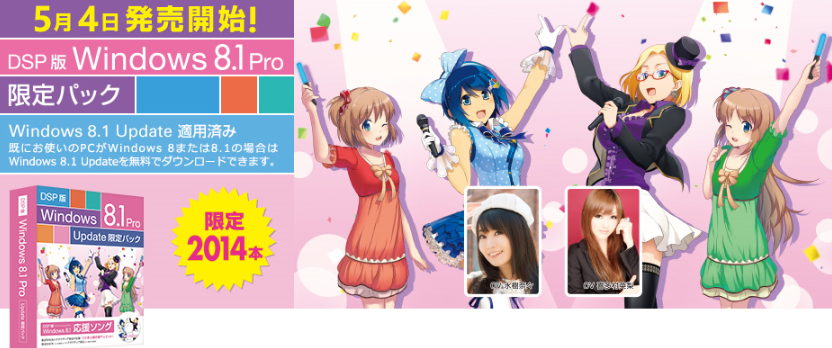
This is part of a larger promotion that we’re doing in Japan around the Windows 8.1 Update during the Microsoft Windows Spring Festival 2014 in Akihabara.

image

There’s more coverage on CNET:

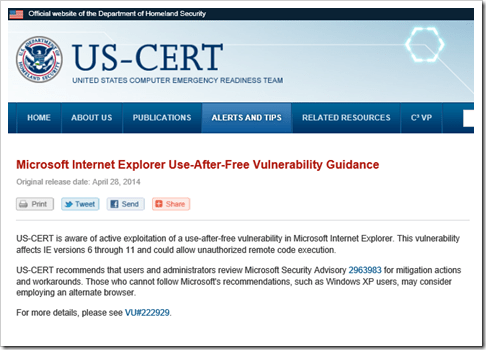
If you need to school anyone that blurts out this nonsense about the Dept of Homeland Security purportedly telling people to “ditch Internet Explorer” or “Stop Using Internet Explorer” or “Don’t use IE”, here’s EXACTLY what the DHS actually said:

image

Seriously.  That’s it.  This is the single paragraph that the media is writing these “dump IE” articles about:

“US-CERT recommends that users and administrators review Microsoft Security Advisory 2963983 for mitigation actions and workarounds. Those who cannot follow Microsoft’s recommendations, such as Windows XP users, may consider employing an alternate browser.”

If you can’t patch, you might want to try another browser:  That’s all they’re saying.  They never say, “don’t use Internet Explorer”.  There’s absolutely nothing here that’s newsworthy written here & this post this could technically apply to ANY piece of software including Chrome, Firefox, & Safari.  Yet somehow, here’s an example of some of the articles that are being written:

Ridiculous ‘eh?

SOURCE:
http://www.us-cert.gov/ncas/current-activity/2014/04/28/Microsoft-Internet-Explorer-Use-After-Free-Vulnerability-Being

imageAnnouncement made about the recent out-of-band patch being issued tomorrow:

At approximately 10 a.m. PDT, we will release an out-of-band security update to address the issue affecting Internet Explorer (IE) that was first discussed in Security Advisory 2963983. This update is fully tested and ready for release for all affected versions of the browser.

The headline grabbing point about this release is that we’re issuing the patch for Windows XP, along with supported versions of Windows, despite XP being out of support.

For more information, read the MSRC post:

To view the webcast on Friday, May 2, 2014 11:00 a.m. PDT, register at:

image

Support for Windows XP ends this month. No big deal you say? Well not so fast my friends. Tune in as Blain Barton interviews Tim Rains, Director of Trustworthy Computing at Microsoft as he lays out the many security risks you open yourself and your organization up to by running Windows XP.

  • [3:44] What are the kind of security risks folks may face as support of XP ends?
  • [4:48] How does Microsoft protect its customers from security threats?
  • [6:11] What exactly does Windows XP end of support mean?
  • [8:38] What is risk of continuing to run XP?
  • [14:48] What motivates cyber attackers?
  • [18:17] What is ransomware?
  • [21:48] What are some typical threats users should expect against Windows XP?
  • [30:26] What should people do if they’re running Windows XP?

One of the things they go over is the key threat of how malware writers reverse engineer vulnerabilities for supported versions of Windows an apply them to Windows XP, which will never be patched.  Thus Windows XP users have a new zero day vulnerability… forever.

Posted by: kurtsh | May 1, 2014

NEWS: Microsoft acquires GreenButton

image

Compute clustering just got a lot more convenient, courtesy of Microsoft.

We announced on our Windows Azure blog today that we acquired New Zealand-based GreenButton, a provider of integrated on-demand solutions that allow customers to manage compute-intensive workloads in the cloud. The existing GreenButton service will no longer be available to new customers & we will launch a new service integrated in Azure later in the year.

image

What is Green Button? (Video)

image

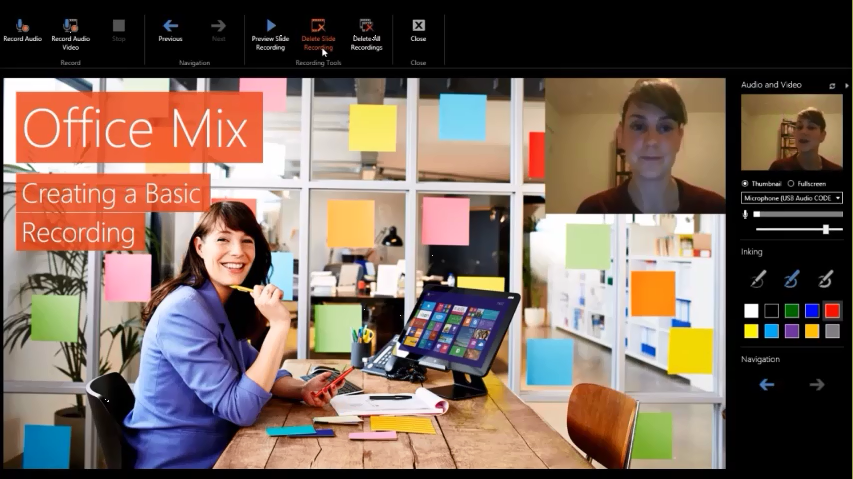
Office Mix, formerly codenamed “Athena”, allows you to turn your PowerPoint 2013 SP1 presentations into interactive online lessons or presentations. We install an add-in that gives you the ability to:

  • record audio, video, and handwriting
  • insert interactive elements like quizzes and CK12 exercises
  • retrieve & analyze quiz results online
  • screen capture so you can record anything on your PC

Once your presentation is ready just click “Create Mix.” We work our magic to mix it into an interactive document complete with analytics, and place it in the cloud. From there, just share the link, and your students can watch it on just about any device with a web browser. You can then check student progress online, see who watched the presentation, and see how they did on your quizzes.

Best of all, Office Mix is free! The website, data analytics, and add-in are all free. Office Mix does, however, require Office 2013. You can try Office for free if you don’t have the latest version.
image
Screenshot of the Office Mix too incorporated into PowerPoint 2013

System Requirements:

  • Computer: 2 gigahertz (GHz) or faster x86-bit or x64-bit processor with SSE2;
  • Memory: 2 GB RAM
  • Hard disk: 1.0 GB available disk space
  • Display: 1024 x 768 screen resolution; Graphics: DirectX 10 or 11 graphics card
  • Operating system: Windows 7, Windows 8, or Windows 8.1
  • Microsoft Office: PowerPoint 2013 w/ SP1, Office 2013 (w/ SP1) or Office 365
  • .Net version: 4.5
  • Other: Microphone or other sound input device for recording, webcam for video recording.

Downloads/Links:

imageSharePoint Conference 2014 (SPC14) now offers the main keynote and all 230+ recorded breakouts for Developers, IT Professionals, and Executives.  These session recordings will help you transform your business and reimagine the way you build SharePoint solutions. SPC14 took place March 3-6, 2014

The sessions cover Search, Security, Yammer, Office, OneDrive for Business, Portals, ECM, BI, operations, Office 365, Azure, SQL Server, and many others. The primary goal is to help you learn how to create and design apps that will drive innovation and be better positioned for the future.

imageThe recorded sessions from the Microsoft Exchange Conference 2014 (MEC2014) are now available!

MEC is the premier global event for Microsoft Exchange and Office 365 professionals. The MEC sessions will help you understand the future of Exchange and learn from people who build and maintain the product.  MEC allows administrators, IT Pros, and Developers to elevate their career potential and enhance their overall knowledge of Microsoft Exchange.  MEC2014 took place March 31-April 2, 2014 in Austin, TX.

Content is delivered across tracks including: Architecture; Deployment & Migration; eDiscovery and Compliance; Exchange Extensibility; Manageability and Support; Outlook, OWA, and Mobility; and Security and Protection.

The sessions are available through the following  link:

Posted by: kurtsh | April 28, 2014

NEWS: OneDrive for Business now provides 1TB/user

clip_image004OneDrive for Business has been part of Office 365 for some time, but earlier this month we announced a new standalone offer for OneDrive for Business, making it even easier for our business customers to get the file sync and share service that’s designed to meet the anywhere access, storage, scale, data security and compliance requirements organizations need.  OneDrive for Business is unique because it offers the flexibility of a reliable and secure standalone service, but is also a tightly integrated Office 365 service, offering enterprise-class productivity.

Today we’re announcing the following:

  • Microsoft will be increasing OneDrive for Business storage from 25GB to 1TB per user.
  • All Office 365 ProPlus customers will get 1TB of OneDrive for Business storage per user as part of their Office 365 ProPlus subscription.
  • We’ll help organizations migrate data from their existing solutions to OneDrive for Business

For more information read the blog post here.

« Newer Posts - Older Posts »

Categories