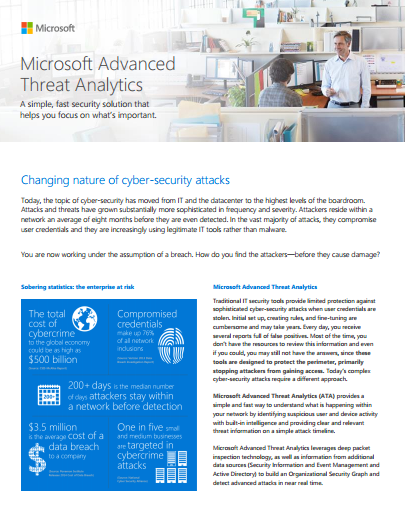
imageIn case you missed it, customers with Enterprise CAL on Software Assurance will be getting Microsoft Advanced Threat Analytics at no additional charge.

So yes, if you have the Enterprise CAL today and it’s on Software Assurance, you’ll be able to take advantage of ATA as soon as it is released.

The purchasing page for ATA, describes the licensing vehicles for this a swell:

imageWe’re happy to announce the release of our newest free ebook, Microsoft Azure Essentials: Azure Web Apps for Developers (9781509300594), by Rick Rainey. This is the fourth ebook in Microsoft Press’s free Microsoft Azure Essentials series.

Posted by: kurtsh | July 24, 2015

HOWTO: Monitor Office 365 Service Availability

If you’re looking for ways to monitor Office 365 to be proactive about your knowledge of how the services is doing, if parts are going down for maintenance or something like that, check out my previous post on the dashboard.

Recently, our Office 365 Technology Specialist, Chandler Bootchk, passed on the following to me to add to our fun:

imageWe’ve all seen clickbait, i.e. content blatantly written to attract readers simply by writing  inflammatory opinions or incorrect facts simply to attract views for the site’s advertisers.

Have you ever asked yourself, “How to I write about the illegitimacy of this article/post without referring/linking back to the page and otherwise rewarding the writer by attracting more hits?”

The answer is to use an “archived page” of the article/post.  An “archived page” is a replica of the page that is referable by a link & even completely downloadable in a ZIP file.

For example, let’s say you consider the following URL to be the clickbait post you want to reference but not actually send people to:

You might instead refer people to the following Archived Page instead.  It provides the same content, but no clickthrough revenue for the writer/site:

ARCHIVING PAGES
The way you do this is by following this procedure:

  1. Go to http://archive.is
  2. Enter the URL you wish to archive under the field, “My url is alive and I want to archive its content”  It will process the URL then send you to a new shortcut to an archive.is page.
  3. Use the new URL for future reference to the clickbait.

CREATING A FAVORITE TO ARCHIVE YOUR CURRENT PAGE IN A SINGLE CLICK
An alternative way of doing this is to create a Favorite/Bookmark that will allow you to automatically archive ANY PAGE you’re currently visiting.  This is the easiest way to

Simply create a Favorite with the following URL string:

Now, whenever you hit a page you consider clickbait, simply hit this Archive Favorite and you’ll have a referable URL that won’t reward the author with clicks.

imageThe Office team released a killer post regarding Office 2016 for Macintosh, entitled, “Your top 10 questions about Office 2016 for Mac answered”.

It addresses the following questions:

  1. Where do I get Office 2016 for Mac?
  2. When will Office 2016 for Mac be available for people and businesses who don’t want a subscription?
  3. When will the Office 2016 for Mac preview stop working?
  4. Can I use Office 2016 for Mac and Office for Mac 2011 on the same Mac?
  5. When will Skype for Business and OneDrive for Business for Mac be available?
  6. I have a technical problem. Where do I go?
  7. How can I request a new feature?
  8. I’m having problems with Outlook connectivity and reliability. What’s happening?
  9. What are your plans for Visual Basic support?
  10. When will Office 2016 for Mac be available in Arabic, Hebrew and other right-to-left languages? What about other languages?

Read the answers here:

image_thumb[1]

We’ve been producing a series of webcasts all about Enterprise Mobility Suite, and its 4 technologies.  (Datasheet here) So if you have an interest in learning about Enterprise Mobility Suite… or you have the impression that it’s just a giant “bundle” with no rhyme or reason, you will really benefit by catching up on some of these videos.

Here’s a list of what’s available:

  • Enterprise mobility security with Azure RemoteApp, MFA, and RMS (August 11, 2015)
  • Configure Azure RemoteApp to provide user access to applications (August 25, 2015)
  • Configure Azure Active Directory Premium features
  • Control access to cloud resources with Enterprise Mobility Suite
  • Secure access with one Identity! Single Sign On for On Prem and Cloud Apps
  • How to deliver apps with Azure RemoteApp
  • How to secure BYOD scenarios with conditional access
  • How do I make e-mail and Office secure on mobile devices?
  • Do I really need an integrated approach for mobility instead of compiling point solutions?
  • Protecting corporate data with Enterprise Mobility Suite
  • How do I know when I’m under attack – and then what do I do?
  • How to manage apps in BYOD scenarios
  • How do I protect my data wherever it goes?
  • An analyst view of EMM trends
  • Extend your existing Active Directory to the cloud
  • Cloud Suites explained: EMS and ECS
  • Better Together: O365 and EMS
  • Secure O365 apps with Microsoft Intune
  • Compare point solutions for enterprise mobility to Microsoft EMS
  • Configure Azure RMS for secure sharing
  • Streamline new employee onboarding with EMS

To register for any of these upcoming webcasts or view those that have already taken place, go to the link below:

For more on Enterprise Mobility Suite, visit:

Part of the Enterprise Mobility Suite webinar series, there is a ton of upcoming webcasts including one on mobile security:

  • Enterprise mobility security with Azure RemoteApp, MFA, and RMS
    This webinar showcases some of the new Microsoft security solutions that allow IT to offer device choice, protect corporate data, and provide secure access from anywhere. This webinar demonstrates the security capabilities from Azure RemoteApp, MFA, and RMS.
    DATE/TIME:
    Tuesday, August 11, 2015
    12:00 PM Central Daylight Time
    REGISTER:
    http://w.on24.com/r.htm?e=933883&s=1&k=60784B6A07D5A6B44E63ED
    F38725BB0A&partnerref=USCLE

image

Starting July 29, Microsoft stores will be the premier destination to experience Windows 10!

To celebrate, all stores will host “Upgrade Your World” events with food, giveaways, music and a series of fun activities to show consumers the power of Windows 10. Select locations will also host Pop-Up experiences, some featuring an in-store celebrity appearance or concert. To get the latest details, visit the Microsoft stores Facebook page.

Join us on Thursday, July 30 from 4:00 – 6:30 p.m. at an exclusive reception for Microsoft partners and customers, to experience all that Windows 10 has to offer and enjoy light refreshments. Store associates will be available to deliver demos and facilitate upgrades on all of your favorite devices. No registration necessary, click here to find your nearest location.

Please help spread the word about the Upgrade Your World events by inviting your family and friends to join in the festivities! We look forward to seeing you!

imageOn July 28th the SoCal Azure Users Group will officially move to its new home at the Microsoft Irvine offices @ 3 Park Plaza. If you’re a technical professional interested in the cloud or already experienced in using Azure, I encourage you to attend. This is an event that brings together Azure experts from the MVP community and Microsoft, to present new and exciting topics on a monthly basis.

If you plan to attend, please register so we can get an accurate headcount as food will be provided.

Please register on the Meet Up registration page:

imageFood is provided. Parking is sponsored by Hitachi Consulting.

Posted by: kurtsh | July 21, 2015

DOWNLOAD: Power BI Starter Kit

Everything you need to get started using Power BI for free is now in one place. Sign up for the starter kit and you’ll be able to start wrangling huge amounts of data into useful information and creating beautiful presentations with Power BI right away.

Getting Started with Power BI

The kit contains the following:

  • Video: Getting Started with Power BI, for all the basics needed to get up and running.
  • Video: Getting Started with the Power BI Designer, for insights into creating reports.
  • Video: Building Reports with the Power BI Designer, for a deeper dive into creating reports.
  • Video: Getting Started with Power BI (the extended version), for a more comprehensive walk through.
  • eBook: The Cloud for Insights E-Book. Learn more about the potential of the cloud and big data generate insights for business.

imageDownload it by signing up here:

Sign up for Power BI for free here:

« Newer Posts - Older Posts »

Categories