Posted by: kurtsh | November 4, 2015

NEWS: Microsoft Azure, now even more Open with Red Hat

AzureLogoThe Azure cloud platform has been built from the ground up to be an open platform, and currently 1 in 4 Azure virtual machines is powered by Linux and 60% of the solutions in Azure marketplace are Linux based. Today we are announcing another significant step forward in our ongoing openness efforts and support for Linux on Azure, and I am pleased to inform you that we have entered into a partnership with Red Hat to provide joint, enterprise grade support on Azure for a breadth of Red Hat solutions. Key elements of the partnership include:

  • Red Hat solutions available natively to Microsoft Azure customers. In the coming weeks, Microsoft Azure will become a Red Hat Certified Cloud and Service Provider, enabling customers to run their Red Hat Enterprise Linux applications and workloads on Microsoft Azure. At this time, Red Hat Cloud Access subscribers will be able to bring their own virtual machine images to run in Microsoft Azure. Microsoft Azure customers can also take advantage of the full value of Red Hat’s application platform, including Red Hat JBoss Enterprise Application Platform; Red Hat JBoss Web Server; Red Hat Gluster Storage; and OpenShift, Red Hat’s Platform-as-a-Service (PaaS) offering. Also, in the coming months, Microsoft Azure and Red Hat plan to provide Red Hat On-Demand— “pay-as-you-go” Red Hat Enterprise Linux images available in the Azure Marketplace, supported by Red Hat.
  • Integrated enterprise-grade support spanning hybrid environments. Customers will be offered cross-platform, cross-company support spanning the Microsoft Azure and Red Hat offerings in an integrated way, unlike any previous partnership in the public cloud. By co-locating support teams the experience for customers will be simple and seamless.
  • Unified workload management across hybrid cloud deployments. Red Hat CloudForms will integrate with Microsoft Azure and System Center Virtual Machine Manager, offering Red Hat CloudForms customers the ability to manage Red Hat Enterprise Linux on both Hyper-V and Microsoft Azure. Support for managing Azure workloads from Red Hat CloudForms is expected to be added next year, extending the existing System Center capabilities for managing Red Hat Enterprise Linux.
  • Collaboration on .NET for a new generation of application development capabilities. Expanding on the preview of .NET on Linux announced by Microsoft in April, developers will have access to .NET technologies across Red Hat offerings, including OpenShift and Red Hat Enterprise Linux, jointly backed by Microsoft and Red Hat. Red Hat Enterprise Linux will be the primary development and reference operating system for .NET Core on Linux.

For more information:

  • Visit the Microsoft and Red Hat landing page here and view the announcement webcast by Microsoft’s Scot Guthrie and Red Hat’s Paul Cormier.
  • Attend (or watch a recording) of a technical webinar on running Red Hat solutions on Microsoft Azure.
  • Go here to learn more about our overall Microsoft open cloud approach and join our social blog.

Today, I learned that the charger for the Surface Book outputs a much high amperage than the Surface Pro 3. 

  • The Surface Pro 3 power supply/brick operates at 12V & 2.53A = 30.36W
  • The Surface Book power supply/brick operates at 12V & 4A = 48W

This is a big deal:  Despite looking nearly identical to another – including the connector to the Surface itself – the rate of charge is dramatically higher using the Surface Book charger because of the higher wattage outputted. 

There’s a couple ways to tell which power supply is which if you own both:

  1. The Surface Book’s power characteristics (Output: 12V & 4A) are listed on the power supply in tiny, tiny print.  If you’re old like me, this can be hard to read
  2. The Surface Book power supply has a holographic sticker on there that reads “Windows”.  The Surface Pro 3’s power supply has a stick that reads “Windows 8”.

Bottom line: If you’re gonna grab a power supply to take on the road, the Surface Book’s 4A power supply is the one you’re gonna wanna take.

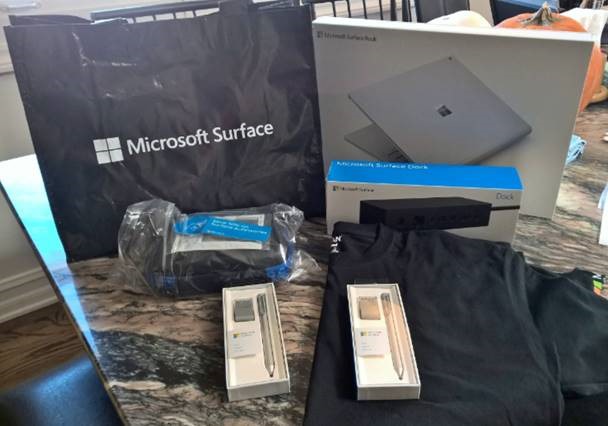
This is sitting on my kitchen table right now.  This is the package I bought:clip_image002
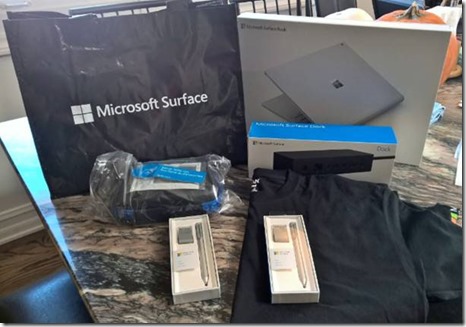
Surface Book with Core i7/16GB GDDR5 RAM/512GB SSD/discrete Nvidia GPU and new Surface Pen, and the new Surface dock.

Notice the two extra Surface pens.   That’s because they work on the Surface Pro 3 and 4 – which I’m also getting or already have.  This means the tail eraser works. I bought them because I know I’ll probably lose one of them – I’m so irresponsible.  Also I don’t believe that the extra tips come with the pen that comes with the Surface Book, but they do come with the extra pens.

A WORD ABOUT THE NEW SURFACE PEN
I actually had to read the instructions to figure this out but there’s a new pairing feature of sorts. 

  • Press & hold the eraser for 5 seconds and a little light on the side of the pen will begin flashing.
  • Hold the pen tip to the Surface screen for 10 seconds to pair it to the Surface.

You can also pair it using the normal Bluetooth pairing technique through Control Panel.

A NOTE ABOUT COMPLETE FOR BUSINESS
It turns out there is a new Complete warranty type being offered by the Microsoft retail stores called “Complete for Business”.  

There’s some sort of detail where if you get the dock and Complete for Business – which has THREE YEARS of warranty coverage – they will discount the package by something like $60.  I didn’t even know about this bit but was glad I heard about it while I was there.

EXTRA SURFACE STUFF… FREE! (FOR MICROSOFT RETAIL STORE BUYERS)
One more benefit of picking up your Surface from the store:  Apparently if you get it at the retail store, you also get a free Surface T-shirt, a free Surface case (looks like it’s for the power supply), a 8GB USB flash drive, and a coupon for 10% off Surface accessories until Nov 24th

This may be a limited time offer thing though so don’t hold me to it.

image

Taken from the page:

The moment we have all been waiting for is almost here! We invite you to join us at the Halo 5 Launch and Celebration, beginning at 6:00 PM PT on October 26 at the Westfield Century City Microsoft Store.

We’re pulling out all the stops for the biggest game launch party of the year. We will kick off the night with free, early game play of the most dramatic Halo story. We will have live broadcast shout-outs throughout the event along with on-site gamer-relevant talent such as 343 developers, voice talent, and the 405th regiment to answer questions and sign autographs. If you pre-order Halo 5: Guardians or make a purchase of $25 or more, you could receive a limited edition poster only available on launch day. We…’ll even have a giant Master Chief Helmet Installation, augmented reality photo experience, Halo-inspired food and beverages, and live music.

As an extra bonus, we will be having raffles throughout the event including a Halo 5 Xbox One console grand prize and more. Plus, you will have the opportunity to enter our sweepstakes for a chance to win a trip for 2 to Seattle, lunch with Major Nelson, and exclusive behind-the-scenes Xbox experiences.

Monday, October 26
4:00 PM PT – Halo 5 Launch and Celebration lineup begins
6:00 PM PT – Halo 5 Launch and Fan Celebration begins
9:00 PM PT – Halo 5: Guardians game pick-up

See rules and FAQs: msft.it/Halo5laFAQ

Taken from Halo Waypoint:

Meet voice-over actors from the game, including Darren O’Hare (Lasky), Q&A with key 343 Industries developers and surprise celebrity guests. Fans will also have a chance to appear on the Halo 5: Live broadcast throughout the night…

Lineup begins at 4 p.m. on Monday, October 26, with doors opening at 6 p.m. More details on the Microsoft store Facebook page

Register here:
https://www.facebook.com/events/192177014448409/

image

Are you a developer?  Get ready for the next Microsoft Connect event!

It all started here – are you ready for what’s next?

A year ago Connect(); started the journey for a new Microsoft for developers, unveiling the future of an open source .NET on Linux and Mac, and a free Visual Studio for targeting any device and any OS.

Join us this year to hear directly from Scott Guthrie, Brian Harry, and Scott Hanselman on what’s next in this exciting journey. Get deeper insights into our exciting announcements with over 30 on-demand sessions. Interact with the engineering team members behind Microsoft tools and technologies to help you get started.

Developer keynotes & technical sessions will all be available streaming live so register for this exciting event!

Posted by: kurtsh | October 20, 2015

RELEASE: Halo 5: Guardians (Original Game Soundtrack)

imageHalo fans:  Are you ready for a full dose of the feels?

343 Industries has made available the entire 39 track soundtrack from Halo 5: Guardians (written by Kazuma Jinnouchi) available to listen to on SoundCloud, leading off with Track 01:  Halo Canticles.

And we all know what that is.

imageGartner recently released their latest Magic Quadrant for Operational Database Management Systems and Microsoft has come out as the clear & away #1 database across all categories including the cloud – surpassing Oracle, IBM, Amazon and other notable vendors.

Read the entire report, at no cost, here:

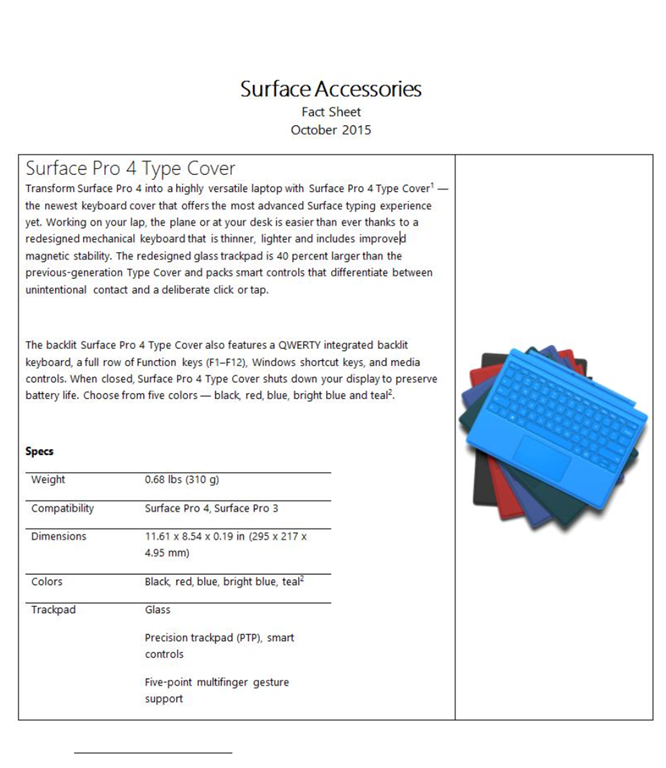
imageIn case you missed them, here’s the Surface Pro 4 factsheet and the Surface Accessories factsheet.

They highlight the new liquid cooling/fanless heat dissipation for quiet operation, the new Surface Pen “eraser” with stiction for the feel of erasing, and the new Surface dock which works with Surface Pro 3, 4, and Book.

imageLooks like in the recent Windows Insider build from yesterday, we are now allowing users to activate Windows 10 using product keys from Windows 7 or 8.x.

Per Gabe Aul’s blog post on the Windows blog:

Device activation improvements: We have received a lot of feedback from Insiders on making it easier to activate Windows 10 on devices that take advantage of the free upgrade offer to genuine Windows by using existing Windows 7, Windows 8 or Windows 8.1 product keys. If you install this build of the Windows 10 Insider Preview on a PC and it doesn’t automatically activate, you can enter the product key from Windows 7, Windows 8 or Windows 8.1 used to activate the prior Windows version on the same device to activate Windows 10 by going to Settings > Update & security > Activation and selecting Change Product Key. If you do a clean install of Windows 10 by booting off the media, you can also enter the product key from prior Windows versions on qualifying devices during setup. Refer to the Insider Hub for more information on these activation improvements including requirements.

Looks like those old copies of Windows 7 are lookin’ really good about now… or at least during the T2 timeframe, ‘eh?

Posted by: kurtsh | October 11, 2015

INFO: Fixing Windows Updates by clearing the cache folder

imageSince updating to Windows 10, I’ve encountered an issue twice where the monthly updates failed to install.  Each time, the solution involved erasing/flushing the Windows update file cache and retrying.

Here’s how to do this in case you need to accomplish the same thing:

Flush the Software Distribution Folder.

Run Command Prompt as administrator. In the CMD box that appears on the computer screen, enter the following strings of text, one at a time, and hit Enter.

net stop wuauserv

net stop bits

Now browse to the C:\Windows\SoftwareDistribution folder and delete all the files and folders inside.

If the files are in use, restart your device. After rebooting, run the commands above again. Your Windows Store App needs to be closed by the way, so do not start it.

Now you will be able to delete the files from the mentioned Software Distribution folder. Now in the Command Prompt windows, type the following commands one at a time, and hit Enter:

net start wuauserv

net start bits

Reboot. If you are using Windows Update try using Microsoft Updates or vice versa.

Taken from:

« Newer Posts - Older Posts »

Categories