imageIn case you missed it, the Microsoft Planner “Ask Microsoft Anything” online event took place this morning from 9-10AM and the record of all questions asked and answered are available online for folks to review.

Here’s a summary of some of the questions:

  • Do you guys have an updated roadmap?
  • Is there is anyway (or on Roadmap) to restore a “plan” from specific time like a snapshot?
  • Why is there no option to search for tasks?  Priorities for tasks?
  • Great to see the Planner web part in SharePoint. What enhancements does the Planner team have lined up?
  • Will Planner be implementing a ‘copy plan’, or ‘template plan’ feature soon, as discussed in the boards?
  • Is there a way to receive notifications when a task is complete via email if I’m the one who created it?

View the AMA written record here:

imageToday, at Enterprise Connect 2018, Microsoft delivered the day’s keynote address. Tune in to hear Bob Davis, Corporate Vice President of Office 365, unveil new announcements advancing our vision for Intelligent Communications.

Hear the latest news, and experience never-seen skills through Microsoft Teams and Teams-powered devices. Learn more about how Intelligent Communications is enabling communications to be more insightful, proactive, and connected.

  • Revolutionizing collaboration & communications with Intelligent Communications through Microsoft Teams with Bob Davis, Corporate VP of Office 365
    (Originally broadcast on Wednesday, March 14, 2018 10 AM EST)
    http://teamsatenterpriseconnect.azurewebsites.net/ 

imageMICROSOFT TEAMS WINS TOP AWARD
Also, check out Microsoft’s latest award for Microsoft Teams, “Best of Enterprise Connect” as written up on Enterprise Connect’s online publication, NoJitter.

Posted by: kurtsh | March 14, 2018

INFO: Office 365 & Client Access License (CAL) rights

Ever wonder what on-prem Client Access License (CAL) rights customers get with Office 365 Subscription Licenses?

Here’s a post that goes over this in a nice table from the Volume Licensing Blog:

The good news is that Office 365 Enterprise E3 & E5 provide both the "on-prem Standard CALs & Enterprise CALs" for Exchange, SharePoint, & Lync/Skype for Business – not just the on-prem Standard CALs. (Note: The E5 license replaced & became a superset of the E4 license)

Here’s the table from the site that gives some orientation around what subscription gets what CAL right:

image

Posted by: kurtsh | March 14, 2018

RELEASE: Azure SQL Database Managed Instance

imageInterested in use an elastic, highly-available SQL Server in the cloud without worrying about making any code changes other than pointing your application to the cloud datasource?

Introducing Azure SQL Database Managed Instance – the first SQL DB service in the cloud that enables SQL Server users to migrate their data to the cloud & connect their applications to the cloud database seamlessly without worrying about previous blockers like SQL CLR, SQL Server Agent, Cross Database Queries, etc.

Description here:

Azure SQL Database Managed Instance combines the best aspects of SQL Server and Azure SQL as a platform service. It enables you to run applications with dependencies on SQL CLR, SQL Server Agent or cross database queries like you would on a physical or virtual server running SQL Server, but as a managed instance you get the as a service benefits so you don’t need to spend time keeping servers patched and up-to-date, plus machine learning powered capabilities like auto-tuning to improve query performance and proactive security recommendations. Lara Rubbelke explains and demonstrates all of this, including how you can set up you own Azure SQL Database Managed Instance in this show.

To learn more about Azure SQL DB Managed Instances, visit:

Here’s a Microsoft Mechanics video brief on the technology:

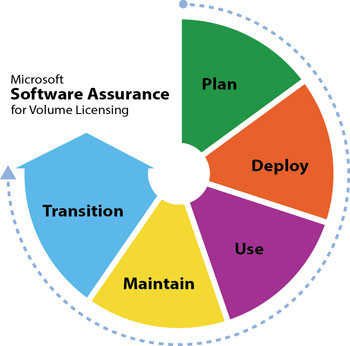
Some organizations that own Windows Server Datacenter Edition on Software Assurance (a.k.a. license maintenance) have also deployed Azure Virtual Machines running Windows Server Datacenter Edition without taking advantage of the Azure Hybrid Use Benefit, despite being eligible.

If a user is eligible, Azure Hybrid Use Benefit enables the user to take advantage of their existing Windows Server Datacenter Edition licensing while on Software Assurance, and NOT have to pay for a Windows Server license while running an analogous Virtual Machine within Azure.

The result is roughly a 40% savings on Azure billing.  And it’s only available on Microsoft’s cloud.

HOW TO ENABLE EXISTING VMS TO USE AZURE HYBRID USE BENEFIT
If you have Virtual Machines eligible for the Azure Hybrid Use Benefit, that are not currently taking advantage of it, you don’t need to redeploy the workload to Azure.

Below is the PowerShell command to convert existing VMs to use Azure Hybrid Use Benefit:

$vm = Get-AzureRmVM -ResourceGroup "rg-name" -Name "vm-name"

$vm.LicenseType = "Windows_Server"

Update-AzureRmVM -ResourceGroupName rg-name

imageJames Phillips, Corporate VP for Business Applications, invites you to join us for the “Microsoft Business Applications Virtual Spring Launch” event!

Get a first-hand look at the Spring 2018 Business Applications update to see how modern, intelligent technologies can transform your operations, improve engagement with your customers, and help move your business forward.

imageJoin the virtual webcast event featuring James Phillips, Corporate Vice President, Business Applications Group. We’ll take a look at many of the new capabilities across Dynamics 365, Power BI, and the Business Application Platform and will showcase how these technologies can help drive your digital transformation.

Posted by: kurtsh | March 13, 2018

TRAINING: Visio Webcast Series (On-demand)

imageMicrosoft Visio helps you simplify and communicate complex information with data-linked diagrams that you can create in just a few clicks.

Visio makes diagramming simple. Whether you want to quickly capture a flowchart that you brainstormed on a whiteboard, map an IT network, build an organizational chart, document a business process, or draw a floor plan, Visio helps you work visually.

Learn how to take advantage of these tools by registering for this webcast series.  Here’s some of the topics:

  • See new & improved features inside Visio 2016
  • Collaborate for innovation and improvement
  • The 3 C’s of Visio Stencils
  • Visualize project status by linking Project to Visio
  • Visio Online Preview
  • Introducing powerful new features in Visio
  • Your GPS to more effective Visio process maps
  • Create value stream maps with Visio 2016
  • Visio techniques to make you a power user
  • Visio Online Viewer & Visio Viewer for iPad & Microsoft’s cross platform vision for Visio

Register here:

imageFreakonomics Radio’s Stephen Dubner had a 40min interview with Satya Nadella, CEO of Microsoft, where he asks about what Microsoft’s growth & cultural changes, about his ascendance to CEO & what got him there, & the impact his upbringing had on his views on leadership.

What follows is a conversation with Satya Nadella, the C.E.O. of Microsoft. It was recorded in September, 2017, soon after Nadella published a book, called Hit Refresh: The Quest to Rediscover Microsoft’s Soul and Imagine a Better Future for Everyone. The interview was done for our six-part series, “The Secret Life of a C.E.O.” And now we’re releasing — as special episodes like this one — our full, lightly edited conversations. Some of the facts are already outdated — Microsoft’s market cap, for instance, has grown a lot more than $250 billion since we spoke. Hope you enjoy.

Listen to the full interview below:

Subscribe to the podcast via RSS or iTunes below:

imageEver had problems with Office 365’s applications?

Have you tried the Microsoft Support and Recovery Assistant for Office 365?

How does it work?
Support and Recovery Assistant works by running tests to figure out what’s wrong. It can fix many problems for you, or it can tell you how to fix them yourself.

  • Problems with Outlook
      • Outlook stops responding
      • Can’t receive emails
      • Outlook keeps asking for my password
      • Shared mailboxes or shared calendars don’t work.
      • Outlook keeps saying "Trying to connect…" or "Disconnecte
  • Problems with Office 365 email on your phone
      • I can’t sync my email
      • Email app keeps asking for my password
  • Trouble setting up Office apps
      • Where do I go to install Office?
      • I can’t activate Office
      • I need help setting up my Office 365 email in Outlook

imageInstallation
The installation is a 195KB stub that installs a 98.8MB .NET application.

After accepting the Terms of Use screen, you’ll be sent to the main page.  In the upper right hand corner, you can sign-in to your Office 365 account to kick things off.

Download the tool from the site below.

clip_image002

These days, a data breach is every organization’s worst nightmare—and for good reason. Cyberhackers are getting more sophisticated by the day, and more and more companies are falling prey to this global cybersecurity epidemic. Is your company prepared to protect against, detect, and respond to an attack when—not if—it happens to you?

At the Microsoft Virtual Security Summit, security experts and thought leaders will gather together to share insights to help you elevate your security posture, stay competitive despite cybersecurity threats, and better protect data, devices, and users in a cloud-first, mobile-first world. Register for this session-packed, live online event on March 14 from 9:00 AM-12:00 PM PT.

You’ll learn about:

  • Best practices to ensure cyber defense and cyber resiliency
  • Innovations in cloud security
  • New threats to look out for in 2018
  • Blockchain security, and more

https://image.email.microsoftemail.com/lib/fef41d767d6606/m/37/en-us_vss_t4_regbutton_v2_160x55.png

Summit Highlights

https://image.email.microsoftemail.com/lib/fef41d767d6606/m/37/en-us_vss_t4_pic03-04_jtrull_90x195.jpg

Anatomy of a Breach: How Do Hackers Break In?
Jim Moeller, Principal Cybersecurity Consultant
& Matt Kemelhar, Cybersecurity Expert, Microsoft

This keynote will provide an in-depth look at the lifecycle of an attack, strategies hackers employ to infiltrate your network, and tips for preventing attacks within your organization based on lessons from real-world examples.

https://image.email.microsoftemail.com/lib/fef41d767d6606/m/38/en-us_vss_t4_pic04-05_sj_jp_90x195.jpg

The General Data Protection Regulation (GDPR) is Coming: Are You Ready?
Sian John, Chief Security Advisor U.K.
& John Payseno, Assistant General Counsel, CELA, Microsoft

GDPR takes effect in May, affecting all companies, government agencies, non-profits, and other organizations conducting any type of business in the EU or collecting or analyzing data tied to EU residents. Tune into this keynote to hear these experts share how to build a compliance practice by understanding both the spirit of the law, as well as the letter.

https://image.email.microsoftemail.com/lib/fef41d767d6606/m/37/en-us_vss_t4_pic05-06_jtrull_90x195.jpg

Cyber Resiliency and Future State: Innovations in Cloud Security
Jonathan Trull, Cybersecurity Executive & CISO
& Shawn Anderson, Executive Security Advisor, Microsoft

Hear from top Global Security Advisors about the trends that will affect cybersecurity into the future across AI, Internet of Things, and Machine Learning.

https://image.email.microsoftemail.com/lib/fef41d767d6606/m/37/en-us_vss_t4_regbutton_v2_160x55.png

Already booked for March 14?
Sign up now and we’ll let you know when the on-demand version is available for viewing.

« Newer Posts - Older Posts »

Categories