image[I didn’t post this soon enough – my bad.  But all the answers are located at the site below]

We are very excited to announce a Microsoft Information Protection Ask Microsoft Anything (AMA) to answer questions about the new capabilities announced at Microsoft Ignite.

The AMA will begin on Tuesday, November 6th at 9am PT.

An AMA is a live online event similar to a “YamJam” on Yammer or an “Ask Me Anything” on Reddit. This AMA gives you the opportunity to connect with members of the product engineering team who will be on hand to answer your questions and listen to feedback.

We will open up the space for questions when the event begins at 9AM PT.

If you absolutely can’t attend and have questions you want to ask, share your questions in this thread and we’ll be sure to move them to the main space.

View the Q&A at the AMA site here:
https://aka.ms/InformationProtectionAMA

imageFinding a balance between readily sharing files and protecting corporate assets is crucial. At Microsoft, we get it. With over 400,000 SharePoint team sites, intranet portals, and OneDrive for Business sites, we have a lot to manage.

Learn how we use custom solutions, organizational policy, Office 365, and Azure Active Directory to help manage, govern, and protect our data in a highly collaborative environment.

Access additional technical content, discover new and exciting career opportunities in IT, and much, much more.

DATE/TIME:
Thursday, Nov 8, 10:00 AM PT

Posted by: kurtsh | November 6, 2018

RELEASE: Azure AD group-based license management

image“I am excited to announce that group-based licensing is now generally available! As part of our general availability release, we made the service more scalable by adding these capabilities:”

  • Developer APIs in Microsoft Graph to allow you to programmatically read group-based licensing assignments on groups, as well as programmatically get assignment status and errors.
  • Ability to reprocess group-based licensing assignments for a single user.
  • Simplified licensing requirements for group-based licensing. Users who are targeted for group-based licensing need Azure Active Directory (Azure AD) Basic (and above), or Office 365 E3/A3 (and above).

To start using group-based licensing, look at our Assign licenses to users by group membership in Azure AD documentation.

imageLooking for cost efficiency around you Azure spend?

Check out this session from Microsoft Ignite by Joanna Van Gansen, Group Program Manager for the new “Azure Cost Management” (A combined portal incorporating the Enterprise Portal & Cost Management from Cloudyn). 

She goes over techniques for saving money on Azure, including:

  • Azure Cost Management
  • Azure Advisor
  • Reserved Instances
  • Azure Hybrid Benefit
  • Changing behaviors, planning for the move from on-prem vs the cloud
  • Microsoft IT’s experiences in drive down costs in Azure

And the recording has 20min of Q&A with Joanna which is very interesting.  Here’s the recording:

imageDid you know that Outlook Mobile for iOS & Android is now supported in Office 365 Government?

It can now be used against Office 365 Government tenants without any sort of exceptions or waivers. (Which were required prior to getting FedRAMP approved.)

As with most GovCloud solutions, there are some differences in functionality to know.  Read about GovCloud usage of Outlook Mobile here:

imageToday is the “official” day that we launched Microsoft Teams for GCC. (Our launch is taking place this week because it should be available to all Office 365 GCC tenants as of this past month.)

VIRTUAL EVENT:
Microsoft Teams for GCC

There is a webinar that we will be doing tomorrow Wednesday, 10/24 at 10:00AM if you can make it:

“Transform collaboration in government with Microsoft Teams”

October 24, 2018
1:00 PM ET / 10:00 AM PT

Registration:
https://resources.office.com/en-us-landing-transform-collaboration-in-government-with-microsoft-teams.html?wt.mc_id=AID738947_QSG_277425

Here’s the original announcement:

Introducing Microsoft Teams for the US Government Community Cloud (GCC)

Today we announced that Microsoft Teams—the hub for teamwork in Office 365— will begin rolling out for the US Government Cloud Community (GCC) on July 17th and will be available for all eligible customers by the end of August 2018.

Microsoft Teams is a chat-based workspace that enables teams to be more productive by giving them a single and secure location that brings together everything a team needs including chats, meetings, calls, files, and tools. Now Microsoft Teams meets the federal compliance requirements of GCC customers, including FedRAMP Moderate, CJIS, IRS 1075, and HIPAA, in addition to supporting global standards, including SOC 1, SOC 2, EU Model Clauses, and ISO27001.

Implementing modern collaboration and communications capabilities in the government can streamline your daily work so you can more efficiently deliver against your mission and provide services to citizens and constituents.

Find out more about the announcement here.
https://techcommunity.microsoft.com/t5/Microsoft-Teams-Blog/Microsoft-Teams-will-be-available-July-17-for-the-US-Government/ba-p/209976

imageAt Microsoft, we will be ending the use of Skype for Business for Microsoft employees internally & switching over to Microsoft Teams.  By group policy, there will no longer be a means to schedule meetings through S4B & instead all meetings are being driven through Teams. 

(The Skype for Business client will remain on our machines & users will still be able to join existing Skype or Business meetings, but chat, creation of new meetings, & other features beyond that will require the use of Teams.)

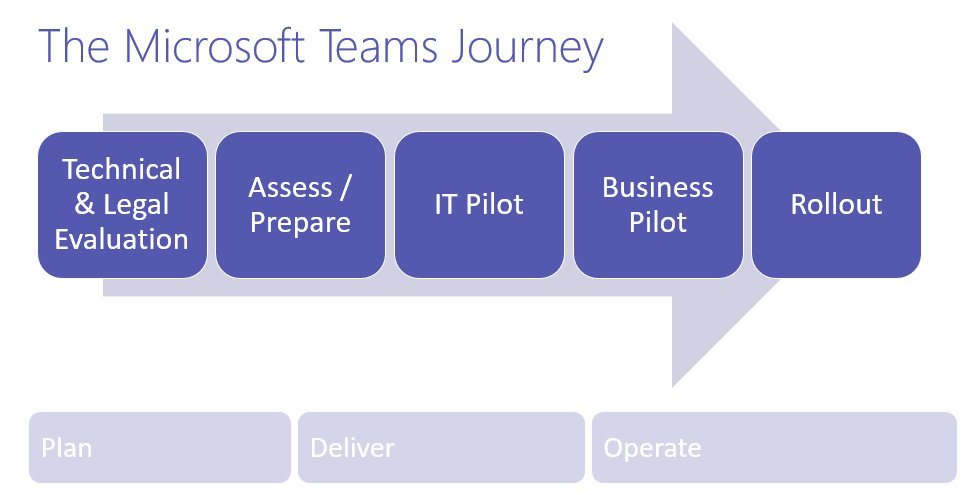
HOW TO MIGRATE TO MICROSOFT TEAMS (IT PLANNING & TRAINING)    
So how is Microsoft IT doing it?  More importantly, how will you do it?

There’s lots of documentation on migrating to Microsoft Teams and fortunately, it comes with recordings of the original presenters sessions at Microsoft Ignite 2018.

imageI strongly recommend reviewing the following:

PLANNING RESOURCES
For more Skype-to-Teams Upgrade Planning Resources:

TECHNICAL DOCUMENTATION
For written guidance on how to accomplish & more detail:

imageAs of today, users for Azure Information Protection and other Microsoft Information Protection solutions can now use Adobe Reader to read labeled and protected content. Both Microsoft and Adobe are encouraged and excited about this collaboration.

Please view the following blogs on how to use the Adobe reader integration and where to download:

imageMicrosoft announced the next version of the perpetual licensed version of Office at Ignite last month as being generally available to Commercial customers. For customers that aren’t ready for the cloud, Office 2019 provides updates to the on-premises apps with new features for end userd and IT professionals.

The Office 2019 GA for Commercial customers includes these products:

  • Office Professional Plus 2019
  • Office Standard 2019
  • Office Standard 2019 for Mac
  • Visio Professional 2019
  • Visio Standard 2019
  • Project Professional 2019
  • Project Standard 2019

Availability

  • General Availability: September 24, 2018
  • RTM build for volume license: 16.0.10336.20044
  • RTM build for Mac volume license: 16.17 (18090901)
  • Office 2019 will initially be available to customers with Enterprise Agreements through the Volume License Service Center. Other channels such as Visual Studio Subscriptions, Imagine, MPN, MAPS and VLSC for non-Enterprise Agreement customers will become available over the next two weeks.

As of October 2nd, consumer customers can also now purchase Office 2019 from Microsoft and other retailers.

System Requirements

The minimum Windows system requirement is Windows 10

The minimum MacOS requirement is 10.12

For more specific details on the system requirements for both see Office System Requirements

Frequently Asked Questions

Office 2019 Commercial for Windows and Mac Frequently Asked Questions is available to answer questions related to Office 2019 vs Office 365 ProPlus.

Documentation

A large amount of information is being published on http://support.office.com and http://docs.microsoft.com to support this release. Key articles are the following:

Are you a Microsoft 365 Government cloud customer?

A new Microsoft 365 Roadmap site has been released and it now has filters to allow you to see what features are available and which are on the roadmap for specific cloud instances, including:

  • Government Community Cloud (GCC)
  • GCC High
  • GCC High/DoD
  • Germany

You can also filter on Office 365, Enterprise Mobility & Security Suite, Windows 10, and all of these suites’ sub-components such as Exchange Online, Microsoft Teams, etc.

image

Visit the new roadmap site here:

« Newer Posts - Older Posts »

Categories