Posted by: kurtsh | May 24, 2019

RELEASE: Identity Secure Score

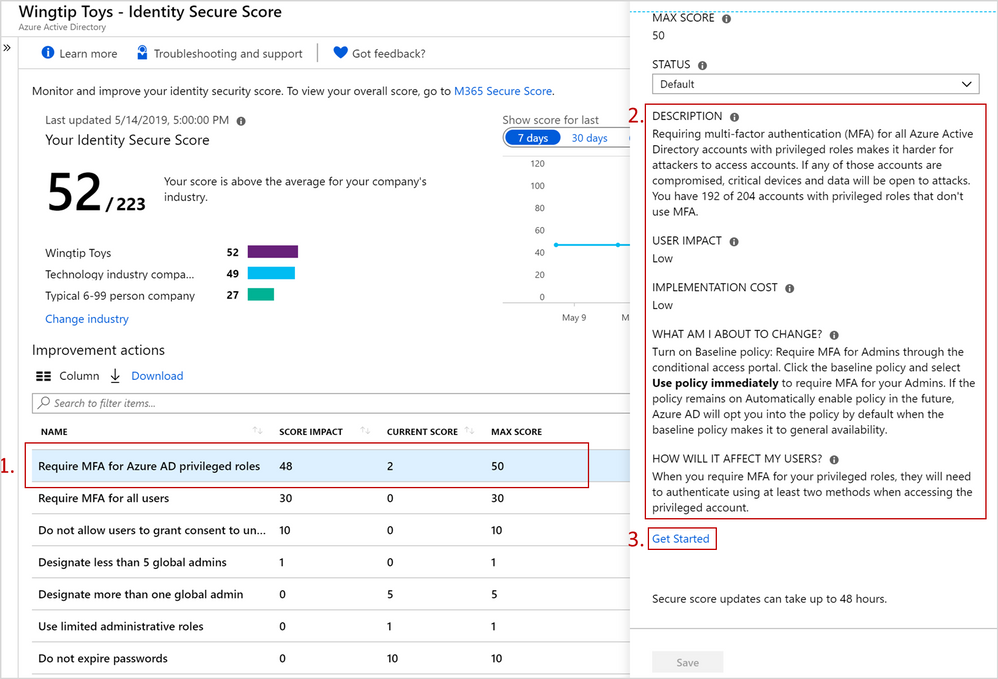
imageIdentity Secure Score is now generally available!
Identity Secure Score provides organizations with increased visibility and control over their security posture by discovering opportunities that will help to improve security across your organization. These opportunities are surfaced as recommendations, which are coupled with the guidance and the workflows necessary to help security administrators implement each recommendation. The more improvements you make, the more your identity security posture improves—increasing your identity secure score!

Read more at the announcement blog post:

The release of Windows 10, version 1903 has introduced a series of new capabilities for Windows Autopilot users and fans!

  • [NEW] Windows Autopilot white glove process [PREVIEW]
  • [NEW] Windows Autopilot Companion app
  • [NEW] User-driven mode for Hybrid Azure AD Join
  • [NEW] Enrollment Status Page for tracking Win32 apps being installed by Microsoft Intune management extensions
  • [NEW] Windows Autopilot self-deploying mode, now with TPM attestation

Here’s a video about Windows Autopilot white glove below.  For more about all these enhancements being released, visit:

As announced earlier, we’ve announced the availability of the “preview” of Windows Server containers in Azure Kubernetes Service (AKS):

Today, we’re excited to announce the preview of Windows Server containers in Azure Kubernetes Service (AKS) for the latest versions, 1.13.5 and 1.14.0.  With this, Windows Server containers can now be deployed and orchestrated in AKS enabling new paths to migrate and modernize Windows Server applications in Azure.

Our customers have applications running on Linux and on Windows. The ability to manage Windows and Linux containers side by side in the same Kubernetes cluster with the exact same APIs, tools and support is what you have been asking us to support, which opens an abundance of new scenarios. For example, you can now add Windows node pools to existing Virtual Network; or deploy a Linux container running a reverse proxy or Redis cache and an IIS application in a Windows container in the same Kubernetes cluster and even as part of the same application – all with consistent monitoring experience and deployment pipelines.

Running Windows Server containers in AKS (preview) also means you can keep taking advantage of many existing Azure services and features that are helping make Kubernetes application development and management much easier, such as:

  • Manage the lifecycle of Linux and Windows containers easily through Azure Container Registry, which pre-stages all container base images. To reduce network latency or meet rigorous compliance needs, Container Registry can automatically geo-replicate the container images to the data center close to where your users are.
  • Deliver applications faster on any OS with a standardized deployment pipeline. Azure DevOps integration with AKS helps automate validation, testing, canary and ultimately production easily in just a few steps.
  • Gain insights into the performance and health of your Kubernetes cluster and workloads with a comprehensive monitoring experience using Azure Monitor.

Read more from the Azure blog announcement here:

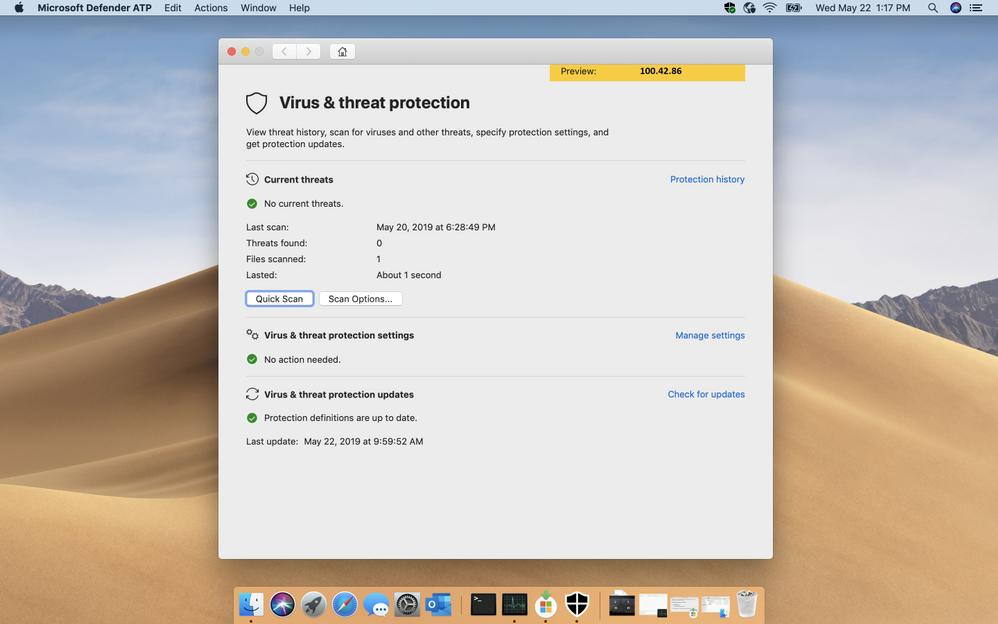
imageMicrosoft Defender ATP for Mac, which brings our unified endpoint security solution to Mac devices, is now in public preview!

We announced and opened a limited preview for Microsoft Defender ATP for Mac in March. For more information on capabilities available in the Microsoft Defender ATP for Mac client, configuration options, and reporting into the Microsoft Defender Security Center, revisit our announcement here: Announcing Microsoft Defender ATP for Mac.

We are thrilled by the response of our customers and the industry to Microsoft Defender ATP for Mac, our own solution for protecting customers across operating systems. Since opening the limited preview, we have been listening to customer feedback and working continuously to enhance the product.

Starting today, Microsoft Defender ATP customers who have turned on preview features can access Microsoft Defender ATP for Mac via the onboarding section in Microsoft Defender Security Center.

Learn how you can get your hands on this goodness.

As announced yesterday in Microsoft Licensing’s news site:

“To help support customers transition to Office 365 ProPlus apps, we have decided to retain the “dual use” policy in the Microsoft 365 From SA product terms.

We had previously announced plans to phase out rights to deploy perpetual Office clients in new and renewing agreements that include the “From SA” version of Microsoft 365 E3 or E5.

Retaining this policy will provide more flexibility and time as customers deploy and adopt Office 365 ProPlus, a key part of the modern workplace.”

Read more here:

Join us for a quick look at the new and improved Supervision policies in Microsoft 365.

Learn how to create policies to help enforce corporate communications policies, monitor risk management, and meet regulatory compliance requirements. Use custom and intelligent policy conditions, such as the offensive language data model, to capture and flag all email and Microsoft Teams communications. Learn how to easily review and classify captured messages with the new management and reporting experience in the Security & Compliance Center.

For more information on Supervision policies in Microsoft 365, follow this link: http://aka.ms/supervision

imageHot off the presses… here’s a summary of the OneDrive announcements made at SharePoint Conference 2019 this week.

This includes the introduction of:

  • “Differential-based file sync, saving time & network utilization”
  • “Microsoft Teams file sharing integration in chats and conversations”
  • “Requests files from others”
  • “Known Folder Move support for OneNote”

Read about it here:

Watch this Teams Academy session to learn about Live Events and how to configure them in Microsoft Teams.

Presentation deck available at:
http://aka.ms/teamsacademy

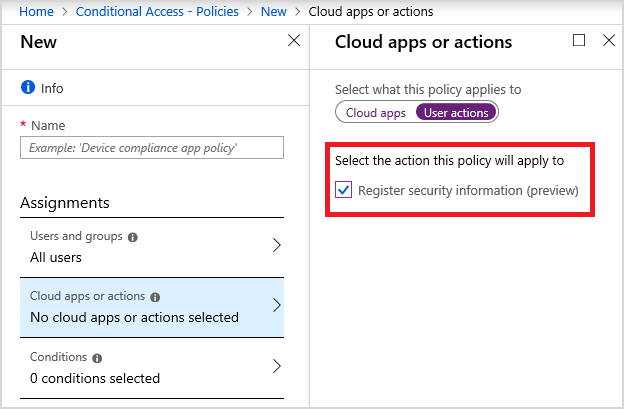
imageAzure AD now supports restricting access to SSPR/MFA self service to trusted devices, trusted networks, low risk scores and more using Conditional Access.

This helps ensure it’s the right user—not an attacker—registering this security sensitive info. Some common restrictions were requested include ensuring that:

  • Users are on a trusted network.
  • Only users with a low sign-in risk can register security information.
  • Users can only register on a managed device.
  • Users should agree to a terms of use during registration.

Check on the announcement & documentation here!

Posted by: kurtsh | May 17, 2019

RELEASE: Disabling hyperthreading in Azure VMs

A new Azure VM capability – “Disabling Hyperthreading” – has been released this week that may provide greater performance & security for folks using Virtual Machines in Azure.

  • The origins of this feature are sourced from a new class of Intel CPU vulnerabilities which makes the use of hyperthreading potentially a risk for companies specifically using untrusted code.
  • Additionally, as a side benefit for some, disabling hyperthreading may improve performance for certain heavy workloads.

Here’s the recently released process on how to disable hyperthreading:

[taken from Guidance for mitigating speculative execution side-channel vulnerabilities in Azure]

Disable hyperthreading on the VM – Customers running untrusted code on a hyperthreaded VM will need to disable hyperthreading or move to a non-hyperthreaded VM size. To check if your VM has hyperthreading enabled, please refer to the below script using the Windows command line from within the VM.

Type wmic to enter the interactive interface. Then type the below to view the amount of physical and logical processors on the VM.

  • CPU Get NumberOfCores,NumberOfLogicalProcessors /Format:List

If the number of logical processors is greater than physical processors (cores), then hyperthreading is enabled. If you are running a hyperthreaded VM, please contact Azure Support to get hyperthreading disabled. Once hyperthreading is disabled, support will require a full VM reboot.

[Thank you to Lee Reese & Raj Nemani for hunting this down for our customers]

« Newer Posts - Older Posts »

Categories