Most people know cloud services to be an Operational Expense (OPEX) however did you know that it can be, under certain circumstances be a capital expense (CAPEX)?

Reserving your VM

As of November 2017, you’re no longer limited to an operational expenditure model in Azure. By using Azure Reserved Virtual Machine Instances (known as RIs) you can change your cloud payment model to a capital expenditure model.

This model works well for a number of situations. Imagine you’re deploying a web service that will require at least two VMs online 24/7 for the next year, with other VMs brought on-and offline as demand fluctuates.

In this situation, you could purchase two, one-year RIs. RIs are paid for upfront with a 1-year commitment and the longer you commit the more you save; this can mean cost-savings versus paying monthly. To respond to increased demand, you’ll still be able to finance other VMs on a pay-as-you-go basis.

If you commit to three RIs you could save up to 82% when compared to pay-as-you-go. That’s a huge saving, especially if you have access to the funds upfront.

Original post here:

May Azure AD webinars are next week and we have two new topics! Beginning Your Journey to Zero Trust with Conditional Access and Identity Protection and The Power of Advanced Hunting will be offered for the first time.

All of our webinars are listed at http://aka.ms/aadwebinars

Details:

  • These webinars are free of cost.
  • These webinars are currently held monthly with new sessions being added.
  • These sessions are 1 hour which includes an anonymous Q&A session with our Engineering Team.

Beginning Your Journey to Zero Trust with Conditional Access & Identity Protection

Tuesday, May 14, 2019 7:00 AM – 8:00 AM PDT (UTC -7)

Tuesday, May 14, 2019 11:00 AM – 12:00 PM PDT (UTC -7)

Streamlining Password Management Using Azure AD

Wednesday, May 15, 2019 7:00 AM – 8:00 AM PDT (UTC -7)

Wednesday, May 15, 2019 11:00 AM – 12:00 PM PDT (UTC -7)

Azure AD Connect Health

Thursday, May 16, 2019 7:00 AM – 8:00 AM PDT (UTC -7)

Thursday, May 16, 2019 11:00 AM – 12:00 PM PDT (UTC -7)

Getting Ready for Azure AD

Tuesday, May 21, 2019 7:00 AM – 8:00 AM PDT (UTC -7)

Tuesday, May 21, 2019 11:00 AM – 12:00 PM PDT (UTC -7)

The Power of Advanced Hunting – Unleash the hunter in you!

Wednesday, May 22, 2019 7:00 AM – 8:00 AM PDT (UTC -7)

Wednesday, May 22, 2019 11:00 AM – 12:00 PM PDT (UTC -7)

Manage Partner and Vendor Access Using Azure B2B Collaboration

Thursday, May 23, 2019 7:00 AM – 8:00 AM PDT (UTC -7)

Thursday, May 23, 2019 11:00 AM – 12:00 PM PDT (UTC -7)

In case you missed it, Windows 10 Enterprise “September” releases have been granted 30 months of support – as result of a policy change made a few months ago. 

Here’s the details of the change:

Longer Windows 10 servicing for enterprises and educational institutions

In April 2017, we aligned the Windows 10 and Office 365 ProPlus update cadence to a predictable semi-annual schedule, targeting September and March. While many customers—including Mars and Accenture—have shifted to a modern desktop and are using the semi-annual channel to take updates regularly with great success, we’ve also heard feedback from some of you that you need more time and flexibility in the Windows 10 update cycle.

Based on that feedback, we’re announcing four changes:

  • All currently supported feature updates of Windows 10 Enterprise and Education editions (versions 1607, 1703, 1709, and 1803) will be supported for 30 months from their original release date. This will give customers on those versions more time for change management as they move to a faster update cycle.
  • All future feature updates of Windows 10 Enterprise and Education editions with a targeted release month of September (starting with 1809) will be supported for 30 months from their release date. This will give customers with longer deployment cycles the time they need to plan, test, and deploy.
  • All future feature updates of Windows 10 Enterprise and Education editions with a targeted release month of March (starting with 1903) will continue to be supported for 18 months from their release date. This maintains the semi-annual update cadence as our north star and retains the option for customers that want to update twice a year.
  • All feature releases of Windows 10 Home, Windows 10 Pro, and Office 365 ProPlus will continue to be supported for 18 months (this applies to feature updates targeting both March and September).

In summary, our new modern desktop support policies—starting in September 2018—are:

image

Read about this and other policy changes here:

“Activates” engagements from Microsoft Premier Services are on-site engagements that includes training on the technology in question, as well as jumpstart guidance to help customers move forward with an initiative.  The goal is to pass on knowledge to customer’s staff so they can move forward on their own.

Each Activates offering is generally a 3-5 days long on-site engagement led by a Premier Field Engineer and requires 5 days of “SAB Planning Services”.  This is the only scenario I know of where SAB Planning Services may be used for Premier offerings.

Contact your Premier TAM for more information on how to take advantage of your SAB Planning Services benefits with “Activates” offerings.

For reference, here is the list of Azure related Activates I’m aware of as for 5/10/19:

Focus Area

Activate Services

Primary Technology

Azure

Activate Azure Stack with IaaS

Azure

Azure

Activate Azure with Administration and Governance

Azure

Azure

Activate Azure with Enterprise-grade Networking

Azure

Azure

Activate Azure with Hybrid Cloud

Azure

Azure

Activate Azure with Recovery Services

Azure

Azure

Activate Azure with Azure Monitor

Azure

Azure

Activate Azure with Virtual Classrooms

Azure

Azure Developer

Activate Azure with Dev Ops

Developer – Azure

Azure Developer

Activate Azure with Intelligent Apps

Developer – Azure

Azure Developer

Activate Azure with Microservices and Containers​​​​

Developer – Azure

Azure Developer

Activate Azure with Mobile Apps

Developer – Azure

Azure Developer

Activate Azure with Modern Apps

Developer – Azure

Data & Analytics

Activate Azure with Automated Deployments

Data AI

Data & Analytics

Activate Azure with Log Analytics

Data AI

Data & Analytics

Activate Business Analytics with Power BI

SQL Server

Data & Analytics

Activate Data Platform Modernization for SQL

Data AI

O365

Activate Enterprise Mobility + Security

EMS (Intune / AutoPilot)

O365

Activate Microsoft Teams

Teams

Security

Activate Windows Hello for Business

Windows 10

Security

Activate Windows 10 Enterprise

Windows 10

Azure

Activate Azure with Conditional Access

Azure

Azure Developer

Activate Azure Internet of things

Azure – Developer

Azure

Architectural Services – Microsoft Azure: Cloud Ready Datacenter

Azure

We’ve published more information recently about why Microsoft strongly discourages the use of Windows 10 Long Term Servicing Channel (LTSC) for desktops.

The Windows 10 LTSC ‘what’s new’ site highlights an important recommendation from both Microsoft as well as advisors such as Gartner Group:

IMPORTANT:
The Long Term Servicing Channel is not intended for deployment on most or all the PCs in an organization. The LTSC edition of Windows 10 provides customers with access to a deployment option for their special-purpose devices and environments. These devices typically perform a single important task and don’t need feature updates as frequently as other devices in the organization. These devices are also typically not heavily dependent on support from external apps and tools. Since the feature set for LTSC does not change for the lifetime of the release, over time there might be some external tools that do not continue to provide legacy support. See
LTSC: What is it, and when it should be used.

For more specific examples of the dangers of using Windows 10 Long Term Servicing Channel (LTSC) as a production desktop OS for an Enterprise, (as opposed to exceptional use for single purpose control consoles or embedded systems) also see:

imageAre you a Microsoft BitLocker Administration & Monitoring (MBAM) user?  Read on:

Microsoft is excited to announce enhancements to BitLocker management capabilities in both Microsoft Intune and System Center Configuration Manager (SCCM), coming in the second half of 2019. Whether your management infrastructure is on-premises or in the cloud, robust BitLocker management is required for today’s enterprises to secure modern endpoints.

Microsoft provides a range flexible BitLocker management alternatives to meet your organization’s needs, as follows:

  1. Cloud-based BitLocker management using Microsoft Intune
  2. On-premises BitLocker management using System Center Configuration Manager
  3. Microsoft BitLocker Administration and Monitoring (MBAM)

Read more on the announcement page:

Ever wanted to activate a specific computer/device with Office 365 ProPlus without being worried about per user licensing?

Announcing “shared computer activation” for Office 365 ProPlus in Microsoft 365

Shared computer activation lets you to deploy Office 365 ProPlus to a computer in your organization that is accessed by multiple users. Here are some examples of supported scenarios for using shared computer activation:

  • Three workers at a factory share a computer, each worker using Office on that computer during their eight-hour shift.
  • Fifteen nurses at a hospital use Office on ten different computers throughout the day.
  • Five employees connect remotely to the same computer to run Office.
  • Multiple employees use Office on a computer that’s located in a conference room or some other public space in the company.

Normally, users can install and activate Office 365 ProPlus only on a limited number of devices, such as 5 PCs. Using Office 365 ProPlus with shared computer activation enabled doesn’t count against that limit.

For more information:

imageYou’re invited to The Virtual Security Summit, a premier virtual event hosted by Microsoft. As an attendee, you’ll hear from industry experts on implementing strong security practices, combating cybercrime, and utilizing advanced techniques to identify and protect against threats.

Please join us on April 16, 2019, from 9:00 AM-12:00 PM PT as we stream live from Redmond Studios.

We have a packed agenda! Highlights for this event include:

Threat summaries. Walk away with the current trends of evolving cyber threats, including the lifecycle of an attack and tips for preventing attacks within your organization.

Cutting-edge perspectives. Security thought leaders will provide their latest assessments on new technology, including innovations in IoT and machine learning, as well as the tools needed to secure them.

Training insights. Microsoft security experts will look to the future and evaluate emerging skill sets that will benefit teams at organizations of all shapes and sizes.

Ready to gain a competitive edge in the ever-evolving realm of cybersecurity? Register for this virtual event today and secure your spot.

Can’t attend the live event?

Register and we’ll send you the on-demand version when it’s ready for viewing.

clip_image001

clip_image002

clip_image003

Sean Sweeney

Americas Director, Cybersecurity Solutions Group, Microsoft

Sian John

Chief Security Advisor, Microsoft EMEA

Curtis W. Dukes

Executive Vice President and General Manager

Security Best Practices and Automation Group, CIS

imageInterested in a deep dive on Azure Advanced Threat Protection?

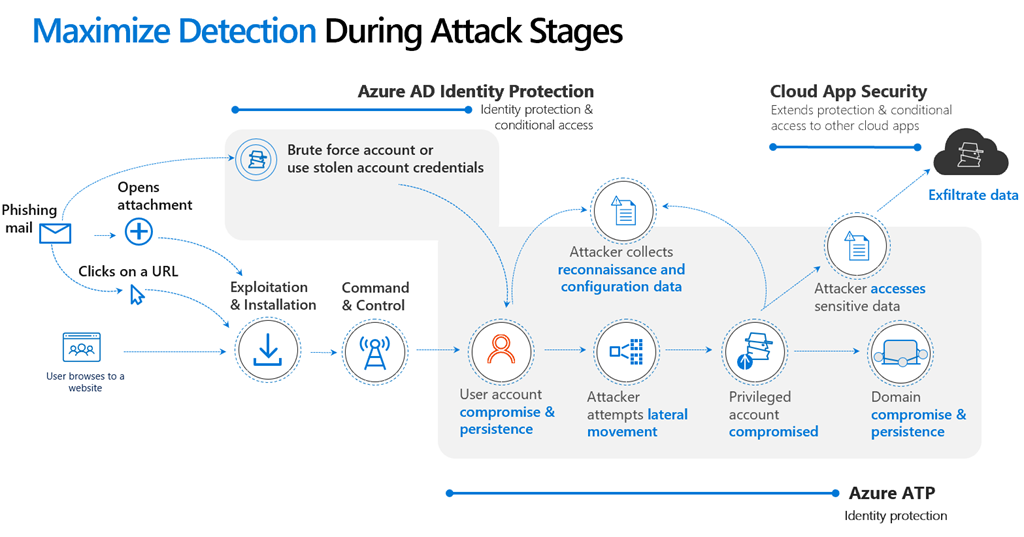
Azure ATP uses real-time data (Network Traffic, Trace data and Events) to find anomalies quickly. It uses a combination of behavioral analytics (profiling users and computers) and known attack techniques, Azure ATP to reduce the number if false positive alerts and allows the SecOps team to focus on what it most important.

Azure allows us to scale from the smallest to the largest environments, and the Intelligent Security graph provides a rich source of data to enhance our detections.

The Azure ATP engineering team is hosting a series of webinars to help demystify Azure ATP. Check out our webinar series. Details and registration at https://aka.ms/AATPWebinar.

The first webinar will focus on Detections & Alerts and will take place on Monday, April 29th at 8:00 AM PT / 11:00 AM ET / 15:00 UTC. We will be posting recordings of the webinars at https://aka.ms/AATPRecordings.

To stay informed about future webinars and other events, join our Security Community at https://aka.ms/SecurityCommunity.

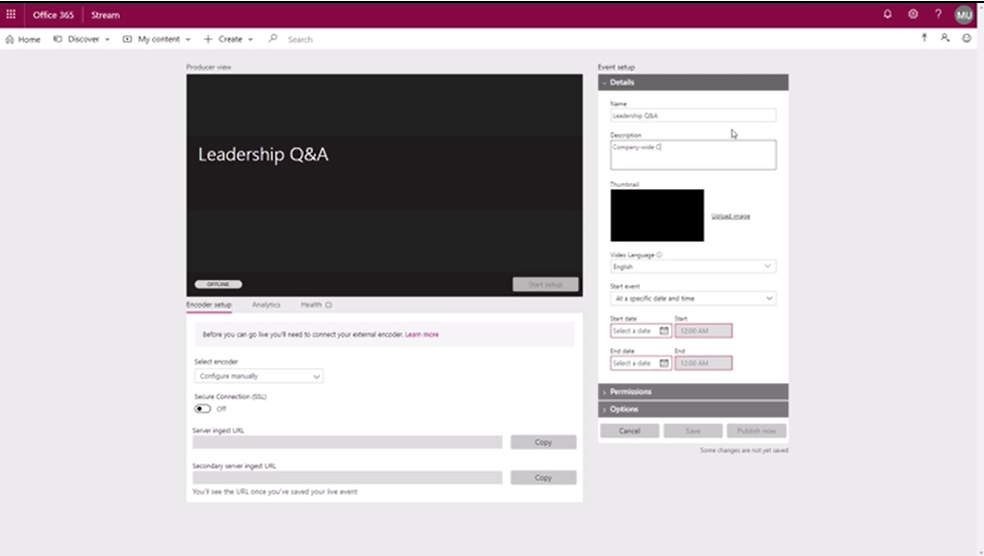
imageWe are very excited to announce that live events are now generally available.

Live events in Microsoft 365 enables anyone to create live and on-demand events that deliver compelling communications to employees. Events use video and interactive discussion across Stream, Teams, or Yammer. And the production can be as simple, or as sophisticated as needed, using webcams and screen sharing for informal presentations, or a studio-quality production for more formal events.

Up to 10,000 attendees can participate in real-time from anywhere, on any device, or catch up later with powerful AI features that unlock the content of the event recording.

For more information, visit the announcement page at:

« Newer Posts - Older Posts »

Categories