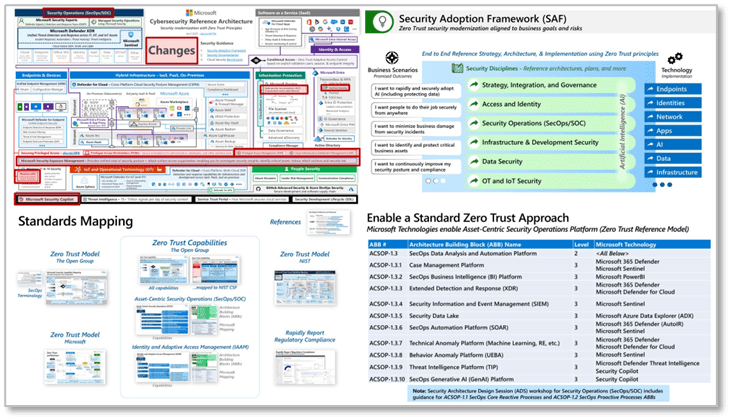
April 2025 version of MCRA is out!  This release of the Microsoft Cybersecurity Reference Architectures (MCRA) focuses heavily on updates related to standards and mappings, products and technology changes, and more.
 
Key changes since the previous December 2023 release:

  • Updated main capabilities diagram to add Microsoft Security Exposure Management, Windows LAPS, passkeys, and Microsoft Entra Verified ID as well as to show Microsoft Security Copilot as a broad capability.
  • Replaced several references of Secure Score with Exposure Management
  • Clarified representations of Microsoft Security Copilot to show broader capabilities beyond Security Operations
  • Added Microsoft Entra ID Governance to Adaptive Access diagram
  • Updated several slides in introduction sequence and added new “Security must be integrated everywhere” slide.
  • Updated slides in Artificial Intelligence (AI) section
  • Added ‘Standards Mapping’ section and included proposed drafts of Zero Trust Reference Model standard from The Open Group (and Microsoft product mapping to them)
  • Added roles list from The Open Group to people section
  • Added Prioritization slide to the Threats section from upcoming draft Security Matrix standard from The Open Group
  • Updated threat intelligence daily signals to 78+ Trillion and updated links/resources on various slides.
  • Updated closing slides to show the full security modernization journey and associated Microsoft Unified engagements

Download the PowerPoint file (including slide notes) from the usual site:

(All hail Mark Simos, Microsoft Principal Cybersecurity Architect, Program Manager, and creator of the MCRA!)
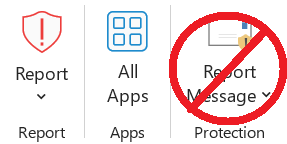
The Microsoft Report Message and Report Phishing add-ins are now in maintenance mode and will eventually be deprecated.

We recommend transitioning from the add-ins to the built-in Report button. The Report button is supported in virtually all consumer and enterprise Outlook clients.

For more information, see the Frequently asked questions section in this article.

Posted by: kurtsh | April 7, 2025

INFO: Microsoft Accessibility & WCAG conformance

Microsoft has specific documentation about the scope of our adherence to WCAG (2.1 & beyond) documented here.  Microsoft audits how our products and services support the recognized the Web Content Accessibility Guidelines (WCAG) & publishes the results in our conformance reports.  Some products are even more explicit.  For example:

  • The Power BI Service has an entire section on building accessible reports.  Power BI Paginated Reports is explicitly documented online.
    The conformance report is available here.  There are separate reports for Power BI Desktop, Power BI for Android, Power BI for iOS, etc.
  • Microsoft Forms’ conformance report is available here.

For further information:

  • Consumer Disability Answer Desk:  Disability Answer Desk provides product support for our customers with disabilities, including Microsoft Office, Windows, and Xbox.
    https://www.microsoft.com/en-us/Accessibility/disability-answer-desk
  • Enterprise Disability Answer Desk:  The enterprise Disability Answer Desk is a support resource for organizations that have questions about the accessibility of Microsoft products and product conformance with accessibility standards. The support team can help resolve issues relating to assistive technology, as well as find conformance documentation.
    https://support.microsoft.com/en-us/accessibility/enterprise-answer-desk?culture=en-us&country=us
  • Ask Microsoft Accessibility: The Ask Microsoft Accessibility bot is a tool that helps users find information about the accessibility of Microsoft products and services. It uses only the publicly available information on microsoft.com as a reference and does not answer general accessibility questions or questions about code.
    https://askma.microsoft.com/
Posted by: kurtsh | April 2, 2025

TRAINING: Complimentary Power BI courses

This is a listing of active, complimentary training opportunities as of April 2nd, 2025 for Microsoft Power BI users – both end users as well as data analysts/IT professionals.

SELF-PACED WRITTEN TRAINING
Microsoft Learn, our online library of text-based training materials has a number of complimentary offerings & lessons that are easy to consume at your own pace.

ON DEMAND VIDEO-RECORDED COURSES
Complimentary video-recorded versions of the Instructor-led courses, available to be taken at your leisure.

ON DEMAND VIDEO-RECORDED ADOPTION TRAINING
Complimentary 1-hour pre-recorded “end user overviews” of Power BI. A 1-hour lesson isn’t going to train anyone to use the tools out of the gate but they’ll explain how Power BI can be used & what it’s capabilities are.

3RD PARTY ON-DEMAND TRAININGS (COMPLIMENTARY)
NetCom Learning, a Microsoft Learning Partner, hosts a number of complimentary on-demand trainings on their web site.

  • Master Class: Accelerate your Business growth with Microsoft Power BI
    2 Hour Master Class on Microsoft Power BI Power BI is one of the most widely used data visualization and BI tools in the industry, utilized by data analysis professionals around the world. Mastering this powerful tool can empower businesses with valuable insights and drive better decision-making.
  • Master Class: Accelerate your Business growth with Microsoft Power BI
    2 Hour Master Class on Microsoft Power BI Power BI is one of the most widely used data visualization and BI tools in the industry, utilized by data analysis professionals around the world. Mastering this powerful tool can empower businesses with valuable insights and drive better decision-making.
  • Accelerate your Business growth with Microsoft Power BI
    Master the techniques to empower your business with business intelligence applications like Power BI today. Power BI is a powerful tool that helps users create interactive visualization using business intelligence. Partake in the exhaustive, instructor-led webinar on “Getting Started with Power BI” and understand what power BI is and gain a thorough understanding of its various applications.
  • Top 5 Strategies to Kickstart Your Data Analytics Resolutions Using Power BI
    Do you know how the massive amounts of data generated every single day are managed? We need effective algorithms to process this data, and it is made possible by the application of Data Analytics. Data Analytics is the application of structured statistical and mathematical practices on collected data to distinguish underlying patterns. It helps businesses make smarter decisions, improves organizational efficiency, and controls risks. Power BI allows the predictive power of advanced analytics to enable users to create predictive models from their data, enabling organizations to make data-based decisions across all fields.
  • Analyzing Data with Power BI Desktop
    Want to let your teams build data models, advanced queries, and develop reports that visualize data? Power BI Desktop is Microsoft’s most powerful data analysis and visualization software. It is the answer to your question. It not only helps you and your workforce gain more data insights (stored in cloud/on your computer), but it also lets you develop visual representations of the data.

INSTRUCTOR-LED COURSES
For managed customers only that are sponsored members of the “Microsoft Enterprise Skills Initiative” training program. If you don’t know what this is, you’re not a sponsored member so skip this section.
These are rigorous courses with both class instruction from a certified trainer as well as hands-on-labs & direct Q&A.
(ESI users: Please login using your authorized user account to register yourself for any of these courses.  Rough syllabi are available online)

Registration now live for the Microsoft AI Skills Fest, April 8 – May 28, 2025

Join us April 8, 2025, at the Microsoft AI Skills Fest—a once-in-a-lifetime opportunity to join learners from around the globe to attempt a GUINNESS WORLD RECORDS™ title for the most users to take an online multilevel AI lesson in 24 hours.

Then to deepen your skills, continue with 50 days of curated AI training in your preferred way, including hackathons, live in-person and virtual events, self-paced tutorials, community events, Microsoft Learn Challenges, and more.

Who is AI Skills Fest for?

Tech professionals: Build your dream AI-powered solutions. Join us to learn how Microsoft’s AI apps and services can help you create innovative solutions quickly. Acquire skills in agents, AI Security, Azure AI Foundry, GitHub Copilot, Fabric, and more. Explore Tech sessions

Business professionals: Build AI skills that can help you improve productivity and gain better insights. Discover how to use Microsoft Copilot to simplify time consuming and repetitive tasks, giving you more space to create and innovate—while still using the tools you already know and love. Explore Business sessions

Students: You’ve already got great ideas—now gain the skills to help you realize your vision. Whether you’re starting with AI or hoping to strengthen your technical skills, we have a learning experience for you. See what you can become when you are empowered by AI. Explore Student sessions

Business leaders: Unlock your team’s innovation. At Microsoft, we’re committed to empowering you and your team with the skills you need to succeed in the AI economy. Leverage upskilling opportunities across key organizational roles that will set you up for the future. Explore Leader sessions

Register today for the “Microsoft AI Skills Fest” – April 8 – May 28, 2025

Questions about AI Skills Fest? Visit:

Posted by: kurtsh | March 18, 2025

EVENT: Microsoft Secure – Online – April 9, 2025

Discover AI innovations for the security lifecycle designed to give you smarter, faster, stronger security.  At Microsoft Secure, you’ll get a first look into AI-first tools coming soon to help you in your day-to-day work. Plus, we’ll share how you can maximize what you’ve got in your hands right now.   

In 60 minutes, you’ll learn how you can: 

  • Harden your defenses: Learn how to secure your data used by AI, AI apps, and AI cloud workloads. Discover the latest tools and techniques to fortify your defenses against evolving threats. 
  • Secure your AI investments: Use data security, protection against AI-specific cyberthreats, and compliance tools to secure your AI investments. Our experts will share best practices and strategies to safeguard your AI initiatives, ensuring they remain resilient against emerging threats. 
  • Discover AI-first tools and best practices: Hear about new AI-first tools, demos, and best practices across your favorite Microsoft Security solutions. These sessions will provide you with practical insights and hands-on experiences to strengthen your security posture and leverage AI-driven solutions effectively.  
  • Keep up with what’s happening in security: Get the latest reports on security trends and platform innovations directly from Microsoft Security leaders. This is your chance to gain insights that can help you stay ahead of emerging threats. 

AGENDA:
Check out the full agenda here.

DATE:
April 9, 2025

REGISTRATION:
Register now and pick the broadcast that works for your time zone. 

ANNOUNCEMENT BLOG:
https://techcommunity.microsoft.com/blog/microsoft-security-blog/ai-innovation-requires-ai-security-hear-what%E2%80%99s-new-at-microsoft-secure/4394130

Microsoft Events at RSAC™ 2025 Conference
Event Date: April 27th-May 1st 2025
Venue Name: Palace Hotel
Venue Address: 2 New Montgomery St, San Francisco, CA 94105

Protecting your business is more challenging than ever before, as you face a rapidly growing threat landscape and manage an increasingly complex technology estate. Microsoft Security can help. Throughout the RSAC™ 2025 Conference, Microsoft Security will offer tailored experiences to equip you with innovative AI-first, end-to-end protection and threat intelligence, so you can be more secure, stay compliant, and lower your total cost of ownership. From Sunday to Thursday during RSAC™ 2025, join Microsoft Security for the chance to:

  • Kick off RSAC™ a day early at our Pre-Day–hear from Microsoft leaders, and learn from your peers at our networking reception or CISO Dinner
  • Learn from Microsoft Security business leaders and technical experts during the RSAC™ keynote and our other conference sessions
  • See live, hands-on demos and theatre sessions all week at the Microsoft booth at Moscone Center
  • Network with your peers and hear from Microsoft experts at the Microsoft Security Hub
  • Ask your most pressing questions in 1:1 customer meetings at the Microsoft Security Hub
  • Recap our product innovation and tour the Microsoft Experience Center at Silicon Valley at our Post-Day Forum

Secure your spot today.

Date/Time:
April 27th-May 1st 2025

Location:
Palace Hotel – 2 New Montgomery St, San Francisco, CA 94105

Registration:
Microsoft RSAC 2025 events Registration

Questions:
Have questions about the events? Contact the Security Events Team

Our Speakers:

  • Vasu Jakkal – CVP, Microsoft Security Business
  • Charlie Bell – Executive Vice President, Microsoft Security

So you have a Unified Enterprise contract with Microsoft. You have access to ‘reactive technical support’ as well as both a Customer Success Account Manager & a bucket of Proactive Services that provide training & technical guidance from subject matter experts across Microsoft products & services.

But did you know your organization can get specific engineers & architects for key workloads & projects you may be planning or driving called Value Acceleration Services?

The following are examples of additive ‘dedicated’, ‘enhanced’ or ‘mission critical’ solutions that your organization can obtain on top of an existing Unified Enterprise contract from Microsoft:

  • Designated Engineering (DE) – Non-dedicated resource, allocated for weeks-months
    Solution-specific expertise that empowers you to embrace cloud transformation and optimize your Microsoft solutions.
    • Employee Workplace DE – Empower your employee to excel by fostering an intelligent, adaptable, and secure work environment with expert-led services for Employee Communications, Communities, Workplace, Analytics, and Feedback through Microsoft Viva.
    • Power Platform/Dynamics DE – Use intelligent applications to deliver operational excellence and create more engaging customer experiences with expert-led services for Power Platform, Dynamics 365 Customer Engagement, and Dynamics 365 Finance and Operations.
    • Data & AI DE – Capture emerging opportunities by using data as a strategic asset and shifting from hindsight to foresight with expert-led services for Migrate and Modernize your Data Estate and Analytics.
    • Azure Infrastructure DE – Accelerate the responsiveness of your business, improve service levels, and reduce costs using intelligent processes with expert-led services for Migrate and Modernize Infrastructure and Workloads.
    • Developer DE – Unify people, process, and technology to innovate at scale and bring better products to customers faster with expert-led services for Cloud Native, Modernize Enterprise Applications and Enable and Accelerate Developer Productivity.
    • Security DE – Protect your data, devices, and passwords, so you can focus on growing your business confidently with expert-led services for Zero Trust, Protect & Govern Sensitive Data, and Security & Compliance.
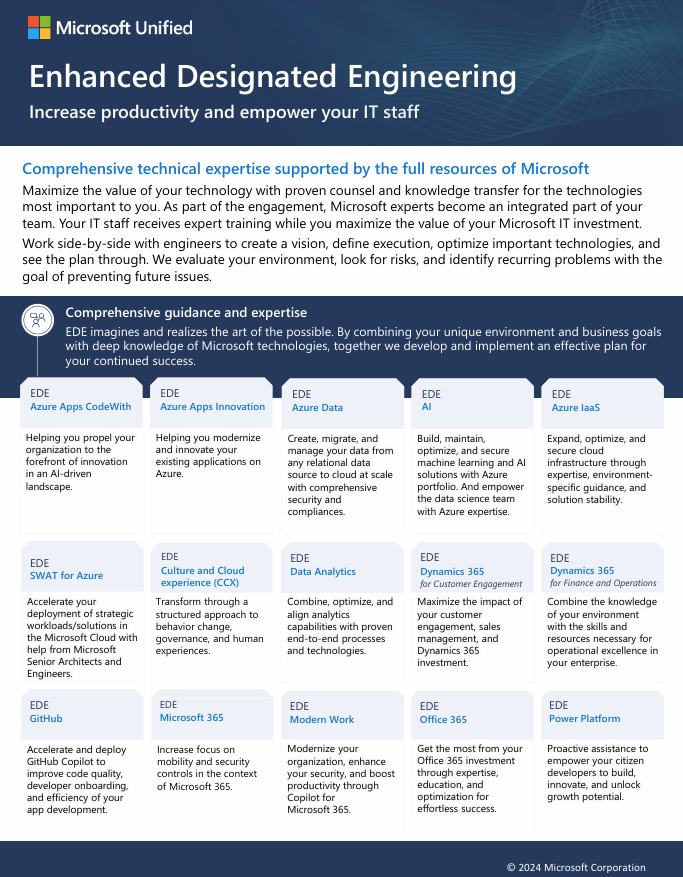
  • Enhanced Designated EngineeringDedicated resource, allocated for 1 year or more
    Comprehensive technical expertise supported by the full resources of Microsoft.

Unified Mission Critical Services

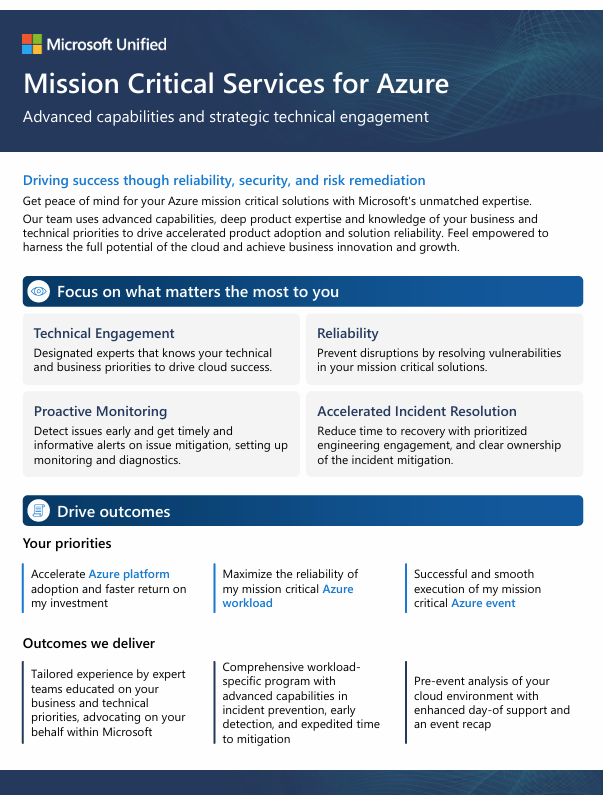
  • Mission Critical Services for Azure
    Partners with you to ensure your most significant Azure products, workloads, and events run smoothly. During critical incidents, this experience expedites recovery and ensures business continuity.
  • Mission Critical Services for Microsoft Security Cloud
    Provides superior engineering engagement, empowering you to escalate critical issues directly to Microsoft Security engineering teams. Our experts ensure your Security products are working effectively to protect you against the modern threat landscape.
  • Unified Enhanced Response
    Empower and care for your business with accelerated response times for key severities and additional Microsoft experts for streamlined resolution across all products.
  • Cybersecurity Incident Response
    Our end-to-end approach is specifically designed to rapidly contain the actions of an active adversary, perform deep investigation, remove the attacker’s control, and deploy critical security controls to help prevent re-compromise.
  • Office 365 Engineering Direct
    Gain an exclusive line to Office 365 product engineering teams and minimize downtime with advanced monitoring, escalation, and incident analysis for your cloud productivity solutions.
  • Support for Mission Critical
    Achieve peak performance of your most business-critical solutions, with in-depth support and preventative services to identify potential risks and create the most stable environment possible.
  • Developer Support
    Advance your DevOps processes, application architecture, and AI integration with help from cloud and application development experts as you build, deploy, and manage solutions.
  • GitHub Engineering Direct
    Manage your GitHub environment more effectively with expedited access to GitHub support, administration assistance, and GitHub health checks, led by a Customer Reliability Engineer.

Are you a government organization looking to secure your organizations data in preparation for deploying Artificial Intelligence solutions like Microsoft 365 Copilot? Do you need to proactively monitor Artificial Intelligence’s use in your organization?

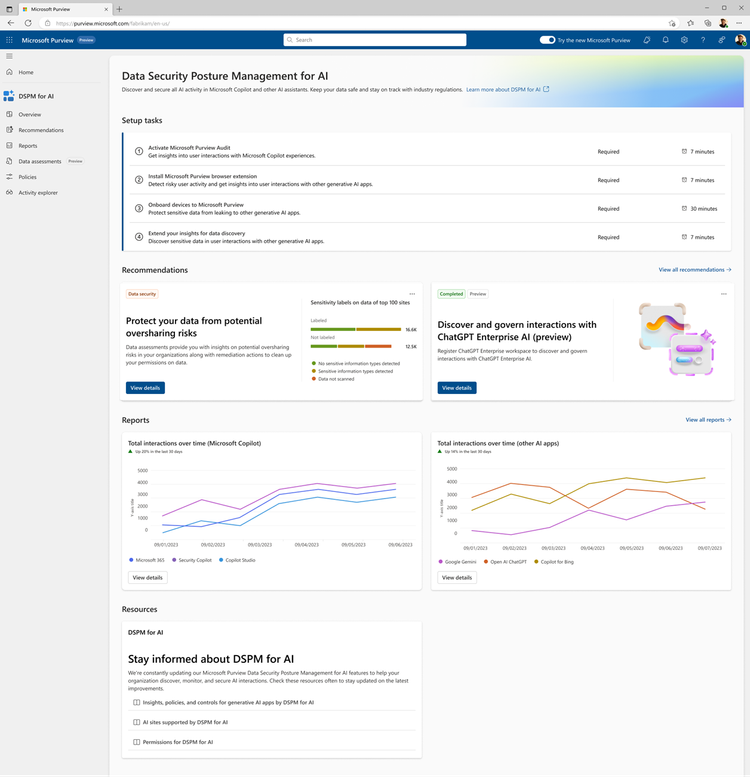
I’m pleased to announce that Microsoft Purview Data Security Posture Management (DSPM) for AI (formerly known as Microsoft Purview AI Hub) is now available in Microsoft 365 GCC cloud instances!

DSPM for AI provides a central management location to help you quickly secure data for AI apps and proactively monitor AI use. These apps include Microsoft 365 Copilot, other copilots from Microsoft, and AI apps from third-party large language modules (LLMs).

Data Security Posture Management for AI offers a set of capabilities so you can safely adopt AI without having to choose between productivity and protection:

  • Insights and analytics into AI activity in your organization
  • Ready-to-use policies to protect data and prevent data loss in AI prompts
  • Compliance controls to apply optimal data handling and storing policies
  • Data assessments to identify, remediate, and monitor potential oversharing of data will be coming to DSPM for AI in April 2025

For details of DSPM for AI, visit, this blog post:

Documentation is available at:

For a demonstration of DSPM for AI from our Microsoft Purview for State & Local Government team, check out:

Licensing requirements:
Functionality available in DSPM for AI depends on the level of licensing one has with Microsoft 365:

  • Microsoft G5 or G5 Compliance Licensing:
    • Full access to Data Security Posture Management for Al, including advanced analytics and comprehensive security solutions.
    • Enhanced Al data loss prevention with adaptive protection, dynamically assigning appropriate Data Loss Prevention policies to users based on their risk levels.
    • Comprehensive analytics to detect Al interactions, providing insights into unethical use, user risk, and more across the organization
    • Pre-configured one-click policies across Microsoft Purview solutions to identify and mitigate data security risks.
    • Guided assistance to Al regulations, helping to stay compliant and up-to-date with Al regulations.
    • Support for additional 1st party copilots, enterprise apps, and 3rd party apps (Copilot Studio and ChatGPT Enterprise)
    • Data assessments and oversharing assessments (when available in GCC)
  • Microsoft G3 Licensing:
    • Core functionality, including Data Loss Management (DLM) and Manual Information Protection (MIP)
    • Activity Explorer events for Microsoft 365 Copilot only, without prompts/responses shown in the event
    • Limited analytics and reporting capabilities compared to G5
    • No data assessments
  • Microsoft 365 Copilot GCC Licensing:
    • Some features of DSPM for Al are available, but with limited functionality compared to G5 and G3

Power BI Admin Monitoring Deep Dive in GCC – Power BI in Government

March 27, 2025 – 11:00AM-12noon PT

Description: This Community Call on “Power BI Admin Monitoring & Logging” will cover an introduction to the topic, an overview of key concepts, and a detailed look at the features and tools available for monitoring and logging in Power BI. It will also include best practices, real-world use cases, and a Q&A session to address attendees’ questions. The webinar will conclude with a recap of key points and additional resources.

No need to register!
At the date and time of the meeting click on this link to join the Community Call:
https://aka.ms/JoinCommunityCall 
(The Teams Meeting link will activate 10 mins before meeting date/time)

——————-

Join us for future community calls!

Power BI in Government for State & Local Government Community Calls 
Presented by Microsoft

Join us for our dynamic State and Local Government Power BI Community calls!
Held regularly, these sessions are your gateway to innovation and knowledge.
Check out the schedule for our upcoming and past calls.

Last month’s presentation:  Using Power BI with OneDrive/SharePoint Document Library
Jan 30th2025 Presentation – Power BI in Government

« Newer Posts - Older Posts »

Categories