Be sure to join us for our next Government Microsoft 365 Copilot Community meeting, where we will be joined by Rima Reyes, Principal Product Manager in Copilot Engineering!

“Build Your First Agent in GCC” hosted by Copilot Engineering – Tuesday, May 27, 10:00AM-11:00AM

In this session, Rima will walk you through everything you need to know to get your first Copilot Agent up and running in GCC. Whether you’re just getting started or looking to sharpen your skills, this is the perfect place to begin.

🗓️ Agenda

  • Introduction to Agents
  • Tools for Building Agents in GCC
  • Let’s Build Our First Agent (Step-by-Step!)
  • What to Do Next
  • Live Q&A

[You must be a Government Microsoft 365 Copilot Community member to receive the meeting invitation]

Not a Government Microsoft 365 Copilot Community member?  Join today!
Want to stay connected and continue learning? Join the Government Microsoft 365 Copilot Community — a dedicated space for government professionals to share insights, best practices, and real-world experiences with Microsoft 365 Copilot.

Community Details

  • Name: Government Microsoft 365 Copilot Community
  • Meets: Last Tuesday of each month
  • Time: 10 AM PST / 1 PM EST
  • Where: Hosted Microsoft Team (invitation sent upon registration)
  • Click here to join the community

We can’t wait to see you at the webinar — and we hope you’ll join the community to keep the Microsoft Copilot in GCC momentum going!
SharePoint Advanced Management (SAM) FEATURES should be available NOW or if not, very soon to Microsoft 365 GCC cloud instances.

You’ll noticed I said “FEATURES” – not “licenses” – because the way SAM FEATURES has (or will) materialize for your organization is the SAM features will show up in the M365 Admin Portal UI (under the SharePoint menu), as a benefit of your M365 Copilot licensing in the ATC M365 cloud instance.  In other words, no actual SAM licenses will be necessary & you should not expect any SAM licenses to appear in your M365 cloud instance.  The features will just be there in the “SharePoint Admin” UI in the M365 Admin Portal (courtesy of your M365 Copilot licenses), similar to how they might be there as a result of having SAM trial licenses. (Getting SAM Trial licenses was our past guidance)

Note:  You may find that there is one SAM feature not available when switching from the “SAM Trial Licenses” to the “M365 Copilot license” feature: “Site Ownership Policy“. It’s been delayed for inclusion in the M365 Copilot license however it’s coming soon. You will find the list of SAM FEATURES available specifically through your Microsoft 365 Copilot licensing below.

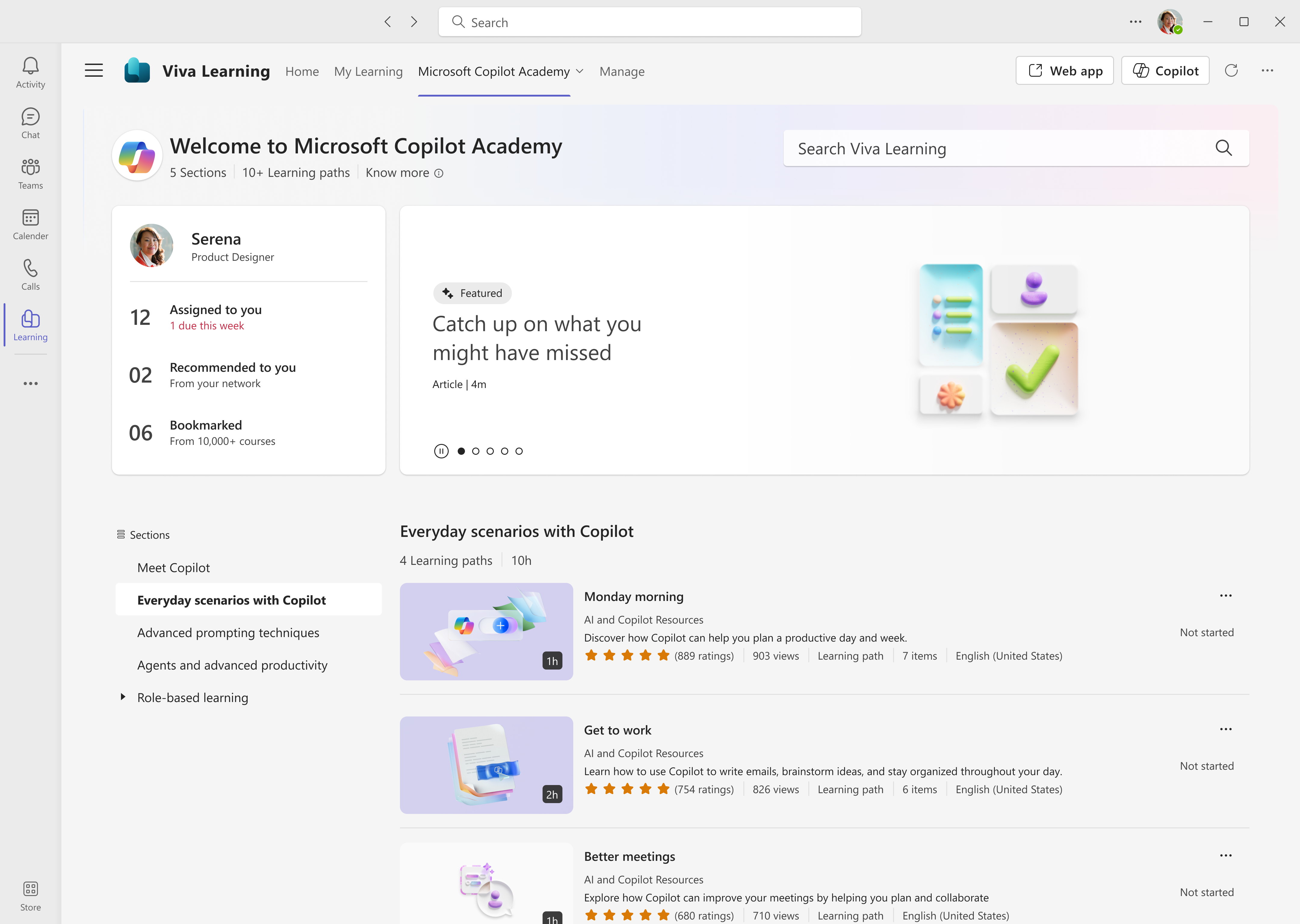
We are pleased to announce that all Microsoft 365 users can now access Microsoft Copilot Academy to improve their AI and Copilot skills. This academy – curated by Microsoft experts – provides a comprehensive, structured learning experience designed to help users master the use of Copilot through hands-on learning activities and experiences. Click here to learn more about what Copilot Academy includes.

Last year, we announced the academy was available to all Microsoft 365 Copilot users. We have now lifted the Copilot license requirement, giving immediate access to any user with a Microsoft 365 license. No additional registration or administrative action is required to start using Copilot Academy. Please see appendix 1 for an updated table that lists the licenses that grant access to Copilot Academy.

Use Copilot Academy to train users before assigning Copilot licenses
The new licensing structure for Copilot Academy unlocks a new scenario for administrators – ensuring users commit to Copilot training through the academy before receiving a Copilot license. Administrators can now use Copilot Academy as a tool to teach users how to leverage Copilot before a license has been assigned. This allows users to see the value of Copilot and learn how it can maximize their productivity throughout the workday. Upskilling before receiving a license encourages faster time-to-value with Copilot and helps identify workstreams where Copilot will have the greatest impact.

Read about Copilot Academy from the Viva Learning blog:

(Government customers: Unfortunately, Copilot Academy is not available yet for GCC cloud instances. I am talking to the Program Manager for the solution to identify a timeline for availability.)

The following are resources for customers needing training for the use of Copilot Chat & Microsoft 365 Copilot – for both END USERS & IT PROFESSIONALS.

—————-

BONUS: Learning Pathways for Microsoft 365 Copilot
(A 3-page .PDF that provides guidance around available training aspiring Copilot learners)

Posted by: kurtsh | May 5, 2025

EVENT: Microsoft Conferences for 2025

This is a list of 2025 Microsoft conferences that I maintain for my customers, along with discount codes for ones that I have them available to our customers.

UPCOMING EVENTS
May 1st 2025Microsoft at RSAC 2025 – San Francisco, CA ($)
May 6-8, 2025Microsoft 365 Community Conference 2025 – Las Vegas, NV ($) SAVE150
May 19-22, 2025Microsoft Build 2025 – Seattle, WA ($) No discounts available
(Online event is FREE)
Jun 10-12, 2025Posette – Microsoft Postgres Conference 2025 – Online (Free)
Oct 28-29, 2025GitHub Universe – San Francisco, CA ($) – GHCOMMUNITY10
October 28 – 30 2025Power Platform Community Conference 2025 – Las Vegas, NV ($)VLAD100
November 17 2025Microsoft Ignite – San Francisco, CA ($) Discount code TBD
(Online event is FREE)
PAST EVENTS
March 3-6, 2025Technical Takeoff for Windows & Intune – Online – Recording (Free)
March 18, 2025Ability Summit – Online – Recording (Free)
March 31-April 2, 2025Fabric Community Conference 2025 – Las Vegas, NV – No recording avail MSCUST
April 9, 2025Microsoft Secure-  Online – Recording (Free)
April 9-10, 2025Microsoft Java Developers Conf – Online – Recording (Free)
April 15, 2025Azure CosmosDB Conf 2025 – Online (Free)
April 30, 2025Microsoft Business Applications Launch – Online (Free)

Did you miss the Windows Server Summit 2025 this past April?  Don’t worry – we recorded all the sessions for you!

Watch all the sessions on-demand at your leisure through the links below.  (Don’t miss the session on the new “Hotpatching” capability – server patching without reboots – only available with Windows Server 2025 with Azure Arc!)

Keynote

Upgrade & Migration

Security & Identity

Core Services

Server Management

Training & Support

Windows 11 is secure by design and secure by default, with layers of defense enabled on day one to enhance your protection without the need to first configure settings. This secure-by-design approach spans the Windows edition range including Pro, Enterprise, IoT Enterprise, and Education editions. 

Support for Windows 10 is ending soon on October 14, 2025. Upgrading or replacing outdated devices before Windows 10 support ends is a critical priority for building a strong security posture. Discover why organizations of all sizes, including 90% of Fortune 500 companies, are relying on Windows 11.

The following online-only “Windows 11 Security Book” covers:

  • Hardware security
  • Operating System security
  • Application security
  • Identity protection
  • Privacy
  • Cloud services
  • Security foundation

This edition includes updates with Windows 11, version 24H2, features and enhancements. Read at:

Are you interested in stopping:

  • DNS Hijacking: By ensuring that only DNS resolutions from trusted PDNS servers are used, ZTDNS helps prevent attackers from redirecting traffic to malicious sites.​
  • Malicious Communications: Blocking outbound connections to IP addresses not resolved through trusted DNS queries helps disrupt phishing and even non-administrative malware stagers and beacons.
  • Data Exfiltration: Restricting outbound traffic to approved domains reduces the risk of sensitive data being transmitted to unauthorized destinations without conducting analysis of domain name resolution patterns.

If so, take a look at Zero Trust DNS which is now available for preview in Windows 11 Insider Build 27766+.

What is Zero Trust DNS?

ZTDNS integrates the Windows DNS client with trusted Protective DNS (PDNS) servers to control outbound IP traffic based on domain names. When ZTDNS is configured on a Windows 11 device to use PDNS servers that support DNS over HTTPS (DoH) or DNS over TLS (DoT), ZTDNS ensures that:​

  • The Windows DNS client forces the use of encrypted DNS and queries are only sent to the configured PDNS servers.
  • Outbound traffic is permitted only to IP addresses resolved by these trusted PDNS servers or to IP ranges with a manual exception plumbed by the IT administrator.
  • All other IPv4 and IPv6 outbound traffic is blocked by default, adhering to the “deny by default” principle of Zero Trust.
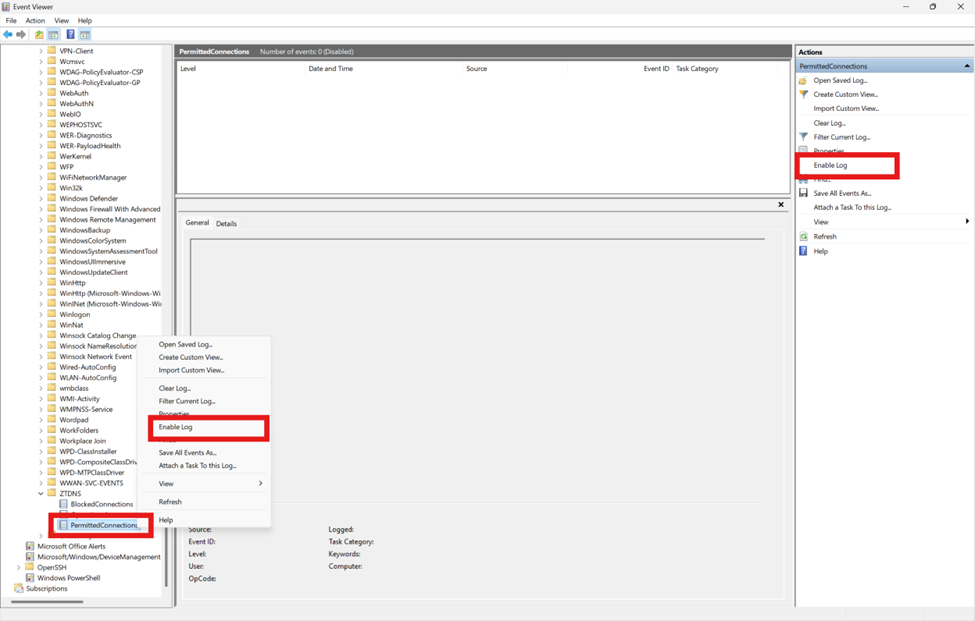
  • A log of attempted outbound connections is maintained on the device.

This approach reduces the need for deep packet inspection or reliance on insecure signals like plain-text DNS or Server Name Indication (SNI) when attempting to determine the domain name associated with outbound traffic. This makes ZTDNS an important tool in the Zero Trust toolbelt since DNS traffic and SNI are increasingly being encrypted. It also aligns with Zero Trust principles by assuming all destinations are untrusted by default, only allowing connections to destinations explicitly permitted through DNS resolutions provided by trusted PDNS servers.

For more information, visit our previous blog post on design of ZTDNS.

To get started deploying Zero Trust DNS or get started with Windows 11 Canary Insider Builds:

#cybersecurity #microsoft #windows11 #zerotrust #dns

Are you an Azure Government customer planning on using Azure Arc-enabled Windows Management services? PLEASE READ THIS POST!

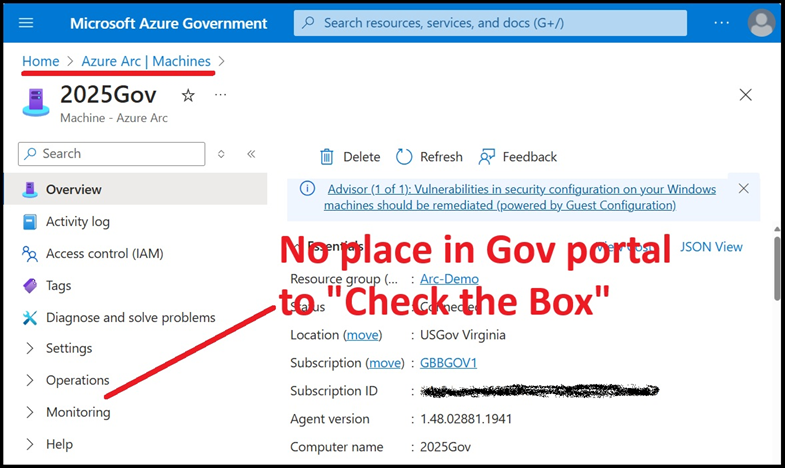
If you have Software Assurance on your Windows Server core licenses & want to enable Windows Management features like Azure Update Manager, Azure Policy, Azure Change Mgmt & Inventory, etc. without getting billed for these Windows Mgmt services in Azure Government (as you are entitled to by virtue of your Software Assurance on your Windows Server cores) you must use the Powershell script written by Scott Metzel, and written about by John Kelbley on the Azure Advanced Migration blog

WHY?
This is because (at least as of April 2025) the Azure Portal UI in Azure Government is currently missing the “Windows Server SA attestation” checkbox that normally mitigates these Azure charges. To get by this, you need to “check the box” using Powershell instead to avoid being billed for these services.

Visit the following for more details & to download the script:

Posted by: kurtsh | April 27, 2025

DOWNLOAD: M365 Copilot Audit Power BI Report

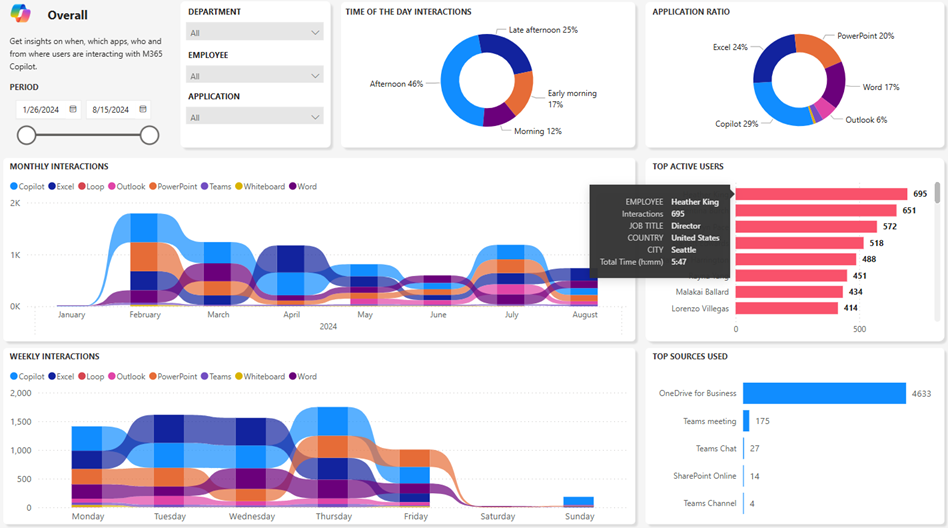
The M365 Copilot Audit Report displays interactions your employees are having with M365 Copilot.

This report uses data from the Purview Audit log and Entra ID exports that get saved into 2 CSV files. The first csv file is storing Copilot Interaction events and other csv is exporting user details (Display Name, UPN, Position, City, Country) for users that have M365 copilot license assigned.

Power BI report is reading data from those these two files and can display users Display names or anonymize them. Report contains Overall and Adoption pages that allow M365 Champs to monitor behavior of M365 Copilot licensed users.

Five Power BI reports are included in this download: Overall, Impact, Decomposition, Adoption & Trend. The image above is a snapshot of the “Overall” report. Information available includes:

  1. Time of the day interaction
  2. Application ratio
  3. Monthly interactions
  4. Weekly Interactions
  5. Top active users
  6. Top sources
  7. Time spent in minutes
  8. Time spent in hours and minutes
  9. Time decomposition by departments and positions
  10. Employee names anonymizer
  11. Active vs total licenses assigned
  12. Trend comparison between two departments
  13. Slicers
    • Time range
    • Application
    • Employee
    • Position
    • Departments

REQUIREMENTS:
The reports use Power BI Desktop & the rest of the prerequisites including required permissions are listed in the README of the GitHub repository. The reports work with GCC cloud instances for government institutions (who don’t have the “Copilot Dashboard” available through Viva Insights yet) so get the Power BI reports from the GitHub repository below for free:

« Newer Posts - Older Posts »

Categories