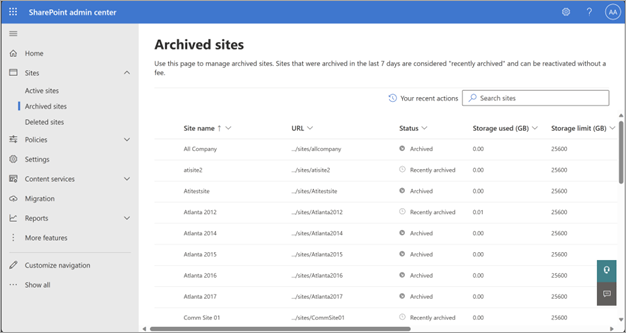
This week Microsoft 365 Archive was made available in the Microsoft 365 GCC cloud.
Microsoft 365 Archive is designed to help organizations manage their inactive data efficiently. It allows you to move inactive SharePoint sites into a cold storage tier, which reduces storage costs while maintaining the same searchability, security, and compliance standards as active data. This feature is already available in Production and is now being released to GCC-L cloud. (Roadmap 545013: SharePoint: Microsoft 365 Archive in GCC-L)
This is a follow on from the Microsoft 365 GCC Message Center message, MC1256304 (https://admin.microsoft.com/AdminPortal/Home?ref=MessageCenter/:/messages/MC1256304) and the following is a copypasta of the Message Center message as of 7/14/2026:
(Updated) Microsoft 365 Archive coming to Government Community Cloud
MC1256304 · Published Mar 19, 2026 · Last updated Apr 24, 2026
Message SummaryUpdated April 24, 2026: We have updated the timeline. Thank you for your patience.
Introduction
Microsoft 365 Archive helps organizations reduce SharePoint Online storage costs by moving inactive SharePoint sites to a low-cost, long-term storage tier while keeping data within the Microsoft 365 compliance boundary.
Once archived, content is removed from active collaboration and Copilot experiences. This helps administrators focus on the most relevant data while maintaining compliance, retention, and discoverability.
With this release, Government Community Cloud (GCC) SharePoint administrators can manage site archiving directly from the SharePoint admin center using a pay-as-you-go billing model.
This message is associated with Microsoft 365 Roadmap ID 545013.
When this will happen:
General Availability (GCC): Rollout will begin in mid-June 2026 (previously mid-April) and is expected to complete by end of June 2026 (previously late April).
How this affects your organization:
Who is affected:
- GCC tenants
- SharePoint administrators managing SharePoint Online storage
What will happen:
- Admins can archive inactive SharePoint sites to reduce storage consumption.
- Archived sites are removed from active collaboration and Copilot experiences.
- Admins can reactivate archived sites at any time when access is required.
- Archived content remains compliant with Microsoft 365 security, compliance, and eDiscovery capabilities.
- No changes are required to existing retention policies or legal holds.
- This feature is off by default and requires admin configuration, including pay-as-you-go billing setup.
What you can do to prepare:
If you want to start using Microsoft 365 Archive in your GCC tenant:
- Review your SharePoint Online storage usage and identify inactive sites.
- Set up pay-as-you-go billing and enable Microsoft 365 Archive in the Microsoft 365 admin center.
- Archive eligible SharePoint sites based on your organization’s site lifecycle requirements.
- Update internal documentation and inform helpdesk staff about site reactivation behavior.
Learn more:
Compliance considerations:
Area Explanation Does the change alter how existing customer data is stored or accessed? Inactive SharePoint sites are moved to a long-term archive storage tier and removed from active collaboration experiences until reactivated. Does the change modify, interrupt, or disable Purview capabilities? Archived sites remain fully supported by eDiscovery, retention policies, legal holds, audit logging, and compliance features. Does the change include an admin control? Archiving and reactivation are admin-controlled through the SharePoint admin center and require pay-as-you-go billing to be enabled.
 kurtsh


You must be logged in to post a comment.