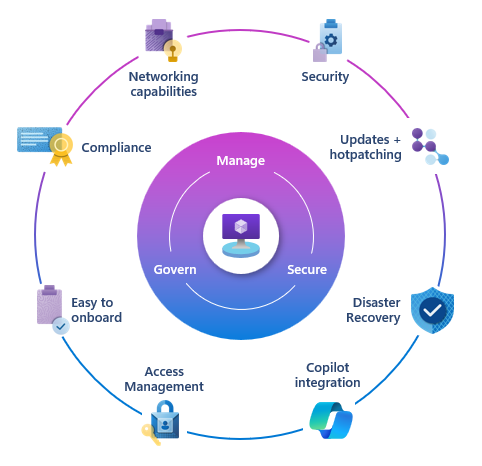
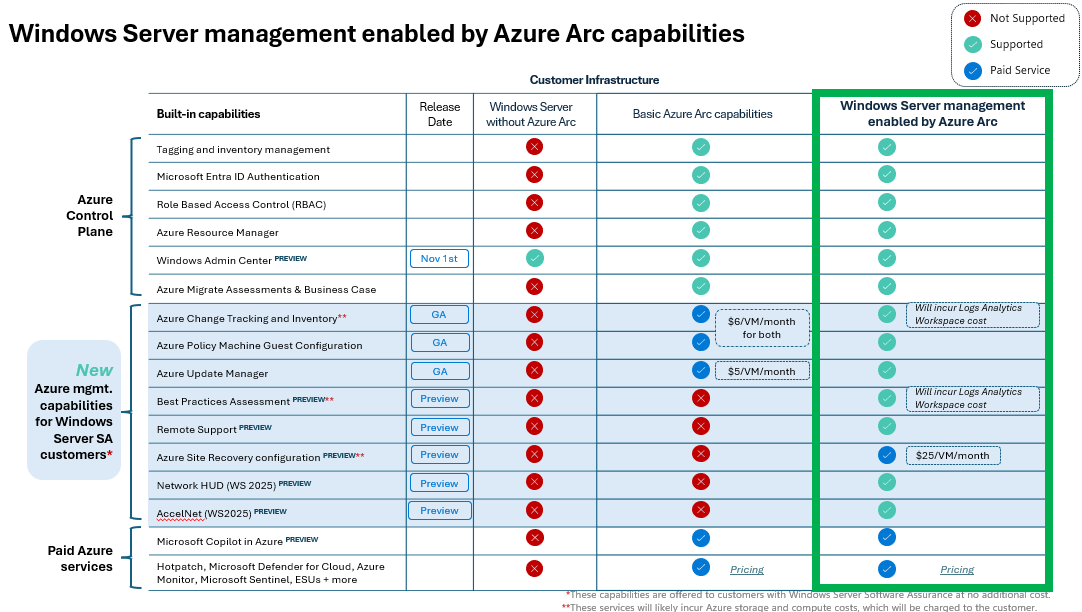
Windows Server management enabled by Azure Arc provides a single pane of glass for 20+ Azure services at no additional cost specifically for customers using either “Windows Server 2025 cores with Software Assurance” or “Windows Server 2025 enrolled in pay-as-you-go”.
These Azure services are designed to provide customers with no-charge management services:
- Central inventory, governance and policy
- Automated patching and maintenance
- Cloud-based resiliency and configuration
Azure services available for Windows Management include:
- Azure Update Manager
- Azure Change Tracking and Inventory
- Azure Site Recovery configuration
- Remote Support
- Azure Policy guest machine configuration
- Windows Server Best Practices Assessment
- Network HUD / Accelnet
- …and more.
Some additional things to remember:
- Azure Arc Gateway:
If you use enterprise firewalls or proxies to manage outbound traffic in your datacenter, the “Azure Arc gateway” lets you onboard infrastructure to “Azure Arc” for monitoring & management using only seven (7) endpoints. With “Azure Arc gateway“, you can:- Connect to Azure Arc by opening public network access to only seven Fully Qualified Domains (FQDNs).
- View and audit all traffic an Azure Connected Machine agent sends to Azure via the Arc gateway.
- Activation:
Administrators with Software Assurance on their Windows Server licenses or (or PAYGO) must enroll in or activate their Windows Server Management benefits so that the above services do not bill their Azure subscription. Not activating these benefits will result in a non-refundable charge monthly. Visit https://learn.microsoft.com/en-us/azure/azure-arc/servers/windows-server-management-overview for details. - Azure Government:
Azure Arc activation is only available from US Gov Texas: It is not available in US Gov Virginia or US Gov Arizona. Additionally, some Azure Arc-enabled services are not available in Azure Government, including Extended Security Updates for SQL Server. - Additional costs:
- Storage:
While there are no services charges for using these Azure services for qualified servers, there may be a storage charge (specifically Azure Log Analytics) for data collected by “Azure Change Tracking & Inventory” or “Azure Best Practices Assessment”. This can be tuned based on retention requirements & volume. - Site Recovery:
Automatically configuring a Azure Arc-enabled VM for Azure Site Recovery comes at no cost, however the persisting the Azure Site Recovery service to keep a VM replica “alive” is roughly $25/VM/month.
- Storage:
Here are some references & documentation on Windows Server Management enabled by Azure Arc:
- Announcement:
- Documentation:
- Jumpstart:
- Beta/Preview Program for Azure Arc Windows Server Mgmt: Microsoft Forms
 kurtsh
 Kurt Shintaku's Blog
You must be logged in to post a comment.