Are you interested in stopping:
- DNS Hijacking: By ensuring that only DNS resolutions from trusted PDNS servers are used, ZTDNS helps prevent attackers from redirecting traffic to malicious sites.
- Malicious Communications: Blocking outbound connections to IP addresses not resolved through trusted DNS queries helps disrupt phishing and even non-administrative malware stagers and beacons.
- Data Exfiltration: Restricting outbound traffic to approved domains reduces the risk of sensitive data being transmitted to unauthorized destinations without conducting analysis of domain name resolution patterns.
If so, take a look at Zero Trust DNS which is now available for preview in Windows 11 Insider Build 27766+.
What is Zero Trust DNS?
ZTDNS integrates the Windows DNS client with trusted Protective DNS (PDNS) servers to control outbound IP traffic based on domain names. When ZTDNS is configured on a Windows 11 device to use PDNS servers that support DNS over HTTPS (DoH) or DNS over TLS (DoT), ZTDNS ensures that:
- The Windows DNS client forces the use of encrypted DNS and queries are only sent to the configured PDNS servers.
- Outbound traffic is permitted only to IP addresses resolved by these trusted PDNS servers or to IP ranges with a manual exception plumbed by the IT administrator.
- All other IPv4 and IPv6 outbound traffic is blocked by default, adhering to the “deny by default” principle of Zero Trust.
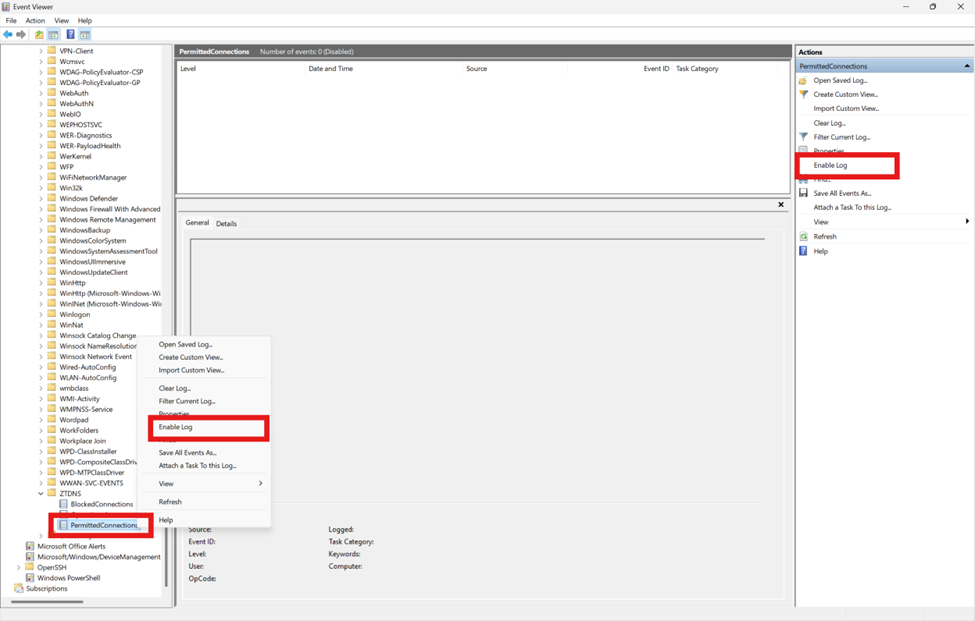
- A log of attempted outbound connections is maintained on the device.
This approach reduces the need for deep packet inspection or reliance on insecure signals like plain-text DNS or Server Name Indication (SNI) when attempting to determine the domain name associated with outbound traffic. This makes ZTDNS an important tool in the Zero Trust toolbelt since DNS traffic and SNI are increasingly being encrypted. It also aligns with Zero Trust principles by assuming all destinations are untrusted by default, only allowing connections to destinations explicitly permitted through DNS resolutions provided by trusted PDNS servers.
For more information, visit our previous blog post on design of ZTDNS.
To get started deploying Zero Trust DNS or get started with Windows 11 Canary Insider Builds:
- Deployment instructions for testing Public Preview of Zero Trust DNS (ZTDNS) on Windows 11 Insider builds
https://techcommunity.microsoft.com/blog/networkingblog/announcing-public-preview-of-zero-trust-dns/4405802 - Troubleshooting Zero Trust DNS
https://techcommunity.microsoft.com/blog/networkingblog/troubleshooting-zero-trust-dns/4405808 - Join the Windows Insider Program and Manage Insider Settings
https://support.microsoft.com/en-us/windows/join-the-windows-insider-program-and-manage-insider-settings-ef20bb3d-40f4-20cc-ba3c-a72c844b563c - (OLD) Announcing Zero Trust DNS Private Preview
https://techcommunity.microsoft.com/blog/networkingblog/announcing-zero-trust-dns-private-preview/4110366
#cybersecurity #microsoft #windows11 #zerotrust #dns
 kurtsh
 Kurt Shintaku's Blog
You must be logged in to post a comment.