The M365 Copilot Audit Report displays interactions your employees are having with M365 Copilot.
This report uses data from the Purview Audit log and Entra ID exports that get saved into 2 CSV files. The first csv file is storing Copilot Interaction events and other csv is exporting user details (Display Name, UPN, Position, City, Country) for users that have M365 copilot license assigned.
Power BI report is reading data from those these two files and can display users Display names or anonymize them. Report contains Overall and Adoption pages that allow M365 Champs to monitor behavior of M365 Copilot licensed users.
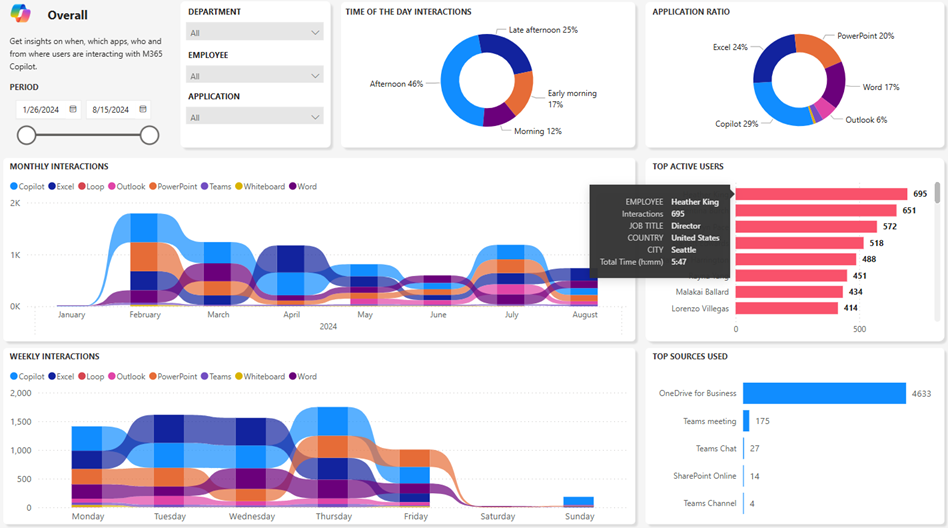
Five Power BI reports are included in this download: Overall, Impact, Decomposition, Adoption & Trend. The image above is a snapshot of the “Overall” report. Information available includes:
Time of the day interaction
Application ratio
Monthly interactions
Weekly Interactions
Top active users
Top sources
Time spent in minutes
Time spent in hours and minutes
Time decomposition by departments and positions
Employee names anonymizer
Active vs total licenses assigned
Trend comparison between two departments
Slicers
Time range
Application
Employee
Position
Departments
REQUIREMENTS: The reports use Power BI Desktop & the rest of the prerequisites including required permissions are listed in the README of the GitHub repository. The reports work with GCC cloud instances for government institutions (who don’t have the “Copilot Dashboard” available through Viva Insights yet) so get the Power BI reports from the GitHub repository below for free:
 kurtsh
 Kurt Shintaku's Blog
You must be logged in to post a comment.