Copilot for Microsoft Teams has a feature called “Intelligent Recap” which provides:
- AI-generated text summaries of Teams Meetings, in addition to the transcript
- bundling of the presented PowerPoints from the meetings
- aggregation of action items discussed
- timemarks for meeting recordings (if one was recorded) for when each person speaks
- searching for key phrases uttered in the meeting & jumps to that point in the recording
This has the benefit of being an Enterprise-managed solution (summaries are encrypted, eDiscoverable transcriptions with retention/deletion policies, secured exclusively to attendees & resident in regulatory compliant cloud storage, commitment to not training AI models on conversations, etc.) while also providing easy-to-use, time-saving value for end users.
But what about other AI notetaking solutions?
3RD PARTY ARTIFICIAL INTELLIGENCE SOLUTIONS FOR TEAMS MEETINGS
If this is a concern for your organization, we recommend starting with establishing a well-communicated HR policy prohibiting these tools use. For example at Microsoft, while Microsoft 365 Copilot is of course secured, managed & available to Microsoft employees, 3rd party AI solutions are strictly prohibited by Microsoft Standards of Business Conduct,, particularly the use of ‘3rd party AI meeting notetakers’. The reason this is such a high level concern is that there are many legal concerns with these tools including a lack of eDiscoverability, lack of Litigation Hold & potential deletion, lack of retention policies, lack of FedRAMP regulatory compliance (or CJIS or Tax1075 or…), etc.
The most common techniques to block these tools from use in Microsoft Teams are:
- Establishing a Virtual Lobby for incoming Teams attendees
IT Admins – Manage lobby options in Microsoft Teams – Microsoft Teams | Microsoft Learn - Implementing CAPTCHA/human verification for Teams attendees
Require verification checks to join Teams meetings and webinars in your org – Microsoft Teams | Microsoft Learn
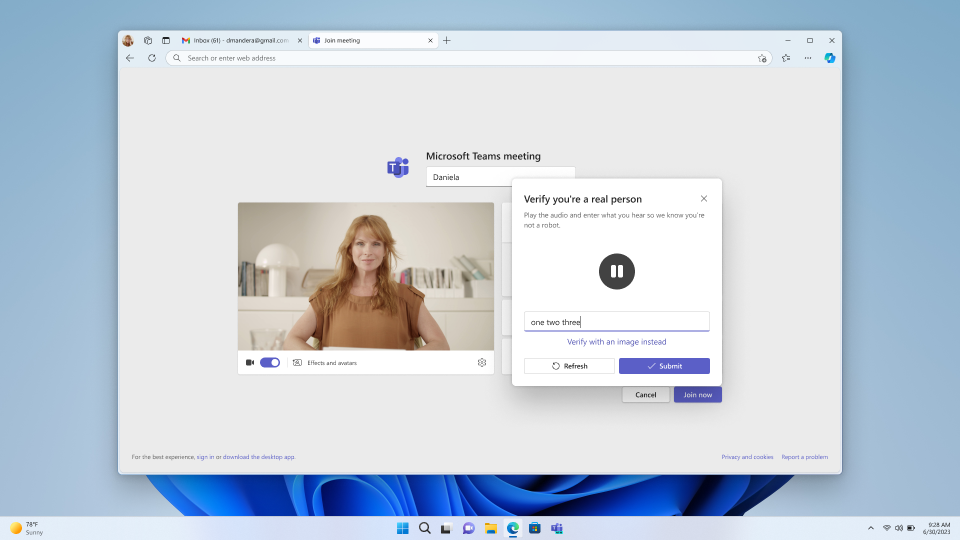
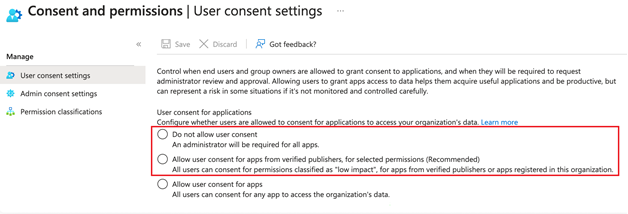
Also, if 3rd party Artificial Intelligence tools are able to present themselves as authorized attendees in your Microsoft 365 environment, they are unfortunately taking advantage of weakly IT-configured EntraID application authentication security. Please review:
- Disallow Microsoft Entra ID single-sign-on/passthrough authentication
Manage consent to applications and evaluate consent requests – Microsoft Entra ID | Microsoft Learn
 kurtsh
 Kurt Shintaku's Blog
You must be logged in to post a comment.