We released the NEW Windows Local Administrator Password Solution (Windows LAPS) close to a year ago and I’m still running into customers that had no idea the solution (or even the previous Legacy LAPS) solution existed. <yikes>
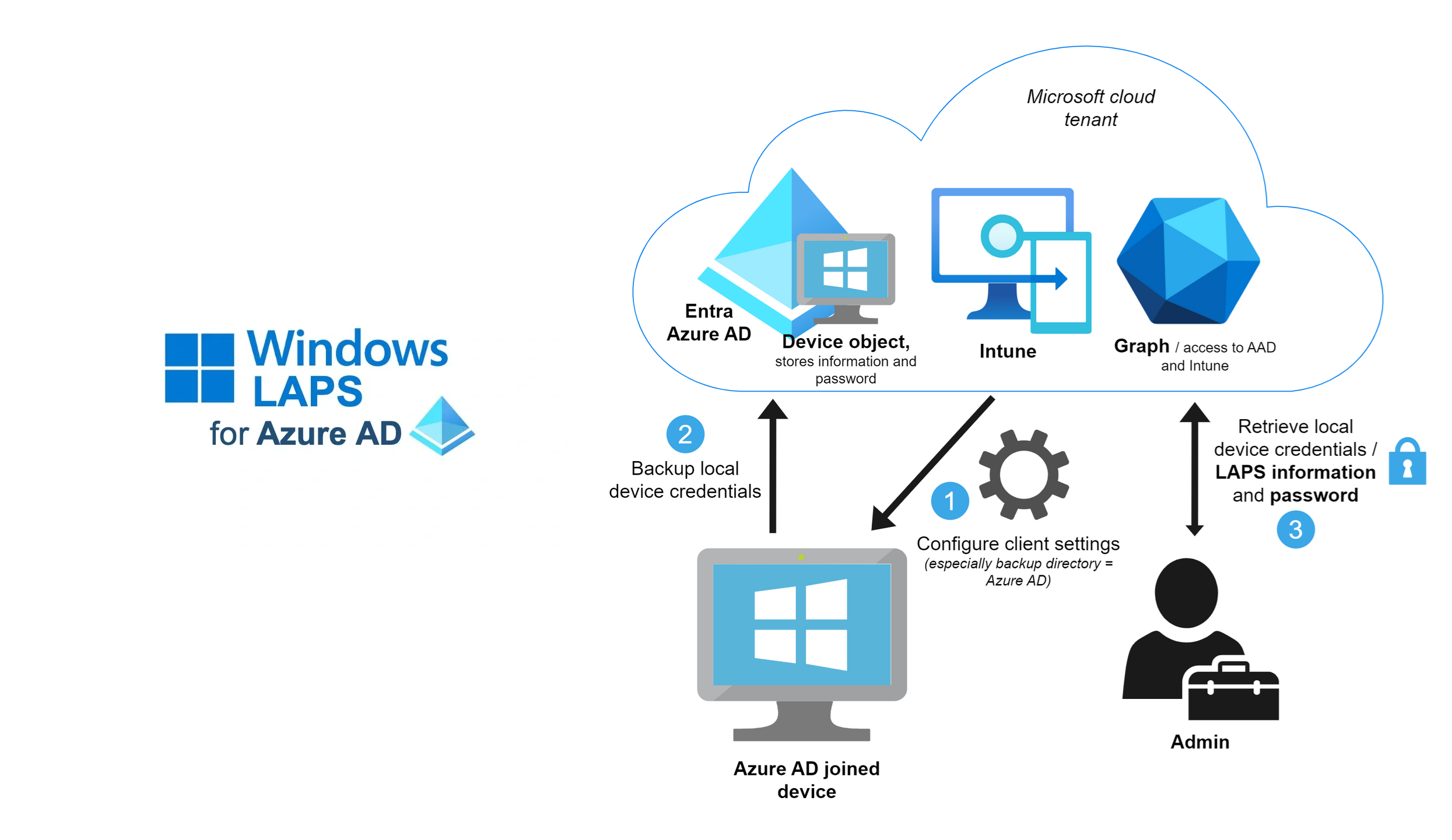
The Windows Local Administrator Password Solution (Windows LAPS) is a solution that changes the Local Admin password on your Windows clients & servers to a randomly generated password on a regular basis & stores the password in Entra ID directory (formerly Azure AD). A privileged role is given the ability to recover Local Admin passwords if required to ‘backdoor’ a workstation or server.
Windows LAPS has the benefit of preventing lateral movement of bad actors from machine to machine in your infrastructure by ensuring every machine has a different local admin password, while also ensuring that every machine’s admin password is changed regularly.
And did I mention Windows LAPS is free to use for any Windows administrator for supported versions of Windows client & server?
- Windows 11 22H2 – April 11 2023 Update
- Windows 11 21H2 – April 11 2023 Update
- Windows 10 – April 11 2023 Update
- Windows Server 2022 – April 11 2023 Update
- Windows Server 2019 – April 11 2023 Update
Here are some resources to use in deploying Windows LAPS:
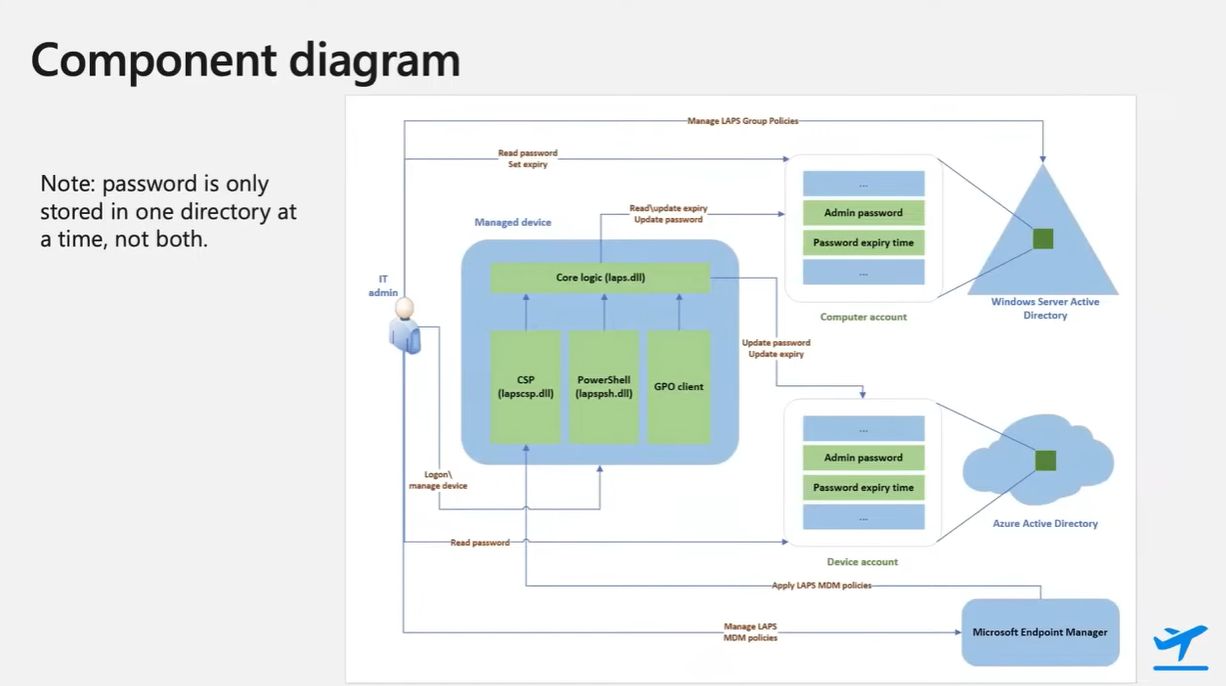
- Video presentations:
- Windows IT Pro: “Keeping passwords secure with Windows LAPS”
https://www.youtube.com/watch?v=bcs1gPB4dOQ - Technical Takeoff 2022 for Windows LAPS
- Recording from “Technical Takeoff 2022“: “Managing local admin account passwords in AD and Azure AD”
https://www.youtube.com/watch?v=jdEDIXm4JgU
- Recording from “Technical Takeoff 2022“: “Managing local admin account passwords in AD and Azure AD”
- Technical Takeoff 2023 for Windows LAPS
- Presentation site & Q&A – https://aka.ms/TT/WindowsLAPSEnhanced
- Recording from “Technical Takeoff 2023“: “TTWIN06 – Windows LAPS- enhancements and roadmap” – https://www.youtube.com/watch?v=0SlHW0oVJfQ
- Windows IT Pro: “Keeping passwords secure with Windows LAPS”
- Feedback community for Windows LAPS
https://aka.ms/WindowsLAPSFeedback - Announcement blog: “By popular demand- Windows LAPS available now!”
https://techcommunity.microsoft.com/t5/windows-it-pro-blog/by-popular-demand-windows-laps-available-now/ba-p/3788747 - Training: Windows LAPS Skilling Snacks
https://techcommunity.microsoft.com/t5/windows-it-pro-blog/skilling-snack-windows-laps/ba-p/3805257 - Demobytes: Windows LAPS demo videos
- Integration with the local device MaximumPasswordAge policy
https://www.youtube.com/watch?v=-RpuQIsiO_Q - Automatically enable accounts during safe-mode boot
https://www.youtube.com/watch?v=D0Pu60z6crE - New post-authentication-action features
https://www.youtube.com/watch?v=iypr8o98JkU - Integration with smart-card-only policy
https://www.youtube.com/watch?v=fSLOspp8CHs
- Integration with the local device MaximumPasswordAge policy
- Documentation
- Overview: https://aka.ms/LAPS
- Deployment: https://aka.ms/WindowsLAPS
 kurtsh
 Kurt Shintaku's Blog
You must be logged in to post a comment.