Wanna use Azure Arc but don’t want to directly connect your datacenter servers to external Internet services?
If you use enterprise firewalls or proxies to manage outbound traffic in your datacenter, the “Azure Arc gateway” lets you onboard infrastructure to “Azure Arc” for monitoring & management using only seven (7) endpoints. With “Azure Arc gateway“, you can:
- Connect to Azure Arc by opening public network access to only seven Fully Qualified Domains (FQDNs).
- View and audit all traffic an Azure Connected Machine agent sends to Azure via the Arc gateway.
This is a Limited Public Preview, so customer subscriptions must be allowed by Microsoft to use the feature. To participate, complete the Azure Arc gateway Limited Public Preview Sign-up form.
How it works:
Azure Arc gateway consists of two main components:
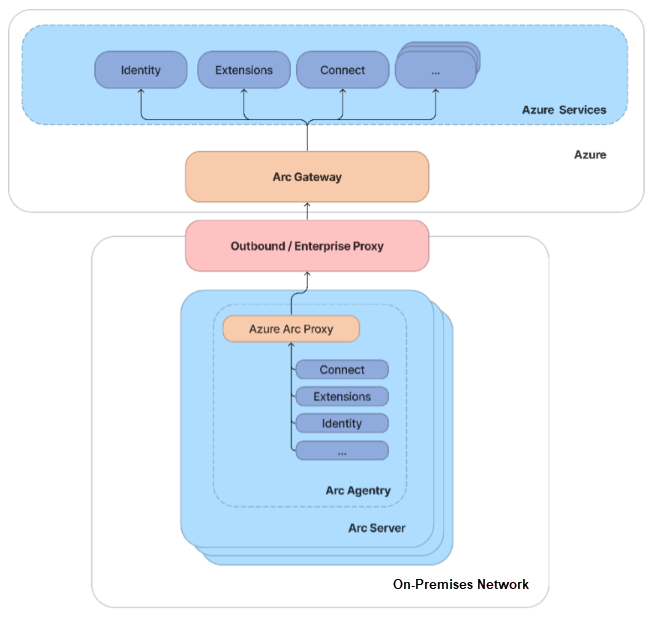
- The Arc gateway resource: An Azure resource that serves as a common front-end for Azure traffic. This gateway resource is served on a specific domain. Once the Arc gateway resource is created, the domain is returned to you in the success response.
- The Arc Proxy: A new component added to Arc agentry. This component runs as a service called “Azure Arc Proxy” and acts as a forward proxy used by the Azure Arc agents and extensions. No configuration is required on your part for the gateway router. This router is part of Arc core agentry and runs within the context of an Arc-enabled resource.
When the gateway is in place, traffic flows via the following hops: Arc agentry → Arc Proxy → Enterprise proxy → Arc gateway → Target service.
For more details on deploying the Azure Arc Gateway, visit:
- Simplify network configuration requirements through Azure Arc gateway (Limited preview)
https://learn.microsoft.com/en-us/azure/azure-arc/servers/arc-gateway
 kurtsh
 Kurt Shintaku's Blog
You must be logged in to post a comment.