Take a look at the image below: Notice the watermark imprinted on the opened document with the current user’s identity, “jholloway@contoso.com”?
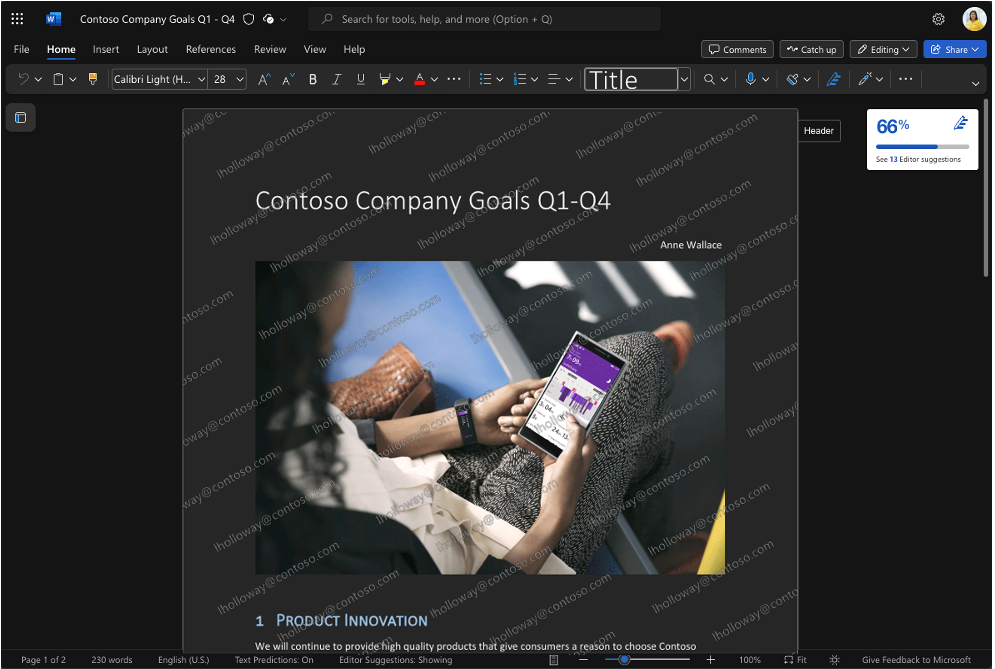
That’s a “dynamic watermark”.
Explore the latest advancement in information protection: Dynamic Watermarking for Word, Excel, and PowerPoint. This innovative feature helps organizations mitigate the risk of data leaks via “analog loopholes” by deterring users from photographing their screens while displaying confidential information. Delve into our recent blog post for detailed insights into this new functionality.
If you work with sensitive or confidential documents, you know how vital it is to prevent any leaks of information from these documents. Sensitivity labels from Microsoft Purview Information Protection offer a highly effective way to limit access to sensitive files and prevent people from taking inappropriate actions with them, such as printing a document, while still allowing for full collaboration.
However, it’s still possible for someone to take a picture of a sensitive file on their screen or of a presentation being shared either online or in-person. (Some forms of screenshotting cannot be blocked with existing technology.) This loophole presents a simple way to bypass the protections that sensitivity labels place on a document. Dynamic watermarking can be a potent weapon in combatting these kinds of leaks.
Read more here:
- Introducing dynamic watermarking for Word, Excel, and PowerPoint
https://insider.microsoft365.com/en-us/blog/introducing-dynamic-watermarking-for-word-excel-and-powerpoint
 kurtsh
 Kurt Shintaku's Blog
You must be logged in to post a comment.