Are you using Office 365, Microsoft 365, Azure or Power Platform? If so, you’re using “Entra ID”, formerly Azure Active Directory.
So how are you protecting your organization’s identities? No, not “multi-factor authentication” & “strong passwords”. Think about:
- Authentication monitoring
- Identifying risks amongst identities
- Simulating risk like atypical travel, leaked credentials, unfamiliar sign-in properties, anonymous IP addresses
- Automatically escalating authentication requirements
If this is unfamiliar to you, you should investigate Entra ID Protection.
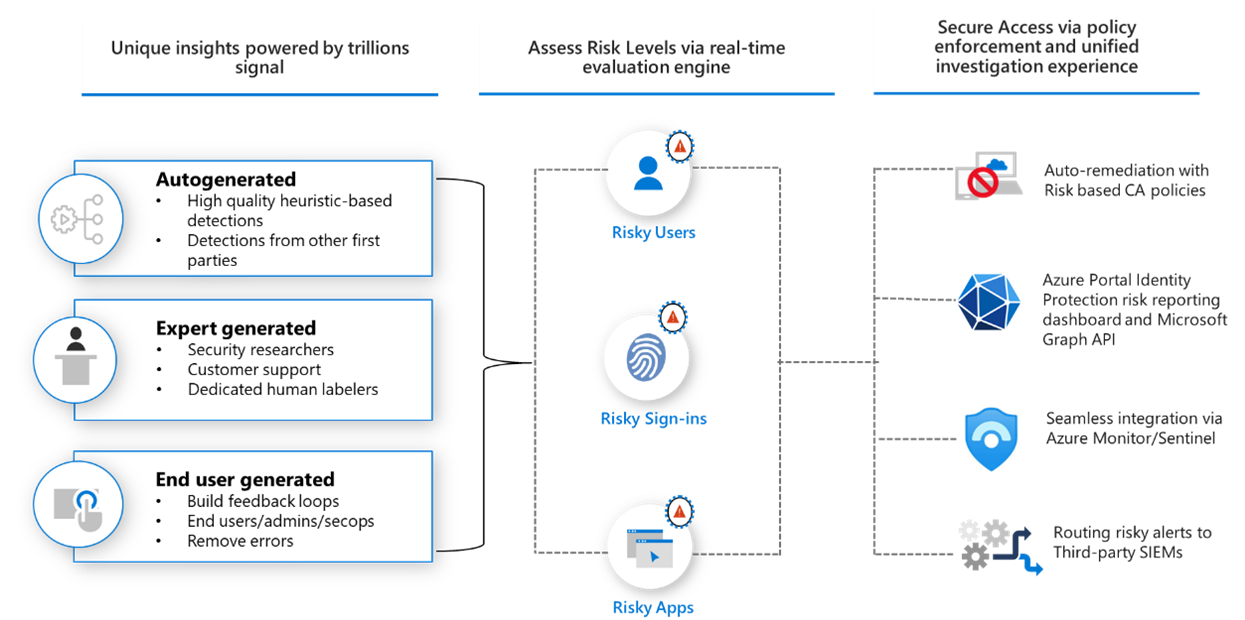
What is Entra ID Protection?
“Microsoft Entra ID Protection helps organizations detect, investigate, and remediate identity-based risks.” https://learn.microsoft.com/en-us/entra/id-protection/overview-identity-protection
- Detect risks
➡ Anonymous IP address usage
➡ Password spray attacks
➡ Leaked credentials - Investigate
➡ Risk detections
➡ Risky sign-ins
➡ Risky users - Remediate risks
➡ Automatic remediation
➡ Manual remediation
Documentation:
- Plan an Identity Protection deployment
https://learn.microsoft.com/en-us/entra/id-protection/how-to-deploy-identity-protection - Configure and enable risk policies https://learn.microsoft.com/en-us/entra/id-protection/howto-identity-protection-configure-risk-policies
- What are risk detections?
https://learn.microsoft.com/en-us/entra/id-protection/concept-identity-protection-risks - Simulating risk detections
https://learn.microsoft.com/en-us/entra/id-protection/howto-identity-protection-simulate-risk
Is there training or deployment planning?
Entra ID Protection has self-paced training available here:
https://learn.microsoft.com/en-us/training/modules/protect-identities-with-aad-idp/
It also has instructor-led training available in the SC-300 Identity & Access Administrator course:
https://learn.microsoft.com/en-us/credentials/certifications/identity-and-access-administrator/?source=recommendations
If you would like guidance around deployment planning:
https://learn.microsoft.com/en-us/entra/id-protection/how-to-deploy-identity-protection
How do I license Entra ID Protection?
Entra ID Protection is available to license (subscribe to) in several ways. Technically, a small amount of Entra ID Protection’s security reporting is available via “Entra ID Premium P1” licenses (which you can see here) however the only way to get full functionality is by obtaining “Entra ID Premium P2” licenses for all your users in Entra ID:
- Entra ID Premium P2
- Enterprise Mobility & Security E5/G5 (which includes Entra ID Premium P2)
- Microsoft 365 E5/G5 (which includes Enterprise Mobility & Security E5/G5)
 kurtsh
 Kurt Shintaku's Blog

You must be logged in to post a comment.