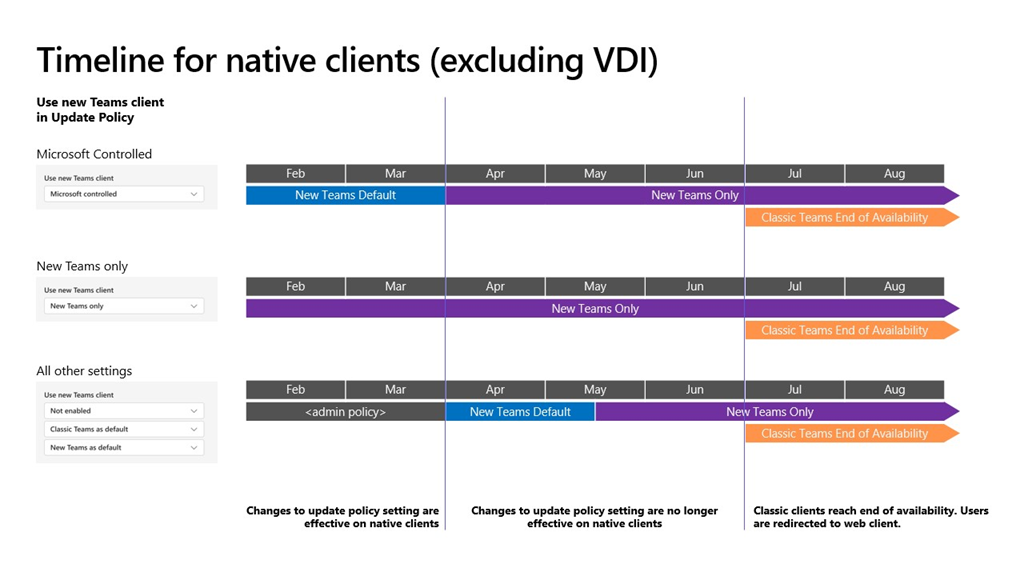
 As announced last year, after March 31, 2024, any classic Teams users that haven’t updated to new Teams will be automatically updated to new Teams. It only takes one click to update to new Teams. Users can easily pick up and resume exactly where they left off in classic Teams and their chat messages, Teams and channels, and apps will appear in new Teams.
Note:
- The classic Teams for Virtualized Desktop Infrastructure (VDI) will reach the end of availability on June 30, 2024.
- Windows Server 2016 is not supported with new Teams. VDI Customers should plan to update to Windows Server 2019 (10.0.17763) or Windows Server 2022 (10.0.20348) or higher to get started on their new Teams journey. For details on VDI system requirements, visit this page.
- The auto-update timeline of March 31, 2024, will not impact Microsoft Teams Rooms (MTR) and Surface Hub devices.
- Users of the Teams Windows desktop app must have Windows 10 version 10.0.19041 or above to access new Teams. The prerequisites for new Teams can be found here.
- If you are using the Admin-controlled policies for manage the New Teams client rollout, as outlined in Upgrade to the new Teams using policies, know that these policies will no longer be honored at the start of April, apart from your VDI users, and the following changes will happen:
- New Teams will be installed and become the default client. The toggle to return to classic Teams will still be available if needed.
- In mid-May, any users remaining on classic Teams will be switched to new Teams, and the toggle to return to classic Teams will no longer be available. We’ll attempt to uninstall classic Teams, currently after a period of 14 days.
Action:
- With March 31, 2024, being less than two months away, we ask that if you are still on classic Teams, to update to new Teams as early as possible.
- Know that starting from this month, any classic Teams users who haven’t updated to new Teams will see an informational banner to remind them about the timeline for the auto update.
- We recently introduced the new Teams usage report in the Teams Admin Center. The client usage report gives customers an overview of the Teams desktop clients in use within their organization. It highlights platform (Windows or Mac), app version, and user type (preview or production) to help customers better understand the current state of their user’s desktop clients. Please try out the usage report tool.
Resources
 kurtsh
 Kurt Shintaku's Blog