
Looking for training around Microsoft 365 Copilot? Your first step should be to download the Learning Pathway document which is a 3 page highly-hyperlinked guide to the available training & resources for people undertaking the adoption of Copilot for Microsoft 365:
- Learning Pathways: Copilot for Microsoft 365 (.PDF, 3 pages)
https://learning-pathways.co.uk/wp-content/uploads/2024/02/Copilot-for-Microsoft-365-Learning-Pathway.pdf
The following are SELF-PACED LEARNING COURSES for Microsoft 365 Copilot:
- Optimize productivity with Copilot for Microsoft 365 (for business users)
Course MS-4004—A: Optimize productivity with Copilot for Microsoft 365 - Craft effective prompts for Microsoft Copilot for Microsoft 365 (for business users)
Course MS-4005—A: Craft effective prompts for Microsoft Copilot for Microsoft 365 - [COMING SOON] Copilot for Microsoft 365 for Administrators (for administrators)
Course MS-4006—A: Copilot for Microsoft 365 for Administrators
The following are SELF-PACED LEARNING PATHS that contain multiple learning modules for Microsoft 365 Copilot:
- End Users
- Administrators
- Prepare for Copilot for Microsoft 365
- MS-012 Prepare your organization for Copilot for Microsoft 365
- Prepare for Copilot for Microsoft 365: Part 1 – Design and prerequisites
- Prepare for Copilot for Microsoft 365: Part 2 – Administrative roles and Tenant health
- Prepare for Copilot for Microsoft 365: Part 3 – Threat protection
- Prepare for Copilot for Microsoft 365: Part 4 – Protecting sensitive data
- Extend and manage Microsoft Copilot Studio copilots
- Prepare for Copilot for Microsoft 365
- Adoption
- Discover how to successfully drive adoption of Microsoft Copilot for Microsoft 365 in your organization
- Empower your workforce with Copilot for Microsoft 365 Use Cases
- Empower your workforce with Copilot for Microsoft 365: Executives Use Case
- Empower your workforce with Copilot for Microsoft 365: Sales use case
- Empower your workforce with Copilot for Microsoft 365: IT Use Case
- Empower your workforce with Copilot for Microsoft 365: Marketing Use Case
- Empower your workforce with Copilot for Microsoft 365: Finance Use Case
- Empower your workforce with Copilot for Microsoft 365: HR Use Case
- Empower your workforce with Copilot for Microsoft 365: Operations use case
- Empower your workforce with Copilot for Microsoft 365: Challenge Use Case
- Development
- Create copilots with Microsoft Copilot Studio – Online Workshop
- Create Copilots with Copilot Studio
- Create Power Platform solutions with AI and Copilot
- Build a Power Apps canvas app for a real estate solution with data from Excel
- Build a canvas app for a real estate solution with Copilot in Power Apps
- Build flows for a real estate solution using Copilot in Power Automate
- Create copilots with Microsoft Copilot Studio
- Add intelligence with AI Builder and GPT
- Integrate external content with Copilot for Microsoft 365 using Microsoft Graph connectors built with .NET
Tech Accelerator for Copilot for Microsoft 365
We recorded 2 days of insights, demos, and deep dives on Copilot for Microsoft 365 in this event called the “Tech Accelerator for Copilot for Microsoft 365”. We had breakout sessions and live Q&A with Microsoft experts—all so you can learn more about how Copilot works, how you can prepare your tenant, strategies to help skill your users and drive adoption, and how you can measure and maximize the impact of Copilot for your organization.
Watch all the recordings at http://aka.ms/AccelerateCopilot. Here are the individual sessions:
| Start time | Session title |
| 7:00 a.m. PT | How Copilot for Microsoft 365 works: A deep dive |
| 7:30 a.m. PT | Building user skills in the world of AI: Prompting fundamentals |
| 8:00 a.m. PT | Measuring usage, adoption, and the impact of Microsoft Copilot |
| 8:30 a.m. PT | Extending Copilot: Building with Copilot Studio |
| 9:00 a.m. PT | Extending Copilot: Expanding knowledge with Graph connectors |
| 9:30 a.m. PT | Copilot for Microsoft 365 AMA: Tech Accelerator edition (Day 2) |
Unified Support
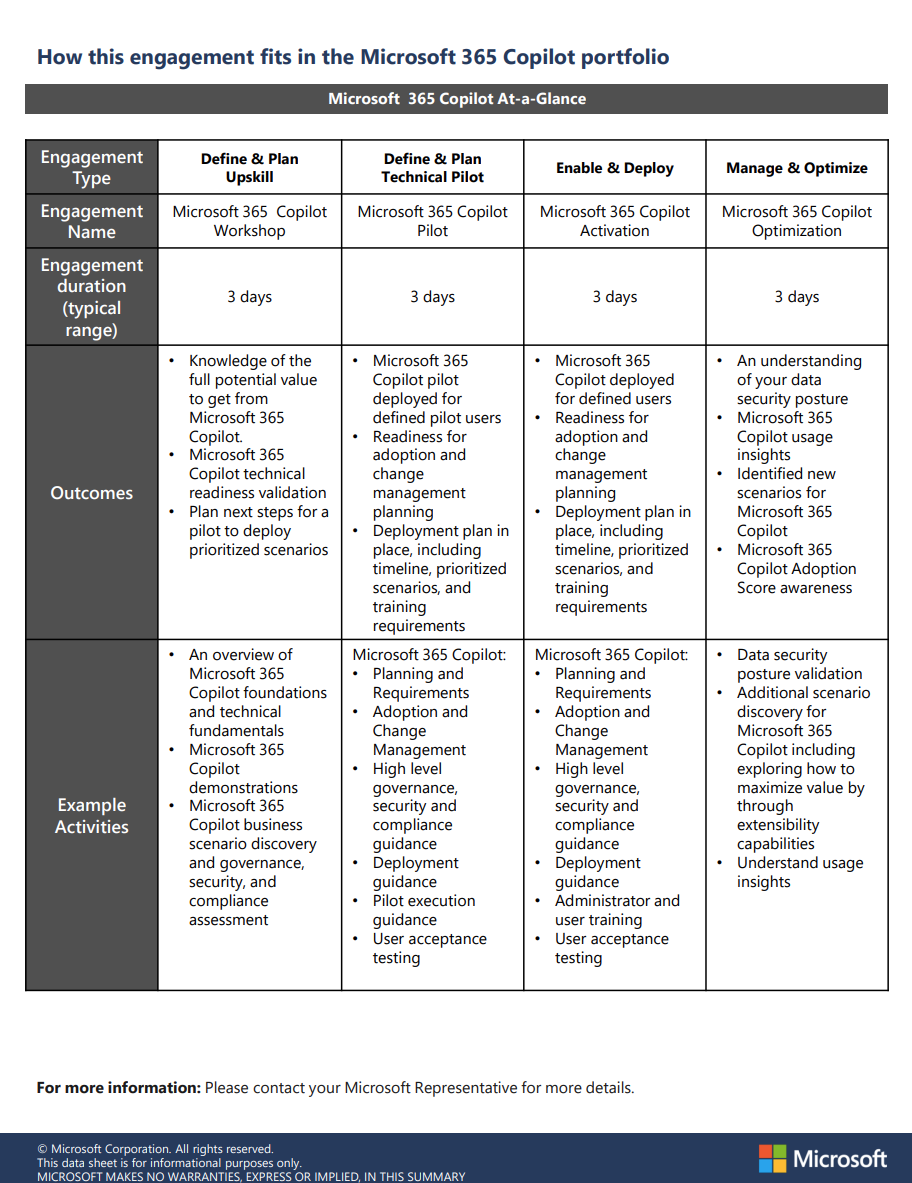
For folks with Unified Support contracts, there’s a lot of offerings available – each with different lengths & costs against your proactive credit allocation:
- Microsoft 365 Copilot Activation (3 day)
- Microsoft 365 Copilot Pilot (3 day)
- Microsoft 365 Copilot Optimization (3 day)
- Copilot for Microsoft 365 Extensibility Activation (3-5 day)
- Copilot for Microsoft 365 Extensibility Pilot (2-3 day)
- Copilot for Microsoft 365 Extensibility Workshop (1-2 day)
- Microsoft 365 Copilot for Adoption Acceleration (3-5 day)
- Microsoft 365 Copilot Workshop (3 day)
- WorkshopPLUS – Power Platform – Copilot Studio (1 day)
Contact your Unified Support “Customer Success Account Manager” for more details.
Adopting Copilot for Microsoft 365
At a higher level, get all the details on Copilot for Microsoft 365, its functionality, and the Microsoft goal of implementing AI responsibly and ethically. Learn the purpose and functionalities of Copilot for Microsoft 365, the working principles behind it, and its core components.
https://learn.microsoft.com/en-us/collections/0d6so53jrrgpq
 kurtsh
 Kurt Shintaku's Blog
You must be logged in to post a comment.