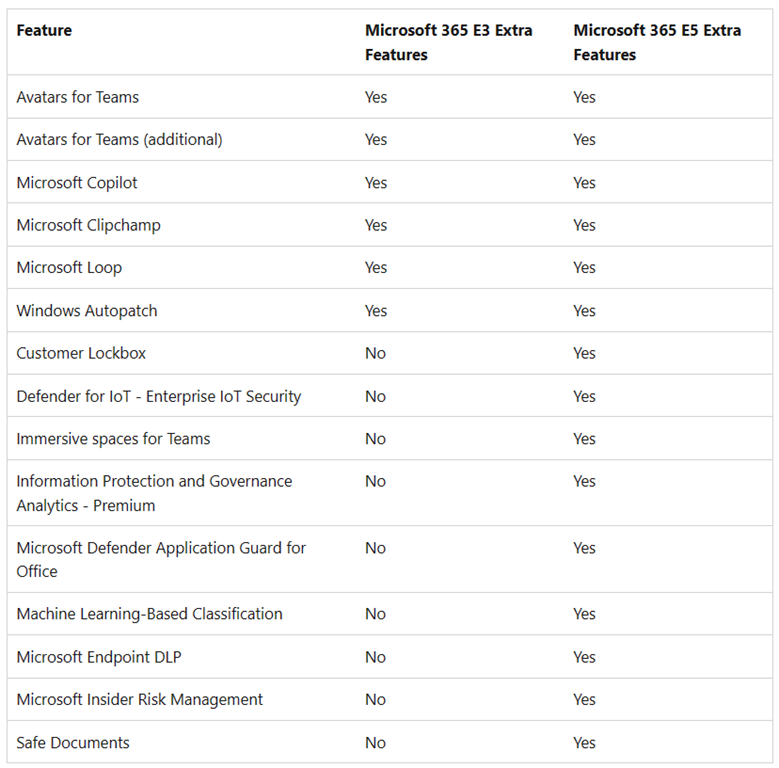
 Did you know there’s an extra license that you have rights to called “Microsoft 365 Extra Features” if you have any of the following suite licenses:
- Microsoft 365 E3
- Microsoft 365 E5
- Microsoft 365 G5
The table to the right shows what extra features & services are available to “Microsoft 365 Extra Features” assigned users.
HOW DO I USE IT?
If you’re a Microsoft 365 Administrator, this license should automatically appear on the Licenses page in the Microsoft 365 Admin Center & available to assign to your users.
UM, WHAT ABOUT MICROSOFT 365 G3?
There is no license for Microsoft 365 G3 subscribers today. It is only available for Microsoft 365 G5 subscribers right now. (No, I don’t know the reason for this yet & don’t have an ETA. Don’t shoot the messenger.)
I DON’T SEE THIS LICENSE. WE HAVE THE MICROSOFT 365 BUT IT’S BROKEN UP IN OUR ENTERPRISE AGREEMENT INTO 3 LICENSES FOR O365, EMS & WIN ENTERPRISE
Ah. You’re the special case. If are one of the rare customers that have an Enterprise Agreement with Microsoft 365 E3/E5 but the suite is broken up into 3 separate licenses on your EA (O365, EMS & WinEnt) then you need to specifically request – through your LAR – that the “M365 Extra Features” license be added to your EA.
The short explanation is that for customers that purchased M365 E3/E5 a long time ago… instead of a single M365 license, they may have 3 licenses. Because of this, they didn’t get the “M365 Extra Features” so this has to be added manually.
For more details on this visit:
- Understand the Microsoft 365 E3 and E5 Extra Features license
https://learn.microsoft.com/en-us/microsoft-365/commerce/licenses/e3-extra-features-licenses?view=o365-worldwide
 kurtsh
 Kurt Shintaku's Blog